Server and client work but remote clients fail (2 Viewers)

irw

Portal Member
July 21, 2022
32
4
Home Country
United Kingdom United Kingdom
Select each tuner in turn, and perform "scan for channels" for each tuner. Remember to select Enable channel movement detection (you will need to enable this for each tuner, each time that you scan or rescan). This method tests each tuner to verify that it is still working, and that all of the aerial connections are in good condition (e.g. no oxidation on the plugs or sockets).
Yes, I always do this. The problem was with trying server version 3.5 - see below.

Use the "Channel Mapping" panel and map onto tuners 2, 3, and 4, the channels found when scanning tuner 1. This is OK if all of your tuners have the same capability. If you have a quad tuner card, all of the tuners are likely to have the same capability, but my HTPC has one DVB-T2 card, and one DVB-T card (so different capabilities).
I don't see that the mapping screen has the ability to do this, it just offers a tick-box if mapping is for EPG only. I see the Combinations screen has a Combine button. Is this it?

A wired connection is always going to be more reliable than a wi-fi connection. But if you are using one of the more-recent versions of wi-fi (== higher speed), and wi-fi channels at your location do not suffer contention with wi-fi users in neighbouring houses, wi-fi would probably work satisfactorily. If you suffer pixelation, or momentary freezing using wi-fi, but not when using the cable, you have your answer.
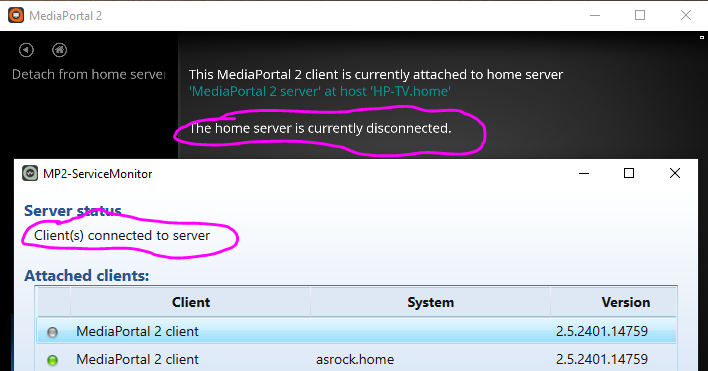
Ironically, it is the wired connection that is giving greater problems. I have no Wi-Fi issues with neighbouring houses. Maybe it is the Home Plug system carrying the signal over the mains electricity that causes issues. I find it strange the system can attach to the server yet not connect - please see attached image - then sometimes it decides it will connect, then later disconnect.


I don't know what version corresponds to TVE3, but one of the problems with TVE3.5 is that scanning for channels using a DVB-T2 tuner finds no channels, whereas a DVB-T tuner does find channels (only the DVB-T ones, obviously).
This was the problem! Although I could find nothing to show which server I had installed, it has to have been version 3.5 because now I have installed 3, all four channels work, as does EPG Genre Map that failed under 3.5.

What I find frustrating, amongst all these other installations things, is that when I untick channels on the TV Chanels screen because I don't want them, they still appear in the Combinations, Mapping and EPG screens and it seems I have to edit those too to remove the ones I don't want.

Clearly, I'm not replying properly as I am getting multiple boxes around your quotes.

 

Attachments

  • Attached but Disconnected.PNG
    Attached but Disconnected.PNG
    84.5 KB

irw

Portal Member
July 21, 2022
32
4
Home Country
United Kingdom United Kingdom
I think I now understand the mapping and Combine button. Reading the documentation, it seems I don't need to do any of this. Had I only set up one tuner, then I could have saved time by mapping the other three.

Also, it seems I don't have to edit the EPG list again as only those channels ticked on the TV Channels screen do show in the client. I thought I had to tick the ones I want and then tick the Store data for only selected channels tick-box.

I think this means that, appart from my wired desktop client, everything is working properly on version 2.5 using server version 3, until something interferes with it all some time in the future.

Having used versions 1 and 2.5, there are some really nice features in each that would be lovely if all could appear in one version.

I hope it is not premature to say this, but thank you very much indeed for your attention and help.
 

CyberSimian

Test Group
  • Team MediaPortal
  • June 10, 2013
    3,611
    2,639
    Southampton
    Home Country
    United Kingdom United Kingdom
    Also, it seems I don't have to edit the EPG list again as only those channels ticked on the TV Channels screen do show in the client. I thought I had to tick the ones I want and then tick the Store data for only selected channels tick-box.
    Setting up the EPG grabber requires some care to obtain the combination of settings that is optimal for the UK. I posted some screen shots in this post showing which options to select, and which options not to select.

    -- from CyberSimian in the UK
     

    irw

    Portal Member
    July 21, 2022
    32
    4
    Home Country
    United Kingdom United Kingdom
    I thought this set of queries was finished but then decided the attached image might be of interest. One part of this client's system says it is attached to the server and another part says it isn't. This is on my desktop client. The client can do everything, including setting up new recordings but cannot view recordings or live TV. That problem looks to be a security issue but all the parameters look to be correct, however, is there an explanation for this connection behaviour?

    Another separate question please - is it right that clients cannot delete recordings? This is my experience.
     

    Attachments

    • ConnectedDisconnected.PNG
      ConnectedDisconnected.PNG
      59.6 KB

    CyberSimian

    Test Group
  • Team MediaPortal
  • June 10, 2013
    3,611
    2,639
    Southampton
    Home Country
    United Kingdom United Kingdom
    The client can do everything, including setting up new recordings but cannot view recordings or live TV. That problem looks to be a security issue
    I don't understand the security implications of different setups, but maybe try the following:
    • Define userids with logon passwords for each system (clients and server).
    • Ensure that each client that is going to connect to the server has the same userid defined on the server, with the same password. The clients don't need to have the same userids as each other.
    The reason that I am suggesting this is based on an experience that I had with my Windows 7 HTPC. I resisted defining a logon password for the HTPC for several years, but my laptop could never access the HTPC, even though the laptop could see the HTPC on the network. I eventually got fed up having to use a USB memory stick to move files between the two systems, and defined a logon password for the HTPC, after which the laptop connected immediately.

    In the Windows settings, you can choose not to require a password when waking from sleep or hibernation. So the logon password is only required when you reboot the system. Will this make a difference to the problems that you are having? I don't know.

    Another separate question please - is it right that clients cannot delete recordings?
    No, that is not correct. With the correct authorisations, clients can delete files from the server.

    -- from CyberSimian in the UK
     

    subx33

    New Member
    March 29, 2026
    1
    0
    Home Country
    New Zealand New Zealand
    Hi, What you write is so correct about our use of computers but I hate to give up for something that might be the simplest of alterations.

    Thank you for recommending NextPVR. I looked at it but sadly it states "The windows client, nextpvr.exe, is included in the 'client' subdirectory of Program Files\NextPVR. At this stage it can only connect to NextPVR running on the same Windows machine". It won't allow my remote clients to connect.

    I think I'll have to revert back to MP2. I did have problems with it such that the EPG stopped and so I couldn't load programmes to view or record - pretty essential, and I know you tried to help. At least the clients did work.
    FYI, there are multiple clients for Windows, like "yauiclient", that can do remote clients. They give you the exact same user interface as nextpvr.exe.
     

    mrceolla

    Portal Pro
    December 11, 2010
    169
    27
    Home Country
    United States of America United States of America
    Note: sometimes the check box for public networks is pre-selected. I always deselect this, as I believe that if Windows thinks that your network connection may be a public network (e.g. an internet cafe), Windows will impose much more restrictive firewall rules, in order to protect your system. This window also appears when the server is installed; deselect public networks for that too.
    Thank you for this tip! I'm moving MP TV Server to a new machine. I installed the 64-bit version and most of the MP firewall rules were set to Public. I couldn't connect to the new TV Server from my old single-seat installation running 32-bit until I changed all MP-related firewall rules on the new machine to Private. Before I did that I had temporarily disabled the firewall on both PCs but that still didn't work. As soon as I switched the rules to Private things started working! Very strange. I assume I only needed to change the TV Server firewall rules but I did all of the MP ones just to be sure. Possibly coincidence, but I'm pretty sure that's what did it. I noticed my old 32-bit machine had all MP firewall rules set to Private as well. Hopefully this info helps someone else. Thanks again!
     

    Users who are viewing this thread

    Top Bottom