United Kingdom
- Thread starter
- #21
Yes, I always do this. The problem was with trying server version 3.5 - see below.Select each tuner in turn, and perform "scan for channels" for each tuner. Remember to select Enable channel movement detection (you will need to enable this for each tuner, each time that you scan or rescan). This method tests each tuner to verify that it is still working, and that all of the aerial connections are in good condition (e.g. no oxidation on the plugs or sockets).
I don't see that the mapping screen has the ability to do this, it just offers a tick-box if mapping is for EPG only. I see the Combinations screen has a Combine button. Is this it?Use the "Channel Mapping" panel and map onto tuners 2, 3, and 4, the channels found when scanning tuner 1. This is OK if all of your tuners have the same capability. If you have a quad tuner card, all of the tuners are likely to have the same capability, but my HTPC has one DVB-T2 card, and one DVB-T card (so different capabilities).
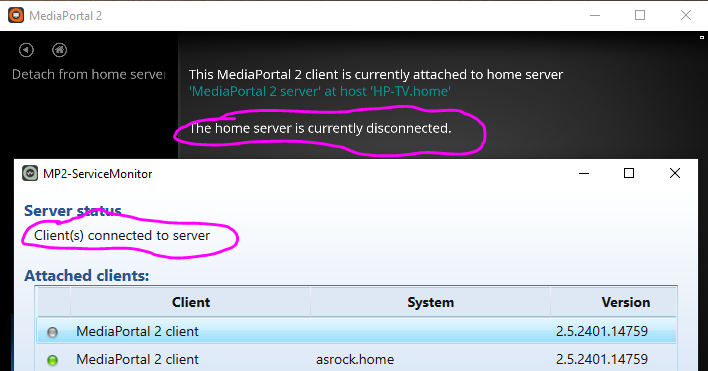
Ironically, it is the wired connection that is giving greater problems. I have no Wi-Fi issues with neighbouring houses. Maybe it is the Home Plug system carrying the signal over the mains electricity that causes issues. I find it strange the system can attach to the server yet not connect - please see attached image - then sometimes it decides it will connect, then later disconnect.A wired connection is always going to be more reliable than a wi-fi connection. But if you are using one of the more-recent versions of wi-fi (== higher speed), and wi-fi channels at your location do not suffer contention with wi-fi users in neighbouring houses, wi-fi would probably work satisfactorily. If you suffer pixelation, or momentary freezing using wi-fi, but not when using the cable, you have your answer.
This was the problem! Although I could find nothing to show which server I had installed, it has to have been version 3.5 because now I have installed 3, all four channels work, as does EPG Genre Map that failed under 3.5.I don't know what version corresponds to TVE3, but one of the problems with TVE3.5 is that scanning for channels using a DVB-T2 tuner finds no channels, whereas a DVB-T tuner does find channels (only the DVB-T ones, obviously).
What I find frustrating, amongst all these other installations things, is that when I untick channels on the TV Chanels screen because I don't want them, they still appear in the Combinations, Mapping and EPG screens and it seems I have to edit those too to remove the ones I don't want.
Clearly, I'm not replying properly as I am getting multiple boxes around your quotes.