[skin update] "theatre" simple to use and nice to view (1 Viewer)

petrovice

MP Donator
  • Premium Supporter
  • January 8, 2009
    56
    1
    Bamberg
    Home Country
    Germany Germany
    NanoGOD,

    I have added screenshots on page 4! Please have a look, and I hope you can fix these!

    Thanks!
    Marcel

    Hi Marcel,
    the size of the fonts looks really scary :mad: Are you using MP on a Vista machine? Have you changed the DPI size?
    If yes, please go back to 96dpi and clear the cache of theatre skin. Now everything should be back in line.

    @ammmze
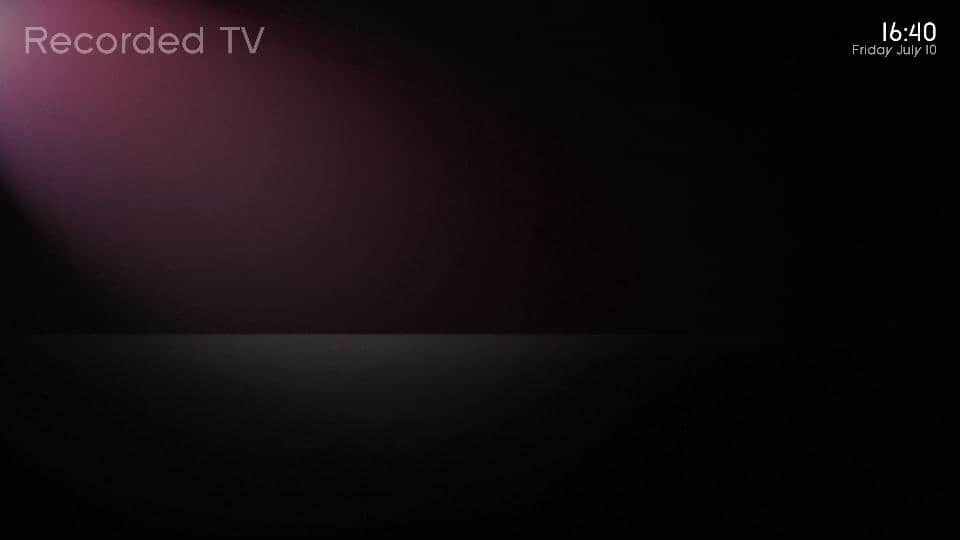
    I have tried your mod for the MyRecordings. Still got the same issue with it - the page shows only the title :mad:

    Greetings,
    Peter
     

    Attachments

    • MyRecordings.jpg
      MyRecordings.jpg
      19.9 KB

    MdFolter

    MP Donator
  • Premium Supporter
  • December 7, 2005
    76
    2
    49
    Breugel
    Home Country
    Netherlands Netherlands
    NanoGOD,

    I have added screenshots on page 4! Please have a look, and I hope you can fix these!

    Thanks!
    Marcel

    Hi Marcel,
    the size of the fonts looks really scary :mad: Are you using MP on a Vista machine? Have you changed the DPI size?
    If yes, please go back to 96dpi and clear the cache of theatre skin. Now everything should be back in line.

    Greetings,
    Peter

    Petrovice,

    MP is running on an XP machine. I have not adjusted anything, so no DPI change. How can I change the DPI setting? :oops:

    Thanks
    Marcel
     

    ammmze

    Portal Member
    April 14, 2006
    32
    3
    Hyperspace
    Home Country
    United States of America United States of America
    @ammmze
    I have tried your mod for the MyRecordings. Still got the same issue with it - the page shows only the title :mad:

    Did you just copy mytvrecordedtv.xml? You also need the common.facade.xml file too!

    MP is running on an XP machine. I have not adjusted anything, so no DPI change. How can I change the DPI setting? :oops:
    Marcel

    Well if you haven't changed anything then your DPI is probably still 96 but you can check if you...
    Right click on desktop -> Select Properties
    Go to the Settings tab - Click Advanced
    In that window there should be a setting for DPI, it should be set to normal for 96 DPI
     

    MdFolter

    MP Donator
  • Premium Supporter
  • December 7, 2005
    76
    2
    49
    Breugel
    Home Country
    Netherlands Netherlands
    Did you just copy mytvrecordedtv.xml? You also need the common.facade.xml file too!

    MP is running on an XP machine. I have not adjusted anything, so no DPI change. How can I change the DPI setting? :oops:
    Marcel

    Well if you haven't changed anything then your DPI is probably still 96 but you can check if you...
    Right click on desktop -> Select Properties
    Go to the Settings tab - Click Advanced
    In that window there should be a setting for DPI, it should be set to normal for 96 DPI

    My DPI is 96. So just normal. BTW I am running MP 1.1a may be that's the problem

    Marcel
     

    afanasyev

    Portal Member
    February 1, 2007
    20
    4
    Kazan
    Home Country
    Russian Federation Russian Federation
    When I start IMDB search during viewing TV action group in videoinfo window is empty
    i324559_empty.png

    Menu appears only if go in basic window and then back in videoinfo window.
    i324572_fine.png
     

    petrovice

    MP Donator
  • Premium Supporter
  • January 8, 2009
    56
    1
    Bamberg
    Home Country
    Germany Germany
    MP is running on an XP machine. I have not adjusted anything, so no DPI change. How can I change the DPI setting? :oops:

    Then don´t mind - the DPI setting is only important for Vista User.

    BTW I am running MP 1.1a may be that's the problem

    Maybe :D

    Did you just copy mytvrecordedtv.xml? You also need the common.facade.xml file too!

    Jap, I have copied all xml files from your zip file into the skin folder. Weather is now also broken and I am getting the XOAP error message the first time.
     

    ammmze

    Portal Member
    April 14, 2006
    32
    3
    Hyperspace
    Home Country
    United States of America United States of America
    Did you just copy mytvrecordedtv.xml? You also need the common.facade.xml file too!

    Jap, I have copied all xml files from your zip file into the skin folder. Weather is now also broken and I am getting the XOAP error message the first time.

    That is strange, I wonder why you still can't see the action menu. As for the weather thing, a quick search on the forum shows what the deal is with that. Found here is the forum where it was discussed. Then in this post here, one of the developers made a fixed dll for the weather. Phew that is comforting, for a minute I thought I had changed something in the skin that messed up the weather, but I haven't touched it...lol. Anyways the XOAP error comes because the weather channel changed their API (aka the way the programs interact with each other). So MediaPortal wasn't sending the right info to get a response, so that new WindowPlugins.dll should fix it. I haven't tried yet, but will soon.

    Hey petrovice,
    maybe you could zip up all the xml files in the skin\theatre folder so I can see if I have the same issue with recordings as you. Maybe I made a change to another xml file to fix it and just forgot to include it in the zip file.

    Edit:
    Just tried the new WindowPlugins.dll and it worked like a charm, no XOAP errors, but the layout does need to be fixed.
     

    Marvman

    Retired Team Member
  • Premium Supporter
  • November 14, 2007
    1,163
    735
    Bavaria
    Home Country
    Germany Germany
    Hi nanogod,


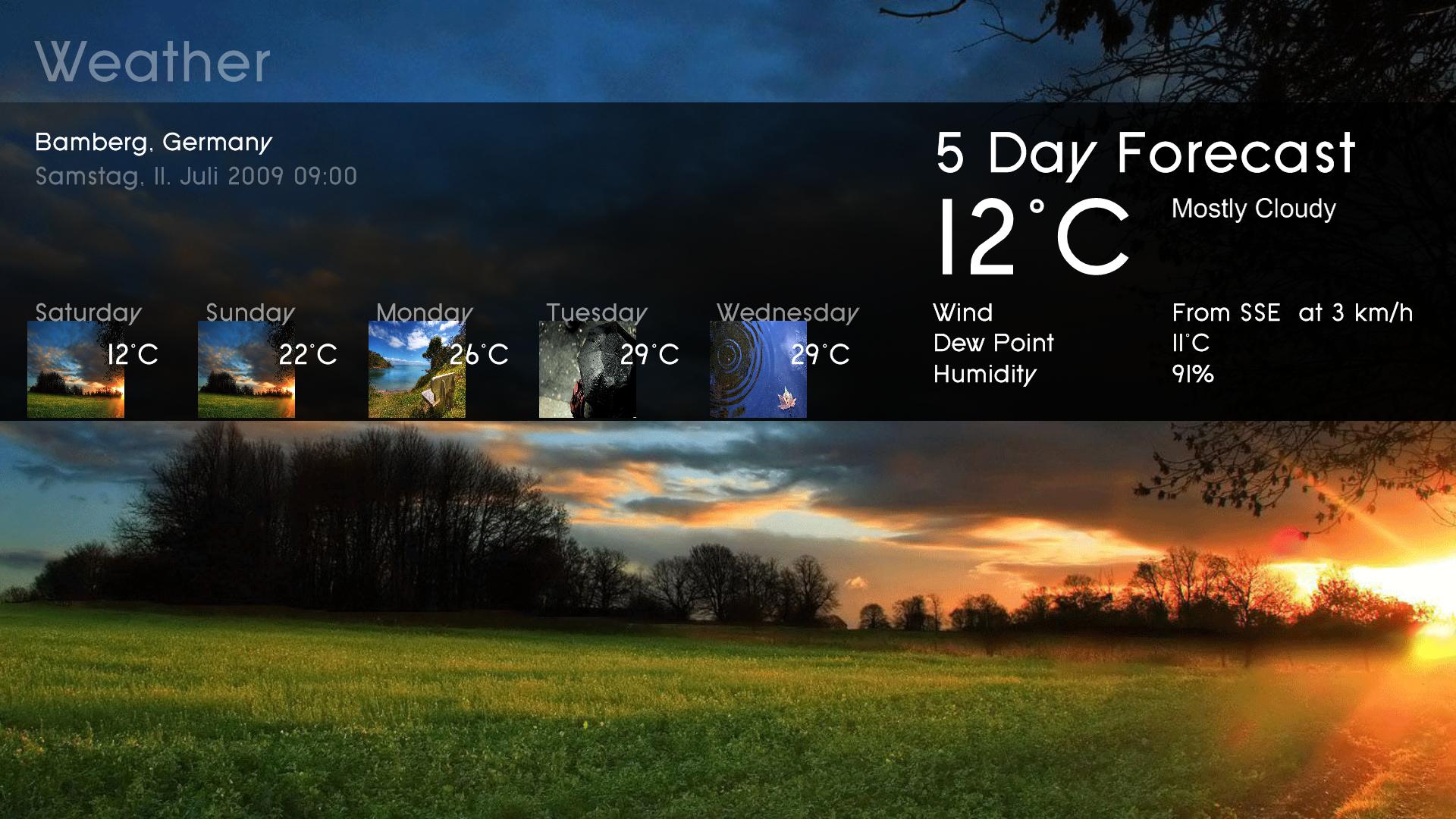
    • the "°C" overlap the "fair"
    • the "bft" is out of the screen"
    • should be the five weather pic's on this position?

    weather.JPG
     

    petrovice

    MP Donator
  • Premium Supporter
  • January 8, 2009
    56
    1
    Bamberg
    Home Country
    Germany Germany
    Hey petrovice,
    maybe you could zip up all the xml files in the skin\theatre folder so I can see if I have the same issue with recordings as you. Maybe I made a change to another xml file to fix it and just forgot to include it in the zip file.

    Edit:
    Just tried the new WindowPlugins.dll and it worked like a charm, no XOAP errors, but the layout does need to be fixed.

    Hi ammmze,
    thanks for the hint with the WindowPlugins.dll, Weather is working fine again! But the icons are now wrong and the view is not as ist should be.
    @nanogod: more work for you :cool:

    You can simple reproduce my setup by downloading the 0.7 Beta and copy your mods into it. No other changes where made.

    Greetings,
    Peter
     

    Attachments

    • MyWeather.jpg
      MyWeather.jpg
      247.9 KB

    nanogod

    Portal Pro
    March 22, 2007
    92
    38
    Bamberg
    Home Country
    Germany Germany
    Hi there!

    Sorry for not posting yesterday. I had a lot of work to do and was tiered on the evening :oops:

    okay so if the issue with the tv recordings is the action menu not coming up i found the problem, it actually lies in the common.facade.xml
    under the listcontrol element it is missing the onleft and onright tags. so i added them to my xml and it works perfectly.

    anyways let me know if that is not the only bug. currently that is the only one i saw.

    oh yea and about that fadelabel for videos going all the way across the screen, i just added a second control one only goes part way across the other goes all the way and then just added another visible condition so that when there is media in the player it will use the short label and when there isn't media in the player it will span the text across the whole screen. seems to work pretty nicely.

    I also changed the size of the thumbnails in filmstrip view of moving pictures. I am not very familiar with the facade views tags so hopefully it is all okay. anyways i attached a zip file with a couple of the xml's i have changed. i think the only changes in these xmls are the width of the fadelabels for videos and moving pictures and the size of filmstrip thumbs in moving pictures, then also the changes for tv recordings so that the action menu shows up when you push left or right.

    Is the weather plugin working for anyone? I get some XOAP error. Not sure what that is yet, guess I will have to check out the xml.

    Thanks Ammmze. On my setup the myrecordings i working fine (even the actionmenu). Only on Vista, it seems that there is content (no recordings are showing on the right...
    Thanks for your mod. I will have a look at it over this weekend. Really appreciated!

    Did you just copy mytvrecordedtv.xml? You also need the common.facade.xml file too!


    Well if you haven't changed anything then your DPI is probably still 96 but you can check if you...
    Right click on desktop -> Select Properties
    Go to the Settings tab - Click Advanced
    In that window there should be a setting for DPI, it should be set to normal for 96 DPI

    My DPI is 96. So just normal. BTW I am running MP 1.1a may be that's the problem

    Marcel

    I also think that this is a prob with 1.1a. I never seen such scary fonts...:confused:

    When I start IMDB search during viewing TV action group in videoinfo window is empty
    i324559_empty.png

    Menu appears only if go in basic window and then back in videoinfo window.
    i324572_fine.png

    Thanks for this screens. i will try to reproduce this and fix it in the next Version.

    Hi nanogod,


    • the "°C" overlap the "fair"
    • the "bft" is out of the screen"
    • should be the five weather pic's on this position?

    View attachment 43297

    Thanks Marvman
    1. and 2. Are you running mp on 4:3 (your screens look like this. So this may be the issue. theatre is only usable at 16:9. Sorry.
    3. No, but this is a problem with the weatherplugin itself. Look here: weather error I hope this is getting solved. At the moment there seems to be no possibility too use large weather backdrops and smal icons at the same time.

    Cheers


    nanogod
     

    Users who are viewing this thread

    Top Bottom