Streamed MP: Community Mods & Bug Fixes (6 Viewers)

Status
Not open for further replies.

rasmuskarlsen

Portal Pro
October 9, 2008
235
12
Home Country
Denmark Denmark
And YES i wan't the rotation and fading like you made it... Just with the original info square at the right bottom corner :)

I got it solved know :)

And how you Solved it? I'm intressted in that too... :D

Just by using the original 3 moving pictures files, and then using Hullebulles movingpictures.common.facade.xml file :)

But you will need the movie Info box in the right bottom corner to be smaller, and also the fonts a little smaller, for it to look good... I'm investigating... Until HulleBulle is hopefully able to help :)
 

Jeditrav

Portal Pro
May 17, 2007
319
20
Home Country
New Zealand New Zealand
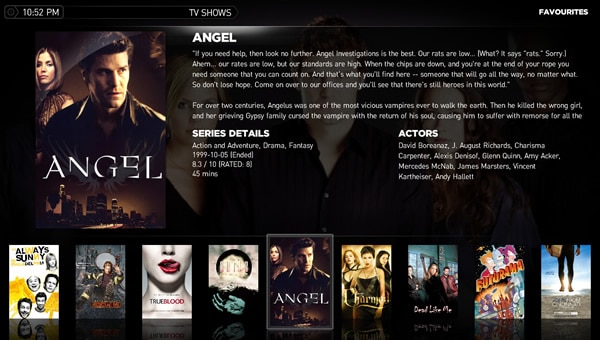
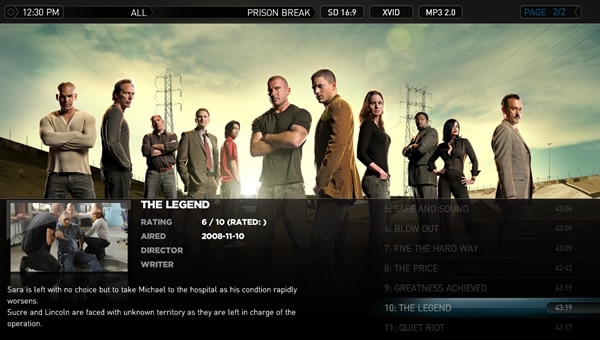
I'm trying/wanting to 'combine' the two main styles of TVSeries that come with StreamedMP. I'd like the main 'Series' page to be the 'Spuck' style flat filmstrip with details (see pic), with the 'Season' and 'Episode' pages to be the more fanart friendly 'Mattsk88' style (see pic). Is this possible? I've tried copying sections from one TVSeries.xml to the other but just made a mess! Can anyone help? :D
 

Attachments

  • tvseries_series_poster_filmstrip_spuck.jpg
    tvseries_series_poster_filmstrip_spuck.jpg
    83.5 KB
  • tvseries_episodes_fanart_Mattsk88.jpg
    tvseries_episodes_fanart_Mattsk88.jpg
    71 KB

HulleBulle

Portal Pro
May 11, 2008
52
6
Home Country
Germany Germany
Just by using the original 3 moving pictures files, and then using Hullebulles movingpictures.common.facade.xml file :)
That's what i thought about it. :D

But you will need the movie Info box in the right bottom corner to be smaller, and also the fonts a little smaller, for it to look good... I'm investigating... Until HulleBulle is hopefully able to help :)
Take a look at 'movingpictures.xml'. Right in the middle of the file you will find that section.
Code:
    <control>
      <type>image</type>
      <id>0</id>
      <posX>1040</posX>
      <posY>605</posY>
      <width>235</width>
      <height>115</height>
      <texture>mpinfo_filmbox.png</texture>
      <visible>facadeview.filmstrip+Control.IsVisible(50)</visible>
    </control>
It manages position and size of that 'box' (it's actually just a picture ;)). In that XML you'll find all the other things you want to change - i guess.
 

bushbrother

Portal Pro
February 14, 2008
192
15
UK
Home Country
United Kingdom United Kingdom
4TR XML Bugs?

Supports For The Record Version 1.3.1.0

Decided to have a look at this skin today and try it out...all looks good and like parts of this a lot...but it lacked 4TR support which limited usability for a me a tad :)

So here are my 4TR files for StreamedMP, did these in a couple of hrs but they seem to work ok...but not really given them a fully workout and still finding my way round this skin...most likley some bugs...let me know I will try and sort them.

Attached is a rar with the required files as gfx are included should delete the cache folder after copying the file.

Great skin - keep up the good work guys.

Trevor

29-Dec-08 - Archive updated with a couple of fixs
29-Dec-08 (a little later) - messed up the ProgramInfo.xml :oops:
3-Jan-09 (dam early) - update to to 4TR_RecordedTv.xml - wrong description tag

Hi Trevor,

Thanks for doing this skin, I also noticed the clock does not show in the guide, did this ever get fixed? I am using the StreamedMP build from 8th Feb and it is still missing ...

I also notice that if Live TV is ON and I goto "search tv guide" then try to click a result MP freezes. However if I do the same with live TV OFF then I get the expected sub menu asking if i want to record that entry ...

Any ideas? :D
 

rasmuskarlsen

Portal Pro
October 9, 2008
235
12
Home Country
Denmark Denmark
Moving Pictures Skin...
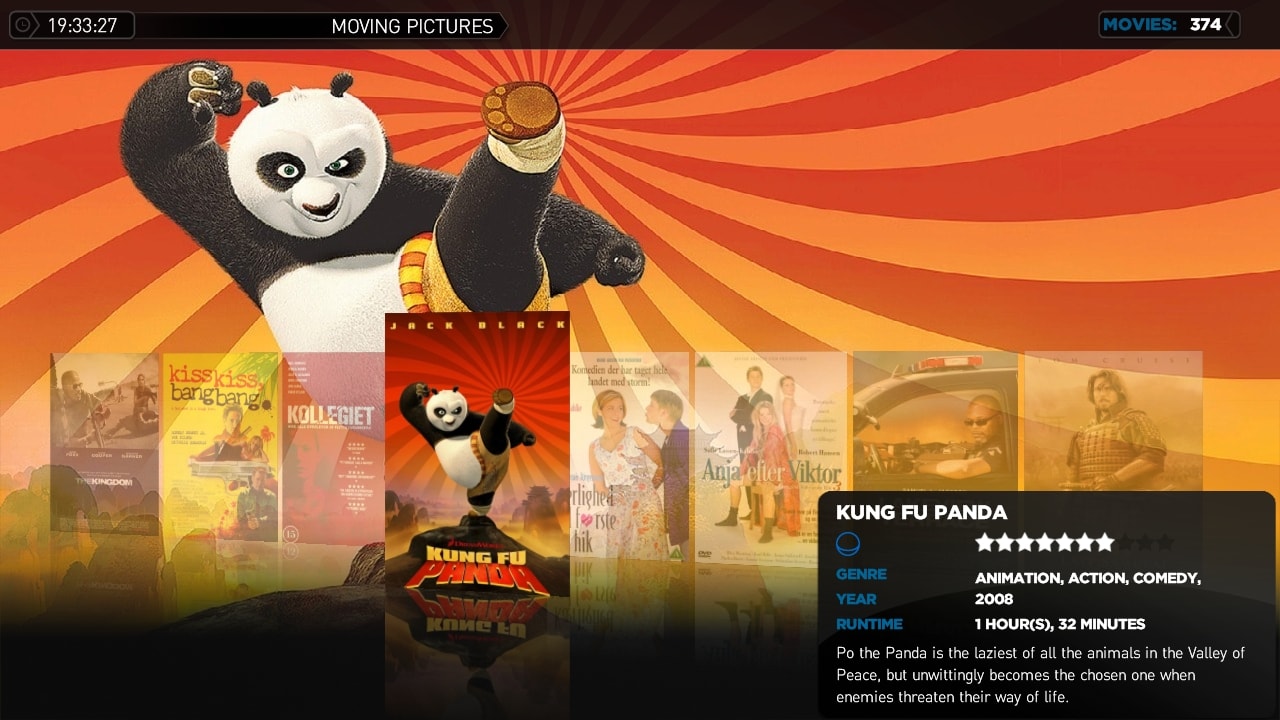
Allright i changed a little here and there... And ended up with the result i like...
It's an compound between HulleBulle's Skin and the Original StreamedMP skin... :D

- Info Box in the right lower corner, with moviedescription... Looks best if you use the IMDB smal plot download. But else there is scroll on...
- Genre is current set to scrool vertical... Because i couldnt find a command for scrolling it horizontal? :/ (Usefull if you have a movie tagged with ex. 5 genres)
- Lesser fading of covers than the original one...

Have not played with the details view screen, only the front front page view...
 

Attachments

  • 19-33-27.jpg
    19-33-27.jpg
    523 KB
  • movingpictures.common.facade.xml
    30.7 KB
  • movingpictures.details.xml
    30.7 KB
  • movingpictures.xml
    30.6 KB
  • movingpictures.views.xml
    30.7 KB

disaster123

MP Donator
  • Premium Supporter
  • May 14, 2008
    3,558
    434
    Home Country
    Germany Germany
    Is it possible to change the default behaviour of create new recordings view? When i select a show I want that always comes up the extended screen where i can select one time recording, every week, ... and not only record the show one time.
     

    HulleBulle

    Portal Pro
    May 11, 2008
    52
    6
    Home Country
    Germany Germany
    Because i couldnt find a command for scrolling it horizontal? :/ (Usefull if you have a movie tagged with ex. 5 genres)
    :D Just change <type>label</type> to <type>fadelabel</type> and it should scroll horizontal.

    Like that:
    Code:
        <control>
          <description>Genre Value</description>
          <type>fadelabel</type>
          <id>0</id>
          <posX>180</posX>
          <posY>655</posY>
          <width>300</width>
          <font>font14</font>
          <label>#MovingPictures.SelectedMovie.genres</label>
          <visible>false</visible>
        </control>
     

    rasmuskarlsen

    Portal Pro
    October 9, 2008
    235
    12
    Home Country
    Denmark Denmark
    Because i couldnt find a command for scrolling it horizontal? :/ (Usefull if you have a movie tagged with ex. 5 genres)
    :D Just change <type>label</type> to <type>fadelabel</type> and it should scroll horizontal.

    Like that:
    Code:
        <control>
          <description>Genre Value</description>
          <type>fadelabel</type>
          <id>0</id>
          <posX>180</posX>
          <posY>655</posY>
          <width>300</width>
          <font>font14</font>
          <label>#MovingPictures.SelectedMovie.genres</label>
          <visible>false</visible>
        </control>

    Haha... that simple... (First time ever i have played around with an -xml file so no comments ;) ) I looked at the mediaportal wiki, but could only find the textboxscrollup... Doh!! ;)
    But have tried to change but must admit that it looks a little wird with horiontal genre scroll and vertical text scrol... So have just sticked to the textboxscrollup command in genre view... But thanks anyways :)
     
    Status
    Not open for further replies.

    Users who are viewing this thread

    Top Bottom