
You are using an out of date browser. It may not display this or other websites correctly.
You should upgrade or use an alternative browser.
You should upgrade or use an alternative browser.
Streamed MP: Community Mods & Bug Fixes (7 Viewers)
- Thread starter mattsk88
- Start date
- Status
- Not open for further replies.
- May 11, 2008
- 52
- 6
- Home Country
-
 Germany
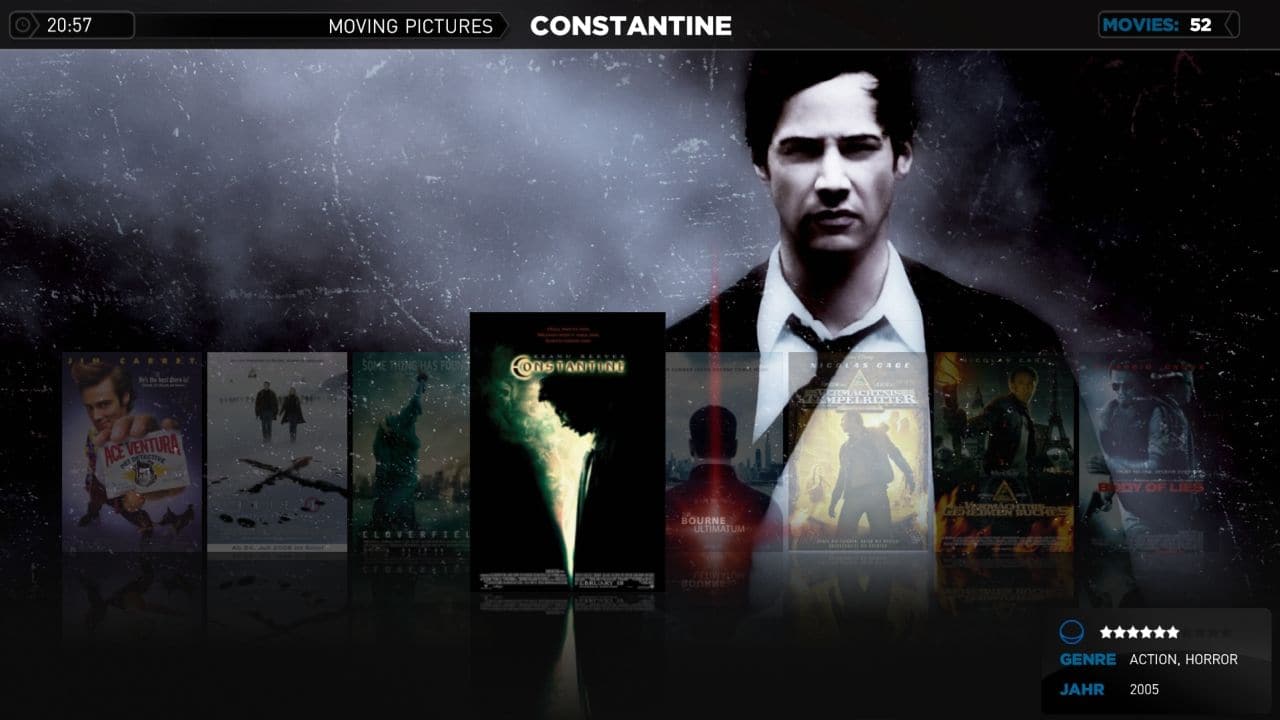
Yes, looks really good - is it possible to have a 'flat' filmstrip, ie not angled away into the distance? How could I go about this?
You want it like that - you gonna get it!

Attachments

- February 24, 2008
- 43
- 14
- Home Country
-
Italy
<Episode.PrettyLocalPlaytime>
but if I delete this string from TVSeries.SkinSettings.xml the time remains
- October 9, 2008
- 235
- 12
- Home Country
-
Denmark
Hi Folks,
i like to have a clean Filmstrip View in moving putures - so i cleaned up a little ...
Update of my Clean Filmstrip, based upon latest xml's!
hope u like it
HulleBulle... First of all i would like to say that i really love your Moving Pictures Skin...
Because the coverarts fades into left upper corner, and it look really nice... But for it to be my dream skin i think it maybe misses a little...The Filmstrip you have made looks very good
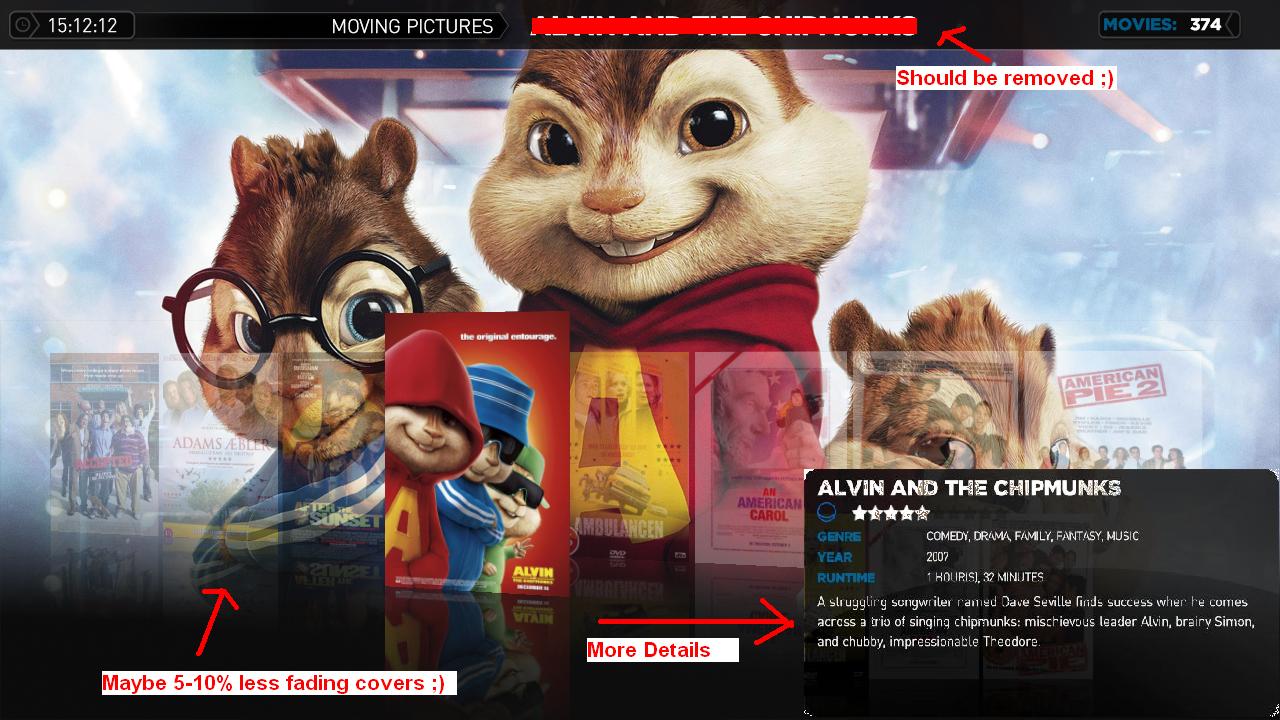
But i miss some details on it Ex. It could be nice if you could see runtime, plot... Mostly plot is important (I'm using the small plot from IMDB) But It could "Auto scroll" for people with longer plots (If they find that nessesary)
I have tried to show it on the attached scren, actually it's just a part of the original MovingPictures filmstrip view for streamedMP, where i copied the movie info in top of your Skin for moving Pictures ( Go Paint
)Further more i could imagine moviename shown in the box specified on the attached scren
So could be niced if it could removed from the top again Then i could imagine the coverart to be 5-10% less fading... (More visible, but maybe only 5-10%) But maybe this it not important...
Attachments
- May 11, 2008
- 52
- 6
- Home Country
-
Germany
But i miss some details on it
Of course! - I clead it up a bit! - Like i sayed.
For Details I use the Detailsview.If i get you right, you want the original look but with rotation and fading?Ex. It could be nice if you could see runtime, plot... Mostly plot is important (I'm using the small plot from IMDB) But It could "Auto scroll" for people with longer plots (If they find that nessesary)
I have tried to show it on the attached scren, actually it's just a part of the original MovingPictures filmstrip view for streamedMP, where i copied the movie info in top of your Skin for moving Pictures ( Go Paint
Further more i could imagine moviename shown in the box specified on the attached scren
Take a look at the 'movingpictures.common.facade.xml' ...
Code:
      <control>
        <description>Filmstrip view</description>
        <type>filmstrip</type>
        <id>50</id>
        <posX>60</posX>
        <posY>350</posY>
        <onright>2</onright>
        <width>1200</width>
        <scrollOffset>3</scrollOffset>
        <onleft>2</onleft>
        <spinPosY>900</spinPosY>
        <spinPosX>1400</spinPosX>
        <spinColor>ffcccccc</spinColor>
        <itemWidth>145</itemWidth>
        <itemHeight>205</itemHeight>
        <textureWidth>145</textureWidth>
        <textureHeight>207</textureHeight>
        <thumbWidth>140</thumbWidth>
        <thumbHeight>200</thumbHeight>
        <thumbPosX>2</thumbPosX>
        <thumbPosY>2</thumbPosY>
        <unfocusedAlpha>80</unfocusedAlpha>			<!-- controls alphablending -->
        <thumbs flipY="true" diffuse="diffusemirrorwide.png"></thumbs>
        <InfoImage flipY="true" diffuse="diffusemirrorwide.png"></InfoImage>
        <imageFolderFocus>-</imageFolderFocus>
        <frame>-</frame>
        <frameFocus>-</frameFocus>
        <background>Coverbig.png</background>
        <showFrame>yes</showFrame>
        <showFolder>no</showFolder>
        <showBackGround>no</showBackGround>
        <showInfoImage>no</showInfoImage>
        <thumbAnimation effect="zoom" start="100,100" end="140,140" time="100">focus</thumbAnimation>		<!-- controls zoom -->
        <thumbAnimation effect="zoom" start="140,140" end="100,100" time="100">unfocus</thumbAnimation>		<!-- controls zoom -->
        <animation effect="rotatey" start="10" end="0" center="525,525" tween="back" ease="easeout" time="500" reversible="false">unfocus</animation>		<!-- controls rotation -->
        <animation effect="rotatey" start="0" end="10" center="525,525" tween="back" ease="easeout" time="500" reversible="false">focus</animation>		    <!-- controls rotation -->
</control>YOU can do that in 'movingpictures.common.facade.xml'! - Just change the line '<unfocusedAlpha>80</unfocusedAlpha>' to a value you like more.Then i could imagine the coverart to be 5-10% less fading... (More visible, but maybe only 5-10%)
Kind Regards!

Hey HulluBullu... i am trying to change your xmls a bit... but one thing is buggin me a bit... i can't seem to get an ondown from the filmstrip... would like the ondown to go to a button i have made on the filmstrip view...
- May 11, 2008
- 52
- 6
- Home Country
-
Germany
I dont know what that means?! - I 'm not THAT expierenced in skinning.would like the ondown to go to a button i have made on the filmstrip view...
- October 9, 2008
- 235
- 12
- Home Country
-
Denmark
And YES i wan't the rotation and fading like you made it... Just with the original info square at the right bottom corner
I got it solved know
But i think the info box in the right bottom corner is to big, and the font is to big...
But i canøt find anyplace in any of the 4 Movingpictures skin files where it's defined how big the box should be!?? And which sie the font is!?
I got it solved know
But i think the info box in the right bottom corner is to big, and the font is to big...
But i canøt find anyplace in any of the 4 Movingpictures skin files where it's defined how big the box should be!?? And which sie the font is!?

And YES i wan't the rotation and fading like you made it... Just with the original info square at the right bottom corner
I got it solved know
And how you Solved it? I'm intressted in that too...
- Status
- Not open for further replies.
Users who are viewing this thread
Online now: 3 (members: 0, guests: 3)