
You are using an out of date browser. It may not display this or other websites correctly.
You should upgrade or use an alternative browser.
You should upgrade or use an alternative browser.
Streamed MP: Community Mods & Bug Fixes (6 Viewers)
- Thread starter mattsk88
- Start date
- Status
- Not open for further replies.

 Sweden

Modified: My Trailers Skin
Added: Large thumbnail of currently selected movie in list view
Changed: Size of font for currently selected movie in list view
This looks great in 1920x1080, should hopefully look good in 720P as well.
Click show to see the modified bits (in bold)
[collapse]
....
<control>
<description>Index Item Selected Label</description>
<type>fadelabel</type>
<id>1</id>
<posX>40</posX>
<posY>225</posY>
<width>600</width>
<label>#selecteditem</label>
<font>mediastream16tc</font>
<textcolor>White</textcolor>
<animation effect="fade" time="250">WindowOpen</animation>
<animation effect="fade" time="250">WindowClose</animation>
<visible>Control.IsVisible(50)</visible>
</control>
<control>
<description>Index Item Selected Poster</description>
<type>image</type>
<id>145</id>
<posX>40</posX>
<posY>275</posY>
<width>400</width>
<height>400</height>
<keepaspectratio>yes</keepaspectratio>
<visible>facadeview.list+Control.HasFocus(50)</visible>
<texture>#selectedthumb</texture>
</control>
....
[/collapse]
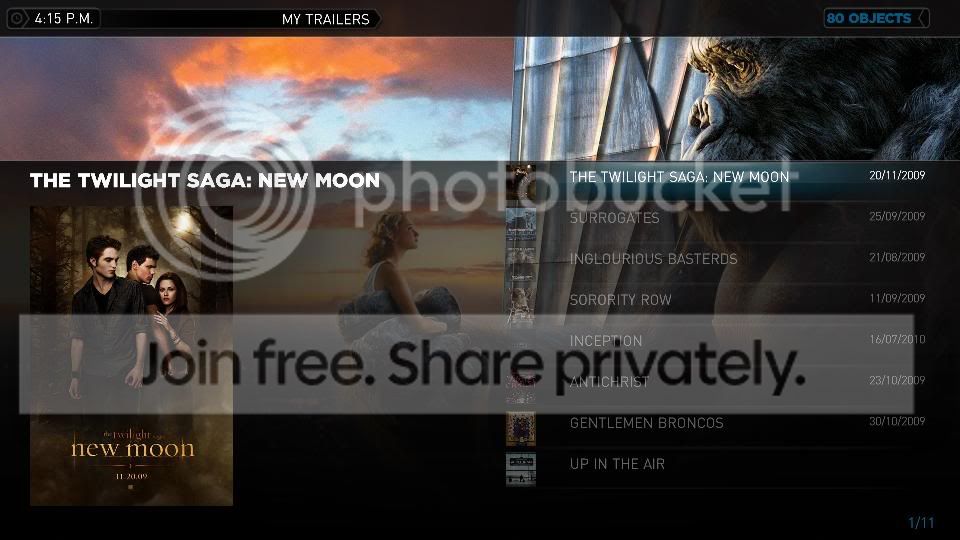
Added: Large thumbnail of currently selected movie in list view
Changed: Size of font for currently selected movie in list view
This looks great in 1920x1080, should hopefully look good in 720P as well.
Click show to see the modified bits (in bold)
[collapse]
....
<control>
<description>Index Item Selected Label</description>
<type>fadelabel</type>
<id>1</id>
<posX>40</posX>
<posY>225</posY>
<width>600</width>
<label>#selecteditem</label>
<font>mediastream16tc</font>
<textcolor>White</textcolor>
<animation effect="fade" time="250">WindowOpen</animation>
<animation effect="fade" time="250">WindowClose</animation>
<visible>Control.IsVisible(50)</visible>
</control>
<control>
<description>Index Item Selected Poster</description>
<type>image</type>
<id>145</id>
<posX>40</posX>
<posY>275</posY>
<width>400</width>
<height>400</height>
<keepaspectratio>yes</keepaspectratio>
<visible>facadeview.list+Control.HasFocus(50)</visible>
<texture>#selectedthumb</texture>
</control>
....
[/collapse]
Attachments

- Moderator
- #393
Thanks kiwijunglist , I have been meaning to add the selectedthumb in list layout for a while now but never got around to adding it. Will make sure I do for next release.
Do you know if there is any other skin properties you can use like Description, Date, etc I have a feeling they are only exposed when you click on a movie.
Do you know if there is any other skin properties you can use like Description, Date, etc I have a feeling they are only exposed when you click on a movie.
i have no idea, it has hard enough for me to guess the code to display the pic, i got the idea from looking in mymusicgenres.xml
Modified: Basichome.xml
Description: This fix allows you to see what menu item is selected on the basic home screen on your minidisplay. The problem is that the menu generator doesn't generate the label tag for each menu item
Solution:
Edit basichome.xml find the text "Dummy label indicating"
The next control element after this will be TV0 or whatever menu item you are using eg. VIDEOS0, WEATHER0 etc...
Change it to this (add the label line)
You have to go through the code and add a label for each item, but you only have to put labels for the 0 and 1 controls
ie TV0, TV1, TVSHOWS0, TVSHOWS1, MOVIES0, MOVIES1, WEATHER0, WEATHER1...
(There are 13 per menu item ie TV0,TV1,TV2...TV13, but only need to change TV0+TV1)
EDIT: You also need 1 additional <label> tag for the default item on basic home, otherwise when you load basic home you can't see the default item on minidisplay until you start scrolling through the menus.
EDIT: This fix causes some overlapping of labels in the top left corner over the current time in the home screen
Description: This fix allows you to see what menu item is selected on the basic home screen on your minidisplay. The problem is that the menu generator doesn't generate the label tag for each menu item
Solution:
Edit basichome.xml find the text "Dummy label indicating"
The next control element after this will be TV0 or whatever menu item you are using eg. VIDEOS0, WEATHER0 etc...
Code:
		<control>
			<description>[b]TV0[/b]</description>
			<type>button</type>
			<id>1700</id>
			<posX>0</posX>
			<posY>0</posY>
			<width>320</width>
			<height>72</height>
			<textureFocus>-</textureFocus>
			<textureNoFocus>-</textureNoFocus>
			<hyperlink>1</hyperlink>
			<hover>-</hover>
			<onleft>-</onleft>
			<onright>17</onright>
			<onup>1810</onup>
			<ondown>1701</ondown>
			<visible>Control.IsVisible(1700)</visible>
		</control>
Change it to this (add the label line)
Code:
		<control>
			<description>[b]TV0[/b]</description>
			<type>button</type>
                           [b]<label>TV</label>[/b]
			<id>1700</id>
			<posX>0</posX>
			<posY>0</posY>
			<width>320</width>
			<height>72</height>
			<textureFocus>-</textureFocus>
			<textureNoFocus>-</textureNoFocus>
			<hyperlink>1</hyperlink>
			<hover>-</hover>
			<onleft>-</onleft>
			<onright>17</onright>
			<onup>1810</onup>
			<ondown>1701</ondown>
			<visible>Control.IsVisible(1700)</visible>
		</control>
You have to go through the code and add a label for each item, but you only have to put labels for the 0 and 1 controls
ie TV0, TV1, TVSHOWS0, TVSHOWS1, MOVIES0, MOVIES1, WEATHER0, WEATHER1...
(There are 13 per menu item ie TV0,TV1,TV2...TV13, but only need to change TV0+TV1)
EDIT: You also need 1 additional <label> tag for the default item on basic home, otherwise when you load basic home you can't see the default item on minidisplay until you start scrolling through the menus.
EDIT: This fix causes some overlapping of labels in the top left corner over the current time in the home screen
- Moderator
- #396
Thanks kiwijunglist, I have added these issues to the Issue Tracker so we wont loose track.
http://code.google.com/p/streamedmp/issues/detail?id=184
http://code.google.com/p/streamedmp/issues/detail?id=185
http://code.google.com/p/streamedmp/issues/detail?id=184
http://code.google.com/p/streamedmp/issues/detail?id=185

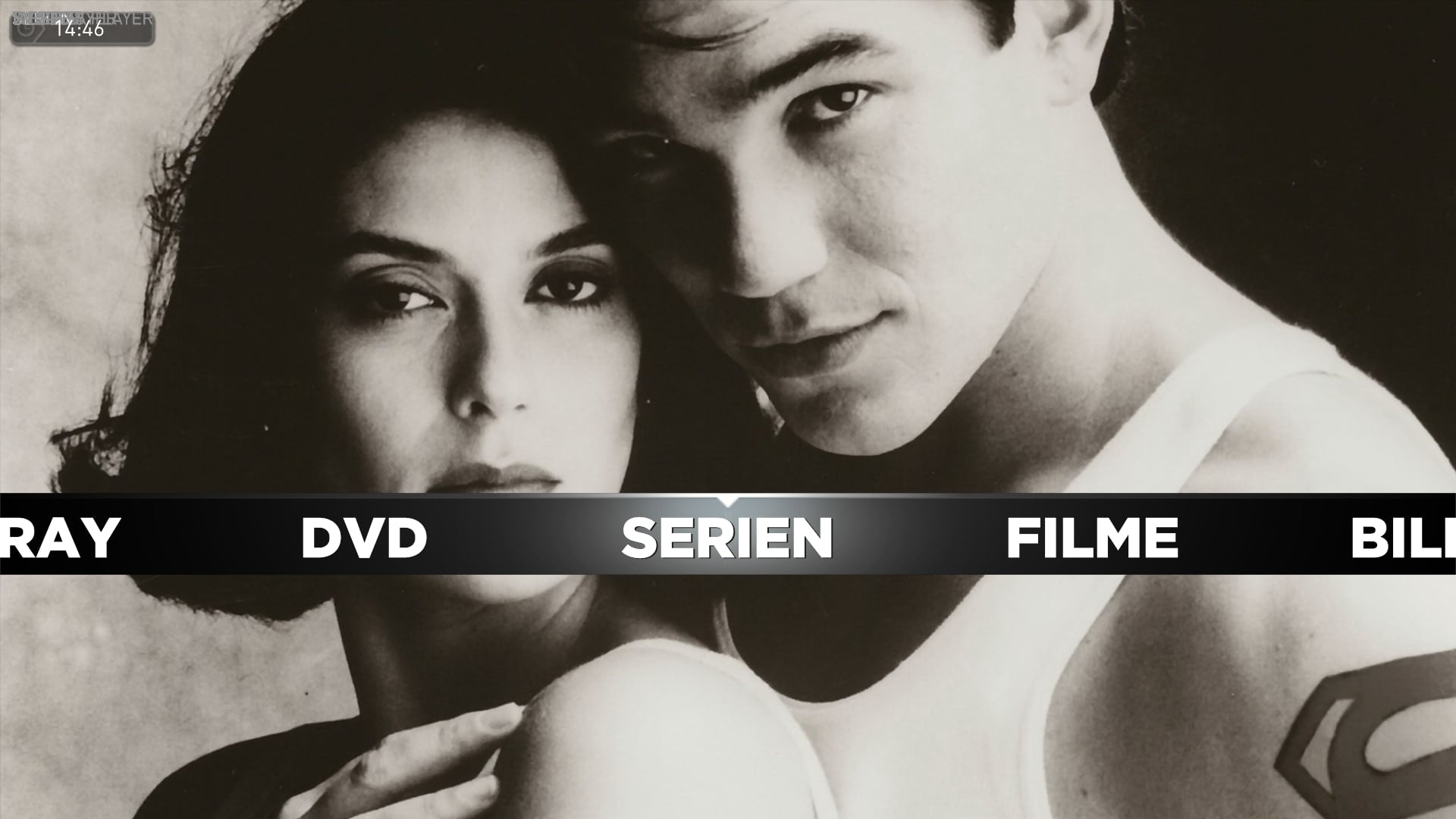
kiwijunglist: Thank you. Display works fine. I just couldn't figure where to add the label for default item.
But something else is messed up. As you can see at the left corner around the time display. It's like the different labels are overlapping. I have no idea what caused this. I cleared cache by the way.
But something else is messed up. As you can see at the left corner around the time display. It's like the different labels are overlapping. I have no idea what caused this. I cleared cache by the way.
Attachments

- Moderator
- #398
@kiwijunglist: Thank you. Display works fine. I just couldn't figure where to add the label for default item.
But something else is messed up. As you can see at the left corner around the time display. It's like the different labels are overlapping. I have no idea what caused this. I cleared cache by the way.
Just looked at (and into) this - the fix is not this simple. The reason you get text overlapping in the top left is because the x and y pos are both 0 on that control.
Am not able to test compleatly as I have an irtrans display which no longer works with Minidisplay, worked fine in the old days of external display...(but that's another story).
Did try it using the debug display (not much better) and with this 'fix' did not get the menu item displayed, do on Blue3wide basichome though.
Will see if I can get to the bottom of this and if I fix it will amend the editor(s).
Cheers
- Status
- Not open for further replies.
Users who are viewing this thread
Online now: 4 (members: 0, guests: 4)