subtitles (1 Viewer)

cybergeek

Portal Pro
November 21, 2007
190
0
Home Country
Canada Canada
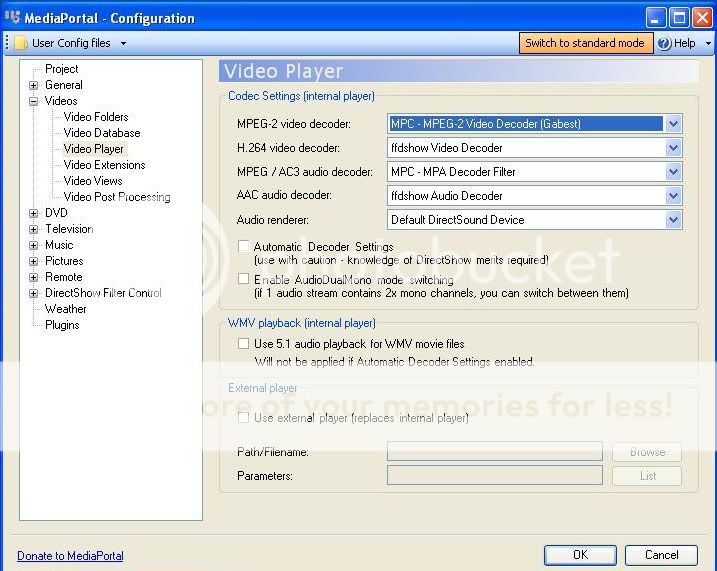
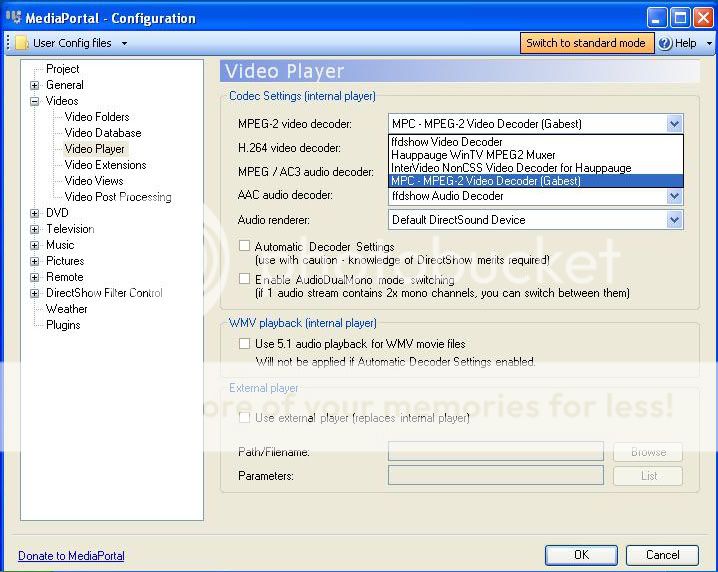
Hi guys my subtitles were working then I upgraded to the latest MP and now I can't get them to work. I did everything according to Gooses guide and the only thing I noticed different was here in the picture below I don't know what option to pick.
MPSubs1.jpg

MPSubs.jpg
 

Lardy

Portal Pro
April 16, 2007
78
38
Home Country
Australia Australia
This is extracted from my install notes and works for me:

install ffdshow-rev2946_20090515_xxl.exe
Install Haali Media Splitter 1.8.122.18
Install VobSub_2.23

Subtitles:
mediaportal configuration>videos>video post processing>add directvobsub (auto-loading version)
ffdshow>video decoder configuration>enable subtitles (this will cover mkv embedded subtitles)
ffdshow>video decoder configuration>subtitles>enable vobsub (should already be enabled and this will cover avi+idx+sub)

Audio Tracks:
mediaportal configuration>videos>video post processing>add ffdshow audio decoder
ffdshow>audio decoder configuration>enable stream switcher
 

cybergeek

Portal Pro
November 21, 2007
190
0
Home Country
Canada Canada
This is extracted from my install notes and works for me:

install ffdshow-rev2946_20090515_xxl.exe
Install Haali Media Splitter 1.8.122.18
Install VobSub_2.23

Subtitles:
mediaportal configuration>videos>video post processing>add directvobsub (auto-loading version)
ffdshow>video decoder configuration>enable subtitles (this will cover mkv embedded subtitles)
ffdshow>video decoder configuration>subtitles>enable vobsub (should already be enabled and this will cover avi+idx+sub)

Audio Tracks:
mediaportal configuration>videos>video post processing>add ffdshow audio decoder
ffdshow>audio decoder configuration>enable stream switcher

Thanks Lardy I got the subtitles working but now I can't turn then on or off. I even changed the DirectVOBSUB to non-autoloading. Can you help me with this one?
 

Lardy

Portal Pro
April 16, 2007
78
38
Home Country
Australia Australia
I find that the subtitles on my setup are off by default. I use an MCE remote and use either the yellow (enter) button or the i (more) button to select the subtitles.

Checking my setup I realise I didn't take very good notes and my setup is a bit more complicated. I installed the XviD codec as well and disabled XviD, DivX 4/5/6 & DivX 3 in ffdshow video decoder configuration>codecs.

I suspect that ffdshow on your computer is rendering the subtitles twice (ffdshow & vobsub). So you can either remove the check from ffdshow>video decoder configuration>enable subtitles (result no subtitles for mkv) or install XviD as I have done and disable XviD & DivX in ffdshow.

Let me know how you go.

--------------------

EDIT: I did some testing after this post and discovered that my subtitles weren't working for my AVI files, but were OK for MKV. I upgraded from 0.2.3.0 to 1.0.2.0 only two weeks ago and didn't realise this was an issue until now. I enabled Videos>Subtitle/Audio tab>select Show subtitles (don't think this was an option in 0.2.3.0) and the AVI were now OK, but I couldn't toggle the subtitles as you discovered. In addition my MKV files would not play at all. So I disabled video post processing>add directvobsub (auto-loading version) and now all subtitles are working and can be toggled successfully.
 

cybergeek

Portal Pro
November 21, 2007
190
0
Home Country
Canada Canada
Yeah I use to press the more button twice and a list came up and that showed subtitles, I then pressed subtitles and that gave me the options of what language subtitles I wanted but now when I press the more button twice I don't see subtitles.
 

Lardy

Portal Pro
April 16, 2007
78
38
Home Country
Australia Australia
Have you enabled Videos>Subtitle/Audio tab>select Show subtitles? What type of file is it? AVI+IDX+SUB or MKV?
 

Lardy

Portal Pro
April 16, 2007
78
38
Home Country
Australia Australia
MediaPortal Configuration>Videos>Subtitle/Audio tab>check Show subtitles
 

Users who are viewing this thread

Similar threads

I'm running 2.5 with the WMC skin. I have .mp4 files, along with the related .srt files in the same folder. I can watch the movies just fine. In past versions of MP, like 2.4x, I could press the More Info button on my remote twice, and on the second press, an option for showing/choosing the subtitles was listed. I'd select the...
I'm running 2.5 with the WMC skin. I have .mp4 files, along with the related .srt files in the same folder. I can watch the...
Replies
0
Views
3K
i love how subtitles are implemented in the MP2 videoplayer, this is just perfect. 1080p playback is also very good. But video playback in MP2 is buggy when playing 4k material. Therefore: PLEASE add an option for an external video player! I'd LOVE to have VLC back as videoplayer, like in MP1! This works perfectly. You will make a...
i love how subtitles are implemented in the MP2 videoplayer, this is just perfect. 1080p playback is also very good. But video...
Replies
0
Views
1K
So, you're power cycling the TV, but not putting the PC to sleep ? In General => Startup/Resume settings, try checking "Ignore Windows resolution/size changes" In Codecs and Render, try selecting the specific audio device rather than "Default DirectSound device" Just ideas, no guarantee this will do anything. If this doesn't work, I...
So, you're power cycling the TV, but not putting the PC to sleep ? In General => Startup/Resume settings, try checking "Ignore...
I'm running MP1 as a client only on this: https://www.amazon.com/dp/B0DZX5DWS5?ref_=pe_123509780_1038749300_t_fed_asin_title&th=1...
Replies
4
Views
303
Sorry, it's my fault -- I did not notice that you are using MP2. :( MP1 has a separate configuration utility, similar to "TV Server Config". I have tried MP2 only a couple of times, and have never used it seriously. I don't know what MP2 supports with regard to adjusting audio delay, but I do know that all of the adjustments of...
Sorry, it's my fault -- I did not notice that you are using MP2. :( MP1 has a separate configuration utility, similar to "TV...
Hi. I recently upgraded my home cinema AVR which also meant changed from sending audio from my HTPC as 5.1 using optical to 7.1...
Replies
5
Views
1K
Are different people taking turns watching the same thing on the same HTPC? For me, separating users in MP2 is a drawback, as is the interface. Simply put, this can't be done in MP1, or rather, it can't be done quickly, because everything would have to be rewritten. But if each user logs in with their own Windows account, MP1 can...
Are different people taking turns watching the same thing on the same HTPC? For me, separating users in MP2 is a drawback, as is...
Hello, Is there a way to integrate a multi-user interface in MP1 where you can create different end users, similar to MP2? A...
Replies
2
Views
529
Top Bottom