TV Server Plugin: TvWishList (3 Viewers)

JiRo

MP Donator
  • Premium Supporter
  • May 1, 2009
    184
    44
    Prague
    Home Country
    Czech Republic Czech Republic
    Hi huha.

    1.2.2.6 installation was not successful :(. By Client configuration is probably problem with TV Server address. I have multiseat configuration, but Client try connect to own IP address (10.0.0.11) not to Server address (10.0.0.10):

    No connection could be made because the target machine actively refused it 10.0.0.11:31456

    JiRo.

    Edit: After Client PC restart everything is O.K. Sorry for "hoax" :mad:...
     
    Last edited:

    TLD

    Portal Pro
    October 26, 2007
    989
    429
    Rainy Washington
    Home Country
    United States of America United States of America
    In the default skin when i right arrow on the remote to highlight the list of programs to be recorded it worked fine but i can not left arrow to get back to the menu. Works in Default wide fine but not in default.
     

    Pog

    Retired Team Member
  • Premium Supporter
  • September 7, 2009
    401
    315
    Wicklow
    Home Country
    Ireland Ireland
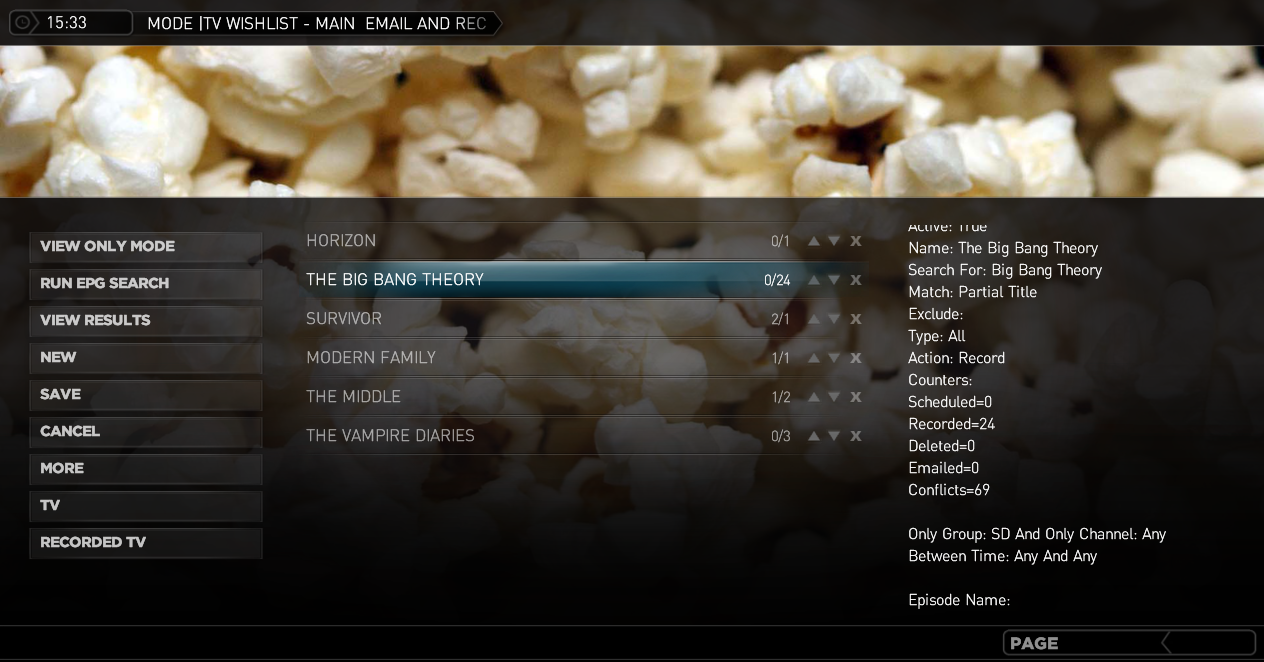
    I've made some updated skin files for StreamedMP that should function better then the ones in the installer.
     

    Attachments

    • 15-33-37.png
      15-33-37.png
      605.1 KB
    • TVwishList-StreamedMP.zip
      1.1 MB

    huha

    Extension Developer
    January 3, 2008
    890
    556
    Home Country
    Germany Germany
    Pog, the skin looks fantastic. i will include it with the next version.

    TLD, the issue is that all my skins are missing in TvWishListMP.xml
    the statement <onleft>2</onleft>. In some cases it seems to work by default, in some cases not.
    I will fix this for the next version or you can manually add it with a text editor.


    <control>
    <id>51</id>
    <description>WishList</description>
    <type>playlistcontrol</type>
    <posX>188</posX>
    <posY>121</posY>
    <width>490</width>
    <height>302</height>
    <upBtnXOffset>370</upBtnXOffset>
    <downBtnXOffset>396</downBtnXOffset>
    <deleteBtnXOffset>421</deleteBtnXOffset>
    <onleft>2</onleft>
    </control>

    Pog, if you doubleclick with the right mouse botton on a tvwish you will see the results only for this single wish. I believe i also assigned a remote button for this. Check the manual.
     

    Pog

    Retired Team Member
  • Premium Supporter
  • September 7, 2009
    401
    315
    Wicklow
    Home Country
    Ireland Ireland
    Ah yes it's in the manual and mapped to the PLAY button (y)

    I've just being trying to change the way results are displayed using the expert settings and I can't get the <br> new line command working. It just displays <br> with the correct items in the output in MP.

    Example of what I tried: {0}<br>{5}<br><br>{13}<br>{6}<br>{1}<br><br>{2}<br>{3}<br>{4}

    EDIT: I found that if I edit tvwishlist.xml config file and change the xml &lt;br&gt; to &#10; it will work. The &#10; is ascii for newline. Of course this will not work from inside the config program and has to be done manually.

    I've also found that the PLAY button mapping does not work on an actual remote but does work when pressing P on the keyboard (which is the equivalent of PLAY). There could be a problem using PLAY as it may interfere with media already running.
     
    Last edited:

    TLD

    Portal Pro
    October 26, 2007
    989
    429
    Rainy Washington
    Home Country
    United States of America United States of America
    Pog, the skin looks fantastic. i will include it with the next version.

    TLD, the issue is that all my skins are missing in TvWishListMP.xml
    the statement <onleft>2</onleft>. In some cases it seems to work by default, in some cases not.
    I will fix this for the next version or you can manually add it with a text editor.

    I found that it will return to the menu if i have the first entry in the record list highlighted but will not if any other entry is highlighted.
    I can wait for the new version as it works as i have said above.

    This is a really great plugin but it would be really cool if you could use the EPG to select the programs you want to add to the wishlist. The options in the expert mode are very useful.
     
    Last edited:

    pur_berger

    Super User
  • Team MediaPortal
  • Super User
  • May 14, 2007
    1,678
    312
    54
    Vienna
    Home Country
    Austria Austria
    hi!

    One question - is it possible to only switch the channel without doing anytanyhing else? So you won't miß a program watching TV?
     

    Pog

    Retired Team Member
  • Premium Supporter
  • September 7, 2009
    401
    315
    Wicklow
    Home Country
    Ireland Ireland
    Some suggestions....

    When I use the "view only mode" to search the epg for shows, I can set a once off recording schedule but there are shows that have 3 or 4 parts that are not yet available in the epg. It would be nice to have an option to create a wish for that show on that channel automatically.

    Sometimes I need to catch a few missed episodes of a series. I can set up a new wish and set the series and episode that I want (great). An option to clone a wish would be a useful starting point for this.

    Currently the info button on the remote (F9 keyboard) is not used. Perhaps using the info context menu for wish options (edit,delete,clone etc) while using the select button to view wish results would make for a more logical layout.

    Sorry to be laying on more work :)
     

    mabdk

    MP Donator
  • Premium Supporter
  • May 29, 2011
    32
    6
    Home Country
    Denmark Denmark
    Hi Huha,

    Been using ver. 1.2.2.6 since you posted it, in a server / multi client environment.
    Working flawlessly, been recording all i ask for etc.

    Also no need for folder sharing which is really nice, since it's not nice to have to share your programdata folder :)

    I have one question / suggestion.
    How do i edit the default options when adding a new entry.
    Standard it will pick from the "All Channels" list, which i do not want since there's hundreds of channels i can't see, so i would prefer it to pick from my "TV" list instead. Not a big deal, but still annoying you have to remember to change the list 2 places.

    Else the add-on is working perfectly, and i haven't discovered any errors yet.

    /mabdk
     

    huha

    Extension Developer
    January 3, 2008
    890
    556
    Home Country
    Germany Germany
    Jiro, as there has been no more report about multi client issues it may have been a singular event. I am planning to do more testing here over the week end.

    I got the skins fixed for the next version and fixed the {0}<br>{5}<br> issue from Pog. On the play issue I can try to exchange the play command with the info command. Will need to check if there exists an action command for remote controls.

    There were a lot of good suggestions on future improvements. But currently I have started to understand MP2 with the goal to bring TvWishList to Mp2 also. So new features will be on hold for some time. Pog, i did not understand what you mean with the view only mode in your post for "once off recording schedule".

    Purburger, I am not understanding what TvWishList has to do with changing channels.

    mabdk, you can set the default settings for a new wish in the MP plugin configuration in expert settings. Change the combobox on the second tab to channelgroup and enter the group you want (described in the manual)

    greetings, huha
     

    Users who are viewing this thread

    Top Bottom