Unable to get tv server working within MP (2 Viewers)

wim168

Portal Member
March 12, 2008
35
2
67
Benthuizen
Home Country
Netherlands Netherlands
Thanks for the tip.
Already installed ffdshow but my problems still persist.
In an earlier response i answered that I had it working with HDTV and MPEG2 but i was wrong.
I know now that all HDTV channels work but i am not able to view the MPEG2 channels.
Tried DBViewer software from my floppydtv and that gives the same problem, so it is not an MP issue.
Maybe there is someone who had the same problem and knows the answer to solving this.

I already did a complete fresh install of windows on a formatted disc but i still have the problem.

Help!!!!
 

sounddude

Portal Member
March 18, 2008
7
0
Auckland
Home Country
New Zealand New Zealand
I am having _exactly_ the same problem, and also in New Zealand.

I am running the latest SVN of MP and TV-Server and TVClient.

I have a HVR-4000 (using DVB-T) running on XP SP2. I can scan for the channels using TV-Server using the DVB-T receiver and receive them all, but when I click preview I only hear the sound and the preview window is grey.

If I go into TV-Server management and use the manual control it produces a .ts file which is watchable using Windows Media player (so one would assume the correct codecs are installed). (I am using ffdshow btw)

However, when I go into Media Portal and into MyTV, it takes ages to load and once it finally loads it won't allow me to click the TV On button. Media portal just hangs for 30 seconds then does nothing, almost like it can't connect to the TV Server.

All the EPG details show up and if I click on channels, I can see all the channels, and when I choose a channel it says timeshifting, so the RPC connection seems to be working.

I have the windows firewall turned off.

I don't know what else to try.
 

Omen

Portal Pro
June 2, 2007
180
6
Auckland
Home Country
New Zealand New Zealand
sorry i've been away for a week and wasn't able to try fixes for a while,

i've done everything suggested here but i've still got the same issues, i'm not sure if it's a hauppage hvr 4000 issue, but it's something i've got in common with sounddude hardware wise and he does seem to have the exact same issue as me.
 

wim168

Portal Member
March 12, 2008
35
2
67
Benthuizen
Home Country
Netherlands Netherlands
sorry i've been away for a week and wasn't able to try fixes for a while,

i've done everything suggested here but i've still got the same issues, i'm not sure if it's a hauppage hvr 4000 issue, but it's something i've got in common with sounddude hardware wise and he does seem to have the exact same issue as me.
I don't think it's a hauppauge issue because i'm using a floppydtv card.

I've given up and returned to windows mce.
I just can't get MP working reliably.

I will do a lot of testing on my normal pc with a hauppauge 150mce before i'll give it an other go on my htpc.

btw about 2 days after my last post the system spontaniously started to work.
I have no idea why

Good luck!!!

I'l be still following the posts and will report back in case i find something interesting.
 

noddan

Portal Member
March 24, 2008
14
2
Gothenburg
Home Country
Sweden Sweden
I experience exactly the same problem. I've tried installing the latest tv-server and svn snapshot of mediaportal in different orders and fiddles with a lot of settings but I always get the same error.

I'm using a FloppyDTV-C. I've gone back to regular mediaportal for now but will definatly try out various fixes when they arrive.
 

Omen

Portal Pro
June 2, 2007
180
6
Auckland
Home Country
New Zealand New Zealand
thats a different problem, he had everything working server end, i can't even get a picture in my preview in a single seat.
 

mcraenz

MP Donator
  • Premium Supporter
  • July 28, 2007
    646
    46
    Auckland
    Home Country
    New Zealand New Zealand
    Omen: You've installed a h.264 codec right? FDDSHOW? Can you record a clip from a DVB-T channel (in TV Server/Manual Control) then go in to graphedit and from the file menu select render media file and point to that recording you just made and see what heppens
     

    nathang

    Portal Member
    October 3, 2007
    9
    0
    Auckland
    Home Country
    New Zealand New Zealand
    I also have an identical DVB-T problem using an HVR-4000. In TV Server config I can preview the channels but only get audio, no video. I have FDDSHOw installed so should have an H.264 codec installed, not sure what else could be causing this. I'm going to try mcraenz's recommendation and post the result back.
     

    nathang

    Portal Member
    October 3, 2007
    9
    0
    Auckland
    Home Country
    New Zealand New Zealand
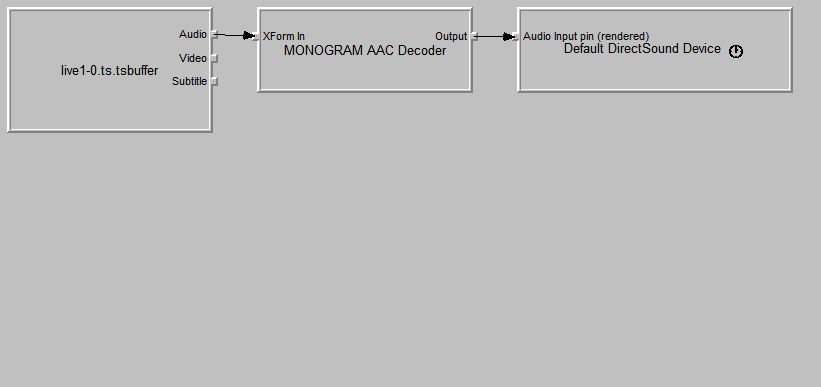
    OK, here is what Graphedit shows when I have audio but no video when previewing DVB-T channels. Looks like there is no video filter, this is probably something to do with codecs?
     

    Attachments

    • DVB-T HVR4000.png
      DVB-T HVR4000.png
      6.9 KB

    Users who are viewing this thread

    Top Bottom