
Unable to play: stream X (1 Viewer)

Hotkey

MP Donator
  • Premium Supporter
  • July 18, 2007
    254
    6
    48
    Dortmund
    Home Country
    Germany Germany
    Controller: local ip address:127.0.0.1
    Good hint, but how/where can i change this? Currently i've the problem continously reproducable from all clients (2 via LAN, one via WLAN and Android also via WLAN).

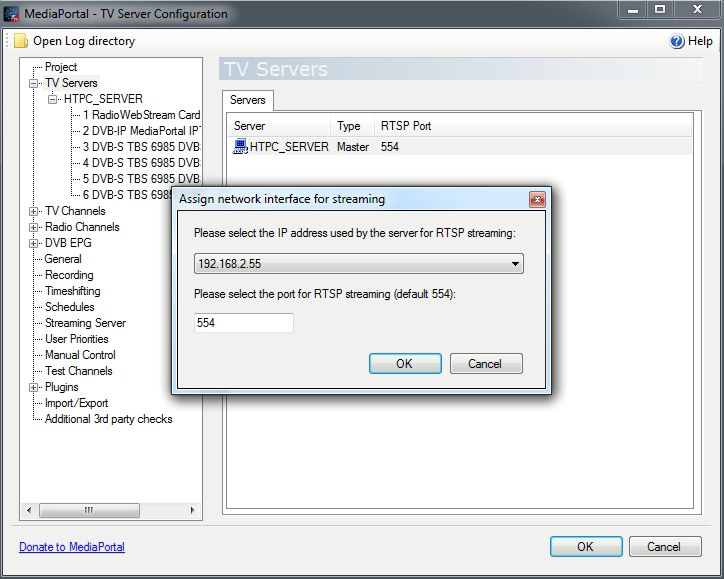
    The streaming setting seems to be ok (see screenshot).
     

    Attachments

    • streaming setting.jpg
      streaming setting.jpg
      61.7 KB

    mm1352000

    Retired Team Member
  • Premium Supporter
  • September 1, 2008
    21,544
    8,236
    Home Country
    New Zealand New Zealand
    Good hint, but how/where can i change this?
    Well, normally you shouldn't even have to think about this problem, but it seems to me like you might have some kind of unusual/complex configuration for MP and the server networking. I can't answer the question since I don't know the full details of your configuration.

    According to the MP configuration (MediaPortal.xml), I'd expect the real IP address for your server to be 192.168.2.55, but from the server logs it looks like the server doesn't have a real IP address. I suspect maybe the server is a virtual machine (???) or something like that, but I don't really know.
     

    Hotkey

    MP Donator
  • Premium Supporter
  • July 18, 2007
    254
    6
    48
    Dortmund
    Home Country
    Germany Germany
    Hi mm1352000,

    the server is a normal PC (see my specs of both server&client). It's not a virtual machine. There's also nothing special about that server (no second network interface for example). For LAN the onboard Realtek interface is used (Asrock mainboard, latest drivers installed). The PC is dedicated only for Mediaportal Server, so no other jobs/work is done on the server.

    Every computer is connected via LAN (Cat7) over a Gbit Switch. The IP Assignment is made over the FritzBox (DHCP with fixed assigne IP for the server in the Fritzbox configuration). The WLAN access is also done via the FritzBox.
    When i have the "unable to play.." error i have it on both clients which are connected via LAN, so i guess it must be a Server or Network Issue. As mentioned above i didn't experience any other network problems when copying media, browsing, accessing the server via Remote Desktop etc.

    I'll now try to disable IPv6 on the Mediaportal machines.
     

    mm1352000

    Retired Team Member
  • Premium Supporter
  • September 1, 2008
    21,544
    8,236
    Home Country
    New Zealand New Zealand
    I'll now try to disable IPv6 on the Mediaportal machines.
    Given what you've told me and what I saw in the logs, this probably won't help.

    the server is a normal PC...
    Okay. I understand some of what you've said, but I have no idea what a "FritzBox" is, so I still struggle to help you.
    Normally I would only recommend assigning a fixed IP address on the server network adaptor configuration, not externally (eg. via router or other).

    When the problem happens does it help to restart the TV service?
    When the problem happens, can you post the output of the DOS/command-line ipconfig command?
     

    Hotkey

    MP Donator
  • Premium Supporter
  • July 18, 2007
    254
    6
    48
    Dortmund
    Home Country
    Germany Germany
    Sorry for confusion. A "fritzbox" is simply a Modem/Router and is also managin WAN and LAN konfiguration. (http://en.avm.de/products/fritzbox/fritzbox-7272/).
    Via the Fritzbox i can configure the DHCP in a way, that some devices get the same IP address assigned. I'll follow your advice and configure the IP/Gateway manually for the servers network adapter.

    When the problem happens it sometimes does help to restart the TV Service via Service Manager. Sometimes only a reboot helps but for the last case this doesn't helped either. Nevertheless after some reboots currently the setup is working again.

    Thanks a lot for your effort so far!!
     

    mm1352000

    Retired Team Member
  • Premium Supporter
  • September 1, 2008
    21,544
    8,236
    Home Country
    New Zealand New Zealand
    A "fritzbox" is simply...
    Ahhh, okay - thanks. :)

    Each case of the problem could have different explanations, so it is currently not possible to give a 100% certain explanation... but maybe...

    When the problem happens it sometimes does help to restart the TV Service via Service Manager.
    This suggests that the TV service might have started before an IP address was assigned by the FritzBox... or maybe the service simply crashed... or maybe the IP assignment was somehow lost.

    Sometimes only a reboot helps...
    In this case it would be really interesting to see the ipconfig output. It could be that for some reason the FritzBox is not assigning an IP to the server until the reboot.

    ...but for the last case this doesn't helped either.
    This case could be similar to the reboot case, except worse. It would be interesting to see if rebooting the FritzBox (to ensure correct IP assignment) and then restarting the TV service (to pick up IP change) would help.
     

    Hotkey

    MP Donator
  • Premium Supporter
  • July 18, 2007
    254
    6
    48
    Dortmund
    Home Country
    Germany Germany
    Hi again,

    i actually have the problem again. Here's the scenario: Started my Client at 19:37 local time which automatically started the HTPC-Server via WOL. I waited a bit, then choosed a TV channel and got the "unable to play: stream3" message again.
    Please finde attached:
    1. TVServerLogs.zip: the logs of the Server (initial log after the failure)
    2. SystemEvents.zip: the System Log (initial log after the failure)
    3. ApplicationEvents.zip: the Application Log (initial log after the failure)
    4. ClientLogs.zip: The log of the client after the failure (no Watchdog for the first attempt).
    5. 2ndPC_MediaPortalLogs_27_10_14__20_01.zip: the Log of the 2nd attempt from the 2nd PC (see below "what i tried...").
    6. TVServerLogs2ndAttempt.zip, the TV Server Logs after the 2nd attempt.
    Here's the ipconfig of the server (as adviced i've configured the IP fix for the Servers adapter, no DHCP):
    Code:
    Ethernet-Adapter LAN-Verbindung:
    
       Verbindungsspezifisches DNS-Suffix:
       IPv4-Adresse  . . . . . . . . . . : 192.168.2.55
       Subnetzmaske  . . . . . . . . . . : 255.255.255.0
       Standardgateway . . . . . . . . . : 192.168.2.2
    
    Tunneladapter isatap.{72B843BD-DD5F-4E44-91A0-9F26E49A47C9}:
    
       Medienstatus. . . . . . . . . . . : Medium getrennt
       Verbindungsspezifisches DNS-Suffix:
    
    Tunneladapter Teredo Tunneling Pseudo-Interface:
    
       Verbindungsspezifisches DNS-Suffix:
       IPv6-Adresse. . . . . . . . . . . : 2001:0:5ef5:79fd:1c38:1bb9:a60a:8f2c
       Verbindungslokale IPv6-Adresse  . : fe80::1c38:1bb9:a60a:8f2c%12
       Standardgateway . . . . . . . . . : ::


    The Server's service still seems to run, at least if i highlight the TVService in "services.msc" i get the option to Restart/Stop the Service.

    The Server's streeming setting is still set to 192.168.2.55 which is correct.

    The Server is in generall reachable via Ping, RDP, FTP, Win Network, etc.

    What i tried to troubleshoot:
    1. Try to watch with a second PC, also connected via LAN: also failed with the same Message, see watchdog log attached (2ndPC_MediaPortalLogs_27_10_14__20_01.zip)

    2. Restart the TV-Service (Stop.. Start):
    TV Worked on the 1st and 2nd PC (not sure if this will help allways).


    Interesting again is maybe the start of the TVServiceLog: (local ip address: 127.0.0.1)
    Code:
    [2014-10-27 19:37:05,390] [Log    ] [4        ] [DEBUG] - Setting up EventWaitHandle with name: Global\MPTVServiceInitializedEvent
    [2014-10-27 19:37:05,702] [Log    ] [4        ] [INFO ] - Set loglevel to: Information
    [2014-10-27 19:37:05,718] [Log    ] [8        ] [INFO ] - TV Service: Starting
    [2014-10-27 19:37:05,718] [Log    ] [TVService] [INFO ] - TVService v1.9.0 is starting up on Windows 7 ( Service Pack 1 ) [6.1.7601.65536]
    [2014-10-27 19:37:05,718] [Log    ] [TVService] [INFO ] - Controller: Initializing TVServer
    [2014-10-27 19:37:05,718] [Log    ] [TVService] [INFO ] - Controller: 1 init attempt
    [2014-10-27 19:37:05,733] [Log    ] [TVService] [INFO ] - C:\ProgramData\Team MediaPortal\MediaPortal TV Server\gentle.config
    [2014-10-27 19:37:05,733] [Log    ] [TVService] [INFO ] - Controller: using MySQL database connection: Server=HTPC_SERVER;Database=MpTvDb;User ID=root;Password
    [2014-10-27 19:37:05,733] [Log    ] [TVService] [INFO ] - Controller: started at HTPC_SERVER
    [2014-10-27 19:37:05,733] [Log    ] [TVService] [INFO ] - Controller: local ip address:127.0.0.1
    [2014-10-27 19:37:05,780] [Log    ] [TVService] [INFO ] - Controller: server running on HTPC_SERVER
     

    Attachments

    • ApplicationEvents.zip
      5.9 KB
    • SystemEvents.zip
      9 KB

    Hotkey

    MP Donator
  • Premium Supporter
  • July 18, 2007
    254
    6
    48
    Dortmund
    Home Country
    Germany Germany
    Hopefully im not confusing the hell out of you, but here is the part of the log after i restarted the TVService:
    [2014-10-27 20:42:41,033] [Log ] [TVService] [INFO ] - Controller: started at HTPC_SERVER
    [2014-10-27 20:42:41,033] [Log ] [TVService] [INFO ] - Controller: local ip address:192.168.2.55

    So the question is why at first the 127.0.0.1 was used?
     

    mm1352000

    Retired Team Member
  • Premium Supporter
  • September 1, 2008
    21,544
    8,236
    Home Country
    New Zealand New Zealand
    Hello again

    Hopefully im not confusing the hell out of you...
    No, you're not. :)

    Interesting again is maybe the start of the TVServiceLog: (local ip address: 127.0.0.1)
    Yep. The same can be seen in the streaming server log, which is the more relevant point for success of streaming:
    27-10-2014 19:37:06.342 Stream server:confused:etup stream server for ip: 127.0.0.1

    So the question is why at first the 127.0.0.1 was used?
    Easy answer: because the network adaptor had not been assigned an IP address when the TV service started.
    The TV service is configured with dependencies on network services to attempt to ensure that this situation doesn't happen. However, some people seem to run into this problem despite the dependencies.
    I advise to set the static IP address directly on the network adaptor rather than in the FritzBox. If that doesn't help, the only solution is to find some other way to delay the start of TV service until after the network adaptor has the proper IP address.

    Here's another example of the same problem which should help to give you an idea for delaying the service start:
    https://forum.team-mediaportal.com/...erun-primer-tuners.125898/page-2#post-1080415
     

    FreakyJ

    Retired Team Member
  • Premium Supporter
  • July 25, 2010
    4,004
    1,427
    Home Country
    Germany Germany
    Just to let you know mm:
    I use on my network also a fritzBox, they are very common in Germany and the best routers I ever had. They just work like a charm and could already handle a lot of connections (used for emule in the early days) where the dlink router just restarted itself because of overload. ... i also had netgear, cisco and obviously dlink and an acer modem. Nothing could reach the fritzBix.
    Okay now is enough xD you probably now know that I love the FritzBox
    Have a great day ;)
     

    Users who are viewing this thread

    Top Bottom