Xface Skin Version 1.6 ready for download 09.06.2008 (2 Viewers)

Harley

Retired Team Member
  • Premium Supporter
  • May 7, 2004
    2,053
    1,993
    Germany
    Home Country
    Germany Germany
    I can no longer use the Search TV Guide screen. There's no shows at all and clicking Genres, Title or Description does nothing. Version 1.0 didn't have this problem and it still works fine in BlueTwo finding 1902 shows.
    However using Scheduled screen and clicking New I can still find all shows by searching..

    Using SVN 16098 and Xface v1.1v2.

    Hi vuego,

    ..yes there was something broken, i have fixed it, please use the new file.

    Greetings Harley :)
     

    Attachments

    • mytvsearch.xml
      30.6 KB

    peque

    Moderator - Spanish Forums
  • Premium Supporter
  • August 4, 2007
    861
    99
    Home Country
    Spain Spain
    Two little things in TV fullscreen:

    When you change channel with numbers in fullscreen tv, number appear in black in the upper left corner, which is very difficult to see if you don't add some clear background box (may be the same progress bar that appears when you skip forward or backwards for example).

    Skip steps "numbers" (+5, +10, END, etc...) don't appear in the middle of the progress bar (vertically) as the do on video fullscreen. They appear a little bit "up".... Where in the .xml file can I change this or at least play with? I found "skip steps" control into tvfullscreen.xml, but changing x and y labels does nothing (after erasing cache). I tried to put something more than "35" on the posY... but it didn't actually changed anything...

    bye!
     

    PierreLo

    Portal Pro
    September 7, 2004
    57
    0
    France
    Hi Harley,

    regarding my missing frames problem, somebody on the French forum suggested that DVD and CD jewelcase frames in filmstrip view only appear in share view, and not in any other view like genre, or artist (which I am currently using).
    Is this true ? So thi would mean you cannot have a display sorted by genre with the filmstrip view with the nice frames around movie covers ?

    If so, how could I get the frames in all views ? Is there a way ? Something to modify in an XML file or anywhere else ?

    thanks a lor for your help

    Pierrelo
     

    jdlmedia

    New Member
    September 18, 2006
    1
    0
    126
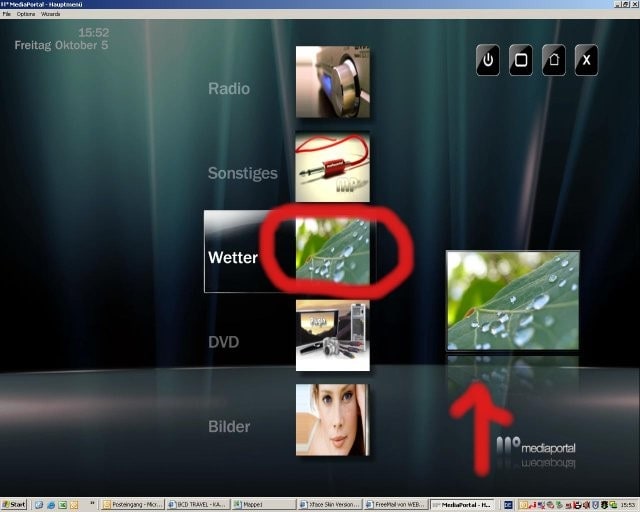
    Edit home.xml opening screen

    Hi all,

    I would need some help in changing the "opening" screen and fit to my personal preferences.

    I would like to erase the pictures next to the menu options in the middle, because they are already shown in the bottom right corner.

    For better understanding I have added a screenshot.

    Can anyone help me extracting those pictures, so that the menu only shows text in the middle ???
     

    Attachments

    • Screenshot.jpg
      Screenshot.jpg
      50 KB

    SpudR

    Retired Team Member
  • Premium Supporter
  • July 27, 2007
    2,657
    718
    Yorkshire, UK
    Home Country
    England England
    At the risk of offending someone and to those of you feeling a little aggrieved at my reply to the post about suggesting a 'Stable SVN release'

    From the release page of EVERY SVN:
    "If you'd like the bleeding edge code and don't mind the inherent risks, upgrade to the snapshot releases as they become available. If stability is important to you, you might want to stay with the fully-tested releases."

    If you want cutting edge - use the SVN - if not go for the stable RC release(s)
    If you want this skin - get a SVN release or (and here's the difficult bit) DONT USE IT!!!!

    Sorry if I caused offence - I kinda asumed people actually READ things like this
    ##Meant to be read with tongue FIRMLY in cheek ;)

    Hopefully the next stable RC is round the corner...
     

    Harley

    Retired Team Member
  • Premium Supporter
  • May 7, 2004
    2,053
    1,993
    Germany
    Home Country
    Germany Germany
    Hi Harley,

    regarding my missing frames problem, somebody on the French forum suggested that DVD and CD jewelcase frames in filmstrip view only appear in share view, and not in any other view like genre, or artist (which I am currently using).
    Is this true ? So thi would mean you cannot have a display sorted by genre with the filmstrip view with the nice frames around movie covers ?

    If so, how could I get the frames in all views ? Is there a way ? Something to modify in an XML file or anywhere else ?

    thanks a lor for your help

    Pierrelo

    ..no the filmstripview is working in all views share, genre and artist with the covers and the frames, as you can see in my last post on the screenshot.
    Important is:

    using 0.2.3.0 RC2, updating on latest svn, and deleting the old skinversion of xface in your skinfolder, deleting the cache folder of the skin. Then put in the new Skin version 1.1v2.

    Harley
     

    emphatic

    Design Group
  • Team MediaPortal
  • August 25, 2006
    3,758
    1,250
    Alingsås
    Home Country
    Sweden Sweden
    It just gets better and better. I noticed though that when changing aspect ratio for videos, the text (showing current mode) is black and is hard to see against the video. Also, I can't see the volume adjustment overlay, since it seems to be hidden underneath the video somehow.

    Emph
     

    Harley

    Retired Team Member
  • Premium Supporter
  • May 7, 2004
    2,053
    1,993
    Germany
    Home Country
    Germany Germany
    At the risk of offending someone and to those of you feeling a little aggrieved at my reply to the post about suggesting a 'Stable SVN release'

    From the release page of EVERY SVN:
    "If you'd like the bleeding edge code and don't mind the inherent risks, upgrade to the snapshot releases as they become available. If stability is important to you, you might want to stay with the fully-tested releases."

    If you want cutting edge - use the SVN - if not go for the stable RC release(s)
    If you want this skin - get a SVN release or (and here's the difficult bit) DONT USE IT!!!!

    Sorry if I caused offence - I kinda asumed people actually READ things like this
    ##Meant to be read with tongue FIRMLY in cheek ;)

    Hopefully the next stable RC is round the corner...

    ..load a new svn version and do a backup with the installer, so you can test the new svn and if something not working fine you can backup then to your old stand. But the svn from today is working good here.

    Greetings Harley
     

    milhouse

    Portal Pro
    November 9, 2006
    363
    54
    52
    Raleigh, NC U.S.
    Home Country
    United States of America United States of America
    SpudR,
    If you want this skin - get a SVN release or (and here's the difficult bit) DONT USE IT!!!!

    That's the difficult part, isn't it? Us enthusiasts are a picky bunch. I really want to use this skin, but know I am missing part of the functionality using RC2. No offense was taken by your post (at least by me).

    <complaining>As an aside, it's really frustrating the amount of changes that go in after a release candidate. A release candidate is usually at the point of feature freeze, and only fixing bugs. A good example - after the SECOND release candidate, the entire music database is re-designed. WHAT!? <\complaining>
     

    Users who are viewing this thread

    Top Bottom