Xface Skin Version 1.6 ready for download 09.06.2008 (2 Viewers)

cyberfix

Portal Member
January 16, 2007
47
14
Home Country
United States of America United States of America
My question to all is how do we handle dvd sets in the default MP player. For instance, I have South Park Season 1 with 13 episodes. When I select it, it shows 13 Discs on the screen. How do I know which disc is which episode other than the obvious alphabetical order? Is it possible to have this or any skin show the selected title when you change between the discs? Maybe I am missing something on how this is supposed to work.

Is it possible for MP to give any feedback on which disc is what? It this an MP issues, a skin issue or simply a user configuration problem? That's the last hurdle I have to overcome on my imported movie list.

Thanks!
 

dwoodzz

Portal Pro
May 2, 2007
102
2
62
Home Country
United States of America United States of America
Hi all,

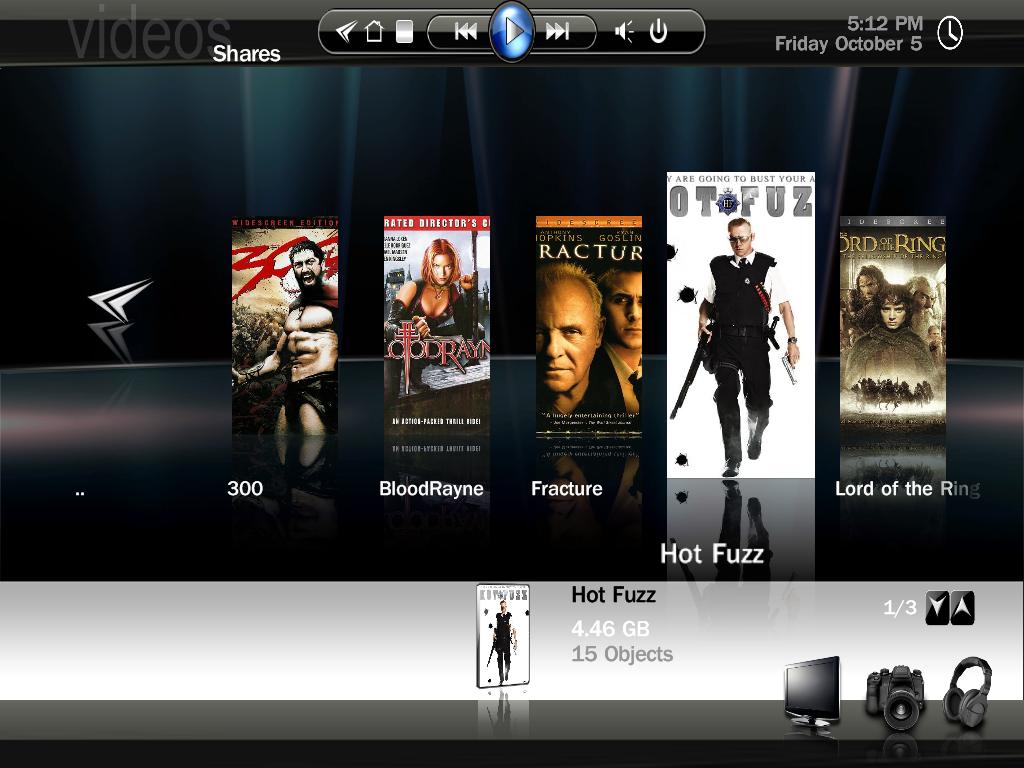
I would need some help in changing the "opening" screen and fit to my personal preferences.

I would like to erase the pictures next to the menu options in the middle, because they are already shown in the bottom right corner.

For better understanding I have added a screenshot.

Can anyone help me extracting those pictures, so that the menu only shows text in the middle ???

Harley
I would also like it this way-what do we need to change?:D
 

Thursday

Portal Member
January 2, 2007
8
0
Home Country
Germany Germany

Regarding thoose 3 buttons down there; Dunno if it's possible to make them "dynamic", but I really wondered what the headset and camera is for - I disabled plugins Photo and Music in configuration ;-).

I'd expect that only thoose are shown that are available. (A "wrong" button just fades out screen and fades it back in again, so nothing much wrong happens. )

However it seems there is a demand to make skins configureable?

And if that's all not going to happen, why are thoose 3 choosen? What about other plugins like Video?
 

grubi

Portal Pro
June 16, 2007
1,207
87
127.0.0.1
Home Country
Germany Germany
At the risk of offending someone and to those of you feeling a little aggrieved at my reply to the post about suggesting a 'Stable SVN release'

From the release page of EVERY SVN:
"If you'd like the bleeding edge code and don't mind the inherent risks, upgrade to the snapshot releases as they become available. If stability is important to you, you might want to stay with the fully-tested releases."

If you want cutting edge - use the SVN - if not go for the stable RC release(s)
If you want this skin - get a SVN release or (and here's the difficult bit) DONT USE IT!!!!

Sorry if I caused offence - I kinda asumed people actually READ things like this
##Meant to be read with tongue FIRMLY in cheek ;)

Hopefully the next stable RC is round the corner...

Strange I don't had stability problems with the latest SVNs at all.

grubi.
 

vuego

Documentation Group
  • Team MediaPortal
  • August 5, 2006
    1,646
    776
    Göteborg
    Home Country
    Sweden Sweden
    Hey Harley I've got some more issues :)
    The Record once icon looks fine but the Record every time icon is a bit big.
    Also the airing time for the selected show in Scheduled recordings overlaps the description.
     

    grubi

    Portal Pro
    June 16, 2007
    1,207
    87
    127.0.0.1
    Home Country
    Germany Germany
    Anyhting new about Xface picking lowres thumbs in filmstrip view.
    I have the same problem that when in filmstrip view only the lowres thumbs are displayed for movies.
    Switching to BT Wide everything is displayed hires.

    grubi.
     

    Karmal

    Portal Member
    August 2, 2007
    6
    0
    using the latest (0.2.3.0) I could find though on a 4:3 monitor (just for this weekend though. Will be back to using my LCD TV Monday). Is there any specific setting to enable the glossy cases? Also, is there specific dimensions for the jpgs in the movies folder to display w/o cropping? Again, if any or all of these is due to the current 4:3 monitor I'm using and everything will be okay once I get back to my normal one, no big deal, just wanting to do the steps I can to get it working when I return.

    Screenshot of what I'm currently seeing attached.

    I would like to say, though, this is an excellent looking skin. Flows very well with Vista.
     

    Attachments

    • snap.jpg
      snap.jpg
      92.9 KB

    PierreLo

    Portal Pro
    September 7, 2004
    57
    0
    France
    Hi Harley,

    That's it !!! I fiollowed your advice, installed latest SVN for MP, removed xface folder form skin folder, removed xface folder from cache folder, and YESSSSS! Thumbnails appear OK with jewel case frame. Thanks a zillion for this !!

    To Karmal:

    What you have is what I had. Just read above. I also set windowed mode resolution to 1366x768 to simulate native resolution on my 4:3 pc screen.

    WOrks great now.

    As for jpg quality and resolution, just use th equality and res that provide satisfactiry image in the thumbnail view.

    Have fun !

    PierreLo
     

    emphatic

    Design Group
  • Team MediaPortal
  • August 25, 2006
    3,758
    1,250
    Alingsås
    Home Country
    Sweden Sweden
    Skip steps "numbers" (+5, +10, END, etc...) don't appear in the middle of the progress bar (vertically) as the do on video fullscreen. They appear a little bit "up".... Where in the .xml file can I change this or at least play with? I found "skip steps" control into tvfullscreen.xml, but changing x and y labels does nothing (after erasing cache). I tried to put something more than "35" on the posY... but it didn't actually changed anything...

    Go to configuration -> screen calibration. In the last step of the screen size settings (for video and subtitles etc) you get to move the OSD vertically. Here you should be able to move it so it all lines up nicely. I did notice it was a bit off until I went there and changed it a bit.

    Also, this is for Harley: I posted a little bug here earlier, but was a bit fuzzy in the description:
    If you watch a movie and change aspect ratio using the remote button, (I use MCE remote, the blue button) the navigation bar isn't visible (like in the live TV screen, it's working ok there). I haven't tested if it's working or not in DVD mode, but for playing video clips from your harddrive, there's only black text with no background.

    Emph
     

    Users who are viewing this thread

    Top Bottom