Xface Skin Version 1.6 ready for download 09.06.2008 (3 Viewers)

rekenaar

Retired Team Member
  • Premium Supporter
  • December 17, 2006
    4,421
    805
    Home Country
    South Africa South Africa
    Guide problem

    When following the steps below, the TV Guide shows in an unreadable format. Various text fields are written over each other. Can't make out anything in the guide. When directly accessing guide without the detailed steps below, it works fine.

    Steps to get funny looking TV Guide:
    • Open MP
    • Go to TV section
    • Turn on TV
    • Go to Channel
    • Change channel group (right arrow button)
    • Back to TV section
    • Go to EPG Guide

    Can someone else please confirm if experiencing the same?

    I am using TV Server and MP SVN of 2007-10-12.
     

    GazpachoKing

    Portal Pro
    February 8, 2006
    75
    28
    Spuck,
    Is it possible to have the 3 column interface remember what show you have selected when going into and out of that show/switching views?
    Also, I am really excited to get the 5 row version working, I hope that change goes through to an svn snapshot soon.
    Thanks for all the work everybody, most excellent skin.
     

    cyberfix

    Portal Member
    January 16, 2007
    47
    14
    Home Country
    United States of America United States of America
    I think this is not a SVN issue... if I use blue Two and Revolution skins File Stacking works!

    Sorry but this is Xface's fault :oops:

    fanoI
    Updated: Forgot to include the source file...
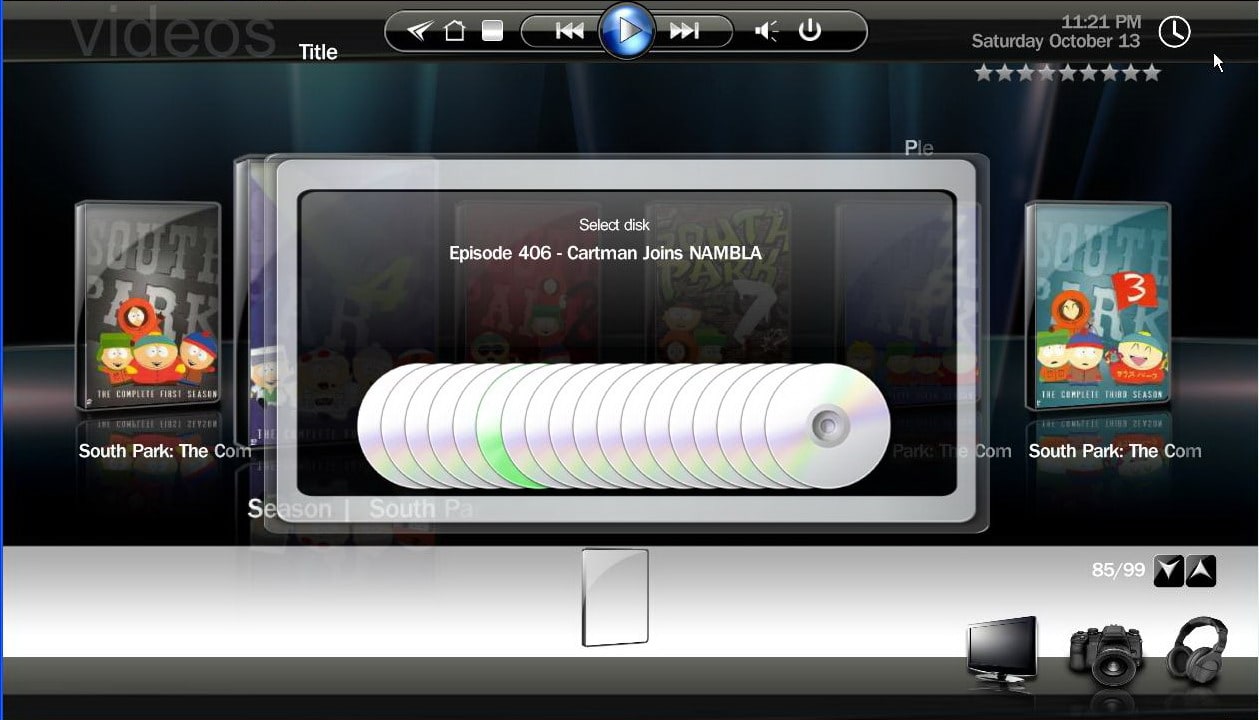
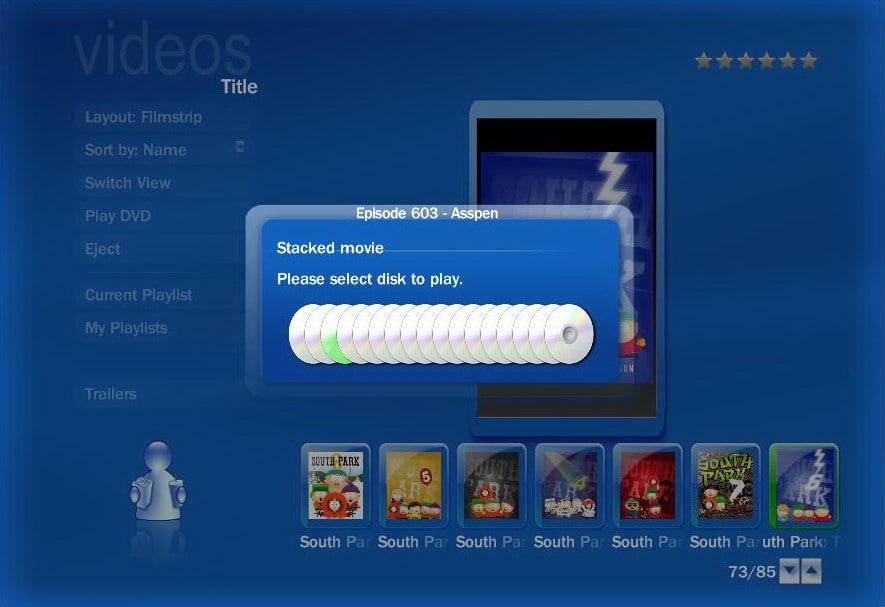
    I may not understand how stacking works, but I have noticed odd behavior with it. If I have a movie with several files, it will show a Disc for each file, but there is no way to know what the disc is. Also, the dialogFileStacking.xml has one small issue in the Xface version. CD 20 had a value of 109 instead of 119 for the left CD value. Also, for some reason Media Portal is placing the dialog as if it is on a screen that is 1366 wide even though 1280 is specified. Also, the CDs do not seem to center on the screen properly. Both are slightly to the left. I modified the dialogFileStacking.xml file to compensate for this. Also, I have added some functionality to the dialog.dll code so that it will try to show the name of the movie when you select each disc in the file stacking dialog. I am attaching the patched DLL file, pathed dialogFileStackign.xml (bluetwo wide and Xface). and a couple of screenshots.

    Anybody else have feedback on this? Is there a label that can go into the XML files for the filename? On the Xface dialog screen, the small cover at the bottom gets blanked out when in stacked dialog mode. Anybody know how to correct this?

    cyberfix
     

    Attachments

    • B2W-FileStack.jpg
      B2W-FileStack.jpg
      88.9 KB
    • XFace-FileStack.jpg
      XFace-FileStack.jpg
      165.2 KB

    rickd

    Portal Pro
    October 9, 2007
    53
    0
    newbie

    Have just downloaded this skin and media portal how do I get it to show my ripped DVD cover art ....I have jpgs of cover art in the folder

    Also the database request does not work to download

    This product looks great but is a bit tricky to config if your new

    Thanks Rick
     

    rtv

    Retired Team Member
  • Premium Supporter
  • April 7, 2005
    3,622
    301
    Osnabruck
    Home Country
    Germany Germany
    I modified the dialogFileStacking.xml file to compensate for this. Also, I have added some functionality to the dialog.dll code so that it will try to show the name of the movie when you select each disc in the file stacking dialog. I am attaching the patched DLL file, pathed dialogFileStackign.xml (bluetwo wide and Xface). and a couple of screenshots.

    Thank you for your effort but please respect GPL and attach the sources of your changes as well :D
     

    Paranoid Delusion

    Moderation Manager
  • Premium Supporter
  • June 13, 2005
    13,052
    2,978
    Cheshire
    Home Country
    United Kingdom United Kingdom
    Have just downloaded this skin and media portal how do I get it to show my ripped DVD cover art ....I have jpgs of cover art in the folder

    MP setup\movies\database editor, choose coverart tab and from there you can select your own picture.
     

    vuego

    Documentation Group
  • Team MediaPortal
  • August 5, 2006
    1,646
    776
    Göteborg
    Home Country
    Sweden Sweden
    When following the steps below, the TV Guide shows in an unreadable format. Various text fields are written over each other. Can't make out anything in the guide. When directly accessing guide without the detailed steps below, it works fine.

    Steps to get funny looking TV Guide:
    • Open MP
    • Go to TV section
    • Turn on TV
    • Go to Channel
    • Change channel group (right arrow button)
    • Back to TV section
    • Go to EPG Guide

    Can someone else please confirm if experiencing the same?

    I am using TV Server and MP SVN of 2007-10-12.

    I followed your list but the guide shows up fine. Using SVN 16098.
     

    -ltb-

    Portal Pro
    April 10, 2006
    4,204
    21
    Home Country
    France France
    // OFF TOPIC\\ TVseries

    IMPORTANT: You need latest SVN version of the plugin for it to work!

    i've missed something, where can i find this version? (Actually i'm using 1.2.0)
    this is not this one? ===> link ===>2007 /04/ 13!
    thx
     

    rekenaar

    Retired Team Member
  • Premium Supporter
  • December 17, 2006
    4,421
    805
    Home Country
    South Africa South Africa
    When following the steps below, the TV Guide shows in an unreadable format. Various text fields are written over each other. Can't make out anything in the guide. When directly accessing guide without the detailed steps below, it works fine.

    Steps to get funny looking TV Guide:
    • Open MP
    • Go to TV section
    • Turn on TV
    • Go to Channel
    • Change channel group (right arrow button)
    • Back to TV section
    • Go to EPG Guide

    Can someone else please confirm if experiencing the same?

    I am using TV Server and MP SVN of 2007-10-12.
    I followed your list but the guide shows up fine. Using SVN 16098.


    Thanks for the feedback. i will try a fresh install when I get the time.
     

    DarkWader

    Portal Pro
    October 3, 2006
    270
    6
    48
    Home Country
    Norway Norway
    // OFF TOPIC\\ TVseries

    IMPORTANT: You need latest SVN version of the plugin for it to work!

    i've missed something, where can i find this version? (Actually i'm using 1.2.0)
    this is not this one? ===> link ===>2007 /04/ 13!
    thx
    You link there is correct. Its the current SVN of the tvseries plugin.
    If it does not work for you, perhaps the author (Inker) changed the file?
     

    Users who are viewing this thread

    Top Bottom