Xface Skin Version 1.6 ready for download 09.06.2008 (2 Viewers)

Makke

MP Donator
  • Premium Supporter
  • August 3, 2006
    193
    3
    Schwerte
    Home Country
    Germany Germany
    Hello,
    First NICE SKIN !
    But... ;-)
    Many plugins have no hover and button pictures
    Like playdvd, mypvrs, mymusicvideo, wikipedia

    At playdvd and wikipedia i can make it an edit it.

    But at Musicvideos and PVR-Scheduler i can only the Hover image edit.
    When i make files for the buttons like " button_mypvrs.png" and "buttonNF_mypvrs.png " the Xface skin always use the button_empty.png .

     

    Doodles

    Portal Pro
    September 9, 2006
    84
    14
    Home Country
    United Kingdom United Kingdom
    Home screen buttons

    Hi! In case they are useful to anyone, here are home screen buttons I use for some of the plugins. The VideoEditor ones already exist but have the wrong names. I have just renamed them.

    I'm trying to work out the names for the MusicVideos plugin button files, but haven't had any success yet.

    Enjoy!
     

    Attachments

    • hover_videoeditor.png
      hover_videoeditor.png
      90.3 KB

    Makke

    MP Donator
  • Premium Supporter
  • August 3, 2006
    193
    3
    Schwerte
    Home Country
    Germany Germany
    PVR-Scheduler (my pvrs) and musicvideos are same Problem Hover works fine
    buttons not.
    Have anyone an Idea that i can see the buttons for these plugins ?
     

    Darre

    Portal Pro
    April 21, 2007
    925
    80
    Home Country
    Norway Norway
    Check how the other files are named and try to name it accordingly.. Check the difference between hover_musicvideos and the other musicvideo icon - and a working hover_plugin and its other icon. Hard to explain what I mean with writing, hope you understand what I mean.
     

    Doodles

    Portal Pro
    September 9, 2006
    84
    14
    Home Country
    United Kingdom United Kingdom
    After many attempts, I've found the filename for the buttons for MusicVideos. It's "button_my music videos .png" and "buttonNF_my music videos .png". Note the space at the end of the basename before the period! I located the name in mediaportal.xml, where it is used as an attribute value in several <entry> tags. I don't see PVR Schedule(?) anywhere in this file (and I don't have it installed) so probably can't help with that one. Sorry.

    Here's my Play DVD button files if anyone wants them. I'll upload my images for MusicVideos when I've done them - unless someone beats me to it.

    Cheers!
     

    Spragleknas

    Moderator
  • Team MediaPortal
  • December 21, 2005
    9,471
    1,822
    Located
    Home Country
    Norway Norway
    Doodles: I suggest you start a new thread, since xface now got its own subforum. This way people can actually find your post in a month or two :)
     

    Makke

    MP Donator
  • Premium Supporter
  • August 3, 2006
    193
    3
    Schwerte
    Home Country
    Germany Germany
    OK that was it !

    doodles you make my so happy!

    I find the name of my plugin there too the name is "pvr scheduler".
    In other skins is called "pvrs".

    So i have all my hovers an buttons visible an now i can edit then.
     

    Harley

    Retired Team Member
  • Premium Supporter
  • May 7, 2004
    2,053
    1,993
    Germany
    Home Country
    Germany Germany
    Hi guys,

    many thanks for all your work here. :) :D

    i will add all important and good working stuff to the next release.


    Greetings Harley
     

    level20peon

    MP Donator
  • Premium Supporter
  • January 4, 2007
    1,082
    102
    44
    Aachen
    Home Country
    Germany Germany
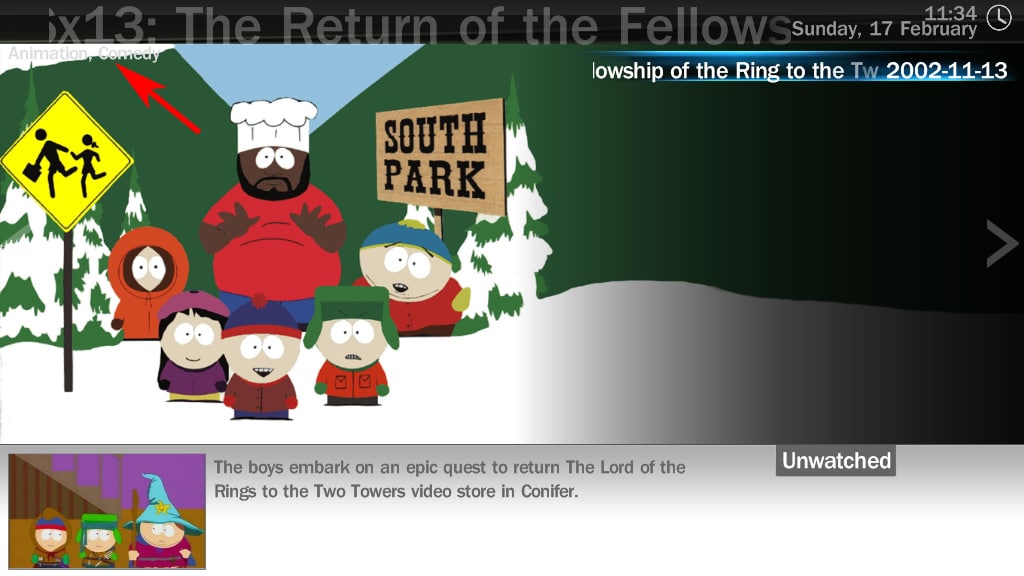
    scrolling text not displayed correctly (clipping)

    Hey Harley,

    I found a workaround for the scrolling text bug I described in post #880. The problem seems to be that the whole scrolling text disappears shortly if a letter with great width is scrolled out of the visible area on the left.

    So I moved the whole scrolling text some pixels to the right and the problem was gone. Since the widest letter I found is a "W" upper case which is about 60 pixels in width I tested some widths between 60 and 70 pixels. "65" is the answer to this (lowest possible width without the problem appearing).


    In other words:

    Open the "TVSeries.xml", jump to line 197 and change the "<posX>11</posX>" to "<posX>65</posX>". It is also necessary in my eyes to change line 199 from "<width>1150</width>" to "<width>990</width>" since the text overlaps the time and date on the right side even if you don't change its X-position.


    Another thing I would like to know:

    Is it possible to move the subtitle (genre) to "<posY>64</posY>" (line 210) for example and put a black background below it in order to make it readable in case the Fanart is too bright there ? (see attachment)
    It now is overlapping with the title (big scrolling text) which doesn't look very nice. Maybe you have an idea how to implement this.


    -level20peon


    PS: Since I just dealt with your skin anyway I have another "fix" you should implement :D

    Changing "common.facade.video.xml" in line 84 from "<textYOff>-40</textYOff>" to "<textYOff>-29</textYOff>" renders the Icon-Layout in a better way since the text below the thumbnails doesn't overlap any more with the thumbnails which in case of the thumbnails being bright makes it hardly readable and doesn't look perfect.
     

    Attachments

    • TVseries.jpg
      TVseries.jpg
      274.9 KB

    whatisk

    Portal Pro
    May 21, 2007
    242
    12
    Brisbane
    Home Country
    Australia Australia
    level20peon said:
    I found a workaround for the scrolling text bug I described in post #880. The problem seems to be that the whole scrolling text disappears shortly if a letter with great width is scrolled out of the visible area on the left.

    So I moved the whole scrolling text some pixels to the right and the problem was gone. Since the widest letter I found is a "W" upper case which is about 60 pixels in width I tested some widths between 60 and 70 pixels. "65" is the answer to this (lowest possible width without the problem appearing).


    In other words:

    Open the "TVSeries.xml", jump to line 197 and change the "<posX>11</posX>" to "<posX>65</posX>". It is also necessary in my eyes to change line 199 from "<width>1150</width>" to "<width>990</width>" since the text overlaps the time and date on the right side even if you don't change its X-position.

    Thanks heaps!!! Works great!! :D

    Just when I had gotten used to not having the large text at the top at all ;)
     

    Users who are viewing this thread

    Top Bottom