About the X-Factor Skin (R479) (12 Viewers)

Status
Not open for further replies.

rekenaar

Retired Team Member
  • Premium Supporter
  • December 17, 2006
    4,421
    805
    Home Country
    South Africa South Africa
    I have just switched over to 1080 resolution and now my recording indicator in the top bar is overlapping with the AM/PM time indicator. Anyone else on 1080 that can confirm how it looks for them?
     

    Imokles

    MP Donator
  • Premium Supporter
  • April 27, 2009
    115
    14
    Home Country
    Germany Germany
    More on this topic;
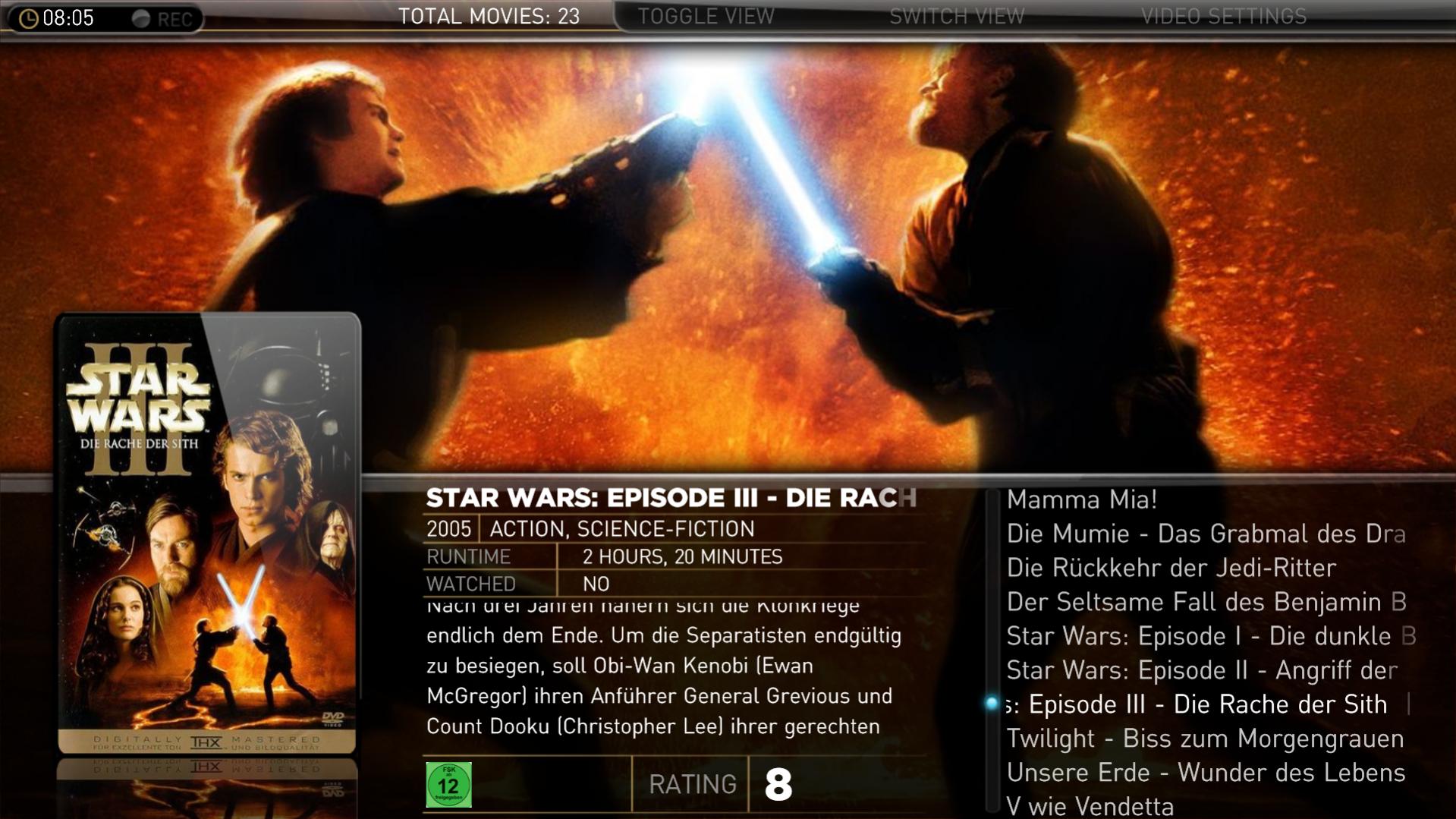
    If your scraper script takes local movie classification then the x-factor skin cannot handle it. x-factor have images for the US rating system (G, NC-17, PG-13, PG and R). See images in the xfactor\media\logos folder (for example G.png). If your movie scraper returns lokal rating it will fail to find image (germany for example uses 0, 6, 12, 16 and 18). Then you have to create images in your xfactor\media\logos folder with these names (like 0.png and 6.png).
    That solved the issue. The German rating icons were missing. I found a set on the web, attached it here. If you are interested, you could integrate them into X-Factor.

    It's a pity they are so ugly... :p
     

    Attachments

    • o.Al..png
      o.Al..png
      5.5 KB
    • 6.png
      6.png
      6.3 KB
    • 16.png
      16.png
      6.4 KB
    • 12.png
      12.png
      6.3 KB
    • 18.png
      18.png
      6.1 KB
    • 08-05-49.jpg
      08-05-49.jpg
      253.8 KB

    cul8er

    Retired Team Member
  • Premium Supporter
  • August 31, 2006
    2,159
    2,679
    Home Country
    Sweden Sweden
    Hi Ticiano,

    This issue is resolved and will be part of the new version.

    cheers
    cul8er
     

    takiskgr

    Portal Member
    February 28, 2009
    12
    0
    Patras
    Home Country
    Greece Greece
    Hi CUL8R,

    first off all i have to thank you for your great job! Keep on. I use this skin from the first version.
    I wanna ask u something. I m using the greek language and i have a problem on displaying some greek characters. Can u tell me in which files i have to change the fonts name ?

    Thank you
     

    Tshoco

    Portal Pro
    November 9, 2008
    66
    0
    Home Country
    Germany Germany
    I am currently using R247 and I want to update to R340.
    Is there any way to backup my Menu (BasicHome)? So I dont have to set up everything again after installing the new version!

    You just have to generate a new one from the plugin. As long as you did press "Save" after your last plugin configuration.
    Emph

    Do I have to overwrite the new (R340) xml with the old (R247) one after doing what you said?

    Another question: I would like to have a new background picture (instead of the red cinema seats), where can I get a nice one and how do I install it?
     

    emphatic

    Design Group
  • Team MediaPortal
  • August 25, 2006
    3,768
    1,234
    Alingsås
    Home Country
    Sweden Sweden
    I am currently using R247 and I want to update to R340.
    Is there any way to backup my Menu (BasicHome)? So I dont have to set up everything again after installing the new version!

    You just have to generate a new one from the plugin. As long as you did press "Save" after your last plugin configuration.
    Emph

    Do I have to overwrite the new (R340) xml with the old (R247) one after doing what you said?

    To be absolutely safe, rename your 247 folder to "XFactor (old)" and keep it. Install 340 (Using the XFactor name for the folder, default). Then open MediaPortal Configuration and go down to the process plugins (make sure you have installed all the plugins that comes with XFactor 340 as well) and right click XFactor and when it's opened, you should see that all the fields are filled with the settings you've used for 247. Now press "Generate new basic home". Click OK for the backup notification and close the plugin configuration. Beforce closing MediaPortal Configuration app, click "User files" at the top of the window to the left. Go into the "cache" folder and delete XFactor. Restart MediaPortal.

    Done!
    Emph
     

    omniaberry2

    Portal Member
    August 13, 2009
    8
    0
    TV Series Osd doesn't show show's season cover

    Hey cul8er,

    Since I upgraded to the 340 version, the picture in the OSD displays the episode's image instead of the show's season cover, Is there any way to fix this?

    I have the latest version of TV-Series plugin and I'm using Media Portal 1.0.2 on XP SP3

    Thanks, your skin is amazing - keep up the good work!
     
    Status
    Not open for further replies.

    Users who are viewing this thread

    Top Bottom