Aeon Menu Generator (3 Viewers)

jburnette

Portal Pro
August 24, 2006
758
116
Kentucky
Home Country
United States of America United States of America
Well, creating the button images is pretty straight-forward, so I managed to do that. The problem is indeed that I can't find the correct window/plugin ID...

The original Aeon basichome has the Play DVD button going to window ID 6 which is the same as My Video (listed as myvideo in available windows). It doesn't look like there's actually a direct window id for that.
 

Darre

Portal Pro
April 21, 2007
925
80
Home Country
Norway Norway
Doesnt MP ask when you insert a DVD? Don't see the need for that icon really =)
 

antony

Portal Pro
January 16, 2007
78
18
Home Country
United Kingdom United Kingdom
Hi There, is there anyway to change the font size for image creator. when i use the Acen's font the words dont fit ie:TV SHOWS becomes TV SHOW..

thank you

Antony
 

jburnette

Portal Pro
August 24, 2006
758
116
Kentucky
Home Country
United States of America United States of America
Hi There, is there anyway to change the font size for image creator. when i use the Acen's font the words dont fit ie:TV SHOWS becomes TV SHOW..

thank you

Antony

Yeah, that shouldn't be a problem.


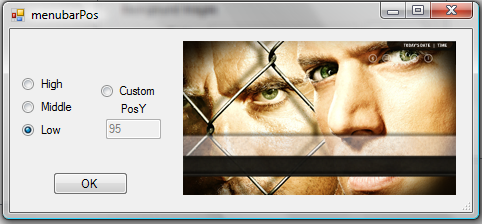
Also, this is the new window to move the menubar position. Is this what those who had requested it had in mind? There are 3 presets as you can see, but you can also specify a custom position.
 

Attachments

  • menubarPos.png
    menubarPos.png
    129.7 KB

Darre

Portal Pro
April 21, 2007
925
80
Home Country
Norway Norway
Hi There, is there anyway to change the font size for image creator. when i use the Acen's font the words dont fit ie:TV SHOWS becomes TV SHOW..

thank you

Antony

Yeah, that shouldn't be a problem.


Also, this is the new window to move the menubar position. Is this what those who had requested it had in mind? There are 3 presets as you can see, but you can also specify a custom position.

More then I wanted/needed =) Good job!

Its not very important to me, but it might help some to add the y-pos in the different settings, so if I want it slightly lower then the lowest I'll know what to put..

something like this:

- middle (y-pos 250)
- low (y-pos 500)

Or if you want to make it perfect; a preview window ;)

No need for it tho, I'd rather have you spend your time with more important things if its a lot of work..
 

jburnette

Portal Pro
August 24, 2006
758
116
Kentucky
Home Country
United States of America United States of America
More then I wanted/needed =) Good job!

Its not very important to me, but it might help some to add the y-pos in the different settings, so if I want it slightly lower then the lowest I'll know what to put..

something like this:

- middle (y-pos 250)
- low (y-pos 500)

Or if you want to make it perfect; a preview window ;)

No need for it tho, I'd rather have you spend your time with more important things if its a lot of work..

Actually, I may be one step ahead of you :p. The preview on the right moves the menu bar based on what you select (a real time preview, basically) and the number in the textbox changes to reflect your selection. You can pick "High" and the number will change to 32 and the menubar will move to that position. Then you can select custom and tweak it to you liking. Is that what you meant?
 

antony

Portal Pro
January 16, 2007
78
18
Home Country
United Kingdom United Kingdom
Hi Jburnette, is the new version with menu positioning availabe yet is is it your wip..

Antony
 

jburnette

Portal Pro
August 24, 2006
758
116
Kentucky
Home Country
United States of America United States of America
Hi Jburnette, is the new version with menu positioning availabe yet is is it your wip..

Antony

Antony, I'm actually working on it right now - just making sure I didn't break anything. I'll most likely upload it tonight.
 

Darre

Portal Pro
April 21, 2007
925
80
Home Country
Norway Norway
More then I wanted/needed =) Good job!

Its not very important to me, but it might help some to add the y-pos in the different settings, so if I want it slightly lower then the lowest I'll know what to put..

something like this:

- middle (y-pos 250)
- low (y-pos 500)

Or if you want to make it perfect; a preview window ;)

No need for it tho, I'd rather have you spend your time with more important things if its a lot of work..

Actually, I may be one step ahead of you :p. The preview on the right moves the menu bar based on what you select (a real time preview, basically) and the number in the textbox changes to reflect your selection. You can pick "High" and the number will change to 32 and the menubar will move to that position. Then you can select custom and tweak it to you liking. Is that what you meant?


Hehe yeah! Excactly what I meant, and as I stated It's not needed, but it really makes it perfect =)

thx!
 

Users who are viewing this thread

Top Bottom