aMPed 3.5.0 beta (for MP 1.3.0) released [Oct 22, 2012] (3 Viewers)

Status
Not open for further replies.

TLD

Portal Pro
October 26, 2007
989
429
Rainy Washington
Home Country
United States of America United States of America
Folder for multiple episodes is in Default Wide but no folder in aMPed.

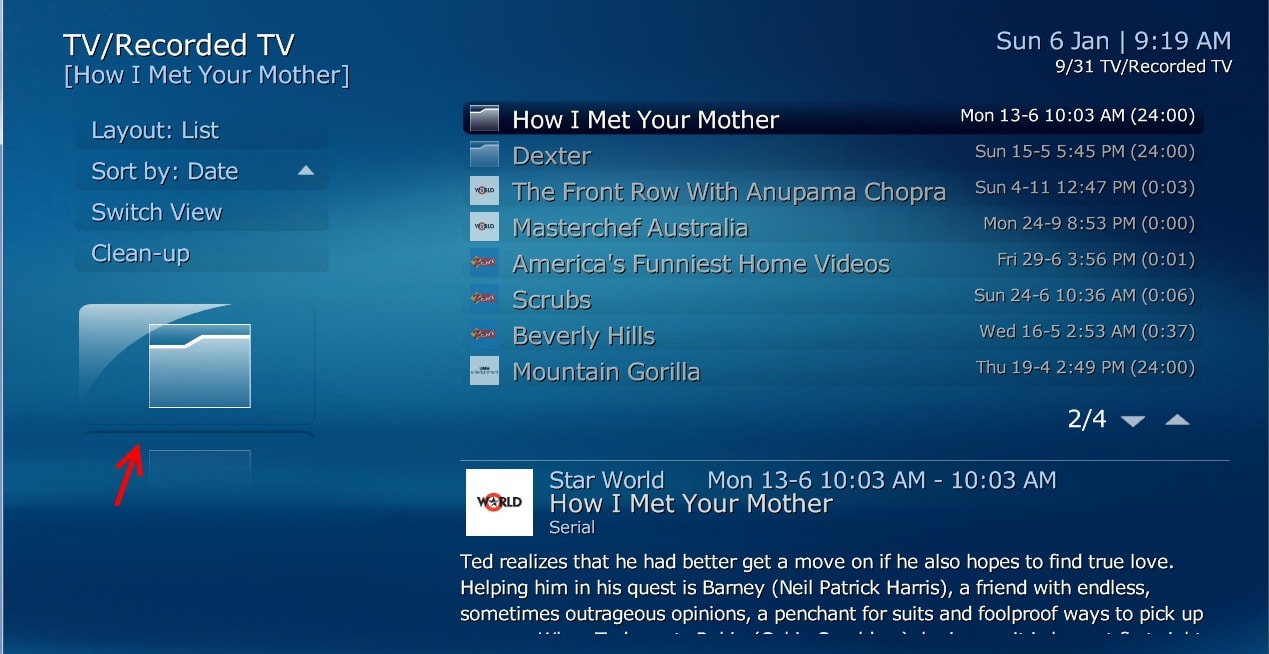
See attached pic notice Get Smart and Monk have a folder showing multiple episodes in Default Wide but in aMPed no folder exist. MP Default Wide.jpg
 

Dadeo

Docs Group Manager
  • Premium Supporter
  • November 26, 2006
    5,340
    3,321
    Himalayas, India
    Home Country
    Canada Canada
    Thanks for reporting TLD. Actually it is not in DefaultWide anymore either in 1.3.0 b - only in the list/facade - it used to display larger/separately (see attached screenshot) which is how aMPed always displayed it since the list icons are too small for most 4x3 users or those will smaller TVs.

    I have reported the issue to the Team to see if this is a bug or intended behaviour. Will keep you posted ;)
     

    Attachments

    • RecordedTV_1.2.3.jpg
      RecordedTV_1.2.3.jpg
      214.2 KB

    TLD

    Portal Pro
    October 26, 2007
    989
    429
    Rainy Washington
    Home Country
    United States of America United States of America
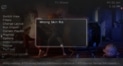
    I just installed "aMPed-3.5.1.1909.mpe1" (RevaMPed) on my TV server and i'm having some issues, like when i go to "TV series" (newest update) it is poping up "wrong skin file" and the page title is under the menu text on some pages.

    I was using v3.5.1.1902 and everything was fine.

    I'll post some screen shots tomorrow.
     
    Last edited:

    Dadeo

    Docs Group Manager
  • Premium Supporter
  • November 26, 2006
    5,340
    3,321
    Himalayas, India
    Home Country
    Canada Canada
    Hi TLD - I have seen that occasionally as well and I have not figured out the cause yet.
    Does the 'wrong skin file' display consistently for you? I mean every time you open TV Series? For me it is usually only the first time I open it and also only if I open TV Series first before opening any other plugin. AFAIK MyFilms is the only plugin that displays a dialog with 'wrong skin file' but I'm not sure about that. IF you can reproduce the issue consistently somehow, can you try disabling MyFilms temporaily to verify that? If so, I can talk to Guzzi about why that happens - for example it could be because aMPed provides a hyperlink between TV Series menu and My Films which invokes the My Films skin version check.

    Regarding your previous issue with Recorded Thumbs - that has been 'resolved' in MP 1.3.0 RC - see Mantis Issue 4174: [TV / Recorded TV] #selectedthumb no longer displays default folder icon in Recorded TV (Guzzi). Unfortunately it is a bit diff than previous behaviour and now displays the exact same thumb that displays on lists in other skins - i.e. Channel Logo when there is no folder or thumb generated by MTN. It looks a bit odd in aMPed, but since MP 1.3.0 RC also significantly improves recording thumbs generation I am waiting to see what to do about it ;).

    EDIT: when you post the screenshots - please include one of the 'wrong skin file' message if you can as that will help me confirm if it is the same issue I see, and if it is indeed related to My Films.
     
    Last edited:

    TLD

    Portal Pro
    October 26, 2007
    989
    429
    Rainy Washington
    Home Country
    United States of America United States of America
    Hi TLD - I have seen that occasionally as well and I have not figured out the cause yet.
    Does the 'wrong skin file' display consistently for you? I mean every time you open TV Series? For me it is usually only the first time I open it and also only if I open TV Series first before opening any other plugin.

    Yes it display consistently when i go to TV Series first, also once it happens i get the page name text under the menu text on all pages as seen in the TV and Home screen shots. The only way to stop the behavior is to restart MP.


    AFAIK MyFilms is the only plugin that displays a dialog with 'wrong skin file' but I'm not sure about that. IF you can reproduce the issue consistently somehow, can you try disabling MyFilms temporaily to verify that? If so, I can talk to Guzzi about why that happens - for example it could be because aMPed provides a hyperlink between TV Series menu and My Films which invokes the My Films skin version check.

    I tried several times with MyFilms disabled and enabled and their was no difference.
    I did notice something odd though, each time i start MP, Fanart Handler is updating i let it get to 100% and turn off but the next time i started MP, Fanart Handler would be updating again.

    Regarding your previous issue with Recorded Thumbs - that has been 'resolved' in MP 1.3.0 RC - see Mantis Issue 4174: [TV / Recorded TV] #selectedthumb no longer displays default folder icon in Recorded TV (Guzzi). Unfortunately it is a bit diff than previous behaviour and now displays the exact same thumb that displays on lists in other skins - i.e. Channel Logo when there is no folder or thumb generated by MTN. It looks a bit odd in aMPed, but since MP 1.3.0 RC also significantly improves recording thumbs generation I am waiting to see what to do about it ;).

    Well can you make it display where the folder use to display when there was multiple recordings.

    EDIT: when you post the screenshots - please include one of the 'wrong skin file' message if you can as that will help me confirm if it is the same issue I see, and if it is indeed related to My Films.

    Yes the 'wrong skin file' message is displayed in the TVSeries screen shot.

    I also included logs gathered by Watchdog when i was having the problem and tried going to the music plugin while doing these tests and MP crashed.

    TV Showes.jpg TV.jpg Home.jpg
     
    Last edited:

    2BitSculptor

    Super Moderator
  • Team MediaPortal
  • January 23, 2008
    2,007
    1,052
    South Central Wisconsin
    Home Country
    United States of America United States of America
    In World Weather, from "aMPed-3.5.1.1909.mpe1, I am getting overprinting in the hourly view (looks like the hourly is overprinting the normal view). I replaced the WorldWeather xmls from 1903 into the 1909 install and it went away. I did notice the YR.NO label was clipped on top, though, in 1903.
     

    Dadeo

    Docs Group Manager
  • Premium Supporter
  • November 26, 2006
    5,340
    3,321
    Himalayas, India
    Home Country
    Canada Canada
    Thanks for the screenshots and logs TLD. I can confrim that is the same dialog/message I see. I searched the language strings files and TV Series is the only plugin that contains that string, so the message is definitely coming from TV Series. Other users have reported the same/similar issue in TV Series forum.
    I see from your logs you are running TV Series v3.4.0.1994 - same as me. When did you install/update it? Did the issue start then and does it exist in previous versions of aMPed as well?

    I think I only started getting the issue after updating to TVS 3.4 which is odd as there were no skin changes afaik. Needless to say it's gonna take a while to figure out what is causing the issue. It's not easy for me because it is not consistent - i.e. I cannot reproduce it like you can. Can you try disabling everything except TV Series and see if the issue still occurs? I'm trying to eliminate variables - such as a conflict with something else in aMPed. IF I could reproduce it I could try reverting to TVS 3.3 and see if that makes a difference.

    I did notice something odd though, each time i start MP, Fanart Handler is updating i let it get to 100% and turn off but the next time i started MP, Fanart Handler would be updating again.
    Yes Fanart Handler does that - however if you install the latest version (3.0.9.0 IIRC) it is MUCH faster.
    Well can you make it [selected thumb/channel logo] display where the folder used to display when there was multiple recordings.
    Yes that's what I did. BUT if you have no folder or thumb generated for the recording you get the channel logo twice.
     
    Last edited:

    TLD

    Portal Pro
    October 26, 2007
    989
    429
    Rainy Washington
    Home Country
    United States of America United States of America
    I'm not positive about when i updated to TV Series v3.4.0.1994 but i think it was a week or so ago.

    I only started getting the issue after updating aMPed yesterday. My other setup still has the older version of aMPed-3.5.1.1904 and still works even with TV Series v3.4.0.1994 and MyFilms-V6.0.3.2830 installed which is what lead me the think the new version of aMPed was the problem.

    I will try disabling all the plugins except TV Series and see what happens and post back here.
     

    Dadeo

    Docs Group Manager
  • Premium Supporter
  • November 26, 2006
    5,340
    3,321
    Himalayas, India
    Home Country
    Canada Canada
    Thanks TLD - no changes to TV Series skin xmls since 1904 - only the zoom on RSS/Infoservice feeds/media overlays and World Weather Lite. But your info helps, so I'll keep looking!

    @2BitSculptor - I can confirm the issue with World Weather hourly conditions - should be an easy fix (visibility conditions). However, I don't know what to do about Yr.no logo - it's not actually clipped BUT the logo fades to black at the top and with the dark overlays on a dark weather image backdrop it LOOKS like it is. :(
     
    Status
    Not open for further replies.

    Users who are viewing this thread

    Top Bottom