ATI 690G/x1250 problems (2 Viewers)

Spragleknas

Moderator
  • Team MediaPortal
  • December 21, 2005
    9,471
    1,822
    Located
    Home Country
    Norway Norway
    Could you tell me what screen that makes MP freeze?

    EDIT: Think I found it... give me 15 min to update

    OK - Se prev. post

     

    kszabo

    MP Donator
  • Premium Supporter
  • December 6, 2007
    796
    86
    Germany, Bayern
    Home Country
    Hungary Hungary
    If someone interested, I did some deinterlace tests with 1080i and x1250.

    The x1250 fails completely deinterlacing through hardware (Avivo). I set deinterlace to "automatic" with pulldown detection on in Catalyst control center. Tried several codecs for h264 1080i playback:

    - ATi h264 codec: terrible picture not deinterlaced at all
    - Cyberlink h264 codec with activated DXVA: picture deinterlaced (I guess through cyberlink software) but too much CPU usage (100%, slow framerate)
    - CoreAVC without deinterlacing: terrible picture not deinterlaced at all
    - CoreAVC with "blend" deinterlace: good framerate with acceptable CPU usage, deinterlaced (but not suitable deinterlace method for quick movements)
    - CoreAVC with "bob" deinterlace: too much for CPU, but better deinterlace for quick movements

    So I stick to CoreAVC with blend deinterlace. BTW it looks loke there are 1080i broadcasts requiring no deinterlacing (mainly films), they look good without (I guess scanned films interlaced through doubling framerate) and broadcasts they need it desperately (like live broadcasts)
     

    Lotsofjazz

    MP Donator
  • Premium Supporter
  • January 7, 2008
    462
    42
    Home Country
    Netherlands Netherlands
    Remember that the X1250 is just a IGP version of X700 - which does not have HD-acceleration abilities in HW.

    This is not correct, check the specs here:

    ATI Radeon™ Xpress 1250 (for Intel)

    Hardware accelleration for MPG2
    Support for simple Mpeg4
    Basis for H264 support..

    I guess the previous poster has a codec issue, or asks too much of his system and should check his setup. Note that also the TV can be a limiting factor, if your TV is in PAL country, 50Hz is the norm... New LCD's come out the last years with 100Hz technology which smartly double the PAL refreshrate to 100Hz which dramatically improves the picture quality, with that ghosting is really history..

    1080i with he X1250 can only be played back at 25Hz (PAL) or 30Hz (NTSC), no wonder you get ghosting with these formats. My experience for now is that 720P@50Hz provides the smoothest an sharpest playback, also with 1080i/p content, and with a 32" LCD TV like I have, that is still really sharp!


    Lots
     

    Spragleknas

    Moderator
  • Team MediaPortal
  • December 21, 2005
    9,471
    1,822
    Located
    Home Country
    Norway Norway
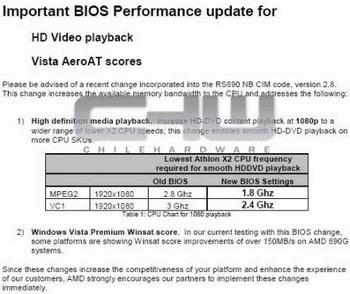
    In another post, I added "I think" - but forgot that here. Even so: the x1250 does not have full support for accelerating HD-material, as it is, as stated above, only a X700 integrated on mobo. ATi's UVD technology is only implemented in the 2x00 and 3x00 series. The UVD decodes HD in hardware all the way, something not even the nVidia 8x00-series can do with PureVideo2 - and (off course) not a x700 either.

    But the is a partial HW decoding, which got better after a BIOS update.
    amd-690-performance-boost-r.jpg


    So: Make sure you have the latest BIOS - and that the motherboard producers has included this update to get PARTIALLY decoding of HD material :)


    Ref: Unified Video Decoder - Wikipedia, the free encyclopedia
     

    kszabo

    MP Donator
  • Premium Supporter
  • December 6, 2007
    796
    86
    Germany, Bayern
    Home Country
    Hungary Hungary
    People! HW-Acceleration is when the GPU decodes the compressed video, it has not much to do with HW DEINTERLACING. You CAN software decode (like CoreAVC or DScaler) your video, send the stuff still interlaced to your graphics card and let it do deinterlacing, even WITHOUT DXGA. I just hoped that the x1250 can deinterlace the 1080i. Not even the simplest deinterlacing like "Blend" it can do. The Core AVC does it with ca. 5-10% extra CPU Power (bob is too much, would be better for football).

    But IF you decode HW-Accelerated by the GPU, it HAS TO DO deinterlacing also, it will not be sent back to a software to do it. That´s why post processing is excluded if you use DXVA. If you software encode, you can decide to deinterlace directly or let it do through GPU.

    I guess the previous poster has a codec issue, or asks too much of his system and should check his setup. Note that also the TV can be a limiting factor, if your TV is in PAL country, 50Hz is the norm...

    no codec issue and I use 50 Hz. Thanx. Yes, I ask too much from my system, exactly that´s what I wrote: it does not manage to deinterlace 1080i. And this is the correct thread to say this, not that others think, x1250 is super for HD-Playback.

    Yes, I have tha lates available BIOS from end January.

    1080i with he X1250 can only be played back at 25Hz (PAL) or 30Hz (NTSC)

    no, it can be played back with 50 Hz. Downscaled before to 720p50Hz. As I do. 1080i is the video source, decoded through CoreAVC (deinterlaced with blend method), downscaled through x1250 as the HTPC is connected through HDMI/720p50Hz.

    Edit:
    I did some tests with SD MPG2 deinterlacing. 720x576 px, 50 Hz interlaced (DVB-S stream), ATi Avivo MPG2 codec:
    I state that the x1250 can do only bob deinterlacing. Sofisticated deinterlacing as adaptive or motion adaptive it can not handle.
    Deinterlacing in Catalyst Control Centre
    - manual bob -> acceptable, deinterlaced picture
    - manual adaptive -> black screen, video does not play
    - manual motion adaptive -> black screen, video does not play
    - automatic -> same picture quality as "bob"
    Very dissapoining results. One should not expect good video quality from a hardware which can handle bob deinterlacing at the best (even with hardware accelerated SD mpg2).
     

    Lotsofjazz

    MP Donator
  • Premium Supporter
  • January 7, 2008
    462
    42
    Home Country
    Netherlands Netherlands
    no, it can be played back with 50 Hz. Downscaled before to 720p50Hz. As I do. 1080i is the video source, decoded through CoreAVC (deinterlaced with blend method), downscaled through x1250 as the HTPC is connected through HDMI/720p50Hz.

    That is what I said, :) you can set the HDMI output to 1080i, but then you get 25Hz or 30Hz at the most.. That is why I also have set the output to 720P50Hz for best picture quality, just like you do.

    I do not have the bad experience with deinterlacing like you have, picture quality is excellent, maybe my TV does a good job deinterlacing.

    In catalyst, do you have the waving ATI flag as a preview to see which deinterlacing works best for you? I do not have the black sceen experience like you have.

    But for HD video decoding I use ffdshow right now, it seems a lot better for compressed (H264) movies. Strange enough, for live TV hardware decoding works much better, using the cyberlink hardware decoders for both Mpeg2 and H264(NGC-HD) channels.

    But isnt it that the decoded video still passes the Avivo graphics enhancement cirquits, like gamma and hue.. because when tweaking those things I do see a difference, so doesnt that mean also the deinterlacing still controlled by the graphics card?

    Let me do some tests as well and then I will come back here.

    EDIT: Ok, I have tried with the movie A Bugs Life that does work on the hardware decoder cyberlink H264 decoder with all set on hardware decoding.. a x264 movie at 720P. All deinterlace modes as set in Catalyst Avivo Video work, no black screen for me. With decoder back to ffdshow (software decoding) I dont see a difference in picture quality, Frame rate between 19 and 35 depending on movement in the video. Overall quality is just excellent.

    So I really think something else is bugging you. Have you tried Cyberlink H264 codec? because my experience with the coreAVC(latest version) is that it is eating too much CPU power and also caused me terrible audio sync problems.

    Because I have VISTA now I also have turned of all 3 VMR9 Options in Mediaportal, and turned on EVR.. which seems to be a little improvement in smoothening the video playback (higher frame rate, less dropped frames) and better sync with audio, BTW, by going over to Vista was an immediate improvement, for all garphics, everything just looks better, smoother.

    lots
     

    kszabo

    MP Donator
  • Premium Supporter
  • December 6, 2007
    796
    86
    Germany, Bayern
    Home Country
    Hungary Hungary
    Ok, I have tried with the movie A Bugs Life that does work on the hardware decoder cyberlink H264 decoder with all set on hardware decoding.. a x264 movie at 720P.

    720p does not need any deinterlacing, it is already progressive with full frames. Try some 1080i HDTV capture with 15-20 MBit/sec! Even with 1080p trailers I do not have any quality issues, 1080i is the challenge. btw you can set your decoder to hw, but it will still run on software because the x1250 does not support h264 decoding (only mpg and wmv).

    But isnt it that the decoded video still passes the Avivo graphics enhancement cirquits... so doesnt that mean also the deinterlacing still controlled by the graphics card?
    t

    AFAIK the decoder sets a "flag" if the video material is interlaced or progressive. So ths GFX knows, if it should deinterlace at all or not. Each frame (half frames) has a timestamp also (like true or false interlaced stuff, 2 halfframes with same timestamp or with 0,02 sec difference) etc. So decoding and deinterlacing is controlled separately.

    More infos form here: VC-1 deblocking doesn't work with DXVA on - Doom9's Forum
    "WMV AP external deinterlacing support:
    ("external" implies deinterlacing in the renderer - but could be software or hardware, depending on video driver support)

    * XP - DirectShow - supported only when DXVA decoding is used, otherwise just passes through as is
    * XP - WMP (WMFSDK) - supported with and without DXVA decoding - "High quality" mode recommended
    * Vista - DirectShow - supported with and without DXVA decoding
    * Vista - WMP (MF) - supported with and without DXVA decoding
    * Vista - WMP (WMFSDK) - supported"
     

    D3tritus

    Portal Pro
    February 14, 2008
    62
    12
    Hey guys. I'm the unlucky owner of an Asus M2A-VM HDMI motherboard. I've been having the same problems as everyone else but just can't get things stable, even at 720p. I've tried the 7.2 Catalyst drivers but still have some freezing issues. This just isn't good enough, imo, and I've decided to drop some cash on a graphics card. Obviously, I don't want to touch ATI cards with a bargepole right now, so an nVidia card would be good. Could anyone recommend one that will work both silently and well at 1080p on Windows XP SP2? I'm just running a media centre, no games whatsoever so there's no need for anything higher end like an 8800GT. Suggestions welcomed.
     

    Users who are viewing this thread

    Top Bottom