ATSC Closed caption (1 Viewer)

jerryt

Portal Member
September 21, 2007
6
0
FFFDShow dvbnacc-v0.8-d3xt3rs-lab.exe is not working for ATSC CC, gives the "closed captions looked terrible: junk, missing characters" you discribe. But for Satellite it is perfect.

Used CCCP to test CC in graphedit, but CCextracter is easier now.

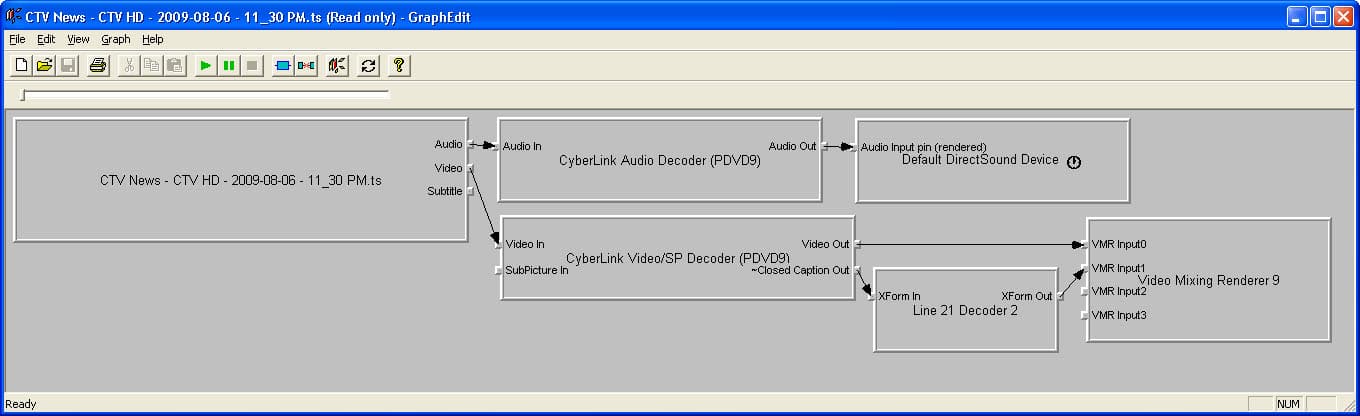
Line 21 decoder 2 only works with Intervideo video decoder (and Cyberlink video decoder), it does not work with FFDShow. I can not advise you how to get Line 21 decoder 2 to be used in Mediaportal. Try building a Intervideo and line 21 decoder 2 graph in graphedit, then you will see how well the CC works.
 

greybox

MP Donator
  • Premium Supporter
  • January 23, 2009
    652
    168
    Home Country
    Canada Canada
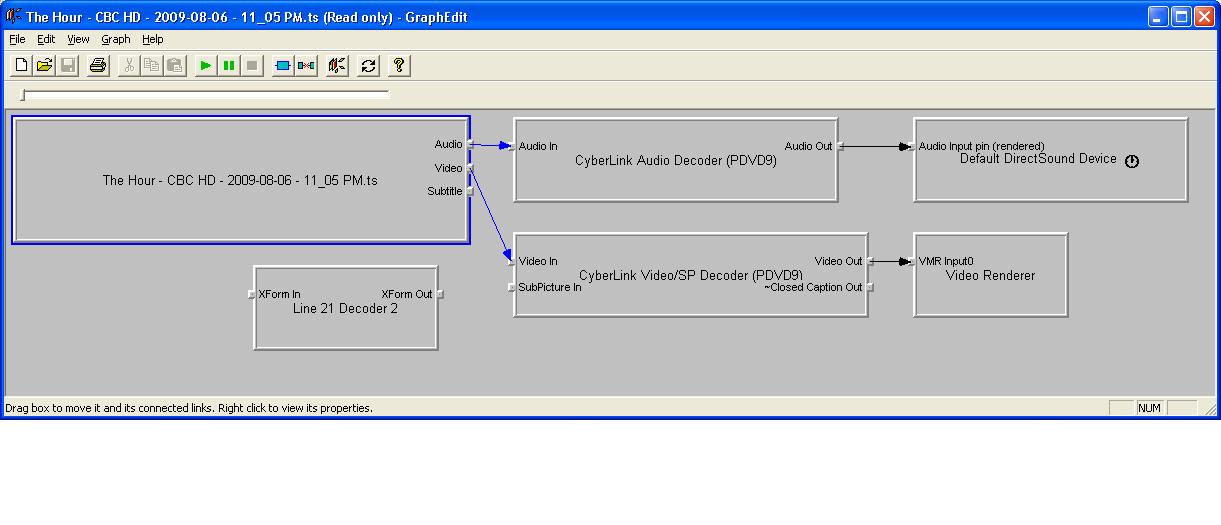
    I tried that, no CC. Attached is my graph. "Subtitle" pin on my TS cannot be rendered and Line 21 decoder 2 does not take this pin.

    Can you show your graph?
     

    Attachments

    • graph-1.JPG
      graph-1.JPG
      69.8 KB

    jerryt

    Portal Member
    September 21, 2007
    6
    0
    You need to add VMR9 so that you can connect (Cyberlink Video decoder pin CC out) to (Line 21 decoder 2) to (VMR9 pin VMR1).
     

    greybox

    MP Donator
  • Premium Supporter
  • January 23, 2009
    652
    168
    Home Country
    Canada Canada
    I still cannot connect Subtitle pin (see the attached graph). And after I connect everything, how do I make things happen in MediaPortal? VMR9 is already there, Line21 Decoder 2 is added to post processing, Cyberlink is selected as a codec but I don't see any closed captions. Can you check the attached zipped video on your computer?
     

    Attachments

    • graph-2.jpg
      graph-2.jpg
      104.6 KB

    jerryt

    Portal Member
    September 21, 2007
    6
    0
    Your file plays captions fine in SageTV. You should be able to view with graphedit. Under file select "Render Media File" and select the file you posted. Then add all the filters and play.

    You don't need the Subtitle pin connected that is a different standard from Closed Captions.

    I cannot advise how to use "Line 21 decoder 2" in MediaPortal because I was never able to and so now I use SageTV.
     

    Kashif Jamil

    Portal Member
    December 25, 2010
    11
    0
    Home Country
    Canada Canada
    Hi,

    I followed the instruction

    1) Download Zodiak CCP filter
    2) Register it
    3) Set Core CCP Filter in post processing in Media Portal Configuration

    After that I didn't see CC. Any clue? Is this the only option?
    Is some thing (e.g. BETA version) that I can download and testfrom Media Portal sorce for CC ?

    Any help will be appreciated
     

    Kashif Jamil

    Portal Member
    December 25, 2010
    11
    0
    Home Country
    Canada Canada
    Hi,

    Core CCP is configured in TV Module's post processing area.

    Regarding reference thread, I don't have access to link which Migue is referring.
    ==================================================================================
    misterD, have you seen this thread? https://forum.team-mediaportal.com/me...nu-dvds-89598/
    I have fully working CC for NTSC analog, as you can see in the screenshot.
    ==================================================================================

    Thanks

    Hi,

    How to get Media Portal 1.2 BETA version source code? Where I can find Migue's patch?

    I can see only Release 1.2.0 Alpha in https://sources.team-mediaportal.com/svn/public/tags/ ?

    Any idea?

    Thanks in advance,
     

    Users who are viewing this thread

    Top Bottom