Basic Menu mods....Please post here ;-) (1 Viewer)

divinius

Portal Member
June 1, 2008
16
1
Home Country
Netherlands Netherlands
i was trying to re-do the colors, the black on black made me a little depressive so here is my new version (not completed tho)

screenshotklein.png


menu info:
music links to external Foobar
web links to external Firefox
bottom right is recordings
the top right Uitzendig gemist is the TVgemist3.0 plugin

included png's and psd's for buttons and background, and xml for basichome
 

Attachments

  • Monochrome MOD.rar
    30.6 KB

cheeseman

Portal Member
November 25, 2008
24
0
Home Country
United States of America United States of America
Kinda new to this....but has anyone changed the background of each button to a image instead of it being a solid color? Such as how the buttons are red in the post above mine, to an image that relates to that button (some sort of TV image for the TV series button, etc)

I would try to do this, but I don't know how hard it would be
 

divinius

Portal Member
June 1, 2008
16
1
Home Country
Netherlands Netherlands
the button is built up by a background image (the red image) and an overlaying image with a logo (like a tv, or music symbol etc)

the image files are found in the skin/monochrome/media folder, the easiest way is to alter the original image, (in the example above, from white to red)

same goes for the background and all other images

to find out what image files are being used just open the .xml file of the page you want to alter (like basichome.xml and search for the objects you want to change, you really don't need to be a programmer or something, just read and think logically and you'll find out.)

hope this answers your question
 

cheeseman

Portal Member
November 25, 2008
24
0
Home Country
United States of America United States of America
the button is built up by a background image (the red image) and an overlaying image with a logo (like a tv, or music symbol etc)

the image files are found in the skin/monochrome/media folder, the easiest way is to alter the original image, (in the example above, from white to red)

same goes for the background and all other images

to find out what image files are being used just open the .xml file of the page you want to alter (like basichome.xml and search for the objects you want to change, you really don't need to be a programmer or something, just read and think logically and you'll find out.)

hope this answers your question

Thanks! I thought maybe there was more to it then that, but that sounds fairly straight forward
 

cheeseman

Portal Member
November 25, 2008
24
0
Home Country
United States of America United States of America
yup.

Ie:
Code:
<control>
	<description>Menu6 BACKGROUND</description>
	<id>1206</id>
	<type>multiimage</type>
	<posx>0</posx>
	<posy>0</posy>
	<width>1280</width>
	<height>720</height>
	<imagepath>#folder6</imagepath>
	<timeperimage>30000</timeperimage>
	<fadetime>800</fadetime>
	<loop>yes</loop>
	<randomize>True</randomize>
	<visible>Control.IsVisible(1006)</visible>
</control>
So - when 1006 is visable, backdrops from a folder (here "#folder6", which is defined somewhere else - but you could use foldername, like "MovingPictures"

Example is from https://forum.team-mediaportal.com/...n-mod-streamedmp-53985/index3.html#post390760

I'll explain better if needed :)

Hmm, I think I need better explaining, haha :p
Being new to editting the code/xml has proven to be harder then I originally thought.
 

PussyWagon

Portal Pro
August 2, 2008
235
7
yup.

I'll explain better if needed :)

I tried without succes ... can you give me more help?
I would like change background image in watch menu (or basichome).
I added this code at the end...

<control>
<description>Menu1 BACKGROUND</description>
<id>1300</id>
<type>multiimage</type>
<posx>0</posx>
<posy>0</posy>
<width>1280</width>
<height>720</height>
<imagepath>C:\ProgramData\Team MediaPortal\MediaPortal\thumbs\Fan Art\fanart\original</imagepath>
<timeperimage>30000</timeperimage>
<fadetime>800</fadetime>
<loop>yes</loop>
<randomize>True</randomize>
<visible>"i tried different string"</visible> *
</control>

Thank you for your help. :)


I have done this in my modified WatchMenu for monochrome. I have set the imagepath to be the one MovingPicture uses for Fanarts. This makes a random slideshow from all my movies in the background in watchmenu. The code looks like this:

<control>
<description>FANART</description>
<id>1</id>
<type>multiimage</type>
<width>1366</width>
<height>768</height>
<imagepath>C:\Documents and Settings\All Users\Application Data\Team MediaPortal\MediaPortal\thumbs\MovingPictures\Backdrops\FullSize</imagepath>
<timeperimage>10000</timeperimage>
<fadetime>2000</fadetime>
<loop>yes</loop>
<randomize>True</randomize>
</control>


The <visible> tag is only in use if you want different images depending on different things. For example, if Tv-Series is in focus you want "tv-series.jpg" to be your background. And when Movies is in focus you want "movies.jpg" to be your background. Then you have to add: <visible>control.hasfocus(X)</visible> (where X is the ID of the Tv-Series or Movies or whatever button...)

Hopes it help!
 

cheeseman

Portal Member
November 25, 2008
24
0
Home Country
United States of America United States of America
yup.

I'll explain better if needed :)

I tried without succes ... can you give me more help?
I would like change background image in watch menu (or basichome).
I added this code at the end...

<control>
<description>Menu1 BACKGROUND</description>
<id>1300</id>
<type>multiimage</type>
<posx>0</posx>
<posy>0</posy>
<width>1280</width>
<height>720</height>
<imagepath>C:\ProgramData\Team MediaPortal\MediaPortal\thumbs\Fan Art\fanart\original</imagepath>
<timeperimage>30000</timeperimage>
<fadetime>800</fadetime>
<loop>yes</loop>
<randomize>True</randomize>
<visible>"i tried different string"</visible> *
</control>

Thank you for your help. :)


I have done this in my modified WatchMenu for monochrome. I have set the imagepath to be the one MovingPicture uses for Fanarts. This makes a random slideshow from all my movies in the background in watchmenu. The code looks like this:

<control>
<description>FANART</description>
<id>1</id>
<type>multiimage</type>
<width>1366</width>
<height>768</height>
<imagepath>C:\Documents and Settings\All Users\Application Data\Team MediaPortal\MediaPortal\thumbs\MovingPictures\Backdrops\FullSize</imagepath>
<timeperimage>10000</timeperimage>
<fadetime>2000</fadetime>
<loop>yes</loop>
<randomize>True</randomize>
</control>


The <visible> tag is only in use if you want different images depending on different things. For example, if Tv-Series is in focus you want "tv-series.jpg" to be your background. And when Movies is in focus you want "movies.jpg" to be your background. Then you have to add: <visible>control.hasfocus(X)</visible> (where X is the ID of the Tv-Series or Movies or whatever button...)

Hopes it help!


Yes! This is what I was looking for! Worked perfectly, thanks!
 

cheeseman

Portal Member
November 25, 2008
24
0
Home Country
United States of America United States of America
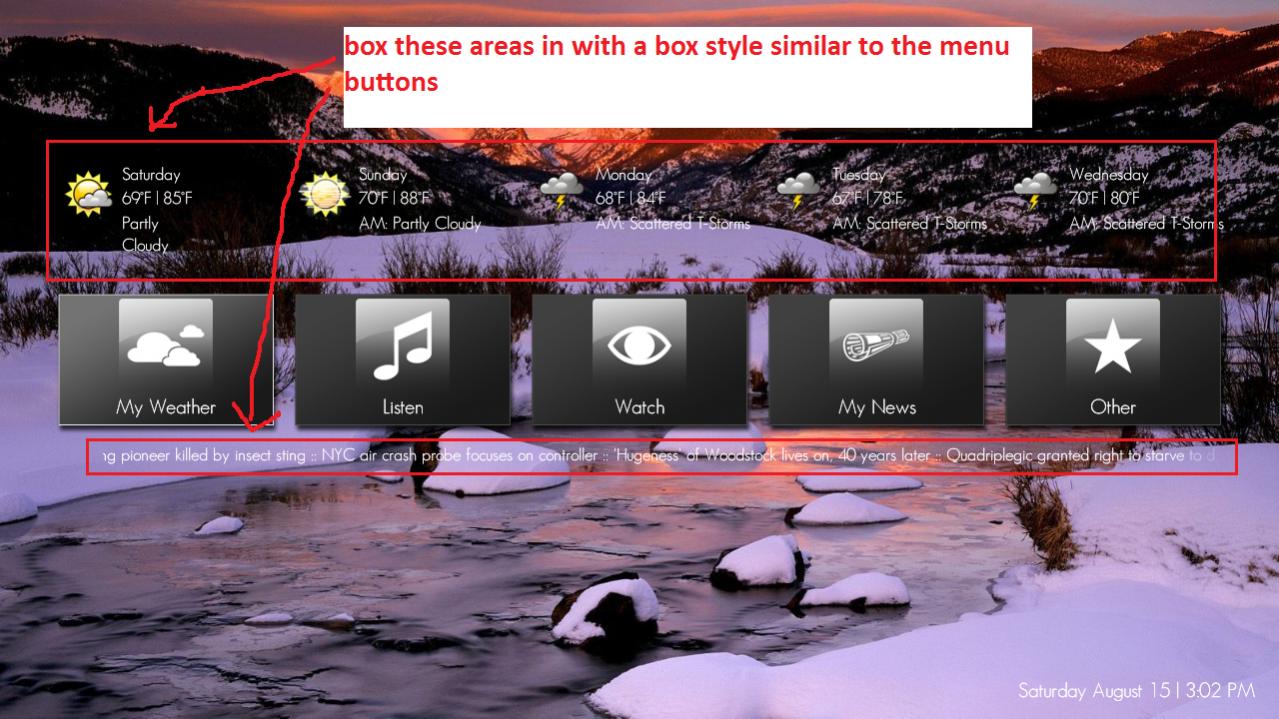
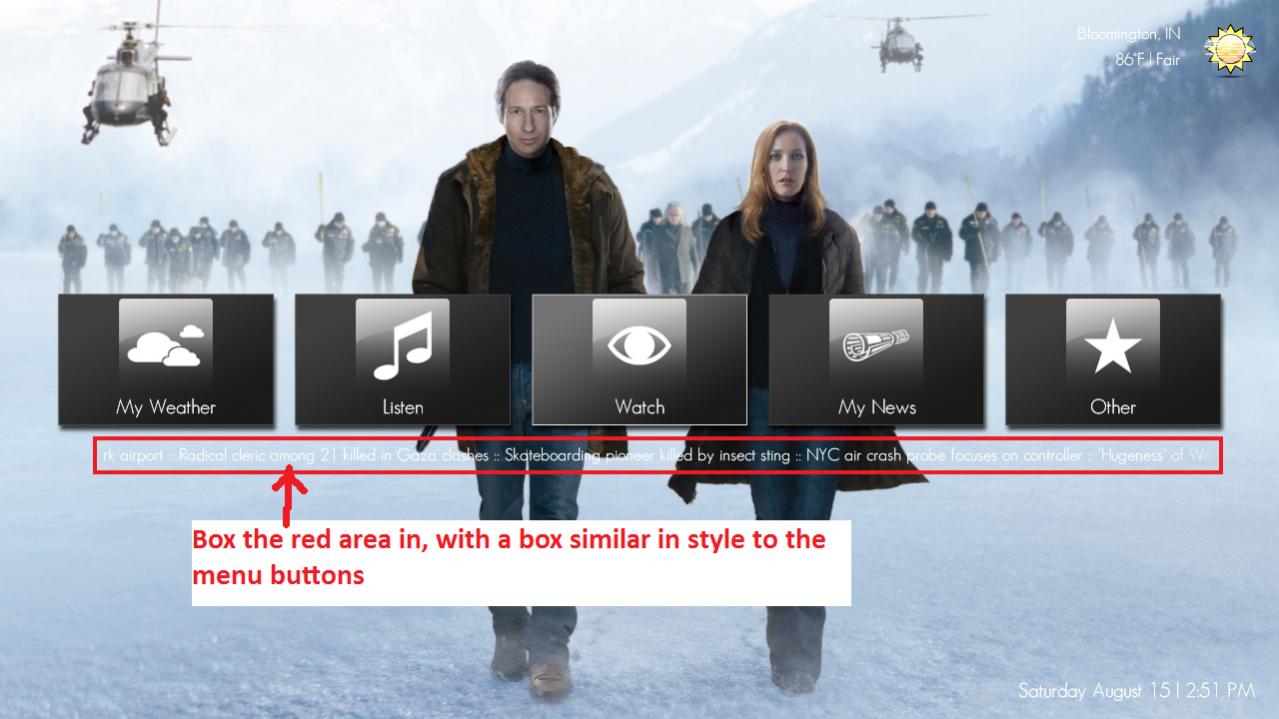
Now that I've got my backgrounds working....does anyone know how I could make a box similar to the menu buttons so that the news ticker is more visible, as well as for the weather button? Check the pictures below for reference...thanks for everyone's help so far! :D
 

Attachments

  • 15-02-32.jpg
    15-02-32.jpg
    145.3 KB
  • 14-51-15.jpg
    14-51-15.jpg
    89.5 KB

PussyWagon

Portal Pro
August 2, 2008
235
7
Now that I've got my backgrounds working....does anyone know how I could make a box similar to the menu buttons so that the news ticker is more visible, as well as for the weather button? Check the pictures below for reference...thanks for everyone's help so far! :D

Add following:

<control>
<description>RSS Background</description>
<type>button</type>
<id></id>
<posX>100</posX>
<posY>600</posY>
<width>1000</width>
<height>50</height>

<textureFocus>basic_button_focus.png</textureFocus>
<textureNoFocus>basic_button_focus.png</textureNoFocus>
<hyperlink></hyperlink>
<label></label>
<textcolor>00ffffff</textcolor>
<textcolorNoFocus>00ffffff</textcolorNoFocus>
<onleft></onleft>
<onright></onright>
<onup></onup>
<ondown></ondown>
</control>


And change the bold text to what suits your needs!
 

Scrounger

Retired Team Member
  • Premium Supporter
  • January 21, 2009
    1,032
    514
    Stuttgart
    Home Country
    Germany Germany

    Users who are viewing this thread

    Similar threads

    MP1 MP2 1.39 x86 1.39 won't install DE
    That did it, thanks.
    That did it, thanks.
    Before you create this bug report: Make sure that your system (windows, codecs and drivers) is up to date, matching the...
    Replies
    2
    Views
    344
    I do not know why this xml was in my theme folders, it must have sneaked in some time ago (years?). I simply removed the file. The Latest Media Handler plugin seems to be working as expected. I've had no lock-ups.
    I do not know why this xml was in my theme folders, it must have sneaked in some time ago (years?). I simply removed the file. The...
    Before you create this bug report: Make sure that your system (windows, codecs and drivers) is up to date, matching the...
    Replies
    13
    Views
    5K
    • Sticky
    Many many years ago, I opened a bug report after I got that same message but I never got a reply. The reason was I had unchecked the Windows Media Player item in Windows 10 Control Panel > Program and Features > Turn Windows features on or off as I didn't need it, without thinking that it was needed by MediaPortal. I kept the "Media...
    Many many years ago, I opened a bug report after I got that same message but I never got a reply. The reason was I had unchecked...
    We have just released MediaPortal 1.39 - Endurance x86 and x64 version. Highlights of this release Bugfixes: [MP1-5257] - Skin...
    Replies
    13
    Views
    890
    MP1 MP2 MP2 - V2.3 EPG has stopped DE
    This recent thread also relates to the discontinuation of MC2XML. The user in that thread eventually found a solution that works for him, although there probably exists more than one solution. -- from CyberSimian in the UK
    This recent thread also relates to the discontinuation of MC2XML. The user in that thread eventually found a solution that works...
    Before you create this bug report: Make sure that your system (Windows, codecs and drivers) is up to date, matching the...
    Replies
    12
    Views
    7K
    Before you create this bug report: Make sure that your system (Windows, codecs and drivers) is up to date, matching the Requirements and you've filled in your System Specs. Have a look at our MediaPortal Wiki! Maybe the solution is already there. Have a look at our Jira (Bug and Issue Tracker)and the threads in this section, maybe...
    Before you create this bug report: Make sure that your system (Windows, codecs and drivers) is up to date, matching the...
    Before you create this bug report: Make sure that your system (Windows, codecs and drivers) is up to date, matching the...
    Replies
    0
    Views
    2K
    Top Bottom