BleazleWide Skin V 6 (2 Viewers)

Status
Not open for further replies.

Spaldo

MP Donator
  • Premium Supporter
  • May 7, 2008
    495
    12
    FlashFXP Development Team
    Home Country
    Dave/Bleazle,

    A quick question in regards to the MyVideos area, when you press info/IMDB on a movie and it displays all the info. Up the top menu it says "MovieInfo" or similar with a ugly blue man.

    How hard would it be to just keep the text and loose the blue man ?

    This doesn't need to be considered at this stage, but I was just interested in what you would need to do...
     

    Bleazle

    Portal Pro
    July 14, 2007
    1,122
    257
    Pukekohe
    Home Country
    New Zealand New Zealand
    Mepo has been dealt to in V6 so he won't be popping up unexpectedly anymore - I've fixed the "Movie Info" graphic too :)
     

    Spaldo

    MP Donator
  • Premium Supporter
  • May 7, 2008
    495
    12
    FlashFXP Development Team
    Home Country
    Mepo has been dealt to in V6 so he won't be popping up unexpectedly anymore - I've fixed the "Movie Info" graphic too :)

    wow... I wasn't expecting that... this new release seems to be the gift that keeps on giving ! Although, I shouldn't say that till it actually happens :D

    Great news.. Cant wait (even more)
     

    Bleazle

    Portal Pro
    July 14, 2007
    1,122
    257
    Pukekohe
    Home Country
    New Zealand New Zealand
    ... this new release seems to be the gift that keeps on giving ! Although, I shouldn't say that till it actually happens :D....

    Yeah - don't hold your breath :( I've been up until 2am for the last 3 nights trying to get this thing sorted but I keep coming across things that I want to fine tune plus there are a couple of things I haven't been able to sort to my satisfaction yet so it's taking longer than expected :( :(

    On the positive side I can tell you that I definitely notice the difference when I flick over to the Bleazle skin (next release is "BleazleWide" - maybe I should have come up a cool codename like "Longhorn" ala Micro$oft :D ) I don't like the old version now - the differences aren't huge but they do make a difference...

    I should be in sales (actually I am - when I remember to work! :D ) the way I'm drawing out the release of this skin - it's kind of like Micro$oft saying "hey here's Windows Vista - check it out - it's crap but don't worry we'll give you something decent in 2010":D :D

    Enough of the comedy, I'd better do a bit of work to pay the bills....

    Dave
     

    Spaldo

    MP Donator
  • Premium Supporter
  • May 7, 2008
    495
    12
    FlashFXP Development Team
    Home Country
    lol..

    Just release a beta version of windows, ala, Vista like MS does and call it revolutionary until the real release (win 7) comes out!

    ha ha

    good luck with the progress, sounds like you are getting there.

    ps. dont worry about work :p skin is the most important
     

    Bleazle

    Portal Pro
    July 14, 2007
    1,122
    257
    Pukekohe
    Home Country
    New Zealand New Zealand
    Update: A quick note on the fanart in the MyVideos & MyMusic plugins

    I've found that having fanart showing REALLY crunches the RAM - I've got 1gb of RAM on my system and I find that after flicking through MyVideos things get "stuttery" - LiveTV turns to crap (stop-start - sound - still picture - all that sort of stuff). I haven't had time to research it completely yet but from what I've read this is a known issue with showing fanart in these plugins - apparently once your RAM is "full" it won't show anymore fanart either :( (I can't test this because I've only added fanart for half a dozen files). Bit of a bummer since showing fanart in TVSeries & MovingPictues doesn't have this effect...

    So while fanart looks great in MyVideos & MyMusic I'm going to add it as an optional extra in the new release (for people that have stacks of RAM)

    If any of you want to try it out it in the current version of the Bleazle skin it's easy enough, just do this:

    1. Open myvideo.xml (notepad will do)
    2. Add the following code highlighted in blue and save the file.

    <?xml version="1.0" encoding="utf-8" standalone="yes"?>
    <!--version="1.0" standalone="yes"-->
    <window>
    <id>6</id>
    <defaultcontrol>2</defaultcontrol>
    <allowoverlay>no</allowoverlay>
    <define>#header.label:134</define>
    <define>#header.hover:</define>
    <controls>
    <import>common.window.xml</import>
    <import>common.picback.video.xml</import>
    <import>common.time.xml</import>
    <control>
    <description>fanart</description>
    <type>image</type>
    <id>1000</id>
    <posX>0</posX>
    <posY>0</posY>
    <width>720</width>
    <height>576</height>
    <colordiffuse>66ffffff</colordiffuse>
    <texture>.\FanArt\Video\#title.png</texture>
    <animation effect="fade" time="400">WindowClose</animation>
    <animation effect="fade" time="400">WindowOpen</animation>
    </control>

    <control>
    <type>actiongroup.....

    3. Open the MP skins directory, open the Bleazle skin folder, then open the Media folder
    4. Create a new folder called "FanArt" then open that folder and create a new folder called "Video"
    5. Then drop some fanart into that folder - you need to name it the same as the title of the movie, i.e. “King Kong.png” that you want the fanart to appear for (including caps and spaces).

    That's it. The above code is for MP 1.0.0 - if you're still using RC3 or 4 change this line <texture>.\FanArt\Video\#title.png</texture> to this <texture>\FanArt\Music\#Play.Current.Artist.png</texture> (i.e. remove the "." before \FanArt.)

    Something for you to play with while you wait for V6....

    In the meantime I'll see if there is a better way to implement fanart in MyVideos and MyMusic...

    Dave
     

    Spaldo

    MP Donator
  • Premium Supporter
  • May 7, 2008
    495
    12
    FlashFXP Development Team
    Home Country
    Thanks Bleazle for the release !

    A much nicer feel so far.. I am just playing around with all the options now. I am having minor issues with fanart showing up in TVSeries, but, you already mentioned that in the release.

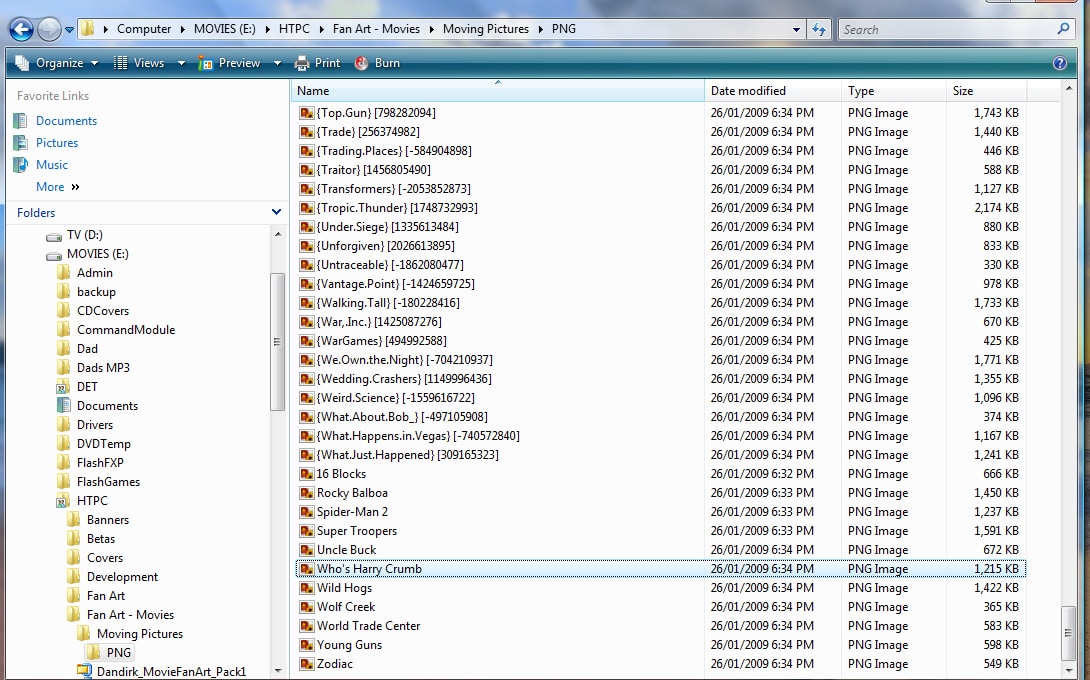
    I downloaded all my backgrounds/fanart from Moving Pictures for MyVideos, however, they look like the attached file.. I have turned them all into PNG's as they were JPG's by default, however, the file names are all strange. Does anyone have any suggestions how I can remove all the crap from the file names ?

    It will take me 600 years to rename 300+ files individually!
     

    Attachments

    • stupid.jpg
      stupid.jpg
      480.1 KB

    Bleazle

    Portal Pro
    July 14, 2007
    1,122
    257
    Pukekohe
    Home Country
    New Zealand New Zealand
    Thanks Bleazle for the release !...

    You forgot to say "took you long enough!" :D

    .. I am having minor issues with fanart showing up in TVSeries, but, you already mentioned that in the release....

    Yeah, that's not a skin issue - hopefully the next proper release of the plugin will sort that.

    ...I have turned them all into PNG's as they were JPG's by default, however, the file names are all strange. Does anyone have any suggestions how I can remove all the crap from the file names ?

    It will take me 600 years to rename 300+ files individually!

    haha - yeah I wouldn't bother - change a few and give it a go to see if you have a problem with your RAM. There are plenty of good "free" renaming apps available online - I use BatchRename Pro. That'll make it easy to get rid of the numbers and {}'s but you'll still have to make sure the files are named EXACTLY the same as the title in the MYVideos plugin - personally I don't think it's worth the hassle... :mad:

    Dave
     

    Spaldo

    MP Donator
  • Premium Supporter
  • May 7, 2008
    495
    12
    FlashFXP Development Team
    Home Country
    I ended up using Ifrnview to turn them all into PNG's and Rename Master JoeJoe's freeware utilities - [Home] to remove all the extra crap.

    I will give it a go soon.

    I think given that they are supporting this within MP soon, that maybe they should be in a common directory, Program Files or ProgramData... Also, they maybe should use the imdb number or something that works a bit better.

    Its all coming together but :D
     
    Status
    Not open for further replies.

    Users who are viewing this thread

    Top Bottom