BleazleWide Skin V 6 (4 Viewers)

Status
Not open for further replies.

Cuitlahac

MP Donator
  • Premium Supporter
  • July 8, 2008
    198
    24
    Göttingen
    Home Country
    Germany Germany
    You made it again!

    Dave,

    you made me happy. Once again you hit my taste to 100% :)

    After a short look at it, I already see that V6 was worth the waiting (and the virtual greasing ;) ).

    Great Job!!! Big Respect!!!

    Thank you very much for all the time and energy you spent on this project!

    BTW my very best greetings go out to your family and friends, because they tolerated this "time wasting" ;) over the last weeks! Tell them, there are people on the other side of the world who think you are a hero :D

    Cheers,

    Michael


    ps. It's a cruel world: Poor little Mepo now has to find another biotope to survive :D
     

    Bleazle

    Portal Pro
    July 14, 2007
    1,122
    257
    Pukekohe
    Home Country
    New Zealand New Zealand
    ....Anyway, question around mytv series. Does this new version have the 15 banner menu or is there something special I need to do.....Ignore my post. I just gave the readme a once over.I have three choices...ya baby. What to do..

    :D Once the new release of TVSeries comes out I'll take another look at this - sooner or later you'll be able to switch from the list/widebanner/filmstrip views within the MP GUI which will be much better than having to change the code..

    Any chance of fixing the icons on basic home so they no longer appear horizontally stretched?...

    Yep, no problem, I agree, it's not right at the moment - I'll tweak it on my local copy and make the file available here later on today.

    ...Sorry, but no 4:3 version is on the horizon...

    :(

    Yeah, sorry about that.

    ...BTW my very best greetings go out to your family and friends, because they tolerated this "time wasting" ;) over the last weeks! Tell them, there are people on the other side of the world who think you are a hero :D

    haha, yeap I'll do that - not that I think they'll care...

    ... It's a cruel world: Poor little Mepo now has to find another biotope to survive :D

    :D
     

    Spaldo

    MP Donator
  • Premium Supporter
  • May 7, 2008
    495
    12
    FlashFXP Development Team
    Home Country
    MyVideos - Shares menu

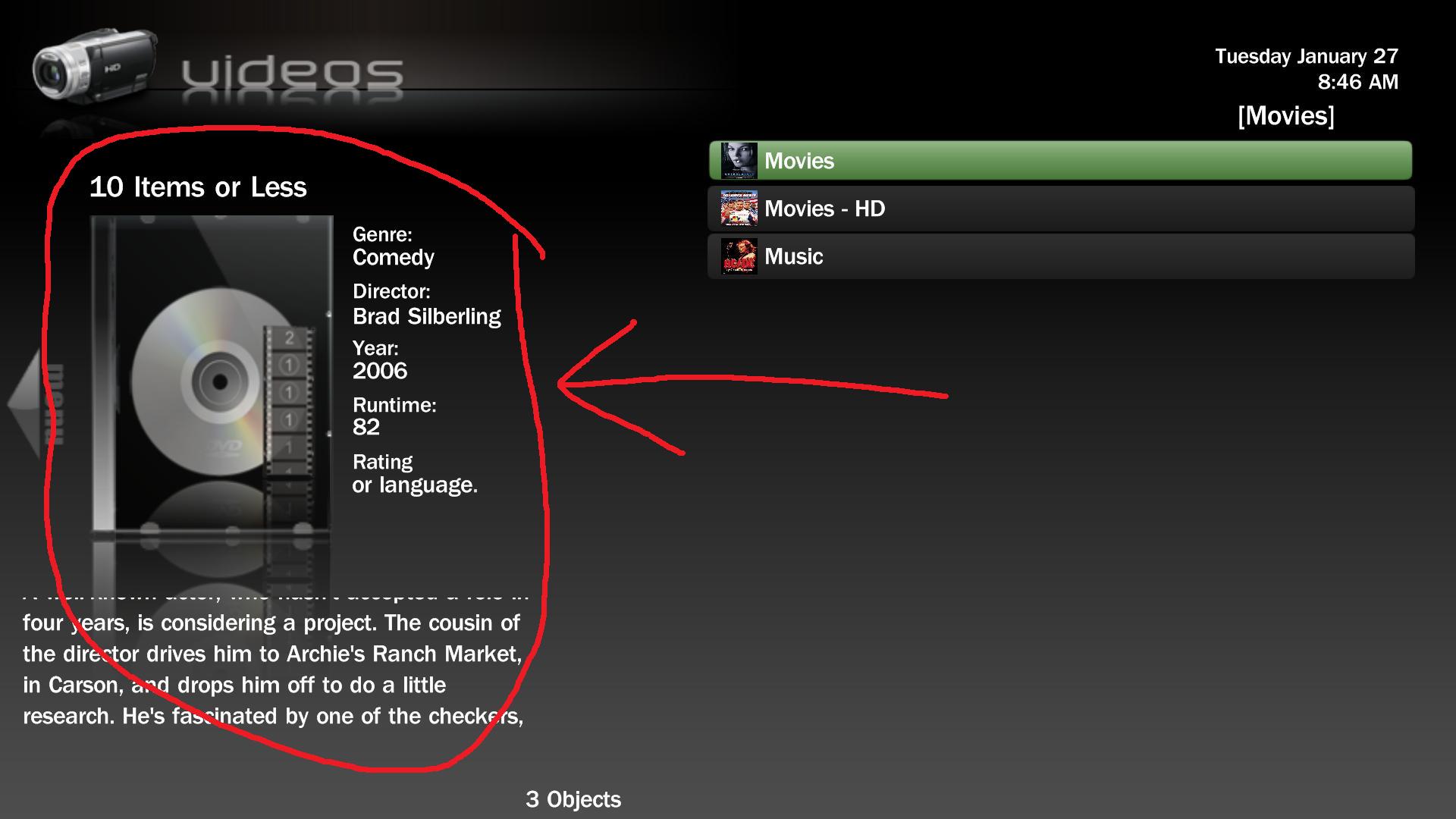
    Bleazle, I haven't had a great test yet, but I did notice that for some reason the movie info & cover is still displaying in the MyVideos - Shares menu. See attached:
     

    Attachments

    • Videos-Shares.jpg
      Videos-Shares.jpg
      130.2 KB

    Spaldo

    MP Donator
  • Premium Supporter
  • May 7, 2008
    495
    12
    FlashFXP Development Team
    Home Country
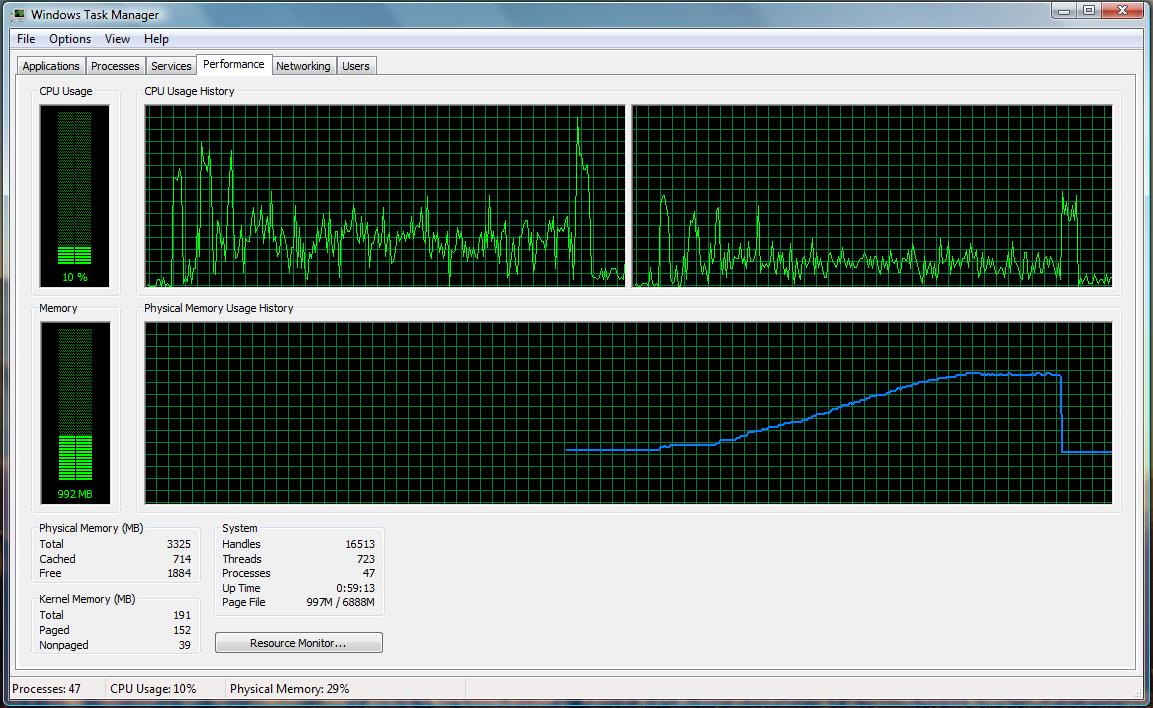
    FanArt - Memory & CPU usage

    Well, I just went through and renamed all the PNG files and put them into my FanArt directory.

    After that, it worked, so I loaded up the Windows Task Manager and then viewed all 300 of my movies/fanarts in Bleazle.

    Here is the result!
     

    Attachments

    • Movie-Fanart-Mem&CPU.jpg
      Movie-Fanart-Mem&CPU.jpg
      176.9 KB

    Bleazle

    Portal Pro
    July 14, 2007
    1,122
    257
    Pukekohe
    Home Country
    New Zealand New Zealand
    ..for some reason the movie info & cover is still displaying in the MyVideos - Shares menu.

    You mean when you have focus on a folder (rather than a movie file) and it shows information for one of the movies inside the folder right? I don't know of a way around that - I'll put up a post tonight to see if someone has an answer....

    Well, I just went through and renamed all the PNG files and put them into my FanArt directory.

    After that, it worked, so I loaded up the Windows Task Manager and then viewed all 300 of my movies/fanarts in Bleazle.

    Here is the result!

    Look at that RAM usage ramp up! How many movie covers did you flick through? I found that after about 5 minutes of playing around with a combination of MyVideos and MyMusic with FanArt showing MP ran like crap. I tried enabling a RAM optimiser but it didn't really seem to help :(

    Re: My Films Plugin - Details Screen

    I've just noticed that the DVD thumb is a bit wider than the jewel case - don't know how that happened because it looked fine when I tested it yesterday - must have changed the width by mistake :mad: It's not a biggie but I've fixed it so I'll make that XML file available on the first post later on today (when I put the tweaked BasicHome file up as well).

    Unless you guys come across anything major that really effects the function of the skin I don't plan on doing another release until MP 1.0.1 comes out but I'll make any files that I tweak available on the first post of this thread so that you can grab them if you want to.

    Dave
     

    Spaldo

    MP Donator
  • Premium Supporter
  • May 7, 2008
    495
    12
    FlashFXP Development Team
    Home Country
    You mean when you have focus on a folder (rather than a movie file) and it shows information for one of the movies inside the folder right? I don't know of a way around that - I'll put up a post tonight to see if someone has an answer....

    Yep, it shows details of a movie when you focus on a folder... Also, it shows a blank cover and missing info if you dont focus on anything.

    That would be great if that could go away from the shares menu/screen :)

    Bleazle said:
    Look at that RAM usage ramp up! How many movie covers did you flick through? I found that after about 5 minutes of playing around with a combination of MyVideos and MyMusic with FanArt showing MP ran like crap. I tried enabling a RAM optimiser but it didn't really seem to help :(

    It is amazing how much ram it uses. Basically I just went through all of my covers in MyVideos one at a time, about 250-300 of them... I would estimate it went from using about 980 megs of RAM up to about 2.5 gigs by the end of going through each one!!

    Then when I closed the program it went back to the base amount. Which means its not leaking any RAM anyway... but, there must be a better way to load them.
     

    mruane

    Portal Pro
    June 4, 2006
    182
    5
    Wellington
    Home Country
    New Zealand New Zealand
    Well done on the v6 release Dave - thanks. You deserve a DB for that effort!!!

    I am observing some interesting effects though and I wonder if you can assist. When I select a menu option from the main opening screen menu (i.e. not the basic home screen) I do not access the expected module i.e.

    Settings opens Videos
    TV opens TV (as expected)
    Videos opens Weather
    Radio opens Music
    Weather opens Weather first then jumps to Pictures
    Plugins opens Radio
    Music opens Settings
    Pictures opens Plugins
    Settings opens Videos

    After stopping MP and restarting, the options change so that now Videos opens Settings and Settings opens Pictures!!!

    So it looks like every time I start MP the menu options open different modules randomly! What else can I tell you to assist?

    PS: the Home Screen menu works as expected accessing all of the correct modules. When you exit from the Home Screen back to the standard main menu then the random module access resumes.

    Cheers Mike
     

    Bleazle

    Portal Pro
    July 14, 2007
    1,122
    257
    Pukekohe
    Home Country
    New Zealand New Zealand
    Well done on the v6 release Dave - thanks. You deserve a DB for that effort!!!

    I am observing some interesting effects though and I wonder if you can assist. When I select a menu option from the main opening screen menu (i.e. not the basic home screen) I do not access the expected module i.e.

    Settings opens Videos
    TV opens TV (as expected)
    Videos opens Weather
    Radio opens Music
    Weather opens Weather first then jumps to Pictures
    Plugins opens Radio
    Music opens Settings
    Pictures opens Plugins
    Settings opens Videos

    After stopping MP and restarting, the options change so that now Videos opens Settings and Settings opens Pictures!!!

    So it looks like every time I start MP the menu options open different modules randomly! What else can I tell you to assist?

    Cheers Mike

    No idea what's going on there!! :eek:

    "interesting effects"? I'd say you're experiencing a nightmare!! :mad: No wonder you only reckon I deserve a DB!! I'm sure if anyone else had had the same issues it would've been posted here by now (over 270 people have already downloaded V6 since last night so it will've been "tested" a bit by now...)

    It can't be a skin issue because the "guts" of the skin is Blue3Wide and none of the changes I've made would cause anything to happen that wouldn't happen in Blue3Wide :rolleyes:

    Have you selected "enable skin animations" in MP config? Are you using MP 1.0.0? I haven't tried it in RC4 or RC3 but I assumed it would work in them - maybe not?? hmmm...

    Let me know how you get on - if you get it working maybe I'll deserve a real beer!! :D

    Dave
     

    mruane

    Portal Pro
    June 4, 2006
    182
    5
    Wellington
    Home Country
    New Zealand New Zealand
    Hi Dave,

    No - you do deserve the beer and a DB is a very smooth taste to my mind!!! Well I have just tried the standard Blue Three Wide and it exhibits the same effects!!! So I take it all back my friend. I seem to have a much wider issue here.

    I am using MP1.0 and no additional plugins. Just a very standard client installation. I went back to the Cache folder (in Vista) and deleted everything from there and restarted. Same problem. I will try a reboot and see if that clears things. Very strange.

    Update: OK got to the bottom of it. I installed the MediaStream skin with its plugins and that seemed to have caused the issues. When I removed the plugins (which I had forgot about) from the Process and Window Plugin folders the problem resolved itself. The skin now works perfectly.

    So, looks like I need to get you some DB!!! Thanks again.

    Cheers Mike
     

    Bleazle

    Portal Pro
    July 14, 2007
    1,122
    257
    Pukekohe
    Home Country
    New Zealand New Zealand
    ...OK got to the bottom of it. ...The skin now works perfectly...So, looks like I need to get you some DB!!! Thanks again.

    Cheers Mike

    :D Good to hear you got it sorted! It sounded like you were looking at a rebuild for a bit there!! I'm having a Speights to celebrate :D

    Dave
     
    Status
    Not open for further replies.

    Users who are viewing this thread

    Top Bottom