BleazleWide Skin V 6 (1 Viewer)

Status
Not open for further replies.

Spaldo

MP Donator
  • Premium Supporter
  • May 7, 2008
    495
    12
    FlashFXP Development Team
    Home Country
    Sorry, I meant when you list the seaons of the series. The episdoes it should show up, but in the season view, there of course, isnt a episode picture for a season.

    Regardless, I will try these new files.

    Edit: Just tried those new files... they totally remove the fanart from the inital page and also remove any season info from the season view and episode info from the episode view :(

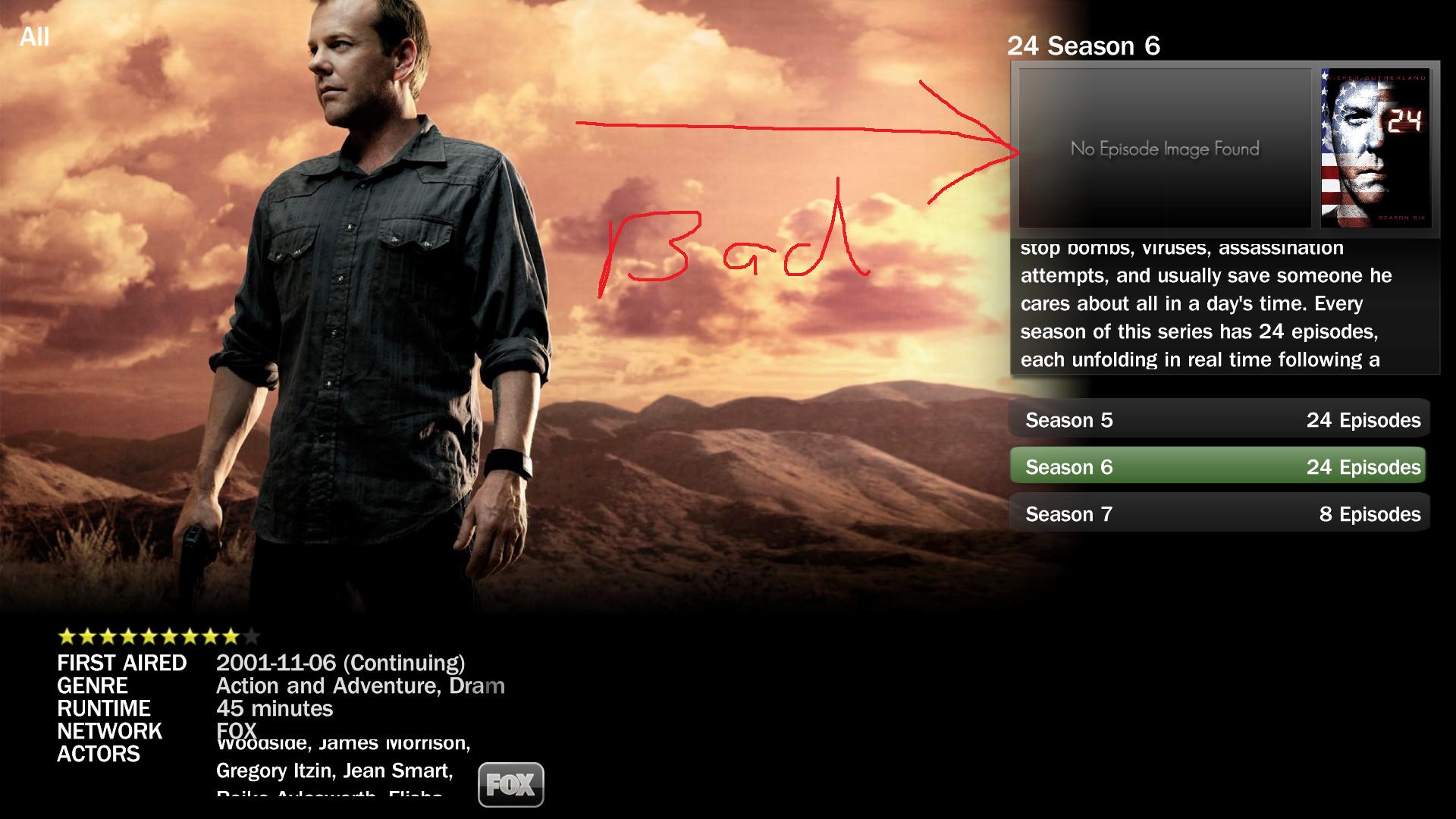
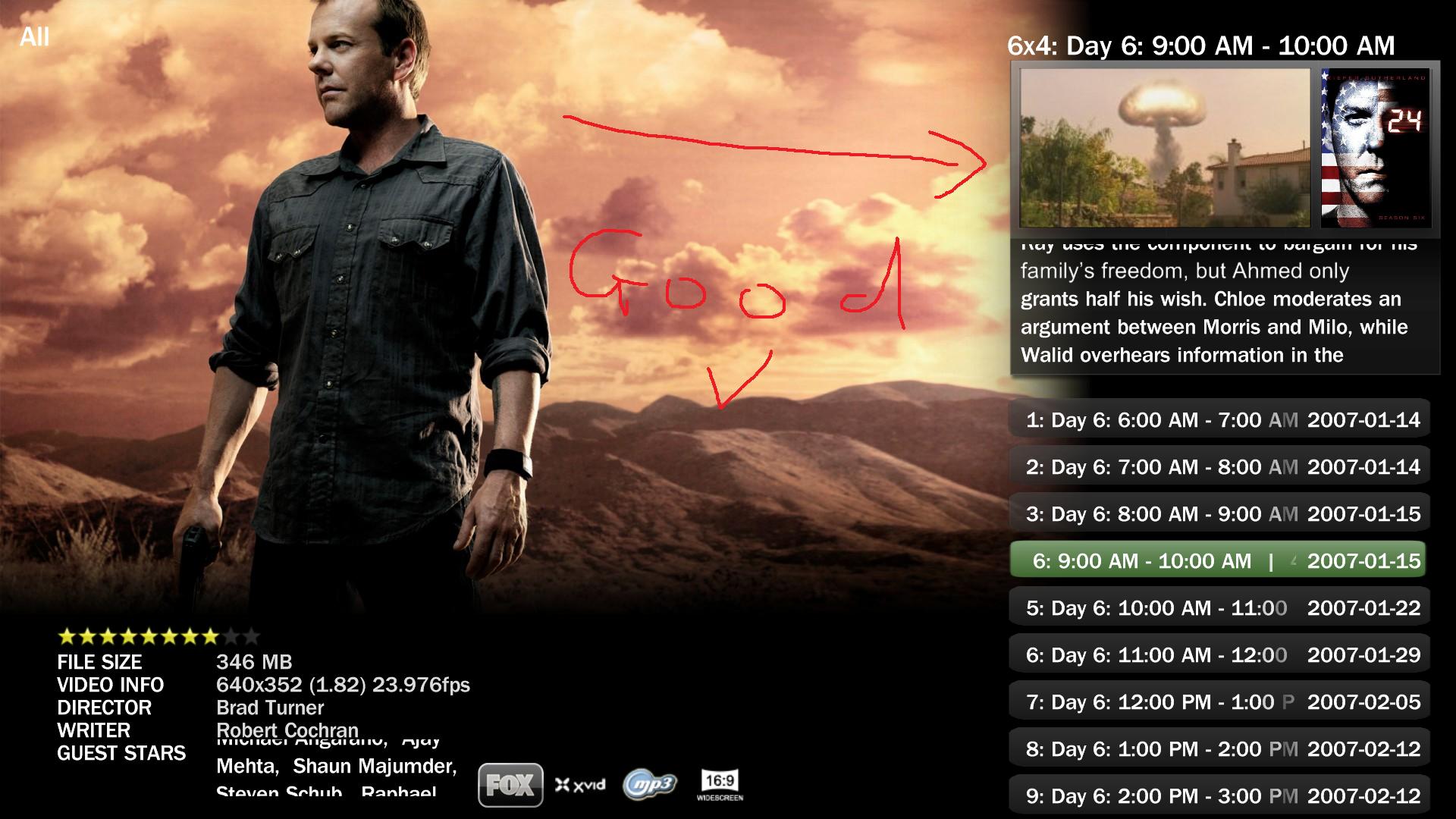
    I have attached what I was originally talking about...
     

    Attachments

    • Episode.jpg
      Episode.jpg
      245.1 KB
    • Seasons.jpg
      Seasons.jpg
      196.1 KB

    Bleazle

    Portal Pro
    July 14, 2007
    1,122
    257
    Pukekohe
    Home Country
    New Zealand New Zealand
    Sorry, I meant when you list the seaons of the series. The episdoes it should show up, but in the season view, there of course, isnt a episode picture for a season..

    Good point, I see what you mean - I'll sort that for the next release.

    ...Just tried those new files... they totally remove the fanart from the inital page and also remove any season info from the season view and episode info from the episode view :(

    Ooops, sorry man, I thought those were the files I was using, I've just checked and they're not :oops: Did you keep a copy of the old files? If not I can post them here (saves you downloading the skin again...)
     

    Bleazle

    Portal Pro
    July 14, 2007
    1,122
    257
    Pukekohe
    Home Country
    New Zealand New Zealand
    Ooops, sorry man, I thought those were the files I was using, I've just checked and they're not :oops: Did you keep a copy of the old files? If not I can post them here (saves you downloading the skin again...)

    I wish, I just overwrote them with the new one you posted :oops:

    No worries, here are the working files :D
     

    Attachments

    • TVSeries.FanArt.xml
      30.6 KB
    • TVSeries.SkinSettings.xml
      30.7 KB
    • TVSeries.xml
      30.6 KB

    Bleazle

    Portal Pro
    July 14, 2007
    1,122
    257
    Pukekohe
    Home Country
    New Zealand New Zealand
    I've got two questions which I thought I'd ask here before I posted them anywhere else:

    1. In previous versions of MP when you watched a video/movie via the MyVideos plugin the font colour would change to blue (like it does in recorded TV) right? It doesn't anymore :(

    2. Once again, in previous version of MP if you hit <PAUSE> during video/movie or recorded TV playback, as well as saying how far into the video you were on the left hand side it said how long there was to go (on the right hand side) whereas now it just says the total time of the clip you're watching on the right hand side - right?

    I could plug in a backed up version of MP to check this out but I figured I'd see if anyone knew the answers first. I can live with the second one but I'm finding the first one to be a real pain in the @ss...

    Cheers

    Dave

    PS - neither of these questions are BleazleWide skin problems, I've checked in Blue3, Blue3Wide and a couple of other skins and they all do the same thing :(
     

    Spaldo

    MP Donator
  • Premium Supporter
  • May 7, 2008
    495
    12
    FlashFXP Development Team
    Home Country
    2. Once again, in previous version of MP if you hit <PAUSE> during video/movie or recorded TV playback, as well as saying how far into the video you were on the left hand side it said how long there was to go (on the right hand side) whereas now it just says the total time of the clip you're watching on the right hand side - right?

    ohh, I haven't noticed that yet, but, that one I really like... it is handy to know how long is left in a movie!
     

    geichel

    Portal Pro
    January 11, 2008
    81
    17
    Dortmund
    Home Country
    Germany Germany
    Do you mean that you would prefer to have no IMDB info shown in any of the Shares views? Or just in the view where you're focused on folders, not files? (which is what I'm trying to do but I haven't received an answer to my post on this yet so that's not looking good..) I added IMDB info in Shares because someone asked for it earlier on in this thread (I can't remember who right now and haven't got time to look) and I like it myself. I could make it an option though - you either have IMDB info or you don't, but I'll stick with the big DVD cover preview, otherwise I might as well just use the Blue3Wide layout :eek:

    I love both the IMDB info and big cover when I am browsing MyVideos inside the shares, but, prior to selecting a folder (share) I dont see why there should be anything shown ?

    I am not sure if this is possible and/or if you know exactly what I mean, here are the screenshots to show what I mean...

    One with Red is bad, other one is great! :D

    Hallo, Spaldo & Bleazle!

    Regarding the probem you mentioned in your post you are right. This is really a problem of MediaPortal at the moment. I am currently working on a fix for this problem, because (@Bleazle) this will make your skin even more amazing ;) So if you are interested I can provide you this fix and you can test it. But I will not provide it before Friday evening, cause I have to build binaries and test it on my own system before.
    Regards,
    Gerrit
     

    p13man

    Portal Pro
    November 20, 2008
    50
    2
    Home Country
    Bleazle -
    2. Once again, in previous version of MP if you hit <PAUSE> during video/movie or recorded TV playback, as well as saying how far into the video you were on the left hand side it said how long there was to go (on the right hand side) whereas now it just says the total time of the clip you're watching on the right hand side - right?

    I think you can call #currentplaytime and #currentremaining

    1. In previous versions of MP when you watched a video/movie via the MyVideos plugin the font colour would change to blue (like it does in recorded TV) right? It doesn't anymore

    Maybe you could use conditional visibility in the label control:
    "if you add a <visible>Player.HasMedia</visible> tag to a control then this control will only be visible if MediaPortal is playing a media file" - from the wiki
     

    Bleazle

    Portal Pro
    July 14, 2007
    1,122
    257
    Pukekohe
    Home Country
    New Zealand New Zealand
    ....Regarding the probem you mentioned in your post you are right. This is really a problem of MediaPortal at the moment. I am currently working on a fix for this problem, because (@Bleazle) this will make your skin even more amazing ;) So if you are interested I can provide you this fix and you can test it. But I will not provide it before Friday evening, cause I have to build binaries and test it on my own system before.
    Regards,
    Gerrit

    That would be great! PM me when it's done :)

    Bleazle -
    2. Once again, in previous version of MP if you hit <PAUSE> during video/movie or recorded TV playback, as well as saying how far into the video you were on the left hand side it said how long there was to go (on the right hand side) whereas now it just says the total time of the clip you're watching on the right hand side - right?

    I think you can call #currentplaytime and #currentremaining....

    I've found "#currentremaining" in the common.progressbar.xml file and looking at that you would think it would show the time remaining, but it doesn't (it shows the total time) :mad:

    1. In previous versions of MP when you watched a video/movie via the MyVideos plugin the font colour would change to blue (like it does in recorded TV) right? It doesn't anymore

    Maybe you could use conditional visibility in the label control:
    "if you add a <visible>Player.HasMedia</visible> tag to a control then this control will only be visible if MediaPortal is playing a media file" - from the wiki

    But that will only change the title to blue while the media is playing (right?) I want it to remain blue so that if I go away, then come back later I know which files have been watched or partially watched (as per Recorded TV). Any ideas?
     
    Status
    Not open for further replies.

    Users who are viewing this thread

    Top Bottom