BleazleWide Skin V 6 (2 Viewers)

Status
Not open for further replies.

p13man

Portal Pro
November 20, 2008
50
2
Home Country
I've been up all night and my brain may not be very sharp - I thought you meant to fade down annoying text, but it's as clear as mud now.
I've justii re-installed 1.0.0.2 with my own tweaks and decided to clear out the database and have fresh one built so I hadn't noticed it was missing!
Sh**, I need that!. I've got thousands of episodes - it'll takes me an hour to find where I'm up to.

That last one was just to buy me time whilst I answered a bell that was ringing.
Moving pictures, sister to MPTVSeries uses a dummy control "Watched Flag Filtering (8)" which is set, presumably, from a field in the Db.
That may trigger off some more ideas.
 

GDusty

Portal Member
September 22, 2007
8
1
Home Country
United Kingdom United Kingdom
First off, I love the skin. Definitely my favourite.

Anyway, I have finally upgraded to MP 1.0 and am going through the tweaking process. I think I'm reasonably proficient at reverse-engineering what is going on in the various xml files, etc.

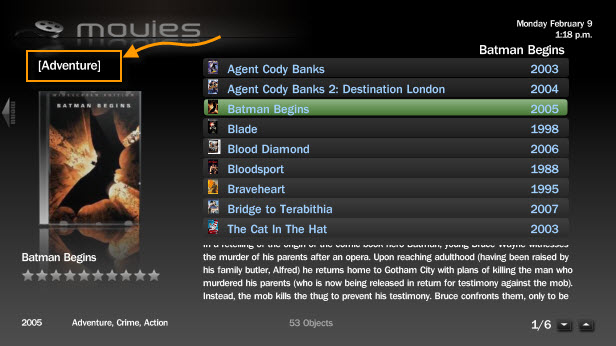
There is one thing however that I cannot figure out. In MyFilms, if I do a filtering selection, then the text for the selection appears inside [square brackets], near the top of the page. I'd like to be able to reposition this, and adjust some of the text properties, as it is in an awkward position on my setup

In the details page (defined through MesFilmsDetail.xml), I can see that the same text is showing due to a control containing <label>#select</label>. I can then reposition it, give it different font colour, etc.

However from the main MyFilms page, I cannot see in which xml the same <label>#select</label> is derived from. I even looked in some of the imported xmls, such as common.window1.xml, but the life of me I cannot find where its source is.

Anybody have any idea?

Thanks.
 

geichel

Portal Pro
January 11, 2008
81
17
Dortmund
Home Country
Germany Germany
Hallo, Bleazle!
Attached to this post you find the "WindowPlugins.dll" which contains fix for displaying movie information. To try it out just replace the old file in your MediaPortal installation folder. !! Do not forget to make a backup of the original file first !! Have fun ;)
Regards,
Gerrit
....Regarding the probem you mentioned in your post you are right. This is really a problem of MediaPortal at the moment. I am currently working on a fix for this problem, because (@Bleazle) this will make your skin even more amazing ;) So if you are interested I can provide you this fix and you can test it. But I will not provide it before Friday evening, cause I have to build binaries and test it on my own system before.
Regards,
Gerrit

That would be great! PM me when it's done :)

Bleazle -

I think you can call #currentplaytime and #currentremaining....

I've found "#currentremaining" in the common.progressbar.xml file and looking at that you would think it would show the time remaining, but it doesn't (it shows the total time) :mad:

1. In previous versions of MP when you watched a video/movie via the MyVideos plugin the font colour would change to blue (like it does in recorded TV) right? It doesn't anymore

Maybe you could use conditional visibility in the label control:
"if you add a <visible>Player.HasMedia</visible> tag to a control then this control will only be visible if MediaPortal is playing a media file" - from the wiki

But that will only change the title to blue while the media is playing (right?) I want it to remain blue so that if I go away, then come back later I know which files have been watched or partially watched (as per Recorded TV). Any ideas?
 

Attachments

  • WindowPlugins.zip
    30.6 KB

Bleazle

Portal Pro
July 14, 2007
1,122
257
Pukekohe
Home Country
New Zealand New Zealand
I am sure you are keeping an eye on it Bleazle, but Moving Pictures 0.7 has been released: https://forum.team-mediaportal.com/moving-pictures-284/new-moving-pictures-0-7-available-54396/

Edit: I am not sure if it is related to the skin or to the actual plugin, but, now MP wont remember my view preference. Ie. icons, list, etc.

I'd missed that release so thanks for the pointer - will check it out in the next few days. Re: Your edit - that's a strange one - I would assume that it's a plugin issue though - Have you tried it in some other skins that support MovingPictures?


..In MyFilms, if I do a filtering selection, then the text for the selection appears inside [square brackets], near the top of the page. I'd like to be able to reposition this, and adjust some of the text properties, as it is in an awkward position on my setup...

haha :D That's a very polite way of saying the text is in the wrong place! :D I don't use that view so I hadn't noticed - thanks for pointing it out. I've moved the text as per the attached screenshot so if that works for you just copy and paste the attached XML file (after backing up the existing file). If you want to change it further this is the code you need to change:

<control>
<type>fadelabel</type>
<id>12</id>
<posX>79</posX>
<posY>120</posY>
<width>520</width>
<height>24</height>
<label>label</label>
<font>font14</font>
<textcolor>ffffffff</textcolor>
<disabledcolor>ff808080</disabledcolor>
</control>


Hallo, Bleazle!
Attached to this post you find the "WindowPlugins.dll" which contains fix for displaying movie information. To try it out just replace the old file in your MediaPortal installation folder. !! Do not forget to make a backup of the original file first !! Have fun ;)
Regards,
Gerrit

I've given it a test run and it works great!! :) @Spaldo - you'll want to plug this in, it'll make you very happy :D Just one question - is it possible to set the default year and runtime to be blank (at the moment the default year is 1900 and the default runtime is "0"). If not that's OK, it's still far better than the "stock" MP .dll file :)

Are you going to see if you can get that file added to MP to replace the existing WindowsPlugins.dll file? If not I'll include it in the next release of BleazleWide so that at least users of this skin get the best view of their Shares :)

Since you were able to fix that are you able to fix the issues I mentioned earlier - i.e. In MyVideos once a video is played (or partly played) the text colour doesn't change - so you have no idea what has been viewed and what hasn't :mad: AND when you hit pause during playback of recorded TV etc MP no longer tells you how long there is to go - it just gives you the total time of the clip (and who wants to do maths while they're watching TV? :D )

Cheers

Dave
 

Attachments

  • myfilms.jpg
    myfilms.jpg
    58 KB
  • MesFilms.xml
    30.6 KB

redsmeg

New Member
March 15, 2007
2
1
Bug

Found a bit of a bug:
when in the TV window (not fullscreen but the one with the menu) and the tv is on, if you jump to my videos the TV overlay stays where it is. This effectively covers the list.

On a side note I have no idea how to skin and I love this skin however, now with the introduction of fanart in mytvseries I thought the skin could use an extra option. I like the graphical banners, but find that they cover too much of the fanart background, a nice compromise is in the purevision skin. This allows for a single row of banners on the right hand side much like your list view only using banners. Any possibility of doing something like this?

All in all great skin!:p

PS: can't remember if your skin has it or not as I am presently at work, but does it display the time one each window? Thats something I find very useful.
 

Bleazle

Portal Pro
July 14, 2007
1,122
257
Pukekohe
Home Country
New Zealand New Zealand
Found a bit of a bug:
when in the TV window (not fullscreen but the one with the menu) and the tv is on, if you jump to my videos the TV overlay stays where it is. This effectively covers the list...

Yeah I've noticed that too - probably something to do with the fact that I have "killed" the "now playing" rectangle in MyVideos. I'm not sure if I'll be able to fix that but I will have a look.

... now with the introduction of fanart in mytvseries I thought the skin could use an extra option. I like the graphical banners, but find that they cover too much of the fanart background, a nice compromise is in the purevision skin. This allows for a single row of banners on the right hand side much like your list view only using banners. Any possibility of doing something like this?...

I know the view you're talking about, I'm not sure that many people will be that keen on it though. Before I originally skinned MYTVSeries I did a bit of research (i.e. I read a lot of threads) and at that time (only a couple of months ago!) the WideBanner view with 6 banners was the only option around and a lot of people were asking to see more banners which is why the Bleazle skin (V5a onwards) shows 15 banners.

If you have a lot of TVSeries it would be a bit "painful" scrolling through them all in the view you're talking about but I agree that it makes Fanart more viewable, which is why the default option in the BleazleWide skin is the list view - it shows the maximum amount of FanArt. I guess that's a long way of saying I'm not planning on changing to a "ListBanners" view at the moment anyway.

..does it display the time one each window?...

No, not in every window - it displays the time in every window that I think it should though. Off the top of my head time isn't shown in the MovingPictures and TVSeries screens and nor are there any of the logo graphics which all of the other screens have (to avoid covering fanart unnecessarily) but apart from that I think most other screens have the time showing..

Dave
 

Spaldo

MP Donator
  • Premium Supporter
  • May 7, 2008
    495
    12
    FlashFXP Development Team
    Home Country
    I know the view you're talking about, I'm not sure that many people will be that keen on it though. Before I originally skinned MYTVSeries I did a bit of research (i.e. I read a lot of threads) and at that time (only a couple of months ago!) the WideBanner view with 6 banners was the only option around and a lot of people were asking to see more banners which is why the Bleazle skin (V5a onwards) shows 15 banners.

    Please leave this one as is !! It is great atm :D

    Also, did you get a chance to check out the new version of Moving Pictures ? I still haven't had a chance to test the problems I mentioned earlier on with a different skin. But, hopefully I should be able to have a play around over the next few days.

    Thanks..
     

    Bleazle

    Portal Pro
    July 14, 2007
    1,122
    257
    Pukekohe
    Home Country
    New Zealand New Zealand
    I know the view you're talking about, I'm not sure that many people will be that keen on it though. Before I originally skinned MYTVSeries I did a bit of research (i.e. I read a lot of threads) and at that time (only a couple of months ago!) the WideBanner view with 6 banners was the only option around and a lot of people were asking to see more banners which is why the Bleazle skin (V5a onwards) shows 15 banners.

    Please leave this one as is !! It is great atm :D..

    haha - what's the saying? "you can please all of the people some of the time but..." - this is a classic example (actually the whole skinning thing is like that which is why it's great that MP offers so many choices! :) )


    ...Also, did you get a chance to check out the new version of Moving Pictures ? I still haven't had a chance to test the problems I mentioned earlier on with a different skin. But, hopefully I should be able to have a play around over the next few days...

    No I haven't had a look at that yet - I haven't had much spare time and the time that I "made spare" (i.e. I decided to do MP stuff instead of work :) ) has been spent setting up ForTheRecord . What a great plugin - it blows the "stock" MyTV plugin out of the water - no more "manual" recordings for me!! yeehaaaa!!! :D

    Now that I've got 4TR up and running I'll be able to add full support in the next release :)

    I was just about to PM you to see if you had tried the windowplugins.dll file that geichel posted - I thought you'd be raving about it by now...

    Dave
     

    Spaldo

    MP Donator
  • Premium Supporter
  • May 7, 2008
    495
    12
    FlashFXP Development Team
    Home Country
    I was just about to PM you to see if you had tried the windowplugins.dll file that geichel posted - I thought you'd be raving about it by now...

    Been working 14 hour days last few... Got a break on Thurs, so I will get a chance to play then :)

    EDIT

    Well... after posting the last one, I thought I better try it because I couldnt sleep without trying it !

    As for my previous issue, with the view mode not being remembered. I have re-extracted the Bleazle skin after installing Moving Pics 0.7 and that has fixed the remembering (so far) of the view in Moving Pictures.

    However, the view in MyVideos is still not remembering. However, I did make a change and rename 'My Videos' to Music instead.. Would that cause it ?

    Also, I tried the new DLL file... Now, in the icons view of MyVideos, it doesnt display any movie info at ALL! (large cover and blurb on selected movie)
     
    Status
    Not open for further replies.

    Users who are viewing this thread

    Top Bottom