BleazleWide V7.1.0 (2 Viewers)

Neville

Portal Pro
July 21, 2008
136
13
Hamilton
Home Country
New Zealand New Zealand
off topic
Go the Chiefs!!!!!!! (that means something to those of us in NZ, Australia & South Africa!)

You won't believe how blue everything is over here :D
Go Bulls!!!
:D

Do me a favour and don't post the score - I don't have Sky so I have to wait for the delayed free coverage tomorrow afternoon :( (NZ time..)

OK- back to MediaPortal stuff...

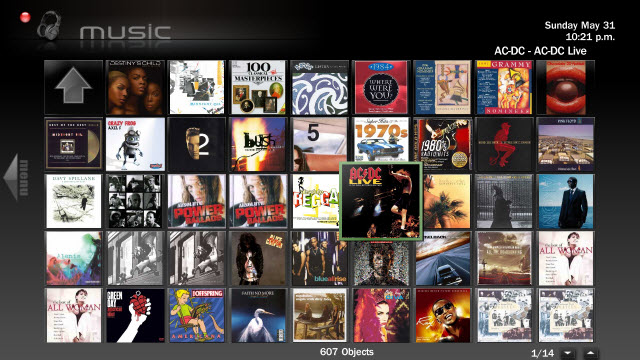
I've been playing around with the Music/icons views. I haven't finished with it yet but I thought I'd make it available so that it can be tested. I still need to finalise the layout/icon dimensions and the position of the spin buttons but it's more or less looking right. The only problem is that my system is struggling with it - maybe it's just due for a restart though (can't do that now as I'm currently recording something)

To try it out just copy the attached XML file into the BleazleWide V7 directory (remember to back up the original file). I'd appreciate some feedback on this.

:D

What music "settings" do you use. Ie layout - icon, view - ? sort by -?
I seem to get a list of folders if I use "by share" option otherwise and alphabetical folder system which is average. I seem unable toget a "wall" of albums ala media centre and find music navigation tricky

If I use the albums view it is only able to then put one artist in the album if made up of various artists.
Music saved in music>artist>album format as per ripping in media player.

I have downloaded the .xml file and seem to go fine but am struggling with above so difficult to be useful to you.

Any ideas? :D Would love to help with the improving of this interface as the music palyer part of Media center is pretty good and I found easier to navigate....:eek:
 

Bleazle

Portal Pro
July 14, 2007
1,122
257
Pukekohe
Home Country
New Zealand New Zealand
  • Thread starter
  • Moderator
  • #93
...If I use the albums view it is only able to then put one artist in the album if made up of various artists. Music saved in music>artist>album format as per ripping in media player....

I remember when I first changed from MCE to MediaPortal I was really disappointed with MP's handling of the Music section - the thing is that it's been so long since I've used MCE that I can't remember what I liked about it anymore :confused:

Try this set-up - Use the "Shares" view but set your music view up as follows:

40991d1243331073-music-screen-does-anyone-have-good-one-picture-1.png


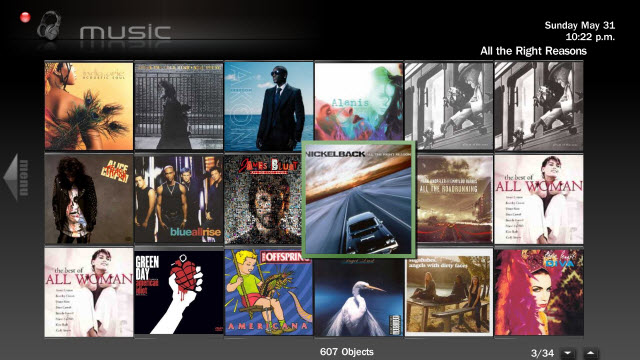
This shows all albums, ordered by artist in a icon mode. When you click into an album it shows the track listings ordered by track. Great if all of your music is held in folders tagged as "Artist - Album Name". See screenshots at the bottom of this post. I've added an updated XML file too.

I'm going to have a play around with this view for My Pictures too...

What's the name of the xml side menu that comes up when you press the left arrow in the music section?

There isn't one - that info is included in the XML file of whichever screen it is you want to edit.If you're talking about editing mymusicsongs.xml look for the following code. I don't know what you're looking at changing so I've copied all of the code that "operates" the slide in menu. If you're only looking at adding or changing some buttons you can skip the code in red:

<control>
<type>actiongroup</type>
<description>action menu</description>
<defaultcontrol>2</defaultcontrol>
<onexit>0</onexit>
<buttonX>0</buttonX>
<buttonY>0</buttonY>
<buttonwidth>106</buttonwidth>
<buttonheight>720</buttonheight>
<textureFocus>Action_focus.png</textureFocus>
<textureNoFocus>Action_nofocus.png</textureNoFocus>
<width>568</width>
<height>720</height>
<dimColor>00ffffff</dimColor>
<control>
<type>image</type>
<posX>26</posX>
<posY>78</posY>
<width>367</width>
<height>591</height>
<texture>Backslide.png</texture>
<colorDiffuse>fffffffff</colorDiffuse>
<visible>!Control.HasFocus(50)</visible>
<animation effect="slide" time="250" start="-300,0" reversible="false">visible</animation>
<animation effect="slide" time="250" end="-300,0" reversible="false">hidden</animation>
</control>
<control>
<description>group element</description>
<type>group</type>
<animation effect="slide" time="250" start="-300,0" reversible="false">visible</animation>
<animation effect="slide" time="250" end="-300,0" reversible="false">hidden</animation>
<visible>!Control.HasFocus(50)</visible>
<control>
<description>caption of the selected item</description>
<type>label</type>
<overlay>yes</overlay>
<id>0</id>
<posX>71</posX>
<posY>639</posY>
<width>285</width>
<height>93</height>
<font>font101</font>
<label>#Play.Current.Title</label>
<visible>!Control.HasFocus(50)+player.hasmedia</visible>
</control>
<control>
<description>caption of the selected item</description>
<type>label</type>
<overlay>yes</overlay>
<id>0</id>
<posX>71</posX>
<posY>589</posY>
<width>285</width>
<height>93</height>
<font>font101</font>
<label>#Play.Current.Artist</label>
<visible>!Control.HasFocus(50)+player.hasmedia</visible>
</control>
<control>
<description>caption of the selected item</description>
<type>fadelabel</type>
<overlay>yes</overlay>
<id>0</id>
<posX>71</posX>
<posY>614</posY>
<width>285</width>
<height>93</height>
<font>font101</font>
<label>#Play.Current.Album</label>
<visible>!Control.HasFocus(50)+player.hasmedia</visible>
</control>
<control>
<description>caption of the selected item2</description>
<allowoverlay>yes</allowoverlay>
<type>label</type>
<overlay>yes</overlay>
<id>0</id>
<posX>217</posX>
<posY>516</posY>
<width>355</width>
<height>87</height>
<font>font103</font>
<align>left</align>
<textcolor>20ffffff</textcolor>
<label>#currentplaytime</label>
<visible>!Control.HasFocus(50)+player.hasmedia</visible>
</control>

<!-- ***** CURRENTLY PLAYING TITLE INFO ETC IN SLIDE MENU ENDS *************************** -->
<!-- ***** CD cover Picture in slide in menu when selecting CD THEN track *************************** -->
<control>
<description>music logo</description>
<type>image</type>
<overlay>yes</overlay>
<id>600</id>
<posX>87</posX>
<posY>469</posY>
<width>118</width>
<height>121</height>
<keepaspectratio>no</keepaspectratio>
<centered>no</centered>
<zoom>no</zoom>
<texture flipY="true" diffuse="Thumb_Mask.png">#Play.Current.Thumb</texture>
<visible>!Control.HasFocus(50)+player.hasmedia</visible>
</control>
<!-- ***** CD jewel case in slide in menu*************************** -->
<control>
<description>music logo</description>
<type>image</type>
<overlay>yes</overlay>
<id>1</id>
<posX>72</posX>
<posY>468</posY>
<width>135</width>
<height>125</height>
<texture flipY="true" diffuse="Thumb_Mask.png">cd_cover.png</texture>
<visible>!Control.HasFocus(50) + player.hasmedia + control.hasthumb(600)</visible>
</control>
<!-- ***** Slide Menu CD case ENDS *************************** -->
<!-- *****<control>
<description>Progress background</description>
<type>image</type>
<id>1</id>
<posX>71</posX>
<posY>626</posY>
<width>250</width>
<height>27</height>
<texture>osd_progress_background.png</texture>
<visible>!Control.HasFocus(50)+player.hasmedia</visible>
</control>
<control>
<description>progress bar</description>
<type>progress</type>
<id>0</id>
<posX>62</posX>
<posY>631</posY>
<width>250</width>
<height>18</height>
<label>#percentage</label>
<visible>!Control.HasFocus(50)+player.hasmedia</visible>
</control>**** -->

<control>
<description>group element</description>
<type>group</type>
<animation effect="slide" time="250" start="-300,0" reversible="false">visible</animation>
<animation effect="slide" time="250" end="-300,0" reversible="false">hidden</animation>
<posX>71</posX>
<posY>121</posY>
<visible>!Control.HasFocus(50)</visible>
<control>
<description>View-As</description>
<type>button</type>
<id>2</id>
<posX>71</posX>
<posY>121</posY>
<label>100</label>
<onright>50</onright>
<onup>17</onup>
<ondown>6</ondown>
</control>
<control>
<description>Switch View</description>
<type>button</type>
<id>6</id>
<posX>71</posX>
<posY>163</posY>
<label>457</label>
<onright>50</onright>
<onup>2</onup>
<ondown>3</ondown>
</control>
<control>
<description>Sort</description>
<type>sortbutton</type>
<id>3</id>
<posX>71</posX>
<posY>206</posY>
<label>103</label>
<onright>50</onright>
<onup>6</onup>
<ondown>12</ondown>
</control>
<control>
<description>Play CD</description>
<type>button</type>
<id>12</id>
<posX>71</posX>
<posY>248</posY>
<label>890</label>
<onright>50</onright>
<onup>3</onup>
<ondown>11</ondown>
</control>
<!--<control>
<description>Eject Disc</description>
<type>button</type>
<id>13</id>
<label>654</label>
<action>100</action>
<onright>50</onright>
</control>-->
<control>
<description>Now playing</description>
<type>button</type>
<id>11</id>
<posX>71</posX>
<posY>291</posY>
<label>4540</label>
<hyperlink>510</hyperlink>
<onright>50</onright>
<onup>12</onup>
<ondown>9</ondown>
</control>
<control>
<description>Current Playlist</description>
<type>button</type>
<id>9</id>
<posX>71</posX>
<posY>333</posY>
<label>4555</label>
<action>33</action>
<onright>50</onright>
<onup>11</onup>
<ondown>10</ondown>
</control>
<control>
<description>My Playlists</description>
<type>button</type>
<id>10</id>
<posX>71</posX>
<posY>376</posY>
<label>983</label>
<onright>50</onright>
<onup>9</onup>
<ondown>107</ondown>
</control>
<control>
<description>Search Music Button</description>
<type>button</type>
<id>107</id>
<posX>71</posX>
<posY>422</posY>
<hyperlink>30885</hyperlink>
<label>137</label>
<onright>50</onright>
<ondown>105</ondown>
<onup>10</onup>
<visible>plugin.isenabled(Search music)</visible>
</control>

<control>
<description>Radiobutton</description>
<type>button</type>
<id>105</id>
<posX>214</posX>
<posY>465</posY>
<width>50</width>
<height>45</height>
<hyperlink>30</hyperlink>
<textureFocus>Radiobutton_focus.png</textureFocus>
<textureNoFocus>Radiobutton_nofocus.png</textureNoFocus>
<onright>106</onright>
<onup>50</onup>
<onup>107</onup>
<ondown>99</ondown>
</control>
<control>
<description>Lastfmbutton</description>
<type>button</type>
<id>106</id>
<posX>274</posX>
<posY>465</posY>
<width>50</width>
<height>45</height>
<hyperlink>7890</hyperlink>
<textureFocus>LastFMbutton_focus.png</textureFocus>
<textureNoFocus>LastFMbutton_nofocus.png</textureNoFocus>
<onright>50</onright>
<onup>107</onup>
<onleft>105</onleft>
<ondown>99</ondown>
</control>

</control>


EDIT: Collapsed code text
 

Attachments

  • music3.jpg
    music3.jpg
    93.3 KB
  • music2.jpg
    music2.jpg
    75.8 KB
  • common.facade.music.xml
    30.7 KB

kiwijunglist

Super Moderator
  • Team MediaPortal
  • June 10, 2008
    6,743
    1,754
    New Zealand
    Home Country
    New Zealand New Zealand
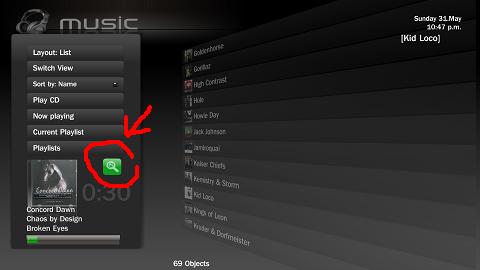
    thanks, basically i want to add functionality that the little search button loads the global music search plugin.
    I have MP 1.0 Final + Beazlewide 6.12 + latest version of global music search
    (which is now called Search Music, so i had to rename the hover_global search.png from beazle 6.12)

    I think I found the bit i need to edit in mymusicgenres.xml thanks!

    <control>
    <description>Search</description>
    <type>button</type>
    <id>8</id>
    <posX>274</posX>
    <posY>422</posY>
    <width>50</width>
    <height>45</height>
    <label>137</label>

    <hyperlink>30885</hyperlink>

    <textureFocus>searchbutton_focus.png</textureFocus>
    <textureNoFocus>searchbutton_nofocus.png</textureNoFocus>
    <onright>50</onright>
    <onup>10</onup>
    <ondown>99</ondown>
    </control>

    attachment.php


    PS - I just realised that my question probably shouldnt be in here bc it's not really realated to v7, want me to delete and start a seperate thread??
     

    Attachments

    • searchbutton.JPG
      searchbutton.JPG
      14 KB

    Bleazle

    Portal Pro
    July 14, 2007
    1,122
    257
    Pukekohe
    Home Country
    New Zealand New Zealand
    • Thread starter
    • Moderator
    • #95
    ...PS - I just realised that my question probably shouldnt be in here bc it's not really realated to v7, want me to delete and start a seperate thread??

    yeah, sounds like a good idea, that way anyone else using V6 can do the same thing if they want to.
     

    Neville

    Portal Pro
    July 21, 2008
    136
    13
    Hamilton
    Home Country
    New Zealand New Zealand
    I remember when I first changed from MCE to MediaPortal I was really disappointed with MP's handling of the Music section - the thing is that it's been so long since I've used MCE that I can't remember what I liked about it anymore :confused:

    Try this set-up - Use the "Shares" view but set your music view up as follows:
    Thanks thats much better - one last question - how do I get MP to remember that view seems to default back to my "shares" view?:confused:

    The only diff between MP and MCenter in ablum view is it goes sideways and this goes up down.....
    There are some tweeks I could suggest :-

    If I highlight and album the name comes up in [brackets] at top of screen. Should there not be some more space there, bigger text and no square brackets. Maybe the artist info could be displayed as well?

    At the bottom on large icon view anyway the scroll bar and number of screens as well as song total etc are invisible as covered

    I think with a wide screen this would explain why microsoft went sideways with scrolling and have ? three rows of album icons not 4.....but this does not fitin with MP std screens. Not sure that it would make any diffs anyway

    what do you think?
    Neville
     

    Bleazle

    Portal Pro
    July 14, 2007
    1,122
    257
    Pukekohe
    Home Country
    New Zealand New Zealand
    • Thread starter
    • Moderator
    • #97
    Hi Neville, thanks for the feedback, here's my feedback on your feedback:)

    ...how do I get MP to remember that view seems to default back to my "shares" view?:confused:...

    After you've set up the music view as above, select "Switch View" and then scroll down to "All Albums" (sorry, I should have been clearer before)

    ...If I highlight and album the name comes up in [brackets] at top of screen. Should there not be some more space there, bigger text and no square brackets. Maybe the artist info could be displayed as well?

    To get rid of the [brackets] grab the references.xml file posted here https://forum.team-mediaportal.com/bleazle-311/bleazlewide-v7-59048/index7.html#post422287. By "more space", do you mean that selecting the top right icon(s) shouldn't overlap the "Selected Item" title? I agree, but, I wanted to fit in as many rows as I could to get a "wall of music" so I figured that for the odd time there will be an overlap it wasn't too much of an issue.

    I don't like big text so I won't be making the "Selected Item" text bigger. I agree that it would be good to have the artists info as well but as far as I can tell it can't be done. The info shown here is handled by MediaPortal, not the skin (but if anyone knows of a way to get the artist info and the album title to show feel free to correct me)

    ...At the bottom on large icon view anyway the scroll bar and number of screens as well as song total etc are invisible as covered...

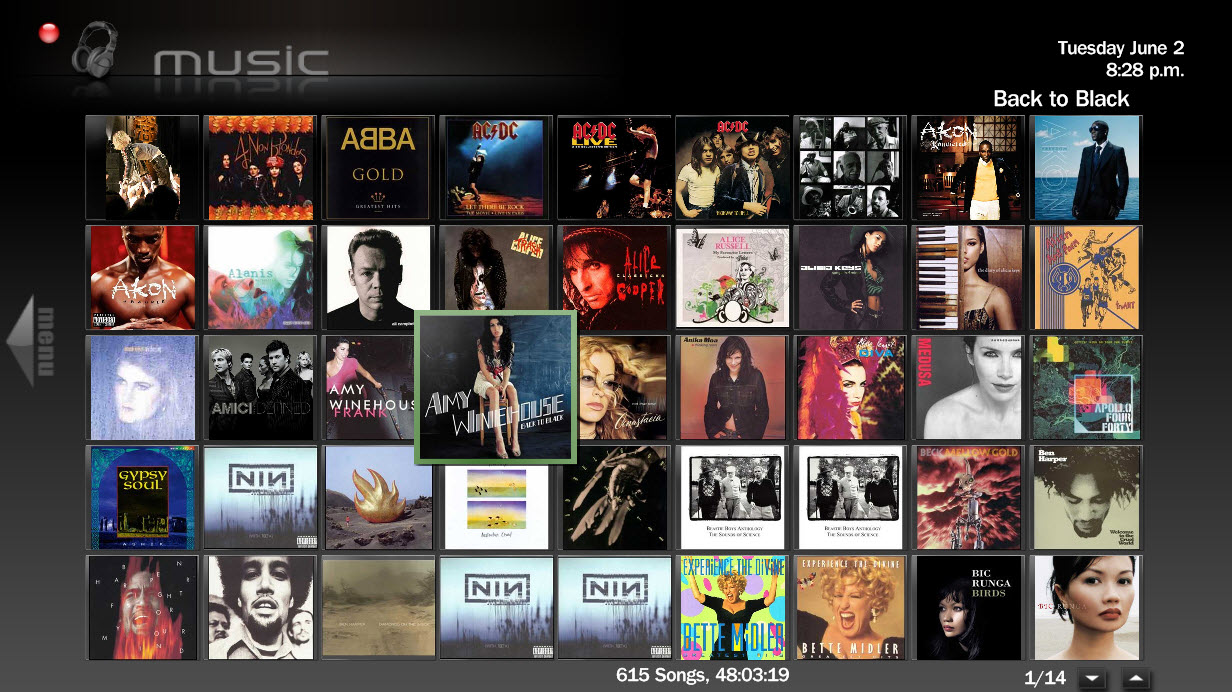
    What size screen are you using? (is it 16:9?)The dimensions of my plasma screen are a little less than 1280 x 720, but as you can see from the following screenshot I can see the number of files plus spin control buttons.

    ...I think with a wide screen this would explain why microsoft went sideways with scrolling and have three rows of album icons not 4.....but this does not fitin with MP std screens. Not sure that it would make any diffs anyway...

    Yeah, scrolling up or down or sideways doesn't really make too much difference to me but it would be good to have that artist info showning....

    Bleazle
     

    Attachments

    • music.jpg
      music.jpg
      260.8 KB

    kiwijunglist

    Super Moderator
  • Team MediaPortal
  • June 10, 2008
    6,743
    1,754
    New Zealand
    Home Country
    New Zealand New Zealand
    I'd like to see the graphic [Headphones Logo + MUSIC] when in the music setting change to [Headphones + MUSIC: Playlists] when in the playlist section of my music.

    What font are you using for it?
     

    Neville

    Portal Pro
    July 21, 2008
    136
    13
    Hamilton
    Home Country
    New Zealand New Zealand
    Hi Neville, thanks for the feedback, here's my feedback on your feedback:)
    you're welcome!

    ...how do I get MP to remember that view seems to default back to my "shares" view?:confused:...

    After you've set up the music view as above, select "Switch View" and then scroll down to "All Albums" (sorry, I should have been clearer before)

    ...If I highlight and album the name comes up in [brackets] at top of screen. Should there not be some more space there, bigger text and no square brackets. Maybe the artist info could be displayed as well?

    To get rid of the [brackets] grab the references.xml file posted here https://forum.team-mediaportal.com/bleazle-311/bleazlewide-v7-59048/index7.html#post422287. By "more space", do you mean that selecting the top right icon(s) shouldn't overlap the "Selected Item" title? I agree, but, I wanted to fit in as many rows as I could to get a "wall of music" so I figured that for the odd time there will be an overlap it wasn't too much of an issue.

    I don't like big text so I won't be making the "Selected Item" text bigger. I agree that it would be good to have the artists info as well but as far as I can tell it can't be done. The info shown here is handled by MediaPortal, not the skin (but if anyone knows of a way to get the artist info and the album title to show feel free to correct me)

    Will try this tonight! Wall of music still ideal and so more rows rather then fewer - do we need scroll bars at all? And a counter of how many albums? Maybe just leave out completely?

    Hopefully someone can work out how to put hte artist info there as well s would be helpfu lfor those albums that you have no idea who where or why you have !!:eek:

    ...At the bottom on large icon view anyway the scroll bar and number of screens as well as song total etc are invisible as covered...

    What size screen are you using? (is it 16:9?)The dimensions of my plasma screen are a little less than 1280 x 720, but as you can see from the following screenshot I can see the number of files plus spin control buttons.
    full high def - 1920x1080 i think it is
    I see you "small" icons look fine - is it a big icon think - not in front of the rig so can have a look when get home.

    ...I think with a wide screen this would explain why microsoft went sideways with scrolling and have three rows of album icons not 4.....but this does not fitin with MP std screens. Not sure that it would make any diffs anyway...

    Yeah, scrolling up or down or sideways doesn't really make too much difference to me but it would be good to have that artist info showning....
    I totally agree - just was a difference!

    regards Neville
     

    Neville

    Portal Pro
    July 21, 2008
    136
    13
    Hamilton
    Home Country
    New Zealand New Zealand
    :D:D:D
    Dave Ya Beauty
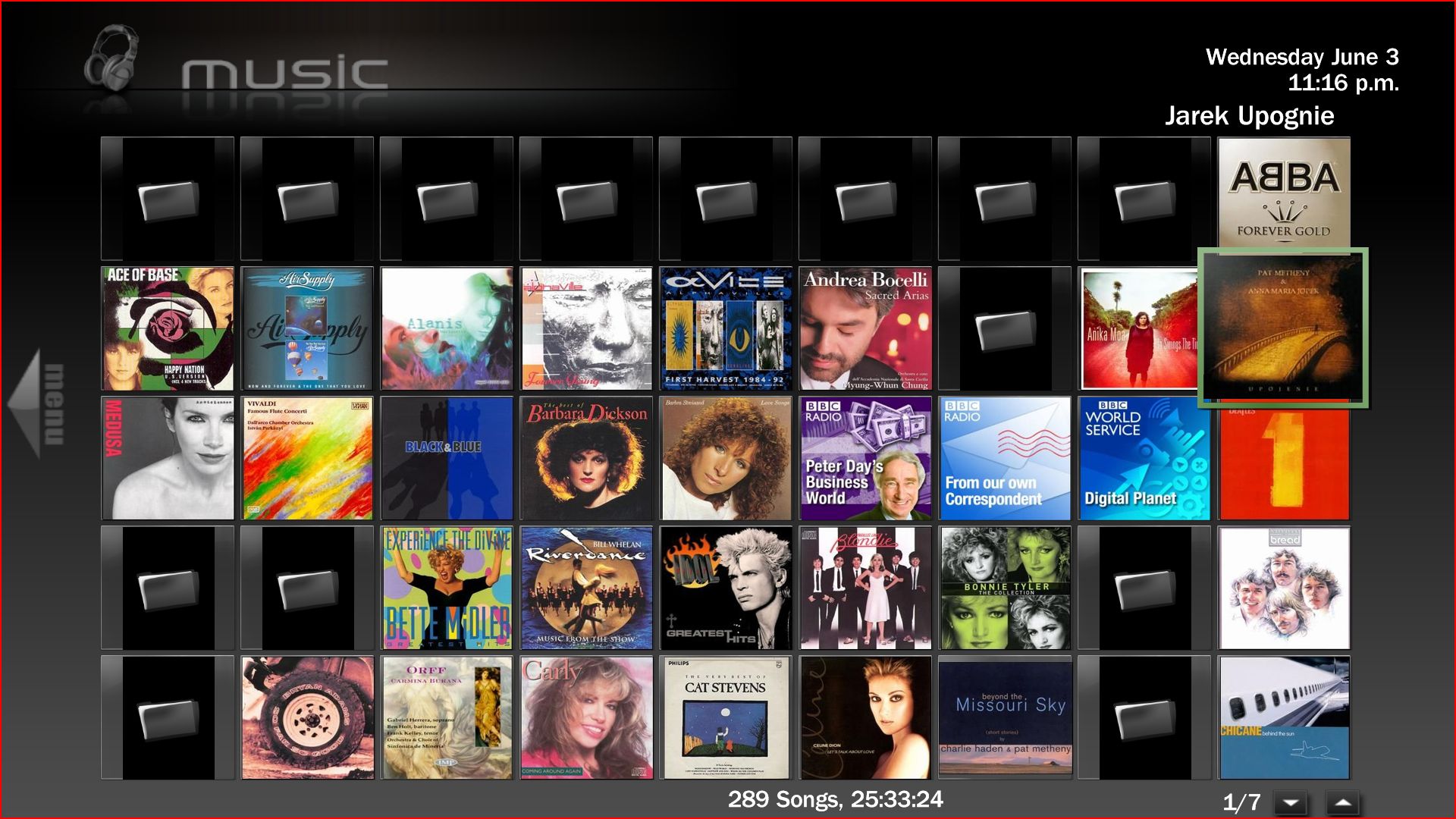
    Looks great now - changed the references.xml and the new common.facade.music :D:D

    see attached on the big screen
    regards
    Neville
     

    Attachments

    • Capture.JPG
      Capture.JPG
      319.5 KB

    Users who are viewing this thread

    Top Bottom