[solved] Cannot get FH Holiday to work (1 Viewer)

KJ-Cox

Design Group
  • Team MediaPortal
  • September 12, 2009
    252
    373
    Brisbane
    Home Country
    Australia Australia
    MP 1.32 x86
    FH 4.0.3.338
    Holidays 1.0.0.17

    I added a birthday and changed the FanartHandler.xml to HolidayShowAllDay yes so I can make sure it works.
    Am I missing a setting?

    Edit: Added logs. Let me know what else you need.
     

    Attachments

    • FanartHandler.log
      7.2 KB
    • MediaPortal-Error.log
      4.5 KB
    • fontEngine.log
      231 KB
    • MediaPortal.log
      84.8 KB
    • LatestMediaHandler.log
      3.9 KB
    • LatestMediaHandler_config.log
      2.1 KB
    • FanartHandler_config.log
      33.6 KB
    • FanartHandler.Holidays.Custom.xml
      278 bytes
    Last edited:

    ajs

    Development Group
  • Team MediaPortal
  • February 29, 2008
    15,959
    13,420
    Kyiv
    Home Country
    Ukraine Ukraine
    HolidayShowAllDay yes
    If today is a holiday, then his Fanart will be shown all day, not for a certain period and then stop. In my opinion this is how it works. The display of the holiday depends on the Skin.
     

    KJ-Cox

    Design Group
  • Team MediaPortal
  • September 12, 2009
    252
    373
    Brisbane
    Home Country
    Australia Australia
    If today is a holiday, then his Fanart will be shown all day, not for a certain period and then stop. In my opinion this is how it works. The display of the holiday depends on the Skin.
    I added todays date as a birthday and see no background of icon.
    Using Titan skin and trying both default and with MEPO theme.

    Nothing works. In fact with MEPO theme, I see no images for at all besides the default background.
    mepo.png
     

    ajs

    Development Group
  • Team MediaPortal
  • February 29, 2008
    15,959
    13,420
    Kyiv
    Home Country
    Ukraine Ukraine
    Added logs. Let me know what else you need.
    You need to enable the log mode - Debugging, there is little information in these logs, and there is not a single error. Everything is working as normal.
    I added todays date as a birthday and see no background of icon.
    Was the file edited while the Media Portal was not running? Changes are not picked up on the fly.
    Nothing works. In fact with MEPO theme, I see no images for at all besides the default background.
    It seems to me that in the Skin settings in the Media Portal you need to select FanartHandler.
     

    KJ-Cox

    Design Group
  • Team MediaPortal
  • September 12, 2009
    252
    373
    Brisbane
    Home Country
    Australia Australia
    You need to enable the log mode - Debugging, there is little information in these logs, and there is not a single error. Everything is working as normal.
    Debug enabled and new logs attached.
    Was the file edited while the Media Portal was not running? Changes are not picked up on the fly.

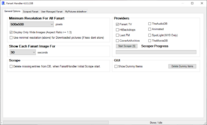
    Yes, Media Portal was not running. I cannot find the setting in the GUI so I manually edited FanartHandler.xml for HolidayShow, HolidayShowAllDay and HolidayEaster. Also, FanartHandler.Holidays.Custom.xml.

    I have now tried editing those two files with fanart handler open and then with Media Portal open but it still does not work.

    FH Settings.png

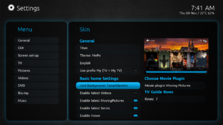
    It seems to me that in the Skin settings in the Media Portal you need to select FanartHandler.
    Already had FanartHandler as the selected Background in skin settings.

    Skin settings.png
     

    Attachments

    • MediaPortal.log
      670.3 KB
    • LatestMediaHandler.log
      6.5 KB
    • Configuration.log
      48.2 KB
    • FanartHandler.log
      34.7 KB
    • MediaPortal-Error.log
      798 bytes

    KJ-Cox

    Design Group
  • Team MediaPortal
  • September 12, 2009
    252
    373
    Brisbane
    Home Country
    Australia Australia
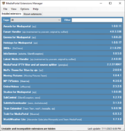
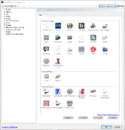
    Maybe I am missing a required plugin?
    Not running anything like MePoTools.
    Testing with Titan skin with default as well as ajs.MePo.Theme.for.Titan.mpe1

    plugins.png

    plugins-config.png
     

    ajs

    Development Group
  • Team MediaPortal
  • February 29, 2008
    15,959
    13,420
    Kyiv
    Home Country
    Ukraine Ukraine
    Debug enabled and new logs attached.
    In log i see:
    Code:
    Fanart Handler Holidays folder: C:\ProgramData\Team MediaPortal\MediaPortal\Thumbs\Skin FanArt\UserDef\Holidays\
    Fanart Handler Holidays (Icon) folder: Theme|Skin|Thumb: \Media\Logos\Holidays\
    Holiday: [x][x] Fanart, [x] All Day, Show: 0min Country: EN Language: EN Easter: Pesach
    Active Window: 35 Refresh: [x] -> Window: [x] Overlay: [ ] Allow: [x]
     --- [x] [x] Play, [ ] Player, [ ] [ ] Selected, [x] Random, [x] Random Latests, [x] Weather, [x] Holiday
    RefreshHolidayProperties: The added or subtracted value results in an un-representable DateTime.
    Parameter name: value
    Here's the problem: The added or subtracted value results in an un-representable DateTime.
    The DateTime Structure has a Minimum value of 1/1/0001 and a maximum value of 12/31/9999
    The code in your loop is attempting to add a number of days that is making today go outside of this range.
    I don't think it's a bug in the source code (but I don't rule it out), more like the quality of the source data, you can send me your files:
    FanartHandler.Holidays.xml
    FanartHandler.Holidays.Custom.xml
     

    KJ-Cox

    Design Group
  • Team MediaPortal
  • September 12, 2009
    252
    373
    Brisbane
    Home Country
    Australia Australia
    Here's the problem: The added or subtracted value results in an un-representable DateTime.
    I did see that and had found an issue with the day and month in my Holidays.Custom, but fix it a couple of days ago (I think).
    I don't think it's a bug in the source code (but I don't rule it out), more like the quality of the source data, you can send me your files:
    FanartHandler.Holidays.xml
    FanartHandler.Holidays.Custom.xml
    Attached. Thanks!
     

    ajs

    Development Group
  • Team MediaPortal
  • February 29, 2008
    15,959
    13,420
    Kyiv
    Home Country
    Ukraine Ukraine
    Gotcha! There is an error in the FanartHandler.Holidays.Custom.xml file!
    Code:
    This file contains the following errors:
    error on line 18 at column 12: Opening and ending tag mismatch: Month line 16 and Holiday
    Missing < in <Month>9/Month> :)
    Try this ... :):coffee::whistle:
     

    Users who are viewing this thread

    Similar threads

    I compliment you on the thoroughness of your investigations. (y) Unfortunately, I don't have any ideas what the problem might be. :( Perhaps someone else will post with some suggestions. :unsure: -- from CyberSimian in the UK
    I compliment you on the thoroughness of your investigations. (y) Unfortunately, I don't have any ideas what the problem might be...
    Would appreciate it if someone could solve (or point me in the right direction to resolve) this issue. I have “MultiSeat”...
    Replies
    4
    Views
    1K
    MP 1.37 Final (Willow) Bugfix II released, download links updated...
    MP 1.37 Final (Willow) Bugfix II released, download links updated...
    We have just released MediaPortal 1.37 - Willow x86 and x64 version. Highlights of this release Bugfixes: [MP1-5232] - GPU...
    Replies
    4
    Views
    3K
    • Sticky
    yes that is indeed what I did in that ticket. It may already be working without updating those plugins because most of it was not relevant to the plugin itself (test, some leftover unused parts etc).
    yes that is indeed what I did in that ticket. It may already be working without updating those plugins because most of it was not...
    We have just released MediaPortal 1.38 - Tatiana & Leo x86 and x64 version. Highlights of this release Bugfixes: New...
    Replies
    37
    Views
    9K
    MP1 MP2 MP2 - V2.3 EPG has stopped DE
    The only configuration that is certain to work is when the MP client and MP server are from the same release. It is sometimes possible to use MP clients from a release that is different to the MP server, but whether it works depends on the specific changes that were made between the two releases. -- from CyberSimian in the UK
    The only configuration that is certain to work is when the MP client and MP server are from the same release. It is sometimes...
    Before you create this bug report: Make sure that your system (Windows, codecs and drivers) is up to date, matching the...
    Replies
    10
    Views
    5K
    I had the same issue and found the executable under C:\ProgramData\Team MediaPortal\MediaPortal\skin\Titan\BasicHome.Editor\TitanEditor.exe Only the shortcut was missing.
    I had the same issue and found the executable under C:\ProgramData\Team...
    Hi all, Not a rant, more a sharing of experience (maybe hoping to get some clarification on which wrong turn I took) It has been...
    Replies
    9
    Views
    4K
    Top Bottom