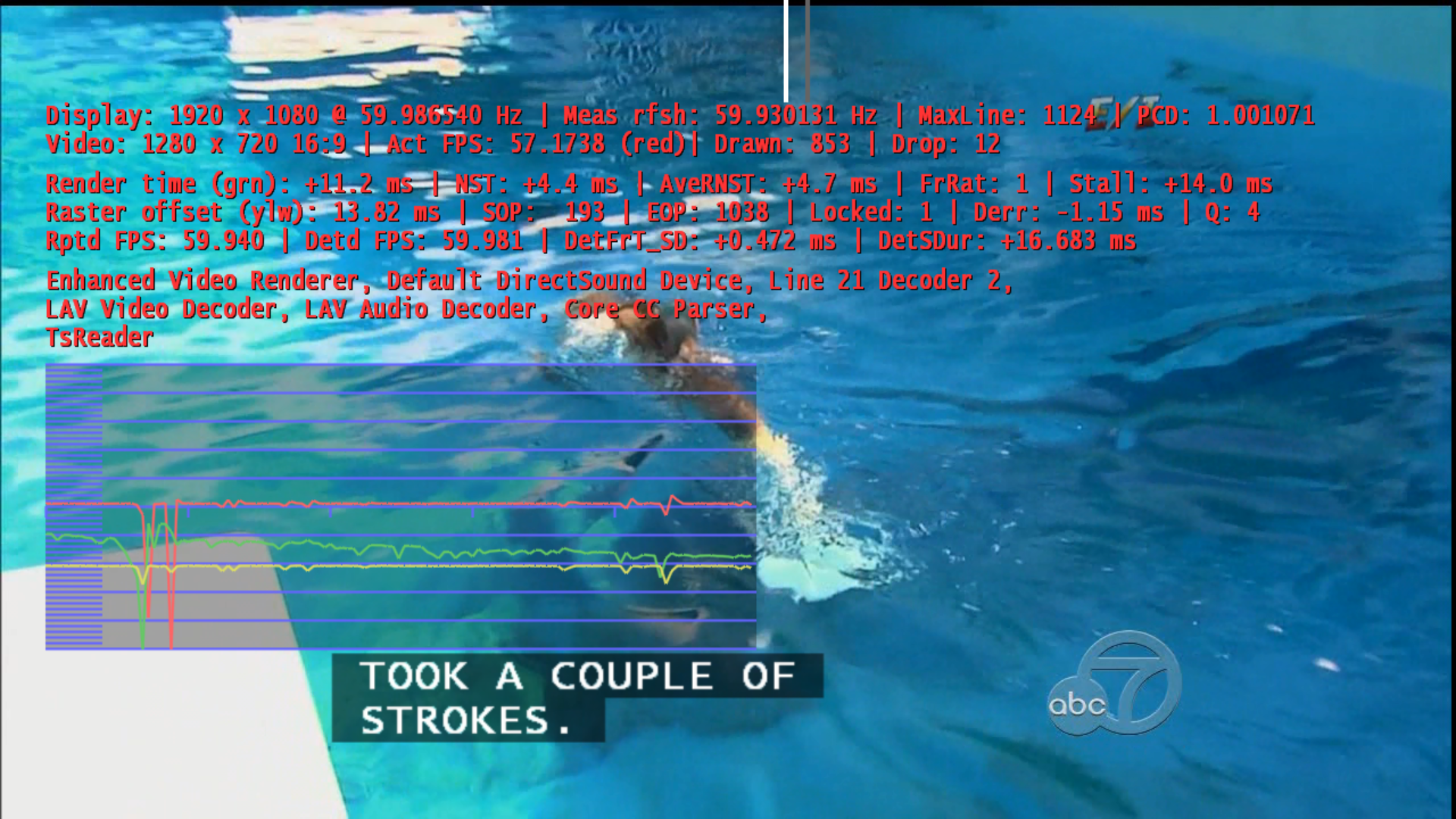
closed captioning does not appear (1 Viewer)

RonD

Test Group
  • Team MediaPortal
  • December 20, 2011
    911
    278
    SillyValley CA
    Home Country
    United States of America United States of America
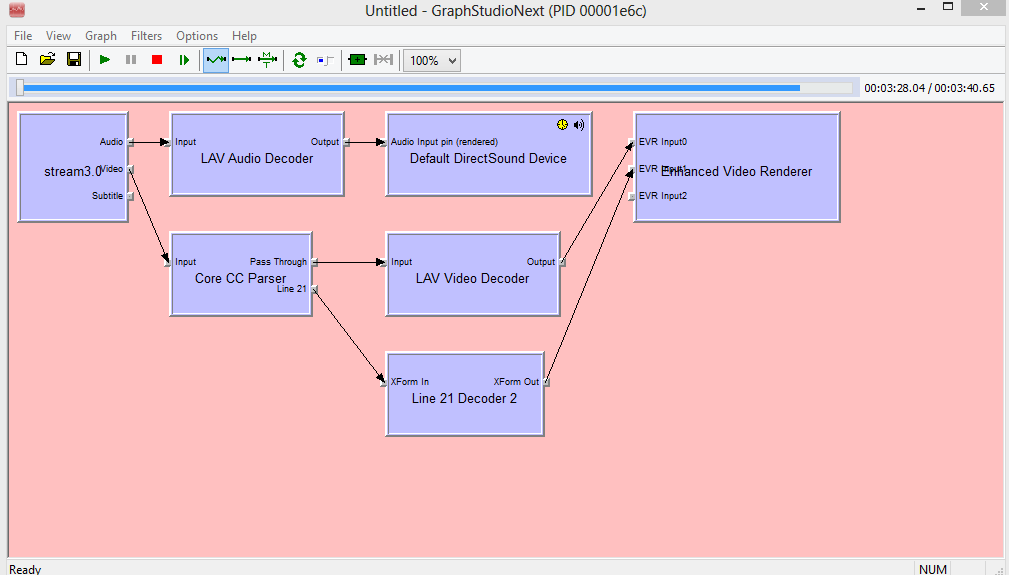
    I ran my Vista x64, MePo 1.3 system and used graphstudio to show a working example. The attached MediaPortal.log shows starting MePo, going to TV, watching Live TV, enabling CC, and then stoping/exiting MePo. This uses Cyberlink for video codec. I tried this with both DefaultWide and Titan skins, CC works with both but I normally just use DW skin. This is on a 2009 Dell laptop with Dell PowerDVD v8.1.

    I tried getting MePo 1.3 CC working a 2013 Dell laptop Win 8.0 x64 that also has PowerDVD v10 SW. This does not seem to work. I'll see if I can get graphstudio working on this system. Need to double check that I have the correct MePo CC setup
     

    Attachments
    • MePo_1p3_CC1.PNG
      MePo_1p3_CC1.PNG
      126.3 KB
    Last edited:

    tachtevrenidis

    Portal Pro
    July 22, 2013
    80
    12
    Home Country
    United States of America United States of America
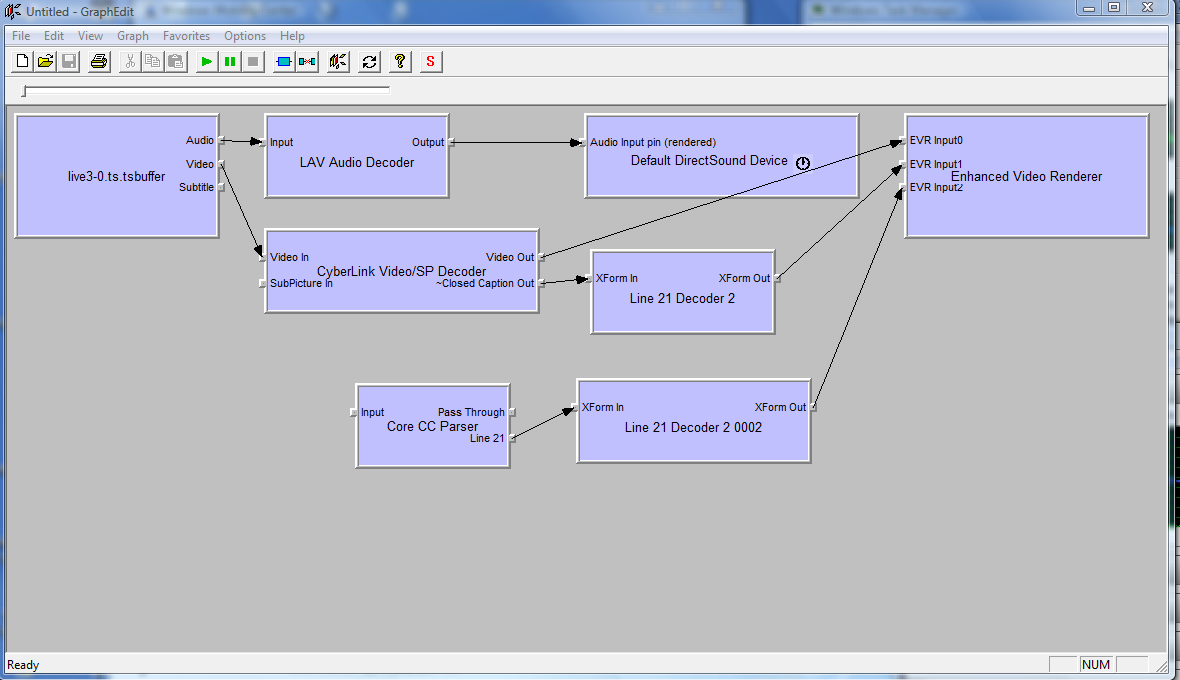
    This is why it will not work, with your actual screenshot, you will get CC only for analog (i think) like DVD.
    To have a hope of work, you should see like my screenshot.

    So i can think of this : TsReader can't send a Video Output that Core CC Parser can handle (like H264 stream) or Core CC parser can't accept the connexion.

    Can you try with different Cyberlink Decoder, i use PDVD12 Video and not the Video/SP maybe it can make a difference.

    Or the channel (VideoType) is not handled by CoreCC Parser.

    You can see VideoType by double clic on 'Live2-0.ts.buffer' (TsReader) got to video tab and see if stream is H264 (AVC for ex) or other type.

    For ex for me : (H264)
    View attachment 133711


    MPEG2 : (Core CC Parser Connected correctly)
    View attachment 133712


    the video format shows MPEG2. The other cyberlink dvd decoder does not work either (as far as cc goes). What a dead end!
     

    Sebastiii

    Development Group
  • Team MediaPortal
  • November 12, 2007
    16,523
    10,466
    France
    Home Country
    France France
    My screenshot are based on Win8 with 1.4.0 install, but i can't really test CC displayed, i don't have it here, i have some sample somewhere.
    But i can only say that i have correct connection :)
    I will attach the Core CC Parser i have (maybe it's different but i don't think so) :)
     

    Attachments

    • cccp.zip
      49.8 KB

    Sebastiii

    Development Group
  • Team MediaPortal
  • November 12, 2007
    16,523
    10,466
    France
    Home Country
    France France
    This is why it will not work, with your actual screenshot, you will get CC only for analog (i think) like DVD.
    To have a hope of work, you should see like my screenshot.

    So i can think of this : TsReader can't send a Video Output that Core CC Parser can handle (like H264 stream) or Core CC parser can't accept the connexion.

    Can you try with different Cyberlink Decoder, i use PDVD12 Video and not the Video/SP maybe it can make a difference.

    Or the channel (VideoType) is not handled by CoreCC Parser.

    You can see VideoType by double clic on 'Live2-0.ts.buffer' (TsReader) got to video tab and see if stream is H264 (AVC for ex) or other type.

    For ex for me : (H264)
    View attachment 133711


    MPEG2 : (Core CC Parser Connected correctly)
    View attachment 133712


    the video format shows MPEG2. The other cyberlink dvd decoder does not work either (as far as cc goes). What a dead end!


    Can you go on IRC ? (webchat.freenode.net) #mediaportal ?
    We can try teamviewer session before going to watch TV (11:10 PM here lol)
     

    RonD

    Test Group
  • Team MediaPortal
  • December 20, 2011
    911
    278
    SillyValley CA
    Home Country
    United States of America United States of America
    downloaded the cccp.zip from Sebastiii and noticed the unzipped cccp.ax files had different sizes

    68 KB old CoreCCParser file from the wiki link
    108 KB new cccp.zip

    to unregister the old file then install the new cccp.ax I opened a "admin command prompt", cd'd to the folder with the new cccp.ax file and did the following

    regsvr32 /u cccp.ax
    regsvr32 cccp.ax

    with the new cccp.ax and Cyberlink Video/SP Decoder (PDVD10), US ATSC Closed Captions Work for Live TV and Recorded TV on my Win8 laptop with MePo 1.3.
     
    Last edited:

    mm1352000

    Retired Team Member
  • Premium Supporter
  • September 1, 2008
    21,544
    8,236
    Home Country
    New Zealand New Zealand
    So, that's two for the wiki update list... :)
    1. Only PDVD codecs work.
    2. Update source of core CC parser.
     

    tachtevrenidis

    Portal Pro
    July 22, 2013
    80
    12
    Home Country
    United States of America United States of America
    This is why it will not work, with your actual screenshot, you will get CC only for analog (i think) like DVD.
    To have a hope of work, you should see like my screenshot.

    So i can think of this : TsReader can't send a Video Output that Core CC Parser can handle (like H264 stream) or Core CC parser can't accept the connexion.

    Can you try with different Cyberlink Decoder, i use PDVD12 Video and not the Video/SP maybe it can make a difference.

    Or the channel (VideoType) is not handled by CoreCC Parser.

    You can see VideoType by double clic on 'Live2-0.ts.buffer' (TsReader) got to video tab and see if stream is H264 (AVC for ex) or other type.

    For ex for me : (H264)
    View attachment 133711


    MPEG2 : (Core CC Parser Connected correctly)
    View attachment 133712


    the video format shows MPEG2. The other cyberlink dvd decoder does not work either (as far as cc goes). What a dead end!


    Can you go on IRC ? (webchat.freenode.net) #mediaportal ?
    We can try teamviewer session before going to watch TV (11:10 PM here lol)


    Sebastiii, thank you for all your dedication on this. I will try the new .ax and report back. If it does not work we can try to get on IRC at a time that is convenient for you.
     

    RonD

    Test Group
  • Team MediaPortal
  • December 20, 2011
    911
    278
    SillyValley CA
    Home Country
    United States of America United States of America
    tachtevrenidis

    if you try the new cppp.ax file, try both the Cyberlink and LAV TV Codecs. This morning I tried LAV/new_cppp.ax and Closed Captions work on all 3 of my MePo 1.3 systems, Vista-64, Win8-64, and Win7-64. The win7-64 system does not have PowerDVD/Cyberlink codecs installed. I have not tried any of the other codec options.

    @Sebastiii do you expect LAV with new cppp.ax to work for ATSC Closed Captions?

    added the graphstudio snapshot for LAV, new cppp.ax from the Win8 system. Also tested ATSC/CC for some RecordedTV shows and TV Series, CC also works.
     

    Attachments

    • 10-43-10.png
      10-43-10.png
      1.9 MB
    • Win8_MePo1p3_CC.PNG
      Win8_MePo1p3_CC.PNG
      24.6 KB
    Last edited:

    tachtevrenidis

    Portal Pro
    July 22, 2013
    80
    12
    Home Country
    United States of America United States of America
    The new .ax file works! It is beautiful. My wife really has hearing loss (I was not kidding) so this was a showstopper for us. I tried all video decoders and it just works!

    thanks again for all your guys' help on this!
     

    mm1352000

    Retired Team Member
  • Premium Supporter
  • September 1, 2008
    21,544
    8,236
    Home Country
    New Zealand New Zealand
    Thanks guys - that's awesome news! :)
    I've updated the link in the wiki to point to Sebastiii's attachment... but even better would be if we could have a link to an official download source.
    @Sebastiii, do you remember... did you build the filter from source code yourself, or did you download it from somewhere?
     

    Users who are viewing this thread

    Similar threads

    I currently have two Quatros running, one connect, one duo using OTA antennae, mostly UHF fringe area, mostly cat5 local network. Hauppauge card retired long ago. I have also retired very early SD units, the Quatros seem to work much better than the older units. Go to SD's support website and download and install the windows...
    I currently have two Quatros running, one connect, one duo using OTA antennae, mostly UHF fringe area, mostly cat5 local network...
    I am currently using a Hauppauge WinTV QuadHD PCIe card on MP1 (1.37) for DVB-T, but 2 of the tuners have died. Thinking about...
    Replies
    3
    Views
    1K
    I don't know about MP2 but as you said you tried MP1 too, how is the MP music config ? MP(1) will only use LAV if you select "Internal DirectShow player" as music output, but then you lose gapless playback. If you you don't have multichannel music you can choose WASAPI as the output and set the number of speakers to stereo. I have...
    I don't know about MP2 but as you said you tried MP1 too, how is the MP music config ? MP(1) will only use LAV if you select...
    Not sure if this a a bug/config/settings problem. I am running a media portal 2.5 server with 2.41 client but it seems I get the...
    Replies
    1
    Views
    651
    MP1 MP2 Not working! DE
    O Frabjous Joy! That seems to have done the trick. Thank you so much for your help and advice, CyberSimian. I hadn't thought of deleting the various folders, but I'll bear that in mind for any future disasters. Now I can record King & Conqueror on Sunday! Cheers Ralph
    O Frabjous Joy! That seems to have done the trick. Thank you so much for your help and advice, CyberSimian. I hadn't thought of...
    I've been running MediaPortal on my PC for several years, but the most recent update "MediaPortal 1.38 Release " does...
    Replies
    5
    Views
    2K
    Reading through your code, I can see it's more than a couple steps above my paygrade. :cry:
    Reading through your code, I can see it's more than a couple steps above my paygrade. :cry:
    I used to run the TVService under the "NT Service\TVService" account to follow least privileges principal (not exposing my whole...
    Replies
    3
    Views
    2K
    @CyberSimian Sorry, I missed your last post. I ended up doing a clean install on the client and all is well now. It still doesn't let me go back in time when I change channels but it does continue operating from that point on. I'm ok with that. Thanks for your help! EDIT: I now downgraded the server (as I did with the client above)...
    @CyberSimian Sorry, I missed your last post. I ended up doing a clean install on the client and all is well now. It still doesn't...
    When I first start watching a TV program the timeshift functions works perfectly. I can shift back and forth in time and it works...
    Replies
    11
    Views
    3K
    Top Bottom