
Flickering Tv-guide and other overlays with EVR enabled (1 Viewer)

rtv

Retired Team Member
  • Premium Supporter
  • April 7, 2005
    3,622
    301
    Osnabruck
    Home Country
    Germany Germany
    So I gueess its a codec problem.

    From what I can say you will only see flicker when DXVA is used. So my assumption is you do not see it on codecs not supporting DXVA.

    grubi.

    Not exactly true. On my machine only Cyberlink codecs expose this issue. If I e.g. use the ATI avivo codecs which make also use of DXVA I don't see any flickering at all. It also does not flicker using ffdshow software decoding with interlaced flag for the renderer to let the GPU do the deinterlacing.
     

    grubi

    Portal Pro
    June 16, 2007
    1,207
    87
    127.0.0.1
    Home Country
    Germany Germany
    Please test what rtv has proposed few months(?) ago. Currently there is no clue what other could cause it on the remaining systems that are still affected after the surface to texture video rendering change.

    Seems that I have missed that. Was this public? Do you have a link?

    grubi

    I just scanned the last page of this thread - at least it's not in here...
    Maybe I mixed up the threads and posted it in our internal team section by accident.

    Testing is easy:
    Use overclocking tools or an alternate BIOS from here to make sure your gpu memory is using the same frequencies for all load scenarios. There are even easy to use BIOS mod tools which allow you to save your own BIOS and just tweak the clock rates.

    Light version of testing:
    Those ATI users which do NOT see the issue (e.g. chemelli?) could look up their exact model and check if its BIOS is using the same speeds.

    OK just extracted the BIOS and checked the values with the tools you stated.
    On my card HD2600XT all clock settings are identical for all modes GPU:800 RAM:700.

    What's next?

    Regards,
    grubi.
     

    providers

    MP Donator
  • Premium Supporter
  • October 3, 2007
    158
    4
    Home Country
    Denmark Denmark
    So I gueess its a codec problem.

    From what I can say you will only see flicker when DXVA is used. So my assumption is you do not see it on codecs not supporting DXVA.

    grubi.

    Not exactly true. On my machine only Cyberlink codecs expose this issue. If I e.g. use the ATI avivo codecs which make also use of DXVA I don't see any flickering at all. It also does not flicker using ffdshow software decoding with interlaced flag for the renderer to let the GPU do the deinterlacing.

    Where do I find that codec?
    Edit, found it on ATI homepage.

    And is it as good as cyberlinks?
    Testing now.....
     

    chemelli

    Retired Team Member
  • Premium Supporter
  • September 28, 2006
    6,159
    2,264
    52
    Milano, Italy
    Home Country
    Italy Italy
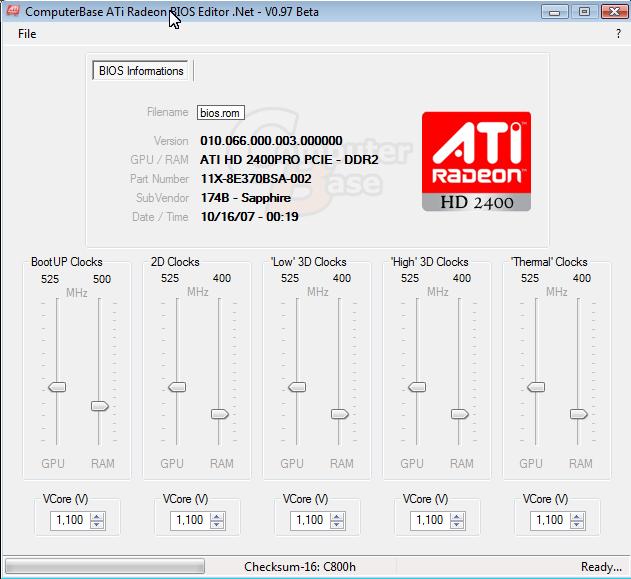
    Those ATI users which do NOT see the issue (e.g. chemelli?) could look up their exact model and check if its BIOS is using the same speeds.

    Used ATIWinFlash v2.0.0.1 to save the current bios. Then loaded this rom into ATI Bios Edit v0.97 Beta.
    Result screen attached.

    Simone
     

    Attachments

    • ATI bios.jpg
      ATI bios.jpg
      50.5 KB

    rtv

    Retired Team Member
  • Premium Supporter
  • April 7, 2005
    3,622
    301
    Osnabruck
    Home Country
    Germany Germany
    OK just extracted the BIOS and checked the values with the tools you stated.
    On my card HD2600XT all clock settings are identical for all modes GPU:800 RAM:700.
    Afaik the <3xxx series didn't support load based "powerplay".
     

    kszabo

    MP Donator
  • Premium Supporter
  • December 6, 2007
    796
    86
    Germany, Bayern
    Home Country
    Hungary Hungary
    Not exactly true. On my machine only Cyberlink codecs expose this issue. If I e.g. use the ATI avivo codecs which make also use of DXVA I don't see any flickering at all. It also does not flicker using ffdshow software decoding with interlaced flag for the renderer to let the GPU do the deinterlacing.

    interesting. I would say that the avivo DXVA is broken and does not work ;) Is there a way to verify if it is working or not? (except monitoring CPU load with same film).

    How is your pic quality with ffdshow-decode-gpu-deinterlace? Same as with PDVD full-dxva?
     

    MLH01

    MP Donator
  • Premium Supporter
  • March 11, 2009
    157
    23
    Gold Coast
    Home Country
    Australia Australia
    Those ATI users which do NOT see the issue (e.g. chemelli?) could look up their exact model and check if its BIOS is using the same speeds.

    Used ATIWinFlash v2.0.0.1 to save the current bios. Then loaded this rom into ATI Bios Edit v0.97 Beta.
    Result screen attached.

    Simone

    I tried the same thing with my Sapphire HD2400XT, which had default clock settings set to GPU:700/Mem:800 for all options in ATI BIOS Editor. I still had stuttering problems - more noticeable in the TV guide.

    I also set all clock settings to GPU:600/Mem:700 (underclocked), with no success either :(

    This is a frustrating bug. Unfortunately I don't know enough about the skin internals or DirectShow programming to help.

    MLH01.
     

    tourettes

    Retired Team Member
  • Premium Supporter
  • January 7, 2005
    17,301
    4,800
    This is a frustrating bug. Unfortunately I don't know enough about the skin internals or DirectShow programming to help.

    No one is ruled it out that it could be even ATI's driver code that causes the issue :p
     

    kszabo

    MP Donator
  • Premium Supporter
  • December 6, 2007
    796
    86
    Germany, Bayern
    Home Country
    Hungary Hungary
    I don't know if this obesrvation helps:
    it looks like people with dedicated ATi graphics cards have heavier flickering issues then users with onboard ATi with shared memory. I had annoying flicker before also but since Catalyst 8.12 (as far as I can remember) or later the issue reduced itself to a very little amount (by scrolling seldom 1 fast blinker, no flicker). This would suggest that this has something to do with the way graphics memory is used (dedicated vs. shared).

    system: Vista 32 bit, EVR, HD3200 onboard / 780G, PC800 RAM, CPU Phenom X3

    as a workaround why don´t all of you with this problem use ffdshow as MPG2 decoder with interlaced flag and let do only the deinterlacing by the ATi GPU. You would have no flicker of the GUI and same picture quality as with a DXVA-codec. Just untill this bug is corrected from someone (maybe with Mediaportal 2 first). I would say a CPU load of e.g. 15-20% for ffdsow or 1-4% for a DXVA-codec plays no argumentative role. DXVA is not that important to have.

    1080i HDTV h.264 is another issue if you have weak CPU. You cannot go on without DXVA. But maybe you have flicker only on SDTV MPG2 streams not with h.264 1080i.
     

    MLH01

    MP Donator
  • Premium Supporter
  • March 11, 2009
    157
    23
    Gold Coast
    Home Country
    Australia Australia
    This is a frustrating bug. Unfortunately I don't know enough about the skin internals or DirectShow programming to help.

    No one is ruled it out that it could be even ATI's driver code that causes the issue :p

    That's possible. If it was the ATI driver, then I'd have no chance of working it out... :D

    Does the flickering happen in Media Centre? I've never tried Media Centre or any other media application for TV, so wouldn't know. I didn't think the Media Centre interface was anywhere near as user friendly as MediaPortal's.

    Where I'm headed here is that if other media applications work without flickering, then would that confirm - or at least reinforce - the idea that the "bug":mad: lies somewhere in MediaPortal?

    Note: the second smilie above is aimed directly at the "bug" - not at anyone here. Overall I really like MP and think the development team have done a fantastic job so far. Keep up the great work!

    Regards,
    MLH01.
     

    Users who are viewing this thread

    Top Bottom