How to increase video cache buffer ? (1 Viewer)

jezra85

New Member
April 10, 2010
4
0
Hi,
Is there a way to delay the buffering? Im trying to watch online TV and every few seconds it starts buffering. Are there plugins I can install to delay it abit?
Thanks
 

el Filou

MP Donator
  • Premium Supporter
  • July 2, 2008
    144
    116
    Home Country
    Belgium Belgium
    What do you mean by "delay" ?

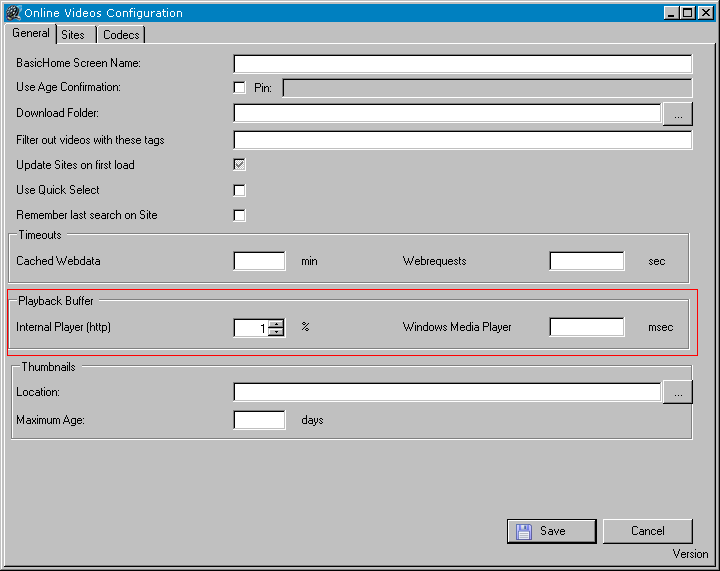
    If you have that problem on all or most of the sites that means it's coming from your connection. Try to increment the initial buffer % offbyone was refering to (it's under "playback buffer" in the options screen) until the pauses go away.

    If you have that problem only with some sites/some videos, that means the problem is on the server side (I sometimes encounter that problem even with YouTube: some rare videos simply can't be watched in realtime as they're pausing every 5 seconds to rebuffer, must be a server load-balancing issue on their side), and that means you would have to set an incredibly high initial buffer % in order to eliminate pauses, and that would negatively impact other sites that are working OK and you would wait an eternity each time you want to watch something. I think the best to do in that case is to download the video in the background and watch it later when it's finished. You can still watch something else in the meantime.
     

    el Filou

    MP Donator
  • Premium Supporter
  • July 2, 2008
    144
    116
    Home Country
    Belgium Belgium
    It is at the bottom of the "General" tab, it's called "Playback buffer" and has two settings: one in milliseconds for Windows Media streams, and one in percentage of total video lenght for HTTP streams.

    At least it's in that place in version 0.20, I can't say for subsequent versions as I've not updated to MP 1.1 yet so I'm stuck at v0.20
     

    el Filou

    MP Donator
  • Premium Supporter
  • July 2, 2008
    144
    116
    Home Country
    Belgium Belgium
    i see. i guess ill have to find the older version then .

    thanks
    Did you even look at the config screen ?! :rolleyes:

    See attached picture, it's right there in the config screen even in latest version !
     

    Attachments

    • playback_buffer.PNG
      playback_buffer.PNG
      17.4 KB

    jezra85

    New Member
    April 10, 2010
    4
    0
    interesting...mine looks completely different and doesnt have that.

    this is what i have when i look at config settings.
     

    el Filou

    MP Donator
  • Premium Supporter
  • July 2, 2008
    144
    116
    Home Country
    Belgium Belgium
    I did my screenshot with 0.23, which is the current latest release (the fields are all empty because it doesn't work on MP 1.0.2 but I installed it anyway to do the screenshot).

    Make sure you use the latest version, that's all I can say to help. ;)
     

    Users who are viewing this thread

    Similar threads

    i think info but I'm really not sure
    i think info but I'm really not sure
    When I import new films using Moving Pictures, it takes an incredibly long time for the information to be found and downloaded...
    Replies
    3
    Views
    688
    Hi mate, As usual, you are always first up with an offer of assistance, and I really appreciate it. So sorry I haven't replied. I'll send you a PM now. Cheers, Steve.
    Hi mate, As usual, you are always first up with an offer of assistance, and I really appreciate it. So sorry I haven't replied...
    It appears that MP somehow caches previously used subtitle files for subsequent use next time the same video is played. My problem...
    Replies
    2
    Views
    2K
    Well, all that remains is to find someone who will add this render if it is a render.
    Well, all that remains is to find someone who will add this render if it is a render.
    Are there plans to support other video renderers? MadVR got added a while ago, but this a 'hardcoded' selection in the...
    Replies
    23
    Views
    9K
    To other people reading about this 'issue', Doskabouter provided me with a fix/patch. It is a modified version of tswriter.ax which solved the problem with dolby digital plus audio. I want to thank Doskabouter for all his time and energy he put into resolving this!!
    To other people reading about this 'issue', Doskabouter provided me with a fix/patch. It is a modified version of tswriter.ax which...
    Hi all, I could use some help with the following; OS: Win11 24H2 TV server: 1.37.000.0|x64 (working with Mediaportal for maybe 20...
    Replies
    4
    Views
    3K
    Before you create this bug report: Make sure that your system (Windows, codecs and drivers) is up to date, matching the Requirements and you've filled in your System Specs. Have a look at our MediaPortal Wiki! Maybe the solution is already there. Have a look at our Jira (Bug and Issue Tracker)and the threads in this section, maybe...
    Before you create this bug report: Make sure that your system (Windows, codecs and drivers) is up to date, matching the...
    Before you create this bug report: Make sure that your system (Windows, codecs and drivers) is up to date, matching the...
    Replies
    0
    Views
    1K
    Top Bottom