IMON support (2 Viewers)

chemelli

Retired Team Member
  • Premium Supporter
  • September 28, 2006
    6,159
    2,264
    51
    Milano, Italy
    Home Country
    Italy Italy
    Which was the previous version installed ?

    Simone

    I was using 3120 and had the "standby problem" and i wanted to see if it was fixed in the new release.

    3210 was working fine (except standby) and now after installing 3120 imon is not detected any longer

    Can you be so kind to collect logs from working 3120 and also from non working 3127 ? I mean all IRSS files in the "log" directory...

    :D

    Simone
     

    belcom

    Retired Team Member
  • Premium Supporter
  • February 27, 2009
    154
    42
    45
    Leibnitz
    Home Country
    Austria Austria
    I've installed the new version, but now my imon remote isn't detected anymore. First time i just updated, second time i uninstalled the previous version and made a new install using application mode, but it's just not working.

    Please try to uncheck "Enable Keyboard Input" in IR Server Configuration and provide logs again. thx
     

    JoeSmith

    Portal Pro
    November 17, 2007
    314
    44
    Home Country
    Germany Germany
    first run of logs (keyboard still enabled, will try that in a few minutes...)


    edit : disabled "Enable Keyboard Input" and after a reboot it is now working. Sorry, i didn't know that i had to turn that one of, it was working with that option enabled.

    BIG THANKS !!

    P.S.: Do you still need "working" logs ?
     

    belcom

    Retired Team Member
  • Premium Supporter
  • February 27, 2009
    154
    42
    45
    Leibnitz
    Home Country
    Austria Austria
    Logs where minidisplay is causing MCE remote not to work.

    The "Back" key on MCE doesn't work in MP.

    Alpha with newest svn and iMon manager.

    How do i configure the PC to hibernate? Before when I had iMON manager instead I was able to put the HTPC into hibernate and then turn it back on with the remote. Is that possible with IRSS?

    As this post is very old I suggest you to da a CLEAN install of newest SVN (weekly build) of MP as well newest build of IRSS and test it again. I think you may suffer from an incompatibility between your MP and IRSS version. Also check the settings in minidisplay plugin: Use SoundGraph driver, USB, none of the checkboxes checked in "Advanced -> Hardware Options & Antec/iMON Manager"

    :D
     

    belcom

    Retired Team Member
  • Premium Supporter
  • February 27, 2009
    154
    42
    45
    Leibnitz
    Home Country
    Austria Austria
    first run of logs (keyboard still enabled, will try that in a few minutes...)


    edit : disabled "Enable Keyboard Input" and after a reboot it is now working. Sorry, i didn't know that i had to turn that one of, it was working with that option enabled.

    BIG THANKS !!

    P.S.: Do you still need "working" logs ?

    Yes, it does work with "enable keyboard input", too, but with that option enabled you will have the "double-click" issue.
    Anyway, your 3127 logs showed, that your system didn't list any iMON devices... thats very strange and I don't know where this comes from, but I'm sure it was the reboot what did the trick.
     

    JoeSmith

    Portal Pro
    November 17, 2007
    314
    44
    Home Country
    Germany Germany
    the strange thing is that i did 3-4 reboots after installing 3127 and i didn't work. I went back to 3120 and it worked after 1 reboot. After that i went back to 3127 to collect some logs and it didn't work again. I did a reboot to check and it did not work. Then i went to the setup unchecked the keyboard input, rebooted and it worked.
    It's also strange that button 1-9,Esc, Enter are still always working (And if i understood you correctly that should have been gone by disabling "Enable Keyboad Input" ??)
    It's not a big problem because i just deleted the keys from the mp plugin


    Edit : for testing i just actived the "Enable Keyboard Input" and my imon did not work anymore until i did a reboot. Now it's working again but that function doesn't seem to make a difference on my system at all (or : i simply don't know what it is supposed to do... ;-) )

    Edit2 : i went back to disable "Enable Keyboard Input" and now my remote is not working any longer. very strange
     

    1stdead

    Portal Pro
    February 1, 2008
    1,089
    139
    Copenhagen
    Home Country
    Denmark Denmark
    Hi.
    I install latest svn of IRSSI and couldn't get my MCE remote to work in application/Service mode. MCE remote is thicked in the Imon USB configuration. Nothing did work.

    One thing i did saw was that when irssi was started my display lighted up :/


    2009-10-18 16:46:03.256988 - Start_HID(): Failed to get open device ?

    Btw imon 7.64.0930
     

    JoeSmith

    Portal Pro
    November 17, 2007
    314
    44
    Home Country
    Germany Germany
    2009-10-18 16:46:03.256988 - Error: System.ComponentModel.Win32Exception: Failed to get open device
    at IRServer.Plugin.iMonUSBReceivers.Start_HID() in c:\svnroot\mp-plugins\trunk\plugins\IR Server Suite\IR Server Suite\IR Server Plugins\Imon USB Receivers\Imon USB Receivers.cs:line 748
    at IRServer.Plugin.iMonUSBReceivers.Start() in c:\svnroot\mp-plugins\trunk\plugins\IR Server Suite\IR Server Suite\IR Server Plugins\Imon USB Receivers\PluginBaseInterfaces.cs:line 104
    at IRServer.IRServer.OnStart(String[] args) in c:\svnroot\mp-plugins\trunk\plugins\IR Server Suite\IR Server Suite\IR Server\IR Server\IR Server.cs:line 299

    1stdead has got the same error as i do, or am i wrong ?
     

    belcom

    Retired Team Member
  • Premium Supporter
  • February 27, 2009
    154
    42
    45
    Leibnitz
    Home Country
    Austria Austria
    Ok... once again...

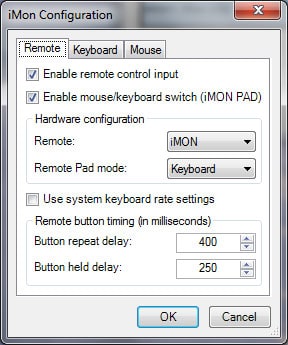
    Every new iMON HID offers 3 "internal" devices to windows.
    - (VID_15C2&PID_0038&MI_00&Col01) Mouse
    - (VID_15C2&PID_0038&MI_00&Col02) Keyboard
    - (VID_15C2&PID_0038&MI_01) Remote

    Mouse and Keyboard are "known" by Windows and so Windows accesses and processes them.
    Applications can also access Mouse and Keyboard directly, but not "exclusive", what means that key presses or mouse movements will always also be processed by Windows in its standard way.

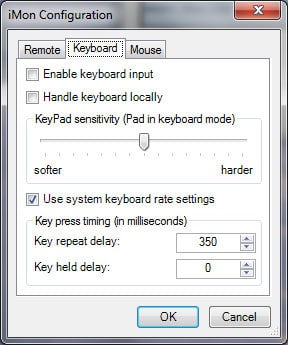
    So, if you enable keyboard in IRSS iMON plugin, MP will recieve this single key press twice, one time from Windows itself and a second time over IRSS (you can remember the "double-click"-'bug'?).
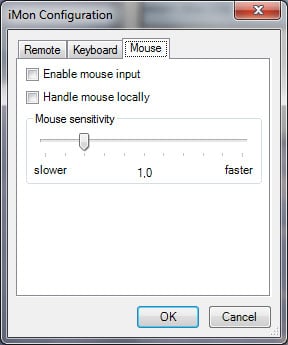
    Same thing belongs to mouse. As mouse commands are never sent to MP but to Windows, every mouse movement will happen with double speed, and every click also turns into double-clicks, because Windows get the command once from itself and a second time from IRSS.

    This leads us to the knowledge, that we have to uncheck "Enable Keyboard Input" and "Enable Mouse Input" to avoid any double-click issues.

    Next thing, if somebody wonders how the "remote" device works, here it is:
    First, over this device all commands are send to iMON (i.e. which remote should it listen to - PAD or MCE?, Keypad or Mouse mode?, and everything you see on the display)
    Second, all button presses which aren't sent over mouse or keyboard device come from it. These are all the media buttons, special buttons and PAD movements in Keypad mode.

    Now we learned, why the "KeyPad sensitivity" slider still works, even if "Enable keyboard input" is not checked.

    Why don't we simply delete all "unneccessary" checkboxes?
    Because there are so called DOS devices out there, and those (mostly) need these checkboxes enabled.
    Also, there are a few HIDs out there, which have something simmilar like old DOS firmware... strange thing, but thats why we cannot simply disable the checkboxes if a HID is detected.
    But we are thinking a lot about this, maybe someday we will get an idea how to get around this problem.

    For all HID users I attached some screenshots. Always start with the shown configuration. Only if keyboard or mouse doesn't already work try to enable them - step by step.

    Hope this helps a bit...

    Yours, belcom.
     

    Attachments

    • Remote.jpg
      Remote.jpg
      34.9 KB
    • Keyboard.jpg
      Keyboard.jpg
      31.3 KB
    • Mouse.jpg
      Mouse.jpg
      19.3 KB

    belcom

    Retired Team Member
  • Premium Supporter
  • February 27, 2009
    154
    42
    45
    Leibnitz
    Home Country
    Austria Austria
    JoeSmith, 1stdead:

    I now tried it with your iMON version (7.64.0930)

    Here it just works! I tried several reboots, hybernates, standbys, ...
    Don't have a clue what goes wrong at your side.

    All I can offer you is that we do a remote debug session!
    Because we will talk a lot please contact me in Skype or MSN.
     

    Users who are viewing this thread

    Top Bottom