
You are using an out of date browser. It may not display this or other websites correctly.
You should upgrade or use an alternative browser.
You should upgrade or use an alternative browser.
iPhone interface for MediaPortal (iPiMP) - original thread (now closed) (18 Viewers)
- Thread starter cheezey
- Start date
- Status
- Not open for further replies.

- Thread starter
- Moderator
- #163
This plugin is great and the remote is so good! Actually tempted to pickup a iPod Touch just to be an actual remote for the house instead
Only thing is i cant seem to get transencoding to work - always says "not available yet"
Have you installed, enabled & configured the iPiMPTranscodetoMP4 plugin? Did you enter the MP4 path in the installer correctly?
For the web app to find the MP4 there are a number of things which have to be setup..
1. The MP4 must be there (well duh!)
2. The MP4 Path in the web app settings page must be set.
3. The MP4 Path in the transcode plugin settings must be set the same as 2.
4. The MP4 Path is also set as a virtual directory in the apache HTTPD.CONF - this is set with the installer - this also has to match 2.
In fact the installer takes your supplied MP4 path and updates each of these locations with it so if you change your MP4 path subsequently you'd need to ensure it was changed in all 3 locations - I might try to tidy that up a bit.
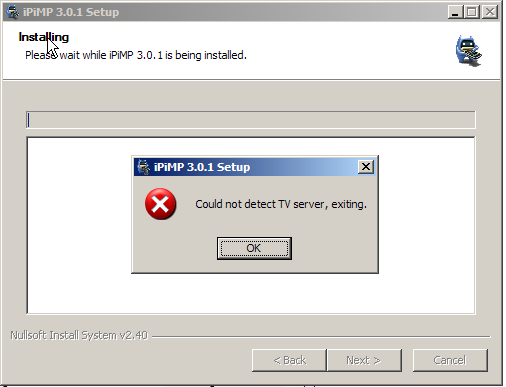
Client only install on 3.0.1 still fails for lacking tv server.
AArrgghh!! Feckity feck!! - Has anyone else seen this?? - I have run 3.0.1 on three clients selecting the client install only and all have worked OK.
I have a setup that involves 1 server that also has the client installed and 2 client only deployments.
Just updated the tv server and clients to rc4.
Installed the ipimp server onto the tv server machine and got the client plugin working fine.
Moved onto the first of my client only deployments and I get the same "cannot find tv server" the moment I double click the ipimp installer executable.
I've tried being sneaky and just dragging the DLL from the plugin folder on the install that is working, it shows up and enables ok but nothing when I try to control it.
All the clients are XP sp 3, made sure the firewall was off on the client only but nothing.
Still, the one that is working did put a grin on my face
*edit*
Scratch that, didn't realise I had downloaded 3.0.0, grabbed 3.0.1 and it installed without problem and is working now on my client only install!
Just updated the tv server and clients to rc4.
Installed the ipimp server onto the tv server machine and got the client plugin working fine.
Moved onto the first of my client only deployments and I get the same "cannot find tv server" the moment I double click the ipimp installer executable.
I've tried being sneaky and just dragging the DLL from the plugin folder on the install that is working, it shows up and enables ok but nothing when I try to control it.
All the clients are XP sp 3, made sure the firewall was off on the client only but nothing.
Still, the one that is working did put a grin on my face
*edit*
Scratch that, didn't realise I had downloaded 3.0.0, grabbed 3.0.1 and it installed without problem and is working now on my client only install!
- Thread starter
- Moderator
- #165
Scratch that, didn't realise I had downloaded 3.0.0, grabbed 3.0.1 and it installed without problem and is working now on my client only install!
Thanks for the feedback.
I've tried being sneaky and just dragging the DLL from the plugin folder on the install that is working, it shows up and enables ok but nothing when I try to control it.
For info... the client requires is the iPiMPClient.dll in the plugins\process folder and the iPiMP.xml in the InputDeviceMappings\defaults folder.

- September 3, 2006
- 21
- 3
- Home Country
-
 Mexico
AArrgghh!! Feckity feck!! - Has anyone else seen this?? - I have run 3.0.1 on three clients selecting the client install only and all have worked OK.
I ran this again today with a clean install of MP1 (final), and I'm still getting the same error. I am deselecting the transcoding option since I believe this uses TV server. Am I right in this supposition? Or is this what's causing the problem?
AArrgghh!! Feckity feck!! - Has anyone else seen this?? - I have run 3.0.1 on three clients selecting the client install only and all have worked OK.
I ran this again today with a clean install of MP1 (final), and I'm still getting the same error. I am deselecting the transcoding option since I believe this uses TV server. Am I right in this supposition? Or is this what's causing the problem?
I thought this only worked with the TV server?
- Thread starter
- Moderator
- #168
AArrgghh!! Feckity feck!! - Has anyone else seen this?? - I have run 3.0.1 on three clients selecting the client install only and all have worked OK.
I ran this again today with a clean install of MP1 (final), and I'm still getting the same error. I am deselecting the transcoding option since I believe this uses TV server. Am I right in this supposition? Or is this what's causing the problem?
Are you also deselecting the web server?
The iPiMP web server is dependent on the TV Server.
BTW folks - I just upgraded to 1.0.0.0 final and am getting an error when trying to go into the transcode plugin setup screen. The iPiMP installer also failed on a couple of tasks with 1.0 - I think the default location for Gentle.Config has changed. (This also stopped my from running webepg-conf and importing my tv server channels) I worked round it by copying Gentle.Config from C:\ProgramData\Team MediaPortal\MediaPortal TV Server to C:\Program Files\iPiMP\aspx\bin
I'll do some more digging and see what needs to be done for iPiMP on 1.0.0.0 final.
tvserver crash and another Q
Hi Cheezey,
I did some more testing about the crash on my tv server that I wrote about earlier, I have not been able to reproduce the error but I think that I did an upgrade of ipimp and I did use the ipimpTrancodetomp4.dll version 2.1 instead of the new one 2.2, so I did an complete reinstallation of the version 2.2 and everything have work fine.
But,
Now I did an complete uninstall of the version 2.2.0 and reinstalled the 3.0.1 version instead.
when I take a look on the file version of the ipimpTrancodetomp4.dll in the plugin section its back to 2.1.0 with the time stamp 2008-12-07.. is this correct?
PS in TV-Server config / Plugins section the ipimpTrancodetomp4 report version 2.2.0 ?
BR and for an super app.
//Moppe
Hi Cheezey,
I did some more testing about the crash on my tv server that I wrote about earlier, I have not been able to reproduce the error but I think that I did an upgrade of ipimp and I did use the ipimpTrancodetomp4.dll version 2.1 instead of the new one 2.2, so I did an complete reinstallation of the version 2.2 and everything have work fine.
But,
Now I did an complete uninstall of the version 2.2.0 and reinstalled the 3.0.1 version instead.
when I take a look on the file version of the ipimpTrancodetomp4.dll in the plugin section its back to 2.1.0 with the time stamp 2008-12-07.. is this correct?
PS in TV-Server config / Plugins section the ipimpTrancodetomp4 report version 2.2.0 ?
BR and
for an super app.//Moppe
- Thread starter
- Moderator
- #170
Hi Cheezey,
I did some more testing about the crash on my tv server that I wrote about earlier, I have not been able to reproduce the error but I think that I did an upgrade of ipimp and I did use the ipimpTrancodetomp4.dll version 2.1 instead of the new one 2.2, so I did an complete reinstallation of the version 2.2 and everything have work fine.
But,
Now I did an complete uninstall of the version 2.2.0 and reinstalled the 3.0.1 version instead.
when I take a look on the file version of the ipimpTrancodetomp4.dll in the plugin section its back to 2.1.0 with the time stamp 2008-12-07.. is this correct?
PS in TV-Server config / Plugins section the ipimpTrancodetomp4 report version 2.2.0 ?
BR and
//Moppe
Yeah - I messed up the versions a bit
I'll look to resolve these in the next version.
Glad your issues are resolved.
- Status
- Not open for further replies.
Users who are viewing this thread
Online now: 18 (members: 0, guests: 18)