
You are using an out of date browser. It may not display this or other websites correctly.
You should upgrade or use an alternative browser.
You should upgrade or use an alternative browser.
iPhone interface for MediaPortal (iPiMP) - original thread (now closed) (10 Viewers)
- Thread starter cheezey
- Start date
- Status
- Not open for further replies.

 United Kingdom
- Thread starter
- Moderator
- #62
OK. I'll try a fresh install and see what happens here.
I know the install/setup is a bit disjointed as the website and tv server are completely separate. I haven't found out how to write to the tv server database yet in the installer.
If you know your way into the tv server database you can open the 'setting' table and update the plugin settings in there, as well as the path to save the mp4s to the path to ffmpeg has to be the full one. The settings for the website are stored in ipimp/aspx/web.config near the top.
I know the install/setup is a bit disjointed as the website and tv server are completely separate. I haven't found out how to write to the tv server database yet in the installer.
If you know your way into the tv server database you can open the 'setting' table and update the plugin settings in there, as well as the path to save the mp4s to the path to ffmpeg has to be the full one. The settings for the website are stored in ipimp/aspx/web.config near the top.
- Thread starter
- Moderator
- #64
the tv server fires an event when a recording finishes. My plugin handles that event and transcodes the recorded file. The filename is is passed with the event. The plugin then fires ffmpeg to transcode the recorded file to MP4 and generate a thumbnail, these are names the same as the recorded file only with an mp4 or png extension. These files should be stored in the location you define.
OK, well I've tried what you suggested, just waiting for it to finish transcoding before I try it, should certainly be able to let you know if that worked shortly though!
OK, manually setting the transcoding path directly in the database and also the web.config has now made it work!
Right, been testing it. It works, too slow via 3g though it seems as it just stops every few seconds. I have a 1.3mbit upload so better than most adsl I think as they tend to be only 512kbit. Works fine over wireless on my internal lan but it seems to be out of sync on the recording that I tried. Would it be possible in a future release to set the settings for transcoding so you could control the quality to keep the size down so it's playable over 3g?
OK, manually setting the transcoding path directly in the database and also the web.config has now made it work!
Right, been testing it. It works, too slow via 3g though it seems as it just stops every few seconds. I have a 1.3mbit upload so better than most adsl I think as they tend to be only 512kbit. Works fine over wireless on my internal lan but it seems to be out of sync on the recording that I tried. Would it be possible in a future release to set the settings for transcoding so you could control the quality to keep the size down so it's playable over 3g?
Tried out this release, great work! I actually thought that the transcoding would be "live", meaning that the transcoding would take place only when I playback a file. I found out though that the approach is to transcode and save the entire collection of recordings. Not the best solution but it is atleast a working solution. Anyway, despite this it is working amazing. Ever since I bought the iPhone I have been wanting to watch TV on it, this seems to be the first great step.
Btw, I found myself having problems at first too, getting the "Video is not transcoded"-error. I realised this was because in the installation I set the MP4 path to one thing, and later I wanted them stored somewhere else. So, in the TVserver plugin I changed it. But there is no way to change the path that have been typed in during installation. This needs to be changed somehow. Maybe make a little config-app to be able to change these settings.
Suggestion: Would it be possible for your app to also interface with ForTheRecord? Because at the moment I am using this, since the shceduling is far superior to that of regular MP. BUt now all my "normal" recordings are not in the regular MP database, therefor doesn't show up in iPiMP. ANy chance of this ever happening?
Dont take the criticism the wrong way, the work you've done is amazing and I would have no idea whatsoever how to do any of it. Just expressing my opinion and making suggestions.
Oh, and if I didn't say it before,
Btw, I found myself having problems at first too, getting the "Video is not transcoded"-error. I realised this was because in the installation I set the MP4 path to one thing, and later I wanted them stored somewhere else. So, in the TVserver plugin I changed it. But there is no way to change the path that have been typed in during installation. This needs to be changed somehow. Maybe make a little config-app to be able to change these settings.
Suggestion: Would it be possible for your app to also interface with ForTheRecord? Because at the moment I am using this, since the shceduling is far superior to that of regular MP. BUt now all my "normal" recordings are not in the regular MP database, therefor doesn't show up in iPiMP. ANy chance of this ever happening?
Dont take the criticism the wrong way, the work you've done is amazing and I would have no idea whatsoever how to do any of it. Just expressing my opinion and making suggestions.
Oh, and if I didn't say it before,
- Thread starter
- Moderator
- #67
OK - there's a few things to look at then
BTW - I found a couple of bugs - when you create a user the values of Recorder/Deleter/Watcher/Admin aren't being set! and the set MP4 path in settings does bugger all! DOH!
BTW - I found a couple of bugs - when you create a user the values of Recorder/Deleter/Watcher/Admin aren't being set! and the set MP4 path in settings does bugger all! DOH!
I also seem to have problems with it not connecting properly if I use any port other than default 80. Even though I allow other ports thru firewall (even tried disabling firewall).
Stick to port 80 and it seems to work. Does seem to keep dropping the connection though, as if apache stops listening or something. I havent had much of a play so will take a look at logs to see what I can see. Did get as far as logging in this time and viewing channel lists though so further than I got last time
Getting there - well done bud!
Stick to port 80 and it seems to work. Does seem to keep dropping the connection though, as if apache stops listening or something. I havent had much of a play so will take a look at logs to see what I can see. Did get as far as logging in this time and viewing channel lists though so further than I got last time
Getting there - well done bud!
Hi Cheezey
I have been using MP for a while now, absolutely love the software and spend far to much time tinkering with plugins and getting my setup right (all part of the fun).
This is my first post in the forums, i recently found your plugin and wanted to say a big thank you it is very impressive.
I have installed the plugin without any problems and really look forward to the Remote control feature you have planned. Is there any idea of when this will be available?
Thanks Again for your hard work
Ant
I have been using MP for a while now, absolutely love the software and spend far to much time tinkering with plugins and getting my setup right (all part of the fun).
This is my first post in the forums, i recently found your plugin and wanted to say a big thank you it is very impressive.
I have installed the plugin without any problems and really look forward to the Remote control feature you have planned. Is there any idea of when this will be available?
Thanks Again for your hard work
Ant
- Thread starter
- Moderator
- #70
v2.0.1 is released, updates include...
* Fixed setting user permissions.
* Fixed settings facility -now updates path of web site and tv server plugin
* Fixed installer - now updates web site and tv server plugin settings - you just need to enable the tv server plugin.
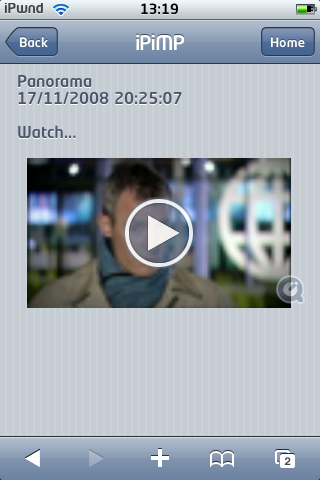
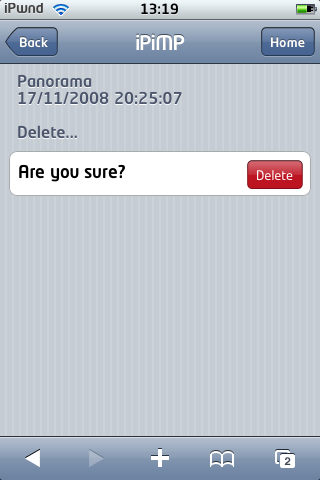
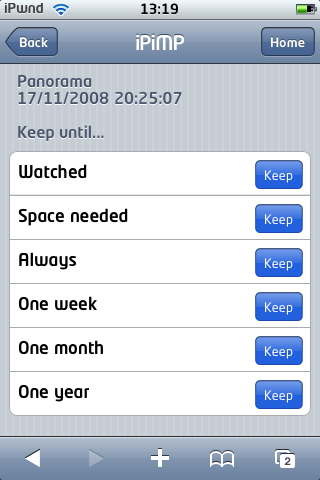
* Added additional page for watch, delete and keep recordings.
* Added additional page for delete schedules.
* Added user permission specific menus to tv guide, recordings & schedules - e.g. you only see delete if you're a 'deleter'
Here's some screenshots for the new watch, delete, keep pages for recordings....
* Fixed setting user permissions.
* Fixed settings facility -now updates path of web site and tv server plugin
* Fixed installer - now updates web site and tv server plugin settings - you just need to enable the tv server plugin.
* Added additional page for watch, delete and keep recordings.
* Added additional page for delete schedules.
* Added user permission specific menus to tv guide, recordings & schedules - e.g. you only see delete if you're a 'deleter'
Here's some screenshots for the new watch, delete, keep pages for recordings....
Attachments
- Status
- Not open for further replies.
Users who are viewing this thread
Online now: 11 (members: 0, guests: 11)