iPhone interface for MediaPortal (iPiMP) - original thread (now closed) (5 Viewers)

Status
Not open for further replies.

lord2013

Portal Member
December 20, 2008
22
0
The error indicates the plugin cannot create this file in this path.

here a test in a cmd shell
Microsoft Windows XP [Version 5.1.2600]
(C) Copyright 1985-2001 Microsoft Corp.

C:\Dokumente und Einstellungen\stephan>m:

M:\>cd MyVideos\temp

M:\MyVideos\temp>dir
Datenträger in Laufwerk M: ist multimedia
Volumeseriennummer: 102D-89E6

Verzeichnis von M:\MyVideos\temp

20.10.2009 07:54 <DIR> .
18.10.2009 20:59 <DIR> ..
20.10.2009 07:54 8.974 Burn Notice - VOX - 2009-10-19 - 22_05.png
20.10.2009 09:17 216.385.266 Burn Notice - VOX - 2009-10-19 - 22_05.mp4
2 Datei(en) 216.394.240 Bytes
2 Verzeichnis(se), 194.271.682.560 Bytes frei

M:\MyVideos\temp>echo test > transcodeme.txt

M:\MyVideos\temp>dir
Datenträger in Laufwerk M: ist multimedia
Volumeseriennummer: 102D-89E6

Verzeichnis von M:\MyVideos\temp

24.10.2009 15:41 <DIR> .
18.10.2009 20:59 <DIR> ..
20.10.2009 07:54 8.974 Burn Notice - VOX - 2009-10-19 - 22_05.png
20.10.2009 09:17 216.385.266 Burn Notice - VOX - 2009-10-19 - 22_05.mp4
24.10.2009 15:41 7 transcodeme.txt
3 Datei(en) 216.394.247 Bytes
2 Verzeichnis(se), 194.271.678.464 Bytes frei

M:\MyVideos\temp>


If I use the transcodeClient everything works works perfect an the MP4 Movies go to the folder, like the "Burn Notice..." files in the directory listing above.

any other ideas ?

Stephan
 

lord2013

Portal Member
December 20, 2008
22
0
What happens if you try to do a manual transcode through iPiMP? Does this work?

That is what I meant by using TranscoeClient. If I start an encoding manually everything works perfekt and I get a png and the MP4 movie in the directory.
There is nothing in the error log except:
Starting the iPiMPweb service
The iPiMPweb service is running


Enclosed a log from restarting the server.
After the restart I added a manual schedule - recorded that - and again nothing happened.

:mad:
 

lord2013

Portal Member
December 20, 2008
22
0
1. What version of TVServer are you running?
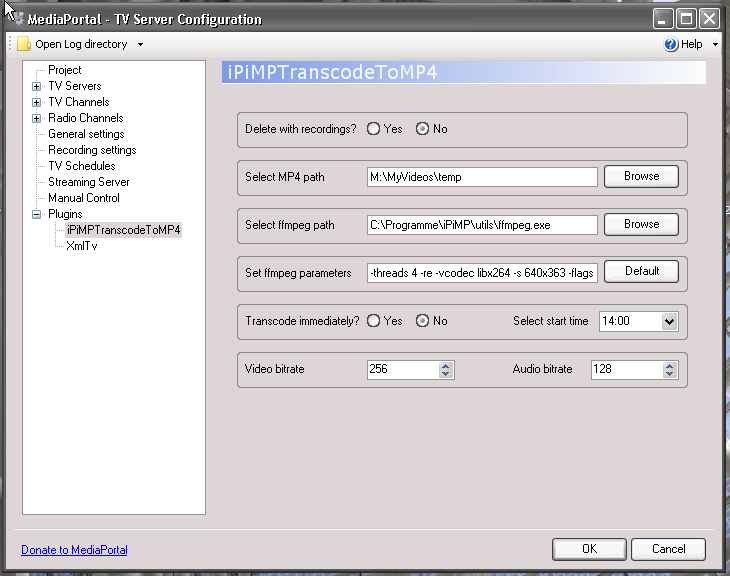
2. Can you supply a screenshot of the iPiMPTranscodeToMP4 setup screen?

Mediaportal Version 1.0.2
 

Attachments

  • Bildschirmfoto 2009-10-25 um 09.01.18.png
    Bildschirmfoto 2009-10-25 um 09.01.18.png
    53.7 KB

cheezey

Community Plugin Dev
August 26, 2004
1,559
312
58
West Yorks, UK
Home Country
United Kingdom United Kingdom
Can you restart your TVService then post tv.log and error.log from your TVServer log folder.
 

cheezey

Community Plugin Dev
August 26, 2004
1,559
312
58
West Yorks, UK
Home Country
United Kingdom United Kingdom
There are errors in your logs which indicate a problem with your TV Server install which is causing the iPiMPTranscodeToMP4 plugin to not function correctly.

2009-10-25 12:30:41.890625 [TVService]: Error while checking if a com object is installed - b2f3a67c-29da-4c78-8831-091ed509a475 - System.Runtime.InteropServices.COMException (0x80040154): The COM class factory for component with CLSID (B2F3A67C-29DA-4C78-8831-091ED509A475) could not be retrieved due to the following error: 80040154
at System.RuntimeTypeHandle.CreateInstance (RuntimeType type, Boolean publicOnly, Boolean nocheck, Boolean & canBeCached, RuntimeMethodHandle & ctor, Boolean & bNeedSecurityCheck)
at System.RuntimeType.CreateInstanceSlow (Boolean publicOnly, Boolean fillCache)
at System.RuntimeType.CreateInstanceImpl (Boolean publicOnly, Boolean skipVisibilityChecks, Boolean fillCache)
at System.Activator.CreateInstance (Type type, Boolean nonpublic)
at TvLibrary.Implementations.DVB.FilterGraphTools.IsThisComObjectInstalled (Guid clsid)

2009-10-25 12:31:46.984375 [DVB EPG timer]: Exception: System.Net.Sockets.SocketException: Could not connect because the target machine actively refused it 192.168.99.100:31456
 

lord2013

Portal Member
December 20, 2008
22
0
There are errors in your logs which indicate a problem with your TV Server install which is causing the iPiMPTranscodeToMP4 plugin to not function correctly.

So what would you suggest? reinstall?

:confused:
I have seen these errors for quite a while, but it never caused any problems.
 

cheezey

Community Plugin Dev
August 26, 2004
1,559
312
58
West Yorks, UK
Home Country
United Kingdom United Kingdom
There are errors in your logs which indicate a problem with your TV Server install which is causing the iPiMPTranscodeToMP4 plugin to not function correctly.

So what would you suggest? reinstall?

:confused:
I have seen these errors for quite a while, but it never caused any problems.

There's nothing else I can think of, it looks like the plugin is not initialising or capturing TV Server events as it should, the numerous errors in the logs indicate the issue is with your TV server.

I see the following in my logs when the TV service is started....

2009-10-25 08:41:12.115134 [TVService]: TV Service: Plugin: iPiMPTranscodeToMP4 started
2009-10-25 08:41:12.127829 [TVService]: plugin: iPiMPTranscodeToMP4 - watching: E:\DVBT
2009-10-25 08:41:12.132711 [TVService]: plugin: iPiMPTranscodeToMP4 - watching: D:\DVBT
2009-10-25 08:41:12.133688 [TVService]: plugin: iPiMPTranscodeToMP4 - watching: D:\DVBS
2009-10-25 08:41:12.134664 [TVService]: plugin: iPiMPTranscodeToMP4 - watching: C:\ProgramData\Team MediaPortal\MediaPortal TV Server\recordings

This is the plugin starting up.

Also....

2009-10-25 08:55:11.472545 [Scheduler timer]: plugin: iPiMPTranscodeToMP4 - scheduled Little Robots

This is the plugin writing something to transcodeme.txt when a schedule has just finished.

iPiMP 4 will be out imminently - so maybe it's a good time. :)
 
Status
Not open for further replies.

Users who are viewing this thread

Top Bottom