IPTV Australia (5 Viewers)

Ausdigital

Portal Pro
September 17, 2008
122
5
Home Country
Hi Stepko,

I have reproduced a filedump with your latest MPIPTVSource file and played it back successfully in VLC.

One thing I did notice is that it commenced playback and nothing appeared until about 5 seconds into the timeline. Then a picture appears and the channel is captured.

Played the file back in Cyberlink Power DVD 8 with this observation- the first frame is still for about 3 seconds and then the video plays normally.

Don't know if that is of any assistance in finding why MP doesn't capture the channels but thought it worth mentioning.

I really appreciate your help so far. Thanks!!

Ausdigital.
 

Stepko

Retired Team Member
  • Premium Supporter
  • September 29, 2007
    186
    152
    Hamburg/Wolfsburg
    Home Country
    Germany Germany
    AW: Re: IPTV Australia

    Hi Ausdigital,

    I have reproduced a filedump with your latest MPIPTVSource file and played it back successfully in VLC.
    OK, that means the filter works. The problem must be somewhere else. Can you play that file in MP video section?

    One thing I did notice is that it commenced playback and nothing appeared until about 5 seconds into the timeline. Then a picture appears and the channel is captured.
    Played the file back in Cyberlink Power DVD 8 with this observation- the first frame is still for about 3 seconds and then the video plays normally.
    That's an important information. I had the same with the file you uploaded. But I thought it was because the file doesn't play correctly in vlc. I also noticed that the file you uploaded was pretty small. I think your provider uses a low bitrate.

    Another quick test you can do is to raise the scan timeouts. You will find them in the TV config under "General"->"Scan". I don't know what each of these settings exactly do, but perhaps the default values are too low for you.

    Stepko
     

    Ausdigital

    Portal Pro
    September 17, 2008
    122
    5
    Home Country
    OK, that means the filter works. The problem must be somewhere else. Can you play that file in MP video section?

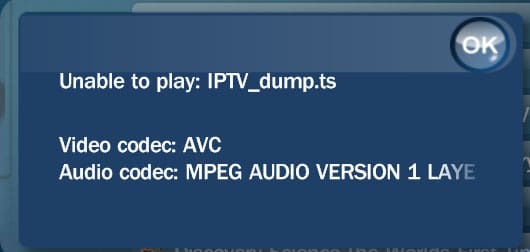
    No, MP reports it cannot play the file- video code AVC.

    It does play with the pause at the start in PowerDVD 8, so codec must be installed.

    EDIT- just renamed the .ts extension to .mp4 and MP now plays it. This is not a solution as it would capture the channel and record it as .ts
     

    Ausdigital

    Portal Pro
    September 17, 2008
    122
    5
    Home Country
    what video format does it play in? is it mpeg2 or h264 or vc-1 even?

    The file is .ts (transport stream) which I believe is a version of MPEG2.

    However, TPG transmit in H264 video stream which is MPEG4.

    When this file was captured in GraphStudio, it was recorded as a transport stream. I don't know enough about codecs but it plays back with VLC and PowerDVD. Media Portal does not play it saying it cannot play AVC (advanced video coding) file.

    I have installed HD Pack2.3, CoreAVC Pro2, dvixH264decoder, and the latest version of ffdshow without any success.
     

    mm1352000

    Retired Team Member
  • Premium Supporter
  • September 1, 2008
    21,544
    8,236
    Home Country
    New Zealand New Zealand
    The file is .ts (transport stream) which I believe is a version of MPEG2.
    Not quite correct. TS is a generic container for other formats, specified by part 1 of the MPEG 2 standard. The MPEG 2 video compression standard is part 2 of the same MPEG 2 standard. Completely different things, but I can see how you'd be confused. ;)

    However, TPG transmit in H264 video stream which is MPEG4.
    That shouldn't be a problem - Mediaportal should handle it fine. You just have to set up codecs correctly. Please remember that the TV codec settings are used for TS files, even if you try and watch them from the video section. This is a side-effect of the fact that TV Server uses TS as its timeshifting/recording file format. I'd recommend you check your TV codec settings in MediaPortal configuration->codecs and renderers->TV codecs tab. Installing all the codecs in the world (CoreAVC etc) isn't going to make any difference to the problem unless you actually change the codec settings there.

    When this file was captured in GraphStudio, it was recorded as a transport stream. I don't know enough about codecs but it plays back with VLC and PowerDVD. Media Portal does not play it saying it cannot play AVC (advanced video coding) file.
    Again, see my comments above. If you have set up codecs correctly and still have trouble then please post a screenshot of the error. It is a new one to me...

    --------------------------------------------------------------------------------------
    Edit:

    Regarding the issue of TV Server not picking up channels in a scan: that is a completely different issue of course. Your logs from the other thread were completely unhelpful for analysing that issue, so please post logs new logs showing what happens during a scan (remember to delete logs before you start - helps to keep them clear and concise). I wonder if your firewall is blocking TV Server from accessing the port/s you need, although you've possibly checked that already. I'm no expert in this area - more specialised in other DVB streams - but I'm happy to help if I can. :)
     

    Ausdigital

    Portal Pro
    September 17, 2008
    122
    5
    Home Country
    Thanks for the detailed response.

    Attached are the logs. Backed up old logs and these are of only the latest channel scan and attempt to play the iptv.ts file captured by GraphStudio. Also attached is the error MP gives when attempting to play said file. (this file will play if extension is changed to .mp4)

    I was aware of the codec settings in the Media Portal Configuration and have been changing them each time I installed a H264 codec in the attempt to play the file.

    The firewall has been set to allow the port to open for the IPTV and this works as both VLC and GraphStudio with the MPIPTVSource.ax file (modified by Stepko) can recieve the stream.

    I am hoping that if MP can play back the file it also should be able to scan and view the stream on the selected channel. The logs only contain the information for ONE channel as to minimise the size.
     

    Attachments

    • iptv.jpg
      iptv.jpg
      47.4 KB
    • MP-Log-29Jan2011.rar
      3 KB

    Stepko

    Retired Team Member
  • Premium Supporter
  • September 29, 2007
    186
    152
    Hamburg/Wolfsburg
    Home Country
    Germany Germany
    AW: Re: IPTV Australia

    Hi mm1352000,

    Ausdigital posted some logs he got using a debug version of the IPTV filter. From that logs you can see that the IPTV filter gets data. So the firewall is not blocking the tvservice. And with GraphStudio he is able to a record with the same filter. But the tv server doesn't get the channels. Since I did the changes to the filter there were some people having problems using DVB-IP. We solved all problems so far, but I've not seen this behavior at all. I have no idea whats happening here. I found these lines in his logs:

    Code:
    2011-01-29 15:48:40.515625 [(14)]: Scan: tuner locked:False signal:100 quality:100
    2011-01-29 15:48:45.562500 [(14)]: Scan Got 0 from 0 channels

    Do you know if this is correct?

    Stepko
     

    mm1352000

    Retired Team Member
  • Premium Supporter
  • September 1, 2008
    21,544
    8,236
    Home Country
    New Zealand New Zealand
    I've been meaning to reply to this thread for two days now but I keep getting side-tracked! :confused:

    Ausdigital: Thanks for the logs: they are good :D

    I've had a good look through the code - both the internal IPTV handler and the MediaPortal player code and I'm starting to get to grips with how they work. I have to say that in my opinion the IPTV support code in TV Server is not very "flash". Probably a reflection of the fact that none of the team members use DVB-IP.

    (@Stepko: why is it necessary to remove and re-add the source filter when the graph is stopped or started? That seems *really* bad!)

    It would be helpful to me to have 2 more bits of information:

    1. MediaPortal logs from Ausdigital showing what happens when you attempt to play the TS file as a TS (failure) and as an MP4.
    2. Logs from another user showing successful IPTV tuning.

    Regarding the log showing 100% signal strength and quality but no lock: TV Server will try to pick up channels even though the tuner isn't locked because there is signal level and quality. The fact that no channels are found is because TsWriter doesn't find any channels:

    Code:
    29-01-2011 15:48:40.515 PatParser:Reset(0)
    29-01-2011 15:48:40.515 NIT:Reset
    29-01-2011 15:48:40.515 PatParser::Reset done
    29-01-2011 15:48:45.562 Scanner finished. Triggering callback

    I don't know why that would be, but maybe the scan (SDT) timeout isn't set long enough. I'd suggest increasing it to 10 seconds for a start. If that still doesn't help then I'm going to have to try to understand why TsWriter doesn't find any channels in the stream. I note that the stream you posted earlier didn't contain any SDT, so that may be the problem. No SDT => no channels.

    I had more to say but I thought it was better just to post as I have to go to bed now... 5:30am here.
     

    Ausdigital

    Portal Pro
    September 17, 2008
    122
    5
    Home Country
    Thanks for both your repsonses. Hopefully we are getting closer to an understanding and solution.

    As for the logs requested, are there alternative logs for MP that fails to play a video file or are they recorded in the same tv server log files.

    Tonight when I get home from work I shall run it with the original TS file and again as the mp4 file and post logs.

    I have increased the scan time outs as previously suggested by Stepko several posts back but that made no difference.
     

    Users who are viewing this thread

    Top Bottom