[WiP] madVR support in MP1 (34 Viewers)

Sebastiii

Development Group
  • Team MediaPortal
  • November 12, 2007
    16,523
    10,466
    France
    Home Country
    France France
    @alexdepalma :)
    I have try to check against null reference. But it could be nice to know what happen and if it happen on official MP build.
     

    Attachments

    • TvPlugin_TvZapOsd_V2.zip
      535 KB
    • TvPlugin_TvZapOsd_V2_Release.zip
      426.5 KB

    joecrow

    Test Group
  • Team MediaPortal
  • August 9, 2012
    2,721
    2,074
    Home Country
    Germany Germany

    What is that?

    Hi
    Testing v102

    3D MVC MKV perfect playback
    Only one minor thing (appeared few versions before); if I stop 3D video and start a new one within 2 to 3 seconds of stooping previous 3D video, the second video plays in 2D instead. So as far as I see, if MadVr is releasing the 3D mode and you start new 3D video, it plays 2D. If alow madVr to release 3D mode (more than 3secs), I can appreciate a tv mode change, the 3D plays fine.

    @alexdepalma I'm not seeing this and just curious because on 3d playback my setup takes at least 4secs. after stop before the menu displays, most likely reseting the refresh rate and/or 3D mode, both ticked in madvr, are they also with you? I did note on an earlier version that on playing a 2nd consequetive 3D vid the TV did not indicate 3D but played it in 3D anyway, however with v102, for me, it is back to displaying the 3D indicator at the start of each 3D vid.

    4K (guau... :D here is a HUGE improvement)(y)(y)(y)
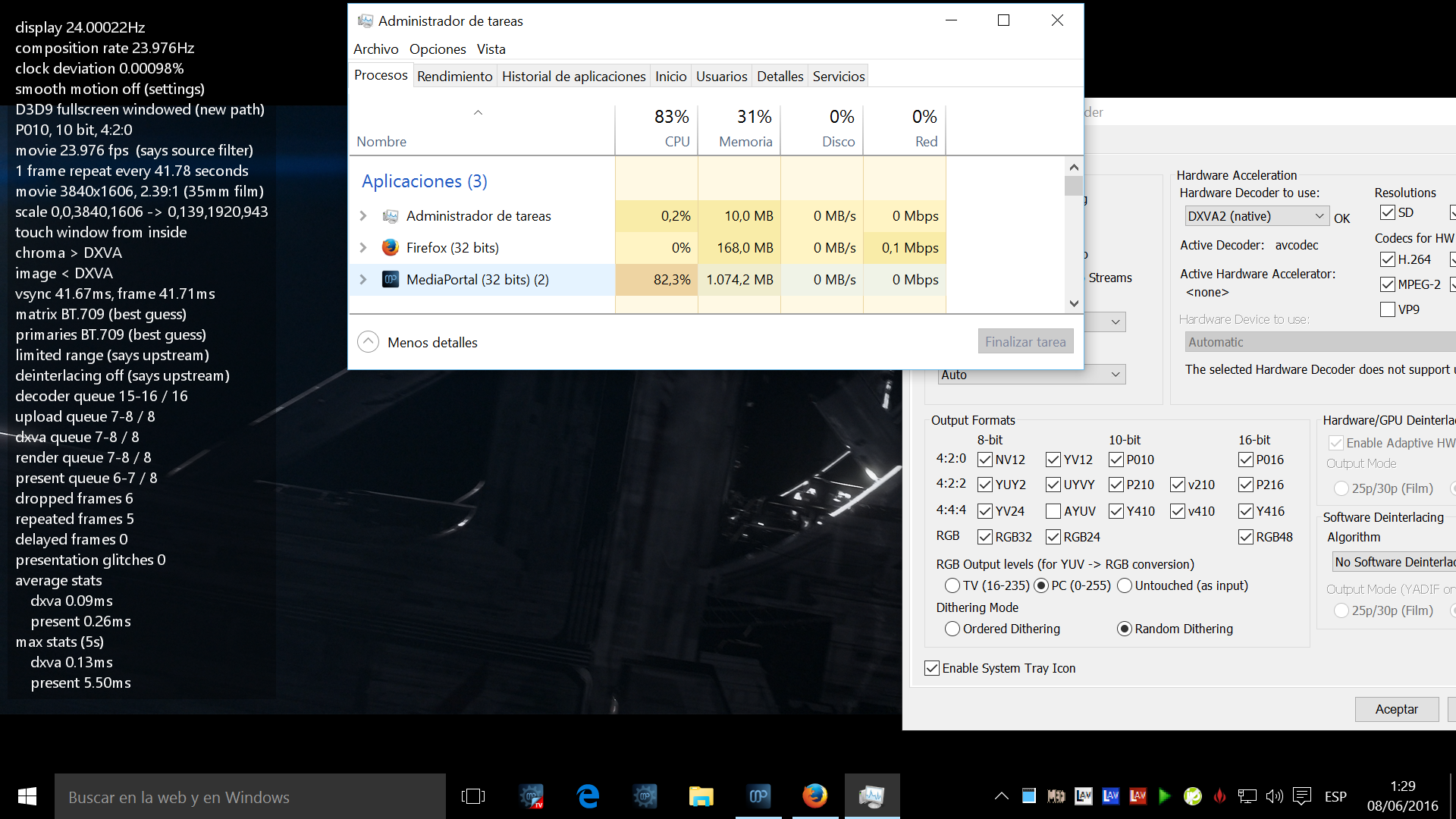
    CPU used to be 100% and some frames dropped. Now 78% CPU!:eek: perfect Elysium video playback (FOR THE FIRST TIME!!!! )

    How did you manage that? :cool: I'm still seeing 100% cpu and very jerky playback:eek:
     

    kenwonders

    MP Donator
  • Premium Supporter
  • January 19, 2007
    791
    741
    Home Country
    England England
    4K (guau... :D here is a HUGE improvement)(y)(y)(y)
    CPU used to be 100% and some frames dropped. Now 78% CPU!:eek: perfect Elysium video playback (FOR THE FIRST TIME!!!! )

    How did you manage that? :cool: I'm still seeing 100% cpu and very jerky playback:eek:
    If you took my advice earlier in the thread and used software decoding in LAV, it's my fault :) You need to use DVXAcopyback, if it's still failing with DVXA-copyback then maybe the card isn't up to it. Check your render times too. They actually shouldn't be very high as madVR is just downscaling. The big effort is in the codec here.

    Seb, things working really well here. The ony major problems I'm having are the occasional jerky playback (fixed by stoping/starting, reported earlier) and a constant desire to mess about with madVR settings :)
     

    Sebastiii

    Development Group
  • Team MediaPortal
  • November 12, 2007
    16,523
    10,466
    France
    Home Country
    France France
    Yep no clue for now about jerky playback, i think i have seen it (rarely) a pause fix it on my side, i think it happen when exclusive mode is enable and when i display something on the screen, the exclusive goes to non exclusive and jerky is here (i didn't remember if exclusive mode is back after closing the arrived window) but it seems to remember that a pause cured it. :)
     

    Sebastiii

    Development Group
  • Team MediaPortal
  • November 12, 2007
    16,523
    10,466
    France
    Home Country
    France France

    daWooky

    MP Donator
  • Premium Supporter
  • April 3, 2012
    783
    871
    Home Country
    Germany Germany
    hi guys
    v102 working here also really well on singleseat and various clients
    never saw ghost channel crazyness (but i'm not really 100% sure how to reproduce that- how did it look, did they get numbers^^)
    only thing i seen madvr creating dxva surfaice failed on tvosd and the exclusive to non exclusive stuff that i get too since v97 or so
    Screenshot (70).png
    but overall nice v102 seb (y)(y)
    cheers
     
    Last edited:

    kenwonders

    MP Donator
  • Premium Supporter
  • January 19, 2007
    791
    741
    Home Country
    England England
    Yep no clue for now about jerky playback, i think i have seen it (rarely) a pause fix it on my side, i think it happen when exclusive mode is enable and when i display something on the screen, the exclusive goes to non exclusive and jerky is here (i didn't remember if exclusive mode is back after closing the arrived window) but it seems to remember that a pause cured it. :)
    Nothing fixes it except a restart of the media for me. The reason I've been messing with exclusive is the idea of using 10bit output, but even though I can see the data reaching the TV I can't see much benefit in quality. Maybe my set is 8bit inside... so I shall use non exclusive for now.

    Guys are you able to reproduce this issue ?
    Nope, never seen it, though myself and family usually select channels from the guide directly.
     

    alexdepalma

    MP Donator
  • Premium Supporter
  • January 31, 2008
    541
    493
    Home Country
    Spain Spain
    @alexdepalma :)

    Could be nice to try with EVR mode and on 1.14 :)
    Yes same happened on EVR.

    I've created a new channel group and copied all channels contained on the ghost. Then deleted the old channel group and finally renamed the new group with the old one, and voila! ghost channels disappeared

    I'm really sorry if this non related problem has taken that high energy from all you.:(:(

    For the time been and until I make more test to confirm this problem is no reproduced or reappeared again, I must stop reporting this error as probably is not related to MadVr.

    For those interested in reproduce this ghost channel problem, just tune any channel and start passing with your remote all your channels. If done quickly enough, no actually channel will be changed, just you'll see the list passing in the proper order, all icons and program content. Between some channels you may find a blank one without any information. Thats the ghost.[DOUBLEPOST=1465342281][/DOUBLEPOST]

    What is that?

    Hi
    Testing v102

    3D MVC MKV perfect playback
    Only one minor thing (appeared few versions before); if I stop 3D video and start a new one within 2 to 3 seconds of stooping previous 3D video, the second video plays in 2D instead. So as far as I see, if MadVr is releasing the 3D mode and you start new 3D video, it plays 2D. If alow madVr to release 3D mode (more than 3secs), I can appreciate a tv mode change, the 3D plays fine.

    @alexdepalma I'm not seeing this and just curious because on 3d playback my setup takes at least 4secs. after stop before the menu displays, most likely reseting the refresh rate and/or 3D mode, both ticked in madvr, are they also with you? I did note on an earlier version that on playing a 2nd consequetive 3D vid the TV did not indicate 3D but played it in 3D anyway, however with v102, for me, it is back to displaying the 3D indicator at the start of each 3D vid.

    4K (guau... :D here is a HUGE improvement)(y)(y)(y)
    CPU used to be 100% and some frames dropped. Now 78% CPU!:eek: perfect Elysium video playback (FOR THE FIRST TIME!!!! )

    How did you manage that? :cool: I'm still seeing 100% cpu and very jerky playback:eek:

    I don't know Sebastii nows...
     

    Attachments

    • H265 Elysium play.png
      H265 Elysium play.png
      1.1 MB
    Last edited:

    alexdepalma

    MP Donator
  • Premium Supporter
  • January 31, 2008
    541
    493
    Home Country
    Spain Spain

    What is that?

    Hi
    Testing v102

    @alexdepalma I'm not seeing this and just curious because on 3d playback my setup takes at least 4secs. after stop before the menu displays, most likely reseting the refresh rate and/or 3D mode, both ticked in madvr, are they also with you? I did note on an earlier version that on playing a 2nd consequetive 3D vid the TV did not indicate 3D but played it in 3D anyway, however with v102, for me, it is back to displaying the 3D indicator at the start of each 3D vid.

    /QUOTE]

    Well mine is immediate and after few seconds (around 3 may be 4s) Tv actually blinks on mode change. But MP gui is always visible immediately after video Stop. No delay
    [DOUBLEPOST=1465343082][/DOUBLEPOST]

    It's another null reference check to try to avoid the issue seeing by @alexdepalma on ghost channel :)

    Guys are you able to reproduce this issue ?

    But waiting from you (@alexdepalma) your testing on 1.14 (EVR) and this build (EVR vs madVR) :p

    Thanks Seb.
    Im afraid is not related to MadVr. Problem seems to be solved. Please forget about this problem.:(
     
    Last edited:

    Users who are viewing this thread

    Top Bottom