[WiP] madVR support in MP1 (498 Viewers)

Sebastiii

Development Group
  • Team MediaPortal
  • November 12, 2007
    16,523
    10,466
    France
    Home Country
    France France
    Am I the only person where EVERY (!) day at 8 pm (first day was 7:59pm, next day 8:00 pm, then 8:01 pm, and so on) window becomes black?

    As said, this only happens with madVR and never ever with EVR. In general my HTPC is running from ca. 6pm to 10 pm. At weekend also in the morning, afternoon, etc. But the issue only happens around 8pm.

    How can we debug and fix this issue?

    Not happen here :(
     

    joecrow

    Test Group
  • Team MediaPortal
  • August 9, 2012
    2,721
    2,074
    Home Country
    Germany Germany
    I have upgraded again from v281 to v290 without any return of the freeze problem when selecting LAV settings from the icon on the taskbar tray, everything seems to be working fine so far.:) Sorry for the false alarm earlier, must be something weird that happens on my setup sometimes with an upgrade.:unsure:
     

    AberDino

    MP Donator
  • Premium Supporter
  • February 17, 2005
    283
    87
    Kincardineshire
    Home Country
    Scotland Scotland
    Last night I upgraded my MP client to the v290 build on the first page. The first test was to play a TV recording, and I still get a black screen when it starts playing. The sound is there however. When I press stop, I see a glimpse of the recording before it goes back to the MP TV Recordings menu. The logs are attached.

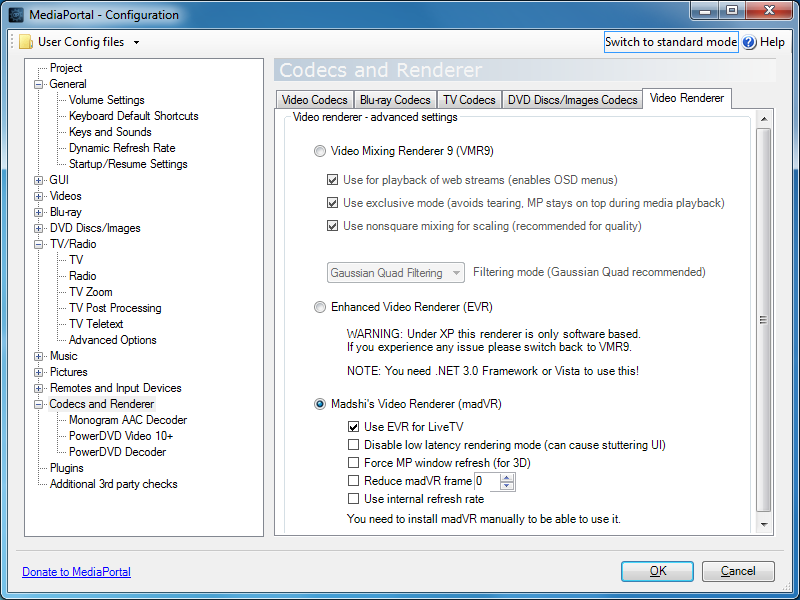
    I have followed the instructions on the Wiki page, i.e. ticked the box to use EVR for LiveTV (all other boxes cleared), disabled the ViewModeSwitcher plugin and disabled MP's internal refresh rate changer. I haven't used MadVR before, so I'm not sure whether I've configured that part optimally for my setup. I have ensured that the 'enable windowed overlay (Windows 7 and newer)' option is cleared though, and I've entered 1080p24, 1080p50 and 1080p60 as display modes.

    Any help greatly appreciated and apologies if I've missed anything which is already mentioned on one of the previous 339 pages of this thread ;).
     

    mm1352000

    Retired Team Member
  • Premium Supporter
  • September 1, 2008
    21,544
    8,236
    Home Country
    New Zealand New Zealand
    Hello AberDino

    I have followed the instructions on the Wiki page, i.e. ticked the box to use EVR for LiveTV
    The log files seem to contradict you:
    [2017-03-04 23:26:20,082] [Log ] [MPMain ] [INFO ] - PlayRecording:\\Tvserver2\recordings\BBC2 HD - Ski Sunday - 2017-02-19.ts - using rtsp mode:False
    ...
    [2017-03-04 23:26:21,557] [Log ] [MPMain ] [INFO ] - VMR9: added madVR Renderer to graph

    Furthermore, there are two audio codecs in the graph:
    [2017-03-04 23:26:21,692] [Log ] [MPMain ] [INFO ] - Added filter: ffdshow Audio Decoder to graph
    [2017-03-04 23:26:21,704] [Log ] [MPMain ] [INFO ] - Added filter: LAV Audio Decoder to graph

    That can cause problems.

    Please use the Watchdog tool with option 1 to reproduce the same scenario and collect full log files. We'll need access to your configuration details, and the Watchdog will get that info for us.
     

    AberDino

    MP Donator
  • Premium Supporter
  • February 17, 2005
    283
    87
    Kincardineshire
    Home Country
    Scotland Scotland
    Thanks @mm1352000, I've not had to use the Watchdog tool before because I've had a rock-solid setup for such a long time ;). The Watchdog tool files are attached.

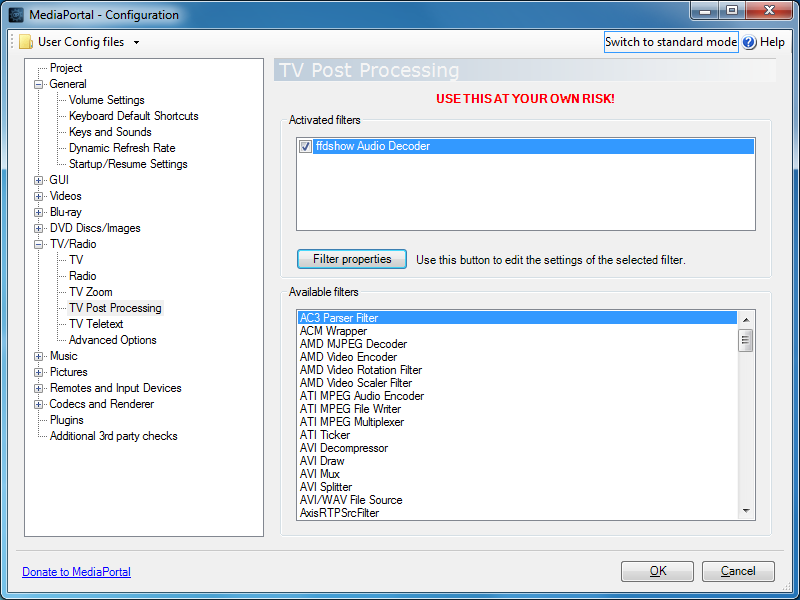
    I've also attached two screenshots; one showing that I have the box ticked to use EVR for LiveTV and the other showing that the ffdshow Audio Decoder is included in the TV post-processing section. The reason I have the ffdshow decoder, is to transcode 5.1 Freeview AAC audio streams (only, not 2.0) to AC3, so I've got proper Dolby Digital sound through my amplifier. If there is another way to accomplish the same thing then I'm happy to try it.
     

    Attachments

    • renderer.png
      renderer.png
      78.5 KB
    • ffdshow.png
      ffdshow.png
      64 KB

    mm1352000

    Retired Team Member
  • Premium Supporter
  • September 1, 2008
    21,544
    8,236
    Home Country
    New Zealand New Zealand
    I've had a rock-solid setup for such a long time ;).
    :)

    The Watchdog tool files are attached.
    Thanks. (y)

    I've also attached two screenshots; one showing that I have the box ticked to use EVR for LiveTV...
    Looks like I was leading you on a wild goose chase. :oops:
    The option says "...for LiveTV...". You're playing a recording, which is not live TV. Therefore EVR will not be used. Whether MadVR can be used successfully for viewing recordings is a question I can't answer.

    The reason I have the ffdshow decoder...
    I'm not aware of any other way to get DD to the amp/receiver when using an S/PDIF connection. As far as alternatives go...
    Obviously an HDMI link would be able to carry 5.1 PCM without any trouble. You've also got the option of Dolby Pro Logic (if your amp/receiver supports it):
    BBC One HD freezes intermittently, watching or recording.
     

    daWooky

    MP Donator
  • Premium Supporter
  • April 3, 2012
    783
    871
    Home Country
    Germany Germany
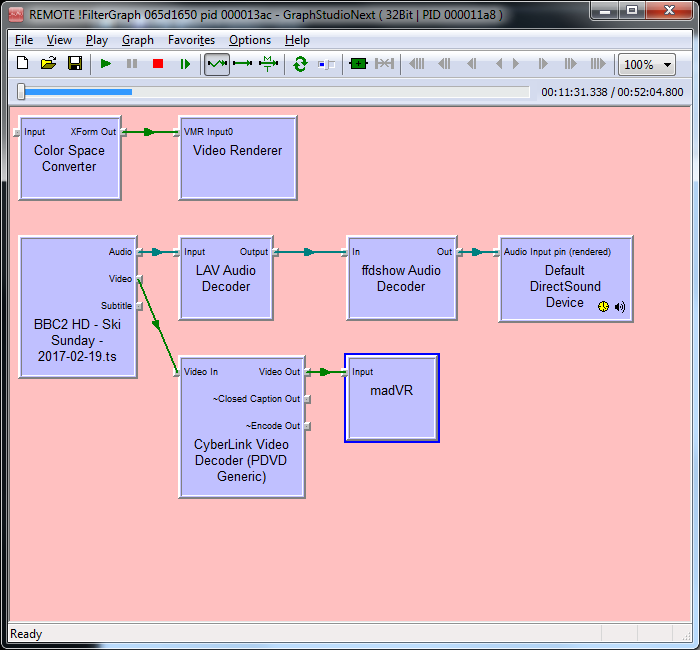
    The CyberLink video decoder can also be to blame and what is the Color Space Converter

    Code:
    [2017-03-05 10:41:21,552] [Log    ] [MPMain   ] [INFO ] - TSReaderPlayer: Add codecs
    [2017-03-05 10:41:21,557] [Log    ] [MPMain   ] [DEBUG] - VMR9: addvmr9 - thread : MPMain
    [2017-03-05 10:41:22,007] [Log    ] [MPMain   ] [INFO ] - VMR9: added madVR Renderer to graph
    [2017-03-05 10:41:22,008] [Log    ] [MPMain   ] [DEBUG] - VMR9: Now active
    [2017-03-05 10:41:22,008] [Log    ] [MPMain   ] [DEBUG] - VMR9: Renderer successfully added
    [2017-03-05 10:41:22,173] [Log    ] [MPMain   ] [INFO ] - Added filter: CyberLink Video Decoder (PDVD Generic) to graph
    [2017-03-05 10:41:22,174] [Log    ] [MPMain   ] [DEBUG] - TSReaderPlayer: UpdateFilters Video done
    [2017-03-05 10:41:22,196] [Log    ] [MPMain   ] [INFO ] - Added filter: ffdshow Audio Decoder to graph
    [2017-03-05 10:41:22,213] [Log    ] [MPMain   ] [INFO ] - Added filter: LAV Audio Decoder to graph
    [2017-03-05 10:41:22,213] [Log    ] [MPMain   ] [DEBUG] - TSReaderPlayer: UpdateFilters Audio done
    [2017-03-05 10:41:22,222] [Log    ] [MPMain   ] [DEBUG] - TSReaderPlayer: PostProcessingEngine to DummyEngine
    [2017-03-05 10:41:22,222] [Log    ] [MPMain   ] [INFO ] - TSReaderPlayer: Render TsReader outputs
    [2017-03-05 10:41:22,227] [Log    ] [MPMain   ] [DEBUG] - Filter: TsReader - try to connect: Audio
    [2017-03-05 10:41:22,228] [Log    ] [MPMain   ] [DEBUG] - DirectShowUtil: volume handler value 65535
    [2017-03-05 10:41:22,228] [Log    ] [MPMain   ] [DEBUG] - DirectShowUtil: build the graph for PIN : Audio
    [2017-03-05 10:41:22,256] [Log    ] [MPMain   ] [DEBUG] - Filter: TsReader - try to connect: Video
    [2017-03-05 10:41:22,256] [Log    ] [MPMain   ] [DEBUG] - DirectShowUtil: build the graph for PIN : Video
    [2017-03-05 10:41:22,379] [Log    ] [MPMain   ] [DEBUG] - Filter: TsReader - try to connect: Subtitle
    [2017-03-05 10:41:22,379] [Log    ] [MPMain   ] [DEBUG] - DirectShowUtil: build the graph for PIN : Subtitle
    [2017-03-05 10:41:22,406] [Log    ] [MPMain   ] [DEBUG] - DirectShowUtil: RenderUnconnectedOutputPins Pin Subtitle - failed
    [2017-03-05 10:41:22,406] [Log    ] [MPMain   ] [DEBUG] - Filter: CyberLink Video Decoder (PDVD Generic) - try to connect: ~Closed Caption Out
    [2017-03-05 10:41:22,406] [Log    ] [MPMain   ] [DEBUG] - DirectShowUtil: build the graph for PIN : ~Closed Caption Out
    [2017-03-05 10:41:22,803] [Log    ] [MPMain   ] [DEBUG] - Filter: CyberLink Video Decoder (PDVD Generic) - try to connect: ~Encode Out
    [2017-03-05 10:41:22,803] [Log    ] [MPMain   ] [DEBUG] - DirectShowUtil: build the graph for PIN : ~Encode Out
    [2017-03-05 10:41:23,102] [Log    ] [MPMain   ] [DEBUG] - DirectShowUtil: RenderUnconnectedOutputPins Pin ~Encode Out - failed
    [2017-03-05 10:41:23,103] [Log    ] [MPMain   ] [INFO ] - TSReaderPlayer: Cleanup Captions
    [2017-03-05 10:41:23,103] [Log    ] [MPMain   ] [DEBUG] - TSReaderPlayer: CleanupCC filter (Tv/Recorded Stream Detected)
    [2017-03-05 10:41:23,105] [Log    ] [MPMain   ] [DEBUG] - Check graph connections for: Video Renderer
    [2017-03-05 10:41:23,105] [Log    ] [MPMain   ] [DEBUG] - Check graph connections for: madVR
    [2017-03-05 10:41:23,105] [Log    ] [MPMain   ] [DEBUG] - Check graph connections for: Default DirectSound Device
    [2017-03-05 10:41:23,105] [Log    ] [MPMain   ] [DEBUG] - Check graph connections for: Color Space Converter
    [2017-03-05 10:41:23,105] [Log    ] [MPMain   ] [DEBUG] - Check graph connections for: ffdshow Audio Decoder
    [2017-03-05 10:41:23,106] [Log    ] [MPMain   ] [DEBUG] - Check graph connections for: CyberLink Video Decoder (PDVD Generic)
    [2017-03-05 10:41:23,106] [Log    ] [MPMain   ] [DEBUG] - Check graph connections for: LAV Audio Decoder
    [2017-03-05 10:41:23,106] [Log    ] [MPMain   ] [DEBUG] - Check graph connections for: TsReader
     
    Last edited:

    AberDino

    MP Donator
  • Premium Supporter
  • February 17, 2005
    283
    87
    Kincardineshire
    Home Country
    Scotland Scotland
    OK, I am pleased to report that I've made some progress...

    I installed V291 and the symptoms remained the same. Based on @daWooky's feedback...
    The CyberLink video decoder can also be to blame and what is the Color Space Converter
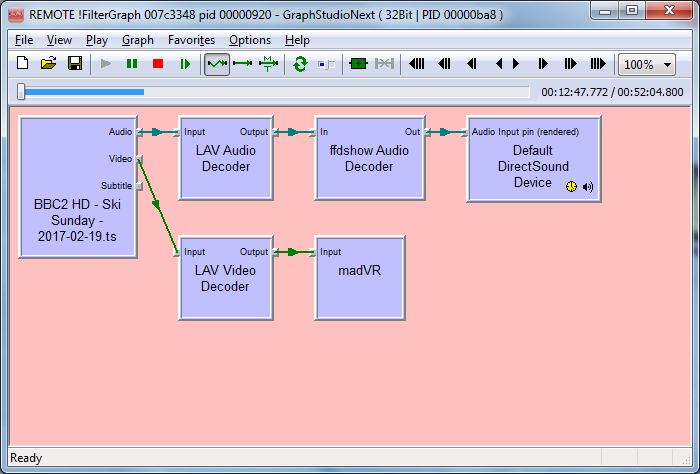
    ... I had a look at the DirectShow graph, and the 'Color Space Converter' filter and 'Video Renderer' appear separately, i.e. not connected to the main chain of filters, see attached screenshot. I then changed the TV video codecs from CyberLink to LAV and all is fine :), so it looks like the CyberLink decoder was to blame. The updated DirectShow graph is also attached for information; the 'Color Space Converter' and 'Video Renderer' are gone.

    In the past I used the SAF6 codec pack, and the recommendation then was to use the Cyberlink filter for live TV rather than LAV. Is it fair to assume that the LAV codecs are now perfectly suitable for live TV, or is there still a reason to use Cyberlink?

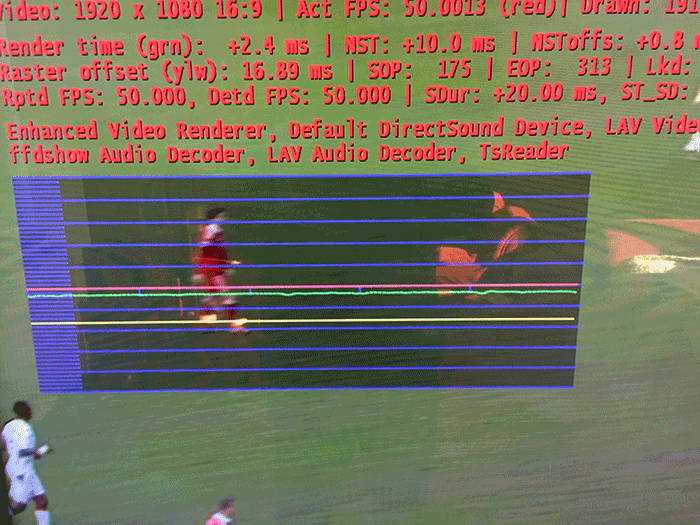
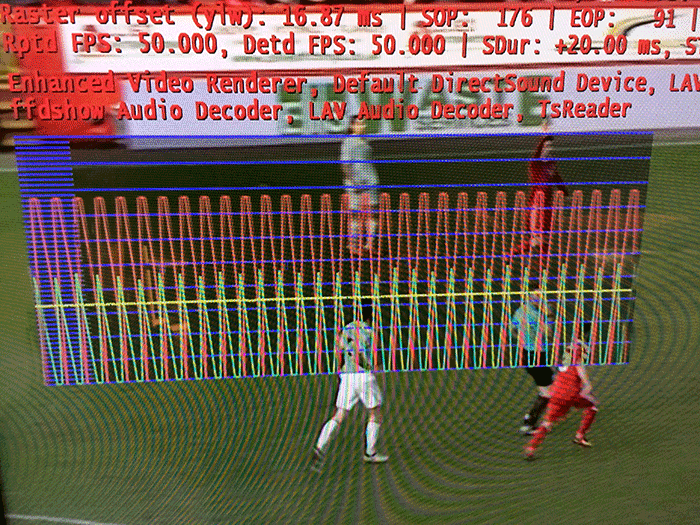
    Then I have another problem... When I watch 23.976fps material, madVR correctly switches to '1080p24', and after stopping it seems to switch back to '1080p50' (at least when I check my TV's input info). However, if I then watch live TV, the picture is no longer smooth. A machine reboot is required to sort this out, i.e. restarting MP itself does not resolve the issue, so I suspect it might not be a MP issue... I have attached two screenshots; one watching TV prior to 1080p24 and one after. I have also included two sets of log files. The first set is watching TV, then play a recording and eventually MP hung when I wanted to play a 23.976fps file (I had to use task manager to close MP). In the second set I was able to play the 23.976fps file and I switched to TV afterwards (with the stuttering).
     

    Attachments

    • directshow_cyberlink.png
      directshow_cyberlink.png
      62.1 KB
    • directshow_lav.png
      directshow_lav.png
      56.5 KB
    • fluent.png
      fluent.png
      131.5 KB
    • stutter.png
      stutter.png
      196.4 KB

    Users who are viewing this thread

    Top Bottom