
You are using an out of date browser. It may not display this or other websites correctly.
You should upgrade or use an alternative browser.
You should upgrade or use an alternative browser.
[WiP] madVR support in MP1 (116 Viewers)
- Thread starter Sebastiii
- Start date
 Germany
hmm, guess ya dont want to hear it 
but have u tried reverting to defaults with mepo,lav,madvr?
and maybe it helps, but this is just a blind guess...
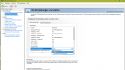
with a nvidia gpu you can try setting power management mode to adaptive or max performance
but have u tried reverting to defaults with mepo,lav,madvr?
and maybe it helps, but this is just a blind guess...
with a nvidia gpu you can try setting power management mode to adaptive or max performance
Has anyone tried watching HDR content with madvr and MP already ? I tried some of the demo files and recognized there is no gui at all as long as the clip is running... no pause menu, no info... nothing. Still pressing "pause" still does its work but no gui at all

my madvr render times are fairly similar between mpc-hc & mp

- Thread starter
- Moderator
- #3,545
@Sebastiii
final 1.16 runs pretty great here, the only thing i miss is the new mediainfo.dll
i dont need it anyway but the drc evr mepo users may...but evr mode also seems nice and stable
greetings
Yep need to create a branch for next version

- Thread starter
- Moderator
- #3,547
Good to knowwow, i fixed my issue after trying almost everything....
View attachment 189614
Turn off vsync in nvidia control panel. That's all it took.
Now Potplayer & MP are within 5ms of each other, sitting under 20ms for most settings.
Thanks So MP already use some kind of Vsync surely


Has anyone tried watching HDR content with madvr and MP already ? I tried some of the demo files and recognized there is no gui at all as long as the clip is running... no pause menu, no info... nothing. Still pressing "pause" still does its work but no gui at all
I just don't get HDR to run on a AMD RX 460 with a LG OLED E6D. Don't know what the problem ist. Reinstalled drivers, checked settings in madvr and amd settings, tried other HDMI cables, eliminated for test the AVR and connected direct to TV. Just nothing work.
Actual settings ycbcr422 with 12 bit.
@GeYe i think you will have to use the Win10 HDR feature for HDR on AMD as far as i know ... at least that was stated in the doom forum.
Additionally:
And i guess you have installed the Creators Update already ?
Additionally:
added support for sending HDR metadata via win10 (not tested yet)
And i guess you have installed the Creators Update already ?
Users who are viewing this thread
Online now: 115 (members: 0, guests: 115)