Maya: Beta release 04-04-10 (Original Thread) (2 Viewers)

Status
Not open for further replies.
J

joostzilla

Guest
Re: Maya: Beta release 06-02-10

Just had a first test run with the skin on my notebook and while there are clearly some things that need polishing the overall-looks of it is amazing.

Some of the things I particularly liked:
  • the "now playing" tv part and how the epg info pops up/down looks very natural and clean
  • The settings menu is a great visual approach of implementing a "tab view"
  • The Maya logo also looks fantastic

There are a lot of flaws but this is an early beta release after all. Do you already want people posting bugs in the forums or on the issue tracker?

Keep on the great work and this skin will be a great success as well as an important posterchild for MediaPortal.

:D

thanks a lot. We appreciate it.
Yes post away :) on our bugtracker preferably.
 

bandyTA

MP Donator
  • Premium Supporter
  • October 31, 2006
    50
    3
    50
    Gödöllő
    Home Country
    Hungary Hungary
    Re: Maya: Beta release 06-02-10

    He's saying he like the skin a lot but has some suggestions for improving it further. And user feedback like that is a good thing. His limited English probably makes it come off harsh when he doesn't intend it that way, is all.

    At least that's how I read it :)

    You are, my Spokesman! :D
     

    kiwijunglist

    Super Moderator
  • Team MediaPortal
  • June 10, 2008
    6,743
    1,754
    New Zealand
    Home Country
    New Zealand New Zealand
    Re: Maya: Beta release 06-02-10

    Have a weird issue with Maya - when turning on TV or a video and then returning to menus the background is black. See attached screenshots. I have tried on ati and nvidia machine - first running vista, 2nd win7 - both have the issue.

    langben-albums-screenshots-picture522-blackbackground.png

    Load MP Config -> General Options -> Skin -> Choose Blue3Wide
    Save & Close
    Delete the skin cache for Maya
    Reopen MP Config -> General Options -> Skin -> Choose Maya
    Save & Close
    Run MP

    Does this fix your problems?
    Note : You need to do the changing skin step in MP Config, Not Mediaportal -> Settings menu.
     

    disaster123

    MP Donator
  • Premium Supporter
  • May 14, 2008
    3,558
    434
    Home Country
    Germany Germany
    AW: Maya: Beta release 06-02-10

    Sleeptimer window has a small red not named rec in it - i think that is a failure.
     

    1stdead

    Portal Pro
    February 1, 2008
    1,089
    139
    Copenhagen
    Home Country
    Denmark Denmark
    Re: Maya: Beta release 06-02-10

    Hello :)
    I've found a few improvements that i would like to see in the plugin/skin:

    Suggestions:
    1.
    Currently all 'Modules in mainmenu' is a "loop", by that i mean even you're in top: Music, Videos, TV. This means on Music, then TV is shown above. I would like it not to be shown. But if you press up you would still go to TV.

    2.
    Currectly 'Modules in mainmenu' are asigned to a 'Window ID'. If you got 'Modules in Submenu' and the 'Modules in mainmenu' is named Extra then it's hard to know where it leads... Instead the windows ID should be assigned to the first one in submenu. So if you go to mainmenu, then it would highlight the first one in submenu.

    3.
    If you add a module with a 'windows ID' linkin to a module that isn't installed, then it shouldn't be displayed. Then it would be possible to share localized settings in .xml (as default). Currently everything is english.

    Hope you know what I mean, if not, you could take a look on 'Windows Media Center'.

    Defects:
    1. Even though Infoservice is disabled in plugin the black bar where it should be still show.

    2. Missing logos: Resultion: <720p is missing. Like SD, DVD etc.. Sound: <5.1, that would be Stereo/mono. And for CD/DVD/folder.

    3. Translation of "My Rating" "Total Series" in MPTVseries.
     

    GeYe

    MP Donator
  • Premium Supporter
  • January 17, 2009
    197
    132
    Home Country
    Germany Germany
    Re: Maya: Beta release 06-02-10

    First of all: I was waiting for such a skin a long time. It is amazing. I like mostly all of the stuff.

    @MT TVSeries I personally don't like the big banners that much. Nevertheless the other layouts are great.

    @TVOSd Yes the simplified osd has something. But I like also to see more informationen of the signal. Some example:
    http://www.dreambox-blog.com/wp-content/uploads/2009/10/ibarx.jpg

    Maybe not in the TV OSD Main View, but I like to see Information of Framerate, Resolution, Soundformat, Tunerquality... I saw a skin for dreambox even better as the screenshot and the information was great.

    Finally I like to say, that I love this skin and I think after some more tests it will get my standard skin @ htpc :D
     

    kiwijunglist

    Super Moderator
  • Team MediaPortal
  • June 10, 2008
    6,743
    1,754
    New Zealand
    Home Country
    New Zealand New Zealand
    Re: Maya: Beta release 06-02-10

    Suggestions
    1.
    Currently all 'Modules in mainmenu' is a "loop", by that i mean even you're in top: Music, Videos, TV. This means on Music, then TV is shown above. I would like it not to be shown. But if you press up you would still go to TV.

    Personally I disagree with this suggestion, I sometimes like to scroll up from the first option, and if you couldn't see the main menu item above (when you were at the top/first item) then it would be harder to know what your about to scroll up to.

    2.
    Currectly 'Modules in mainmenu' are asigned to a 'Window ID'. If you got 'Modules in Submenu' and the 'Modules in mainmenu' is named Extra then it's hard to know where it leads... Instead the windows ID should be assigned to the first one in submenu. So if you go to mainmenu, then it would highlight the first one in submenu.

    Interesting idea, however if I want to scroll down past an 'extra' menu I would get stuck on the submenu each time. So I disagree with this proposal as well.

    3.
    If you add a module with a 'windows ID' linkin to a module that isn't installed, then it shouldn't be displayed. Then it would be possible to share localized settings in .xml (as default). Currently everything is english.

    Not sure why you would try to add menus in the basic menu editor if they don't exist. The basic menu editor has an option to name the menu item anything you want, just change the text and click update. Because it is custom the user can call the menu item anything in any language. Therefore I disagree with your suggestion. Or am I misunderstanding your idea?

    Defects:
    1. Even though Infoservice is disabled in plugin the black bar where it should be still show.
    I agree, either the black bar on basichome should have a conditional visibility tag based on whether an RSS feed exists, or alternatively there should be an option in the basichome editor to remove the black bar. You should add to the issue tracker.

    2. Missing logos: Resultion: <720p is missing. Like SD, DVD etc.. Sound: <5.1, that would be Stereo/mono. And for CD/DVD/folder.
    Not sure if the team are aware or not, you should add to the issue tracker so the development team are aware, even better if you could create the logos for them.

    3. Translation of "My Rating" "Total Series" in MPTVseries.
    Add to issue tracker so the development team are aware.

    @TVOSd Yes the simplified osd has something. But I like also to see more informationen of the signal.
    Some example:http://www.dreambox-blog.com/wp-content/uploads/2009/10/ibarx.jpg
    Maybe not in the TV OSD Main View, but I like to see Information of Framerate, Resolution, Soundformat, Tunerquality... I saw a skin for dreambox even better as the screenshot and the information was great.

    I agree this would be a useful screen, if it was possible an information screen could be added to the F9 context menu or added as a sub item in the osd after you press the up arrow to expand the osd.
     

    emphatic

    Design Group
  • Team MediaPortal
  • August 25, 2006
    3,758
    1,250
    Alingsås
    Home Country
    Sweden Sweden
    Re: Maya: Beta release 06-02-10

    I have to agree with kiwijunglist about keeping the Basic Home "loop", as I plan the order of items in my list so I have the third most used item last in the list. This way it's just one step up from my most used item, and the next to most one is one step down.

    Like this:

    Movies (third)
    TV-Series (first)
    Music (second)

    Of course, if the "loop" could be turned on/off in the plugin, everyone would be happy, especially those who only have four items (no need to loop).
    Emph
     

    pilehave

    Community Skin Designer
  • Premium Supporter
  • April 2, 2008
    2,566
    521
    Hornslet
    Home Country
    Denmark Denmark
    Re: Maya: Beta release 06-02-10

    I agree, either the black bar on basichome should have a conditional visibility tag based on whether an RSS feed exists, or alternatively there should be an option in the basichome editor to remove the black bar. You should add to the issue tracker.

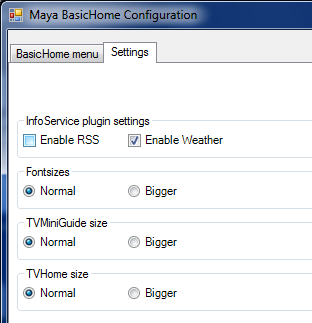
    If you use the latest version of the plugin available from Downloads - mamp2 - Project Hosting on Google Code and uncheck the "Enable RSS" box you'll never see the black box again :)

    The black bar is already conditionally visible by checking if the InfoService is enabled/disabled. InfoService 1.32 unfortunately only has a simple tag for enabled/disabled. The upcoming 1.50 has way more tags, including an "enable rss" tag. But for now you'll need to disable RSS in Maya.

    :D
     

    Attachments

    • uncheck.png
      uncheck.png
      18.3 KB

    langben

    Portal Member
    April 4, 2009
    32
    1
    Re: Maya: Beta release 06-02-10

    Have a weird issue with Maya - when turning on TV or a video and then returning to menus the background is black. See attached screenshots. I have tried on ati and nvidia machine - first running vista, 2nd win7 - both have the issue.

    langben-albums-screenshots-picture522-blackbackground.png

    Load MP Config -> General Options -> Skin -> Choose Blue3Wide
    Save & Close
    Delete the skin cache for Maya
    Reopen MP Config -> General Options -> Skin -> Choose Maya
    Save & Close
    Run MP

    Does this fix your problems?
    Note : You need to do the changing skin step in MP Config, Not Mediaportal -> Settings menu.

    Unfortunately not. Issue persists. Pressing CTRL+Enter and getting MP in windowed mode and then back to fullscreen the background turns blue again - but turns black again after returning from a full screen vid or TV.
     
    Status
    Not open for further replies.

    Users who are viewing this thread

    Top Bottom