Maya: Beta release 04-04-10 (Original Thread) (3 Viewers)

Status
Not open for further replies.

mortstar

MP Donator
  • Premium Supporter
  • January 30, 2008
    414
    41
    Home Country
    England England
    Re: Maya: Beta release 06-02-10

    EDIT: OK - I fixed the problem I had to add a <height> as well as the <width> tag to get the image to scale, if either was missing it was positioned relative to my screen resolution. Very strange as this is not the case for any of the other image controls?!

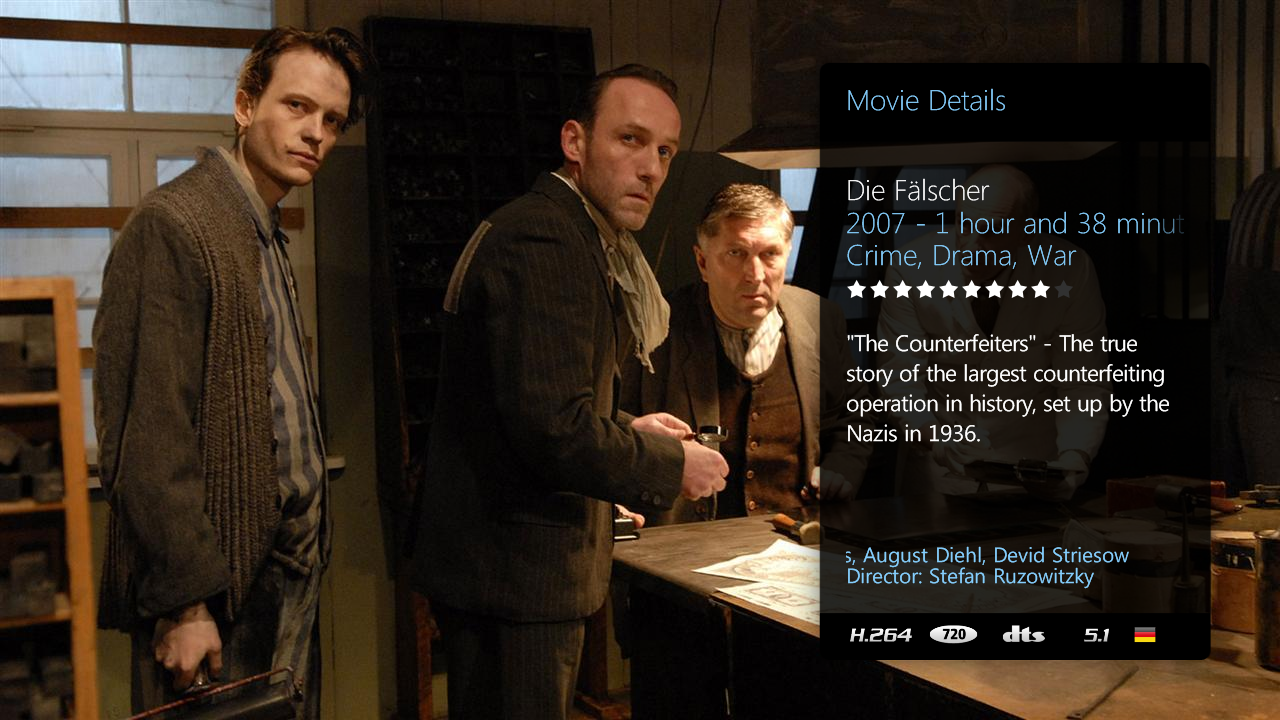
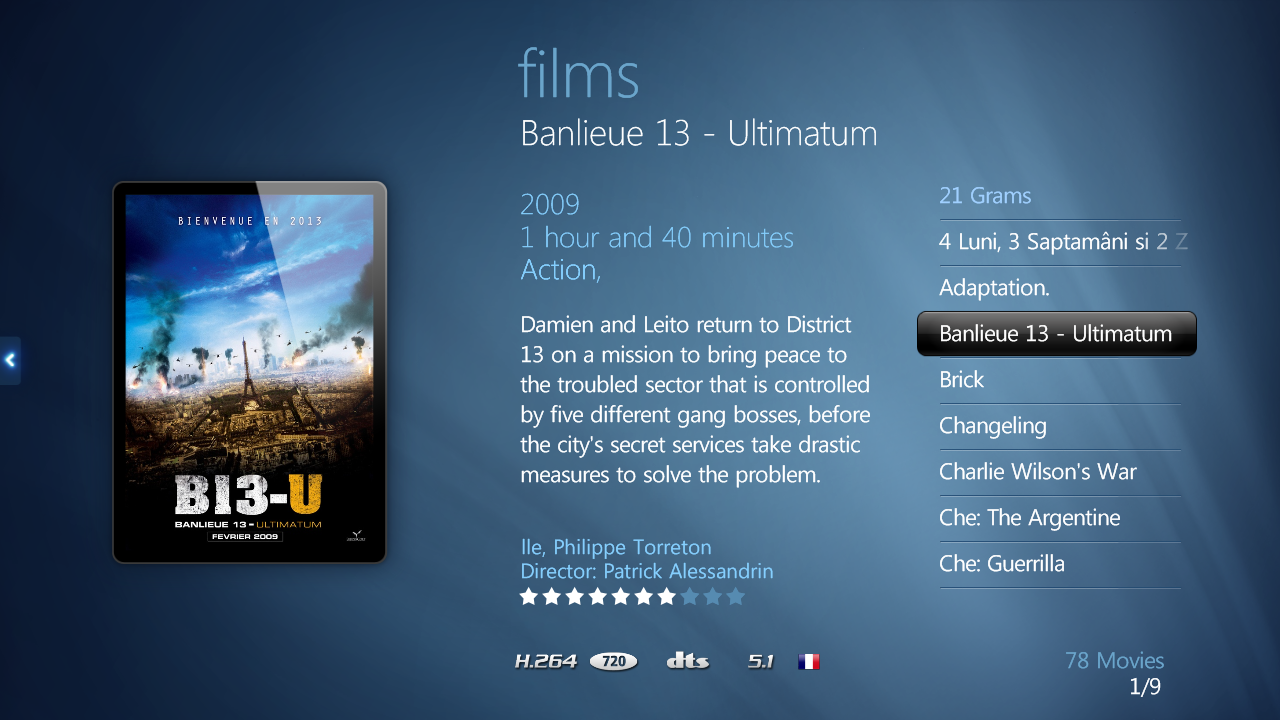
    Anyway, attached below is the result of my work. I think it is suitable but very useful as it is a bit of information I always like to know before I start watching a film.

    EDIT2 : See below post for how.
     

    Attachments

    • List.png
      List.png
      605.8 KB
    • Details.png
      Details.png
      945.2 KB

    Henkie Flits

    Portal Pro
    November 1, 2008
    210
    44
    Home Country
    Netherlands Netherlands
    Re: Maya: Beta release 06-02-10

    Awesome skin!
    I had to get used to it for a while but it is so clean and professional! Would love to see the Fanart musci section, mock-up is awesome!


    Just one request: could the Shoutcast Radio plugin get support? I use my HTPC as a radio to but now it doesn't work. Would be great to see this work!
     
    J

    joostzilla

    Guest
    Re: Maya: Beta release 06-02-10

    Awesome skin!
    I had to get used to it for a while but it is so clean and professional! Would love to see the Fanart musci section, mock-up is awesome!


    Just one request: could the Shoutcast Radio plugin get support? I use my HTPC as a radio to but now it doesn't work. Would be great to see this work!


    Thanks!
    I will put it on our wish list.

    Groeten uit Drunen.
     

    emphatic

    Design Group
  • Team MediaPortal
  • August 25, 2006
    3,758
    1,250
    Alingsås
    Home Country
    Sweden Sweden
    Re: AW: Maya: Beta release 06-02-10

    Where should I copy the file to?

    This depends on whether you're on XP or Vista, so do a search in Windows for the file, as you're replacing an existing one and you should be able to find where the current one is this way.

    Emph
     

    mortstar

    MP Donator
  • Premium Supporter
  • January 30, 2008
    414
    41
    Home Country
    England England
    Re: Maya: Beta release 06-02-10

    In the above screenshots I've added a flag to the MediaInfo Logo bar to represent language. I'll describe how below, but it is slightly involved. I'm not just attaching my xmls and/or the flag icon pack because for the former I've made some minor adjustments for my setup that others may not like and the later I've not asked permission from the owner and perhaps they wouldn't want them distributed in this way.

    First of all, download a free flag pack of your choice from Techtrends: Free Flag Icons for download (I got the pack from Free Icons - Download Free Mac OS X Icons and Flags | Icon Drawer cause they look sweet!). Extract the contents to ...\skin\Maya\Media\Logos\language (needs creating). Unfortunately the files will need renaming to the way that the language string is stored in MovingPictures Database (e.g. rename France.png to French.png)

    In movingpictures.xml you need to add this code:
    Code:
    	<control>
    	  <description>language flag</description>
    	  <type>image</type>
    	  <id>0</id>
    	  <posX>852</posX>
    	  <posY>694</posY>
    	  <width>24</width>
    	  <height>24</height>
    	  <texture>Logos\language\#MovingPictures.SelectedMovie.language.png</texture>
    	  <visible>facadeview.list+Control.IsVisible(50)</visible>
    	</control>

    In movingpictures.details.xml you need to add two controls:
    Code:
    	<control>
    	  <description>language flag</description>
    	  <type>image</type>
    	  <id>0</id>
    	  <posX>1210</posX>
    	  <posY>666</posY>
    	  <width>24</width>
    	  <height>24</height>
    	  <texture>Logos\language\#MovingPictures.SelectedMovie.language.png</texture>
    	  <visible>!Control.IsVisible(50)+!Control.IsVisible(51)+Control.HasFocus(6)+!Control.HasFocus(66)</visible>
    <animation effect="slide" start="-800" end="0" time="500" tween="quadratic" easing="out" reversible="false">Visible</animation>
    	</control>
    and
    Code:
    	<control>
    	  <description>language flag</description>
    	  <type>image</type>
    	  <id>0</id>
    	  <posX>1210</posX>
    	  <posY>666</posY>
    	  <width>24</width>
    	  <height>24</height>
    	  <texture>Logos\language\#MovingPictures.SelectedMovie.language.png</texture>
    	  <animation effect="slide" start="0" end="-800" time="500" tween="quadratic" easing="out" reversible="false">Visible</animation> <visible>!Control.IsVisible(50)+!Control.IsVisible(51)+Control.HasFocus(66)+!Control.HasFocus(6)</visible>
    	</control>

    This'll give you results like:
    55649d1265940903-maya-beta-release-06-02-10-list.png

    55650d1265940903-maya-beta-release-06-02-10-details.png


    @ Developers: Some MediaInfo tags need changing in your MovingPictures files as the strings do not match what is stored in the MovingPictures database. For 1 channel audio the string to compare is 'mono' not '1'. For 2 channel audio the string to compare is 'stereo' not '2'. A MediaInfo icon is not displayed for mp3 codec. A MediaInfo icon is not displayed if the resolution is 'SD'.
     

    pilehave

    Community Skin Designer
  • Premium Supporter
  • April 2, 2008
    2,566
    521
    Hornslet
    Home Country
    Denmark Denmark
    Re: Maya: Beta release 06-02-10

    @ Developers: Some MediaInfo tags need changing in your MovingPictures files as the strings do not match what is stored in the MovingPictures database. For 1 channel audio the string to compare is 'mono' not '1'. For 2 channel audio the string to compare is 'stereo' not '2'. A MediaInfo icon is not displayed for mp3 codec. A MediaInfo icon is not displayed if the resolution is 'SD'.

    This should be fixed in SVN :)
     

    vgallego65

    MP Donator
  • Premium Supporter
  • January 26, 2006
    171
    7
    Home Country
    Spain Spain
    Re: Maya: Beta release 06-02-10

    One question that I don´t find anywhere, It is 4therecord supported in this skin???
     

    ixian

    MP Donator
  • Premium Supporter
  • August 14, 2007
    320
    56
    57
    Home Country
    United States of America United States of America
    Re: Maya: Beta release 06-02-10

    One question that I don´t find anywhere, It is 4therecord supported in this skin???

    It's being worked on. You can download the first "draft" of it from the Maya Googlecode:

    Issue 61 - mamp2 - Support for For The Record? - Project Hosting on Google Code

    There's a link to "draft 2" about halfway down that page. Make sure you get that one not the first.

    It's pretty decent as is, couple minor tweaks here and there but otherwise looks good and full 4TR functionality. Maya should be integrating it in to the next release.

    P.S. I use 4TR, and these files, myself.
     
    Status
    Not open for further replies.

    Users who are viewing this thread

    Top Bottom