Moving Pictures (21 Viewers)

Namenloser

New Member
February 16, 2011
2
0
Home Country
Germany Germany
AW: Moving Pictures

Hallo
konnte in der suche nix finden also frage ich nun hier...

Ich habe BD´s als Ordnerstruktur auf der Festplatte liegen. Wenn ich nun zb "Salt" über das Videomenü von MP starte läuft es fehlerfrei...Wenn ich es aber über moving pictures starte startet er nur einen stream mittendrin... weder anfang noch ende ist dann anzuschauen....
Bei anderen filmen gehts komischerweise nur bei manchen ned... Wurden alle mit dem fuchs erstellt
Woran kann das liegen? Der Film wird ja in beiden Fällen über die index.bdmv gestartet..:eek:


EDIT hat sich erledigt lag wohl an win7 nach erneutem installieren und erneuten einspielen funzt nun alles super....

Eine frage hab ich aber noch:
Habe Blu-Ray Handler drauf und wenn ich den film starte kommt ja das Menü.
Im falle von "Salt" kann ich dann die 3 versionen auswählen des films (normal, kino und extendet) Warum ist da aber jede Version mit 3 Steams aufgelistet obwohl alle gleich sind scheinbar (zumindest laut laufzeit pro version 3x selbe länge)
 

Pattyboy

Portal Pro
June 16, 2011
59
1
Habe eine Frage:
Bei Moving Pictures wird das Backdrop beim Durchblättern der Filme immer etwas verzögert angezeigt, d.h. wenn ich auf den nächsten Film switche, dann erscheint zwar der Filmname und das zugehörige Cover, das Backdrop wird aber erst mit etwas Verzögerung angezeigt (sieht aus wie ein "Übergangseffekt").
Kann man irgendwo einstellen, dass er auch sofort das Backdrop anzeigt?
 

Holzi

Super Moderator
  • Team MediaPortal
  • April 21, 2010
    7,934
    2,235
    Ba-Wü
    Home Country
    Germany Germany
    AW: Moving Pictures

    Irgendwo in der movingpictures.xml, die sich im Skinordner befindet, solltest du sowas in der Art finden:

    <control>
    <description>Movie Backdrop (Fan Art) - Plug-in sets to invisible, if no art.</description>
    <type>image</type>
    <id>1</id>
    <posX>0</posX>
    <posY>0</posY>
    <width>1280</width>
    <height>720</height>
    <texture>#MovingPictures.Backdrop</texture>
    <animation effect="fade" time="300">visible</animation>
    <animation effect="fade" time="300" delay="300">hidden</animation>

    <!-- Do not modify the visibility for this component. It is handled by the plug-in. Use the above
    defines for conditional visibility if you dont want to use fan-art only specific views. -->
    </control>
    <control>
    <description>Alternate Movie Backdrop - Toggles Load with Component 1 for animations on visibiltiy</description>
    <type>image</type>
    <id>11</id>
    <posX>0</posX>
    <posY>0</posY>
    <width>1280</width>
    <height>720</height>
    <texture>#MovingPictures.Backdrop2</texture>
    <animation effect="fade" time="300">visible</animation>
    <animation effect="fade" time="300" delay="300">hidden</animation>

    <!-- Do not modify the visibility for this component. It is handled by the plug-in. Use the above
    defines for conditional visibility if you dont want to use fan-art only specific views. -->
    </control>

    Wenn du den Animation Code (rot) löschst, sollte der Übergangseffekt weg sein. Habs aber selbst nie getestet..
     

    mike9677

    Portal Pro
    January 10, 2008
    585
    9
    Home Country
    Germany Germany
    Hallo zusammen,

    gibt es eine Möglichkeit, die fehlenden Filmspezifikationen (HD 1080p, 720p, SD, 16:9, etc) irgendwie nachladen zu lassen ??
    Man kann ja in Moving-Pictures in die File-Details wechseln und dort alles manuell nachtragen.
    Aber wenn das automatisch ginge, wäre natürlich besser !!

    mike
     

    Attachments

    • 5.gif
      5.gif
      119.7 KB

    Holzi

    Super Moderator
  • Team MediaPortal
  • April 21, 2010
    7,934
    2,235
    Ba-Wü
    Home Country
    Germany Germany
    AW: Moving Pictures

    In der Moving Pictures Configuration -> Rescan mediainfo
     

    mike9677

    Portal Pro
    January 10, 2008
    585
    9
    Home Country
    Germany Germany
    Ich fall vom Stuhl !!!! Wer lesen kann ist klar im Vorteil !!

    Aber warum macht er das beim neueinlesen eines Films nicht gleich mit ??

    Gruß
    mike
     

    Holzi

    Super Moderator
  • Team MediaPortal
  • April 21, 2010
    7,934
    2,235
    Ba-Wü
    Home Country
    Germany Germany
    AW: Moving Pictures

    Sollte er eigentlich, außer du hast diese Option deaktiviert.
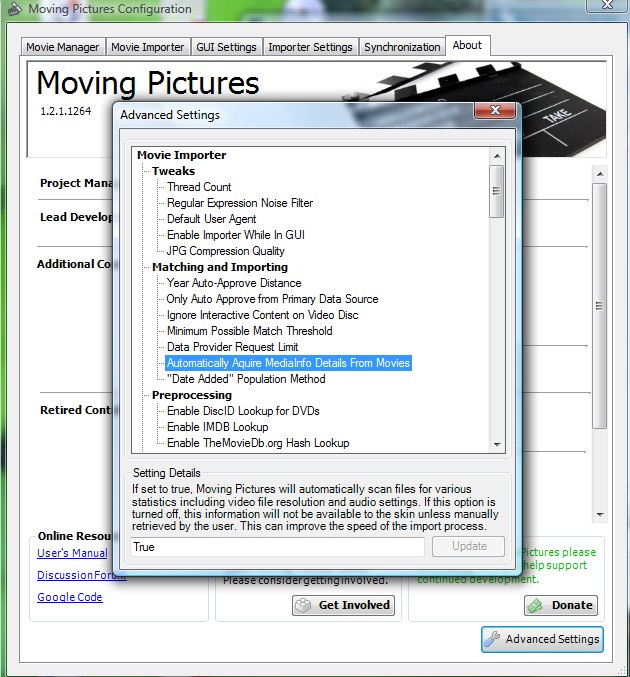
    MovPic Config -> Reiter About -> Advanced Options -> Automatically aquire MediaInfo from movies -> da dann True eingeben, bei dir müsste False da stehen - Update klicken nach der Eingabe nicht vergessen. (siehe Screenshot im Anfang)
     

    Attachments

    • movpic_config.jpg
      movpic_config.jpg
      106.2 KB

    Pattyboy

    Portal Pro
    June 16, 2011
    59
    1
    Wenn ich MP unter Vista oder Win7 installiere finde ich irgendwo im Programm-Ordner "Team Media Portal" alle Backdrops etc. die Moving Pictures verwendet, sie werden also dort gespeichert.
    Ich habe MP jedoch unter WinXP laufen, dort werden sie auch irgendwo gespeichert, aber wo?

    Noch eine Frage, betrifft aber nicht Moving Pictures ...
    Ich werde meine MediaPortal-Datenbank sichern (habe WinXP laufen). Kann ich diese dann problemlos wieder in Vista oder Win7 öffnen? ... weil die Ordnerstruktur von MediaPortal in diesen Betriebssytemen unterschiedlich ist.
     

    Holzi

    Super Moderator
  • Team MediaPortal
  • April 21, 2010
    7,934
    2,235
    Ba-Wü
    Home Country
    Germany Germany
    AW: Moving Pictures

    Ich denke, das wird leider nicht ohne Probleme funktionieren..
     

    Users who are viewing this thread

    Similar threads

    i think info but I'm really not sure
    i think info but I'm really not sure
    When I import new films using Moving Pictures, it takes an incredibly long time for the information to be found and downloaded...
    Replies
    3
    Views
    723
    I've updated dlls in first post. Fixes: Summary / Overview was always empty Collections were not filtered to official ones Studios were not populated Fallback to english tagline didn't work Score / Popularity now empty instead of dummy rating and unknown popularity numbers Also I've tried to compile plugin against MP 1.34 x64 and...
    I've updated dlls in first post. Fixes: Summary / Overview was always empty Collections were not filtered to official ones Studios...
    Hi! TheTVDB.com has movies in their API now. API itself looks ok now so I decided to add TVDB to Moving Pictures. Check it if you...
    Replies
    2
    Views
    2K
    My problem is that I would like to switch from Kodi to Mediaportal. In Kodi, putting an Extras folder in the same folder as the movie automatically manages all the extras on the Bluray, so my library is organized in this way. Moving everything would be a very long job (I have more than 2800 movies), plus I would lose the Extras...
    My problem is that I would like to switch from Kodi to Mediaportal. In Kodi, putting an Extras folder in the same folder as the...
    Hello, is it possible to exclude some folders from the Moving Pictures scan? My movies are organized in separate folders...
    Replies
    4
    Views
    3K
    maybe setting loglevel to debug might pinpoint the difference between normal and stuck? Preferable with as much disabled as possible also try to see if anything is happening during stuck for the mediaportal process(resource monitor, disk activity, cpu usage, anything) maybe other programs competing for resouces?
    maybe setting loglevel to debug might pinpoint the difference between normal and stuck? Preferable with as much disabled as...
    Since over a year my MP sometimes stucks while showing the welcome screen. It started once a week now it happens every second time...
    Replies
    4
    Views
    1K
    • Sticky
    yes that is indeed what I did in that ticket. It may already be working without updating those plugins because most of it was not relevant to the plugin itself (test, some leftover unused parts etc).
    yes that is indeed what I did in that ticket. It may already be working without updating those plugins because most of it was not...
    We have just released MediaPortal 1.38 - Tatiana & Leo x86 and x64 version. Highlights of this release Bugfixes: New...
    Replies
    37
    Views
    10K
    Top Bottom