MP1 EVR Presenter/dshowhelper community development (6 Viewers)

Owlsroost

Retired Team Member
  • Premium Supporter
  • October 28, 2008
    5,539
    5,038
    Cambridge
    Home Country
    United Kingdom United Kingdom
    it seems that it solves the problem....I have to try better..but it seems that it work worse than v12 and v13...can I try v19 too?

    Yes - v0019 is like v0013 with the latest crash fixes incorporated.

    Tony

     

    davitzen

    MP Donator
  • Premium Supporter
  • May 30, 2008
    198
    7
    Berlin
    Home Country
    Germany Germany
    AW: Re: AW: Re: AW: MP1 EVR Presenter/dshowhelper community development

    Hello Owlsroost,

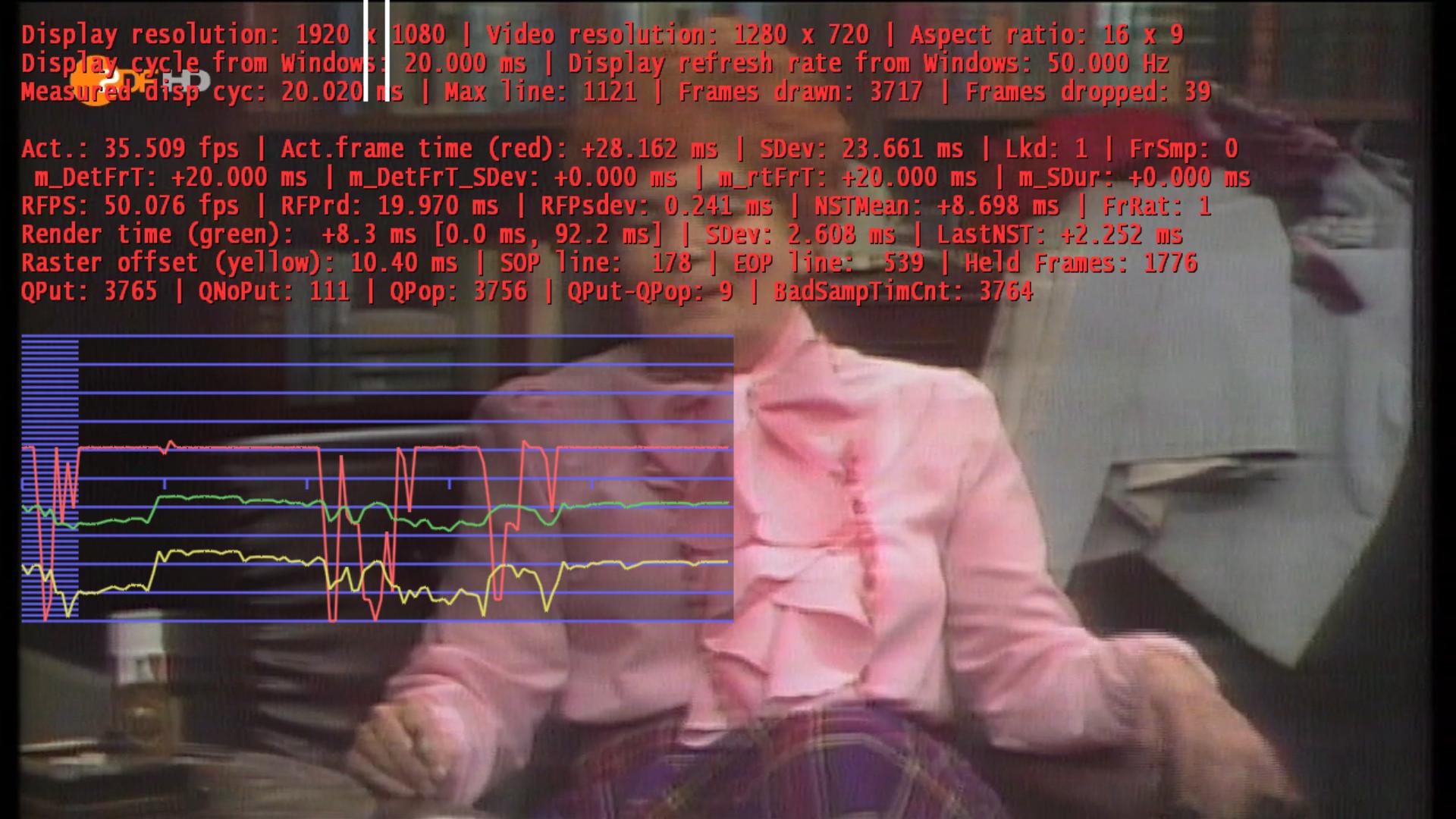
    I updated my Driver and tested my client 1. There is the same problem, stutter and dropped frames with HD 720p. On recordings there aren't stutter or dropped frames.

    David

    My GT240 shouldn't too slow!

    If recordings and other video files play OK then it's nothing to do with the dshowhelper - the problem is somewhere earlier in the chain I suspect....

    Tony

    Hello Owlsroost,

    I tested my first client intensive and my recordings stutters also. The stutter isn't so much like live-TV but it's there.
    My signal is very well, a technician was here and set the level of the installation. Maybe my TV cards are shit.

    David
     

    Attachments

    • screenshot.jpg
      screenshot.jpg
      231.2 KB

    mironicus

    Portal Pro
    March 9, 2008
    688
    44
    AW: MP1 EVR Presenter/dshowhelper community development

    davitzen

    If you have stutter on your Client side, try to use UNC paths in the Mediaportal setup.

    Open the Configuration with the debugoption command.

    C:\Program Files\Team MediaPortal\MediaPortal\Configuration.exe /debugoptions

    Click on TV and go to Debugoptions - enable "Multi Seat Setup: use UNC paths" and also set the path to your timeshift- and recording folder (you have to enable network access to this folders on the client side). That helped me a lot in my case. No more stutter on client side, the channel changing times are much faster.
     

    davitzen

    MP Donator
  • Premium Supporter
  • May 30, 2008
    198
    7
    Berlin
    Home Country
    Germany Germany
    AW: MP1 EVR Presenter/dshowhelper community development

    @davitzen

    Does only the HD-channels stutter? Did you try to change the codecs? There are only a few codecs that works well with TV + Mediaportal.

    On recordings there aren't stutter or dropped frames.

    Already recorded TV material is just playbacked like any video file on your hard drive, there is no TVServer and TSReader involved in this process - so you probably get no stutter and dropped frames.

    Stutter is also on SD, but not so heavy. With dshowhelper.dll V019 it runs good, but it stutters. I tested Coreavc 2.0 with and without CUDA, PDVD 10 Codec and Arcsoft. MP 1.02 ran very well!

    David
     

    mrmojo666

    MP Donator
  • Premium Supporter
  • January 24, 2006
    603
    182
    Turin
    Home Country
    Italy Italy
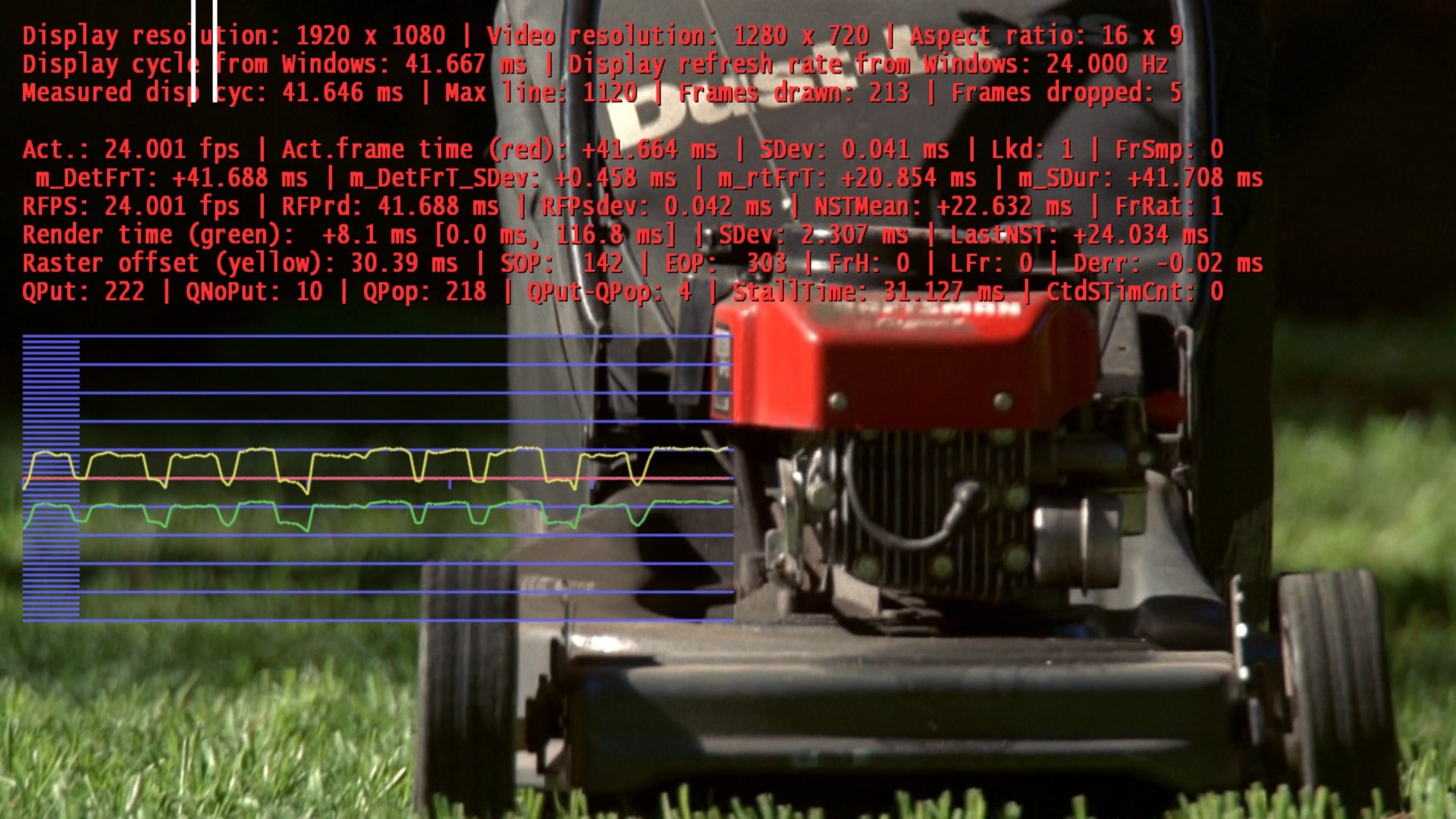
    Great Work Tony, today i've tried the v19 dll with MP rc3...and it works awesome.

    Red line is always totally FLAT, just in 24p BD and 720p, 1080p mkv i get yellow and green lines slightly spiked..... almost no frame loss.

    the interesting part is finally the powerdvd10 codec is working perfect, more flat lines in HDTV.

    All these results are made with Catalyst 10.6.

    As soon as possible i'll do a more long tests and post complete results.

    byeeeeeeeee
     

    davitzen

    MP Donator
  • Premium Supporter
  • May 30, 2008
    198
    7
    Berlin
    Home Country
    Germany Germany
    AW: MP1 EVR Presenter/dshowhelper community development

    @davitzen

    If you have stutter on your Client side, try to use UNC paths in the Mediaportal setup.

    Open the Configuration with the debugoption command.

    C:\Program Files\Team MediaPortal\MediaPortal\Configuration.exe /debugoptions

    Click on TV and go to Debugoptions - enable "Multi Seat Setup: use UNC paths" and also set the path to your timeshift- and recording folder (you have to enable network access to this folders on the client side). That helped me a lot in my case. No more stutter on client side, the channel changing times are much faster.

    I'm using UNC paths, without I can't watch TV (many artefacts and much more stutter).

    David
     

    cecet23

    MP Donator
  • Premium Supporter
  • March 18, 2009
    137
    16
    Perugia
    Home Country
    Italy Italy
    Hi Owlsroost,
    for now I didnt' have a crash. I upgraded the nvidia driver to 257 and all works better..
    Only one thing the green and the yellow line aren't totally flat and sometimes I receive a microstutter.. I have attached a screen capture.

    thx
     

    Attachments

    • screen.jpg
      screen.jpg
      541.4 KB

    doornjoostje

    Portal Pro
    December 6, 2007
    432
    14
    Home Country
    Netherlands Netherlands
    Re: AW: MP1 EVR Presenter/dshowhelper community development

    @davitzen

    If you have stutter on your Client side, try to use UNC paths in the Mediaportal setup.

    Open the Configuration with the debugoption command.

    C:\Program Files\Team MediaPortal\MediaPortal\Configuration.exe /debugoptions

    Click on TV and go to Debugoptions - enable "Multi Seat Setup: use UNC paths" and also set the path to your timeshift- and recording folder (you have to enable network access to this folders on the client side). That helped me a lot in my case. No more stutter on client side, the channel changing times are much faster.

    Sorry offtopic.

    I've tried to do this but it doesn't work.
    What I did, on the server side i've shared the directory with recordings.
    I also need to give the timeshift directory, but this in no longer there as a setting in the config on server side, so I let it empty.

    Now live TV and recorded TV are not watchable, I recieve an error.
    Am I missing something?
     

    davitzen

    MP Donator
  • Premium Supporter
  • May 30, 2008
    198
    7
    Berlin
    Home Country
    Germany Germany
    AW: Re: AW: MP1 EVR Presenter/dshowhelper community development

    @davitzen

    If you have stutter on your Client side, try to use UNC paths in the Mediaportal setup.

    Open the Configuration with the debugoption command.

    C:\Program Files\Team MediaPortal\MediaPortal\Configuration.exe /debugoptions

    Click on TV and go to Debugoptions - enable "Multi Seat Setup: use UNC paths" and also set the path to your timeshift- and recording folder (you have to enable network access to this folders on the client side). That helped me a lot in my case. No more stutter on client side, the channel changing times are much faster.

    Sorry offtopic.

    I've tried to do this but it doesn't work.
    What I did, on the server side i've shared the directory with recordings.
    I also need to give the timeshift directory, but this in no longer there as a setting in the config on server side, so I let it empty.

    Now live TV and recorded TV are not watchable, I recieve an error.
    Am I missing something?

    You have to share your Timeshift and Recordings folder (easy sharing under XP on server side and there you can put in a sharing name e.g. Timeshift and for Recordings the same). Under configuration /debugoptions on your client you have to put in under Multiseat UNC path: "\\192.168.1.150\Timeshift" (for Timeshift) and under Recordings: \\192.168.1.150\Recordings (for Recording).
    The IP above is my IP, your IP is maybe another one.

    David

    PS: Sorry for my English, ich bin ein Berliner!
     

    doornjoostje

    Portal Pro
    December 6, 2007
    432
    14
    Home Country
    Netherlands Netherlands
    Re: AW: Re: AW: MP1 EVR Presenter/dshowhelper community development

    Thanks, but in the 1.1.0 version there is no setting any more for the timeshift folder, right?
     

    Users who are viewing this thread

    Top Bottom