MP1 initial difficulties (5 Viewers)

harryzwo

Portal Pro
July 25, 2006
957
151
Home Country
Germany Germany
After a reinstallation of MP1 1.39 x86, I have the problem that a disc is always requested after the start. This cannot be clicked away either.
 

Attachments

  • MP_Logs_HTPC_26_10_17_20_03.zip
    52.9 KB

CyberSimian

Test Group
  • Team MediaPortal
  • June 10, 2013
    3,830
    3,027
    Southampton
    Home Country
    United Kingdom United Kingdom
    After a reinstallation of MP1 1.39 x86, I have the problem that a disc is always requested after the start.
    I don't think that I can help with this error (the log entries don't mean anything to me), but your "Error.1" log file shows an error with the DWHD skin:

    Code:
    [2026-10-17 19:53:45,037] [Error  ] [MPMain   ] [ERROR] - GUIWindow:OnWindowLoaded 'C:\ProgramData\Team MediaPortal\MediaPortal\Skin\DefaultWideHD\videoOverlay.xml' control id:0 ex:Das Objekt mit dem Typ "MediaPortal.GUI.Library.GUIGroup" kann nicht in den Typ "MediaPortal.GUI.Library.GUIImage" konvertiert werden.    bei System.RuntimeType.TryChangeType(Object value, Binder binder, CultureInfo culture, Boolean needsSpecialCast)
       bei System.RuntimeType.CheckValue(Object value, Binder binder, CultureInfo culture, BindingFlags invokeAttr)
       bei System.Reflection.RtFieldInfo.InternalSetValue(Object obj, Object value, BindingFlags invokeAttr, Binder binder, CultureInfo culture, StackCrawlMark& stackMark)
       bei System.Reflection.RtFieldInfo.SetValue(Object obj, Object value, BindingFlags invokeAttr, Binder binder, CultureInfo culture)
       bei MediaPortal.GUI.Library.GUIWindow.OnWindowLoaded() MediaPortal.GUI.Video.GUIVideoOverlay

    I think that @catavolt or @High_Five need to look at it. (It may or may not be relevant to the DVD error.)

    -- from CyberSimian in the UK
     

    CyberSimian

    Test Group
  • Team MediaPortal
  • June 10, 2013
    3,830
    3,027
    Southampton
    Home Country
    United Kingdom United Kingdom
    I have just tried to reproduce your problem on my default laptop (64-bit MP 1.39.0 on 64-bit Windows 10). My laptop does not have an integral CD/DVD drive, so I plugged in a USB CD/DVD drive.

    I encounter the same DWHD error as you did (for "Music" as well as "Video", so possibly present on other panels too), but I have not been able to trigger the "Please load a DVD" error. :(

    I have virtually no plugins installed, whereas I notice that you have many plugins installed. It would be worth trying your testcase with most plugins disabled, just to see if it is one of those that is causing the problem. If I remember correctly, when you run MP via the "MP Watchdog" tool, it does disable (temporarily) all optional plugins, so that would avoid having to disable all optional plugins manually.

    Remember to enable DEBUG logging before running the Watchdog (I don't know whether the Watchdog will do this for you).

    -- from CyberSimian in the UK
     

    harryzwo

    Portal Pro
    July 25, 2006
    957
    151
    Home Country
    Germany Germany
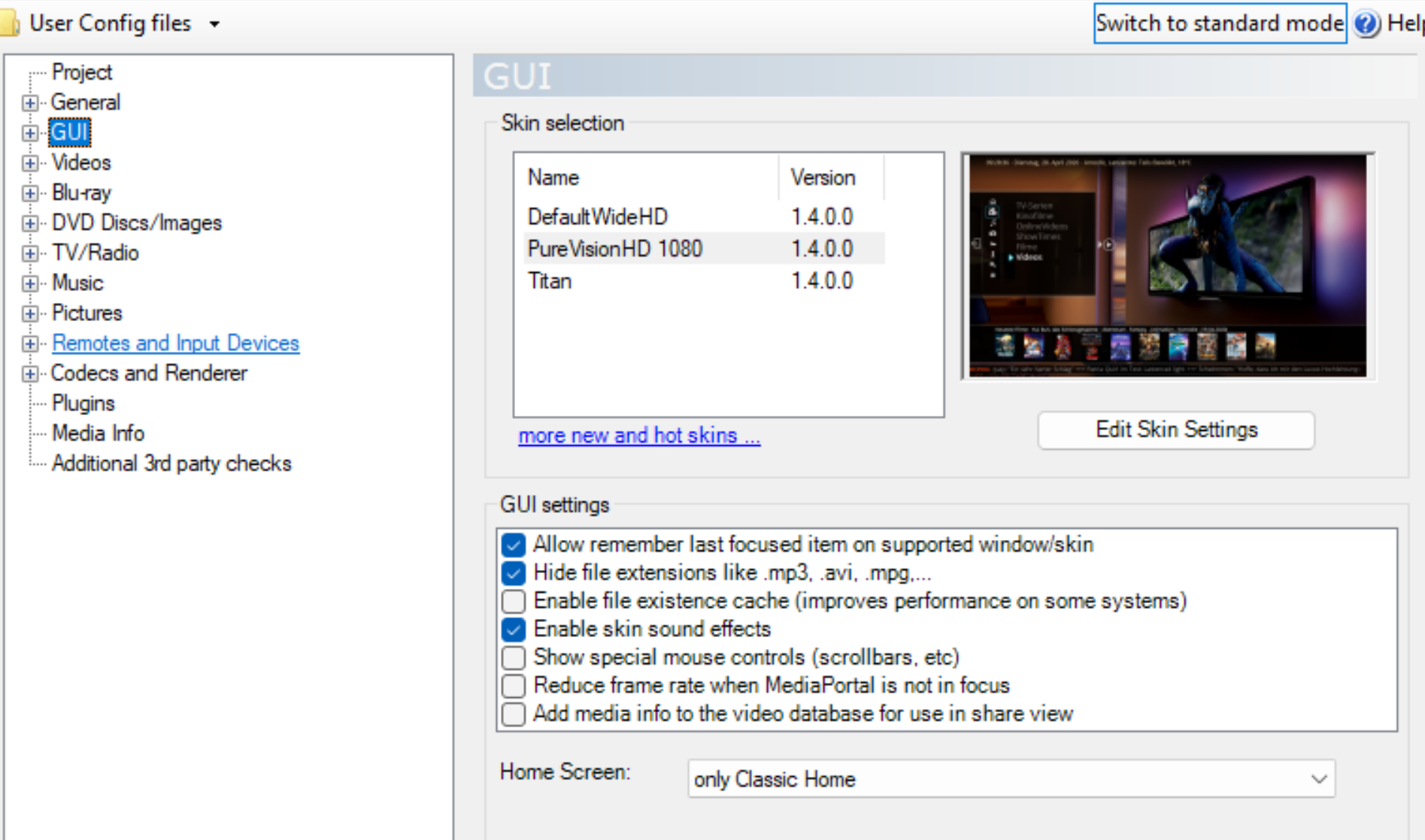
    I was able to narrow down the problem. If the GUI-config 'HomeScreen prefer Classic' is clicked on the error. Not at 'HomeScreen prefer Basic'. Maybe that helps.
     

    Attachments

    • classic-home.png
      classic-home.png
      655.1 KB

    CyberSimian

    Test Group
  • Team MediaPortal
  • June 10, 2013
    3,830
    3,027
    Southampton
    Home Country
    United Kingdom United Kingdom
    Same result with watchdog
    From your logs, I notice that the DVD error also occurs with the "Titan" skin. Unfortunately, it does not occur on my system.

    The "Classic Home" panel has a list of selections, with the top selection being "Play DVD". This is the selection that has the focus when the panel is displayed. The effect that you are seeing is equivalent to some part of the system pressing the OK button or ENTER key whenever the panel is displayed.

    There are also multiple occurrences of this error:
    HideVolumeOSD: Multiple pairs found!​
    These errors precede the DVD error, so it may be these that are triggering the DVD error. Unfortunately, I don't know what this error message means.

    It is rare that I can provide a solution, but I do try to provide a workaround. If the error occurs only for "Classic Home", then the workaround is to use "Basic Home". It will need one of the developers to investigate this further.

    -- from CyberSimian in the UK
     

    Users who are viewing this thread

    Similar threads

    • Sticky
    Many many years ago, I opened a bug report after I got that same message but I never got a reply. The reason was I had unchecked the Windows Media Player item in Windows 10 Control Panel > Program and Features > Turn Windows features on or off as I didn't need it, without thinking that it was needed by MediaPortal. I kept the "Media...
    Many many years ago, I opened a bug report after I got that same message but I never got a reply. The reason was I had unchecked...
    We have just released MediaPortal 1.39 - Endurance x86 and x64 version. Highlights of this release Bugfixes: [MP1-5257] - Skin...
    Replies
    13
    Views
    721
    Sorry, I didn't get email notifications on these latest replies. I just came here to report I solved the problem after adjusting power settings for "Intel Graphics". I set it to Maximum Performance. I tried many other things so it could be a combination of them, but this was the last thing I did and I haven't had the problem return...
    Sorry, I didn't get email notifications on these latest replies. I just came here to report I solved the problem after adjusting...
    I'm running MP1 as a client only on this: https://www.amazon.com/dp/B0DZX5DWS5?ref_=pe_123509780_1038749300_t_fed_asin_title&th=1...
    Replies
    5
    Views
    2K
    Your timing is great.....I just got home myself!! :) A little confusion for me here! There are 2 x files in the folder......one is x86, and other is x64 Wondering if I should be selecting the x64.....since I'm installing the 64bit version? UPDATE Transferred both files to the destination folder, and labelled appropriately. This way...
    Your timing is great.....I just got home myself!! :) A little confusion for me here! There are 2 x files in the folder......one is...
    Am a long time MP1 user, and have successfully been running the x64 version since it first appeared. Recently, problem of black...
    Replies
    10
    Views
    3K
    MP1 MP2 EPG woes DE
    Yes, I saw that. Was beyond my understanding, however. Didn't see how to set that up. I'm a relative neophyte, who's done hardly any command-line coding. To be more specific: I don't see, under either "Grabbing Listings" or in the "First use example," where it is designated just where on one's C drive the tv.xml file is...
    Yes, I saw that. Was beyond my understanding, however. Didn't see how to set that up. I'm a relative neophyte, who's done hardly...
    Does anyone know how to “fix” the MC2XML application, and hopefully permanently? Mine stopped working sometime after September 29...
    Replies
    16
    Views
    1K
    Thank you for this tip! I'm moving MP TV Server to a new machine. I installed the 64-bit version and most of the MP firewall rules were set to Public. I couldn't connect to the new TV Server from my old single-seat installation running 32-bit until I changed all MP-related firewall rules on the new machine to Private. Before I did...
    Thank you for this tip! I'm moving MP TV Server to a new machine. I installed the 64-bit version and most of the MP firewall...
    Server and client on modern uptodate Windows 11 desktop. Software is Server and Client version x86 1.38.003 Remote client on...
    Replies
    26
    Views
    4K
    Top Bottom