MP2.1.1 Manual TV Channel Setup (1 Viewer)

Manumiter

Portal Member
May 10, 2017
17
0
Home Country
United States of America United States of America
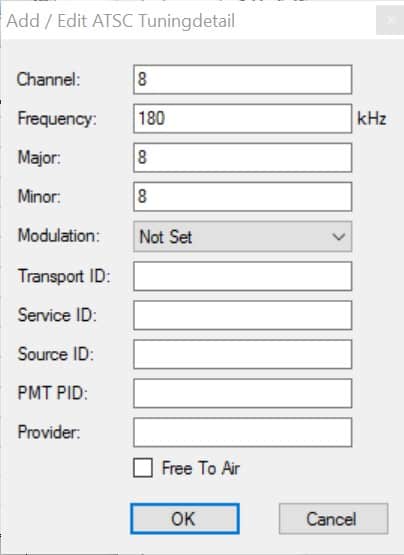
Please see attached screen shot.

What is all this stuff and where does a person search to obtain all this information per TV channel in order to manually setup channels?

Thanks.
 

Attachments

  • Channel Info.jpg
    Channel Info.jpg
    30.6 KB

Brownard

Development Group
  • Team MediaPortal
  • March 21, 2007
    2,301
    1,886
    Home Country
    United Kingdom United Kingdom
    Hi, can you explain what it is you are trying to do? Those are advanced settings and shouldn't normally need to be configured manually (they'd usually be configured automatically by a channel scan).

    Sent from my SM-T530 using Tapatalk
     

    ge2301

    Lead Design MP2
  • Team MediaPortal
  • January 11, 2014
    8,725
    3,521
    Stuttgart
    Home Country
    Germany Germany
    What is all this stuff and where does a person search to obtain all this information per TV channel in order to manually setup channels?
    Please check WIKI (Same between MP1 and MP2 for TV), where it is explained how to setup TV-channels. There are also descriptions that explain "all this stuff", but as Brownard explained you do not touch those in normal circumstances, so would be good to know what you are intending to do.
     

    Manumiter

    Portal Member
    May 10, 2017
    17
    0
    Home Country
    United States of America United States of America
    Thank you both for inquiring. I use Hauppauge HVR2250 cards in a PC to record ATSC over the air broadcasts in the U.S. Best I can tell, after posting here on the forum before in detail and spending copious hours reading the forum and WIKI, is these are not going to work with MP2.1.1 to successfully get a channel scan. The only successful person that had responded to me was forced to manually setup all his TV stations. You may read his post here:

    TV Configuration Always Crashes on Channel Search - New Win10 and MP2 Install

    What I get when I attempt a scan is a lock up followed by an entire page of log errors, posted in the above thread. After that, to get the setup tool working again, I have to completely uninstall MP and reinstall it. Unfortunately, the nice poster that had to manually setup his TV channels did not provide adequate instructions on how to do so, and I am unable to find them. Being a long time WMC user, and first time MP hopeful (if I can ever get channels setup that is) I noted MP2 not only could play back WMC recordings, but had a similar WMC skin. So I thought MP2 would make a nice substitute for WMC as I am attempting to change my PC from WIN7/WMC to WIN10/MP2.
     

    Brownard

    Development Group
  • Team MediaPortal
  • March 21, 2007
    2,301
    1,886
    Home Country
    United Kingdom United Kingdom
    Thanks, after a quick search of the forum it seems that newer versions of the driver for your Hauppauge causes the issues but it should work with the 7.9.1.28162 version - see post here. And it seems that you can get that version from this post here. I'd probably try and completely uninstall/clean your current driver then install the linked version, then try a channel scan.
     

    Manumiter

    Portal Member
    May 10, 2017
    17
    0
    Home Country
    United States of America United States of America
    Thank you Brownard. I will report back, for those that follow, so others may know if this worked or not. It will be a few days before I have time to try it.
     

    Cordraconis

    Portal Pro
    July 26, 2016
    82
    2
    Home Country
    Belgium Belgium
    I have read your post and did some quick research, but I am seriously pressed for time to give an adequate answer.

    I am in the DVB-C (and analog) area with a cable company, where you have to deal with (airborne) ATSC. So I am doing a warm invite for people who have digital ATSC channels set up, preferrably over an antenna.

    From what I could google together, you could manually input the correct frequency - as per the screenshot you posted - and the modulation set to 8VSB.
    I *think* this should allow the card to find the datastream and get the other parameters (like channel Id) by itself, but i hope somebody from the USA can verify that.

    Edit: you can use the "hcwclear" utility from the haupauge site to completely strip the drivers, .ini files, registry setings, folders, ... from your system. It will be like hauppauge never existed after a reboot. saves re-installing windows...
    If you really DO need transport stream IDs etc... you could try "VLC player". It has a portable version and with some googleing you can find out how to watch digital TV useing your tuner card.
    VLC HowTo/Use a capture card - VideoLAN Wiki
    (you'll need to adjust for ATSC)
    In the stream info you can find the broadcast IDs etc... to input in media portal. (don't use VLC and MP2 together, they'll fight over the tuner cards/drivers. Just write everything down, but try all of the above first with one single channel.)
     
    Last edited:

    Manumiter

    Portal Member
    May 10, 2017
    17
    0
    Home Country
    United States of America United States of America
    Cordraconus, thanks for all the help... I said I'd report back in. After, yet again, another full day of messing around with this, I have failed in being able to get the TV configuration tool to scan without a crashing lockup and file damage that forces a minimum of a system restore to get the configuration tool working again. This is AFTER I performed a total ground up WIN10 install over again and then the recommended driver as suggested earlier in this thread. So the same damn thing just happened all over again. I have been using the hcwclear utility during this process to no avail.
     

    Cordraconis

    Portal Pro
    July 26, 2016
    82
    2
    Home Country
    Belgium Belgium
    Hmmm... So scanning is definately out then. (I think I never tried the "old" drivers since I couldn't find them and afterwards I didn't need them anymore.)

    Then did you have any sucess in manually setting up one single channel? Or in VLC player?

    Are there some other persons who could help around? Maybe a technician you know from your cable or antenna company, or a local sattelite dish installer who could know the correct settings for one single channel to input in MP2?
    Unless you find an "ATSC guy" here on the forum, I think I am running out of help, short of drinking lots of coffee and setting up a VNC connection to have some whacks at it, with the risk of crashing your system again.
     

    Manumiter

    Portal Member
    May 10, 2017
    17
    0
    Home Country
    United States of America United States of America
    Cordraconis,

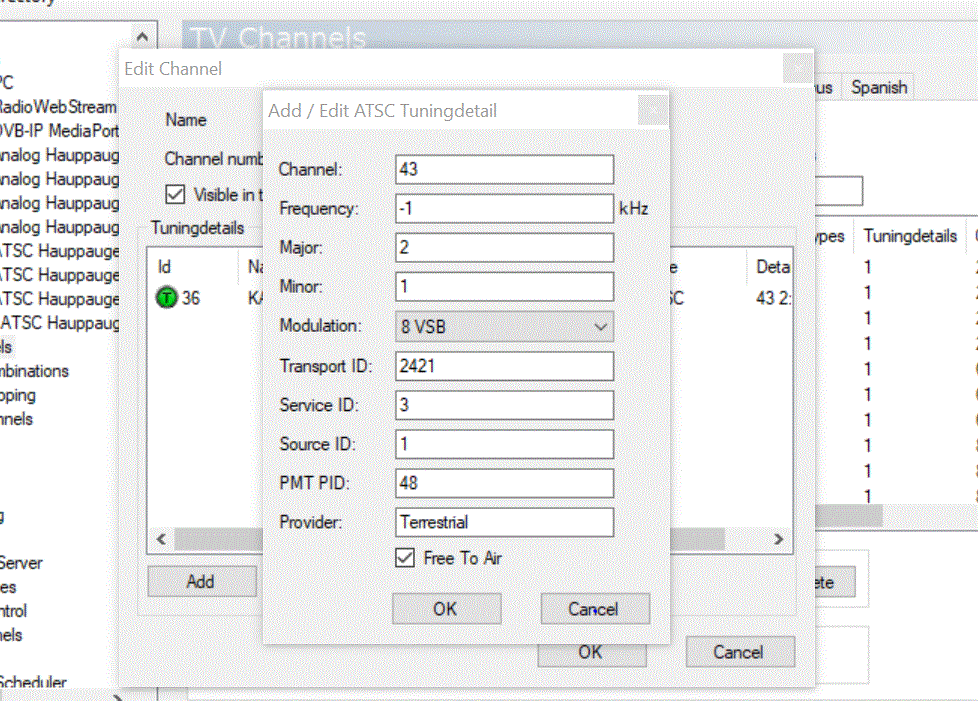
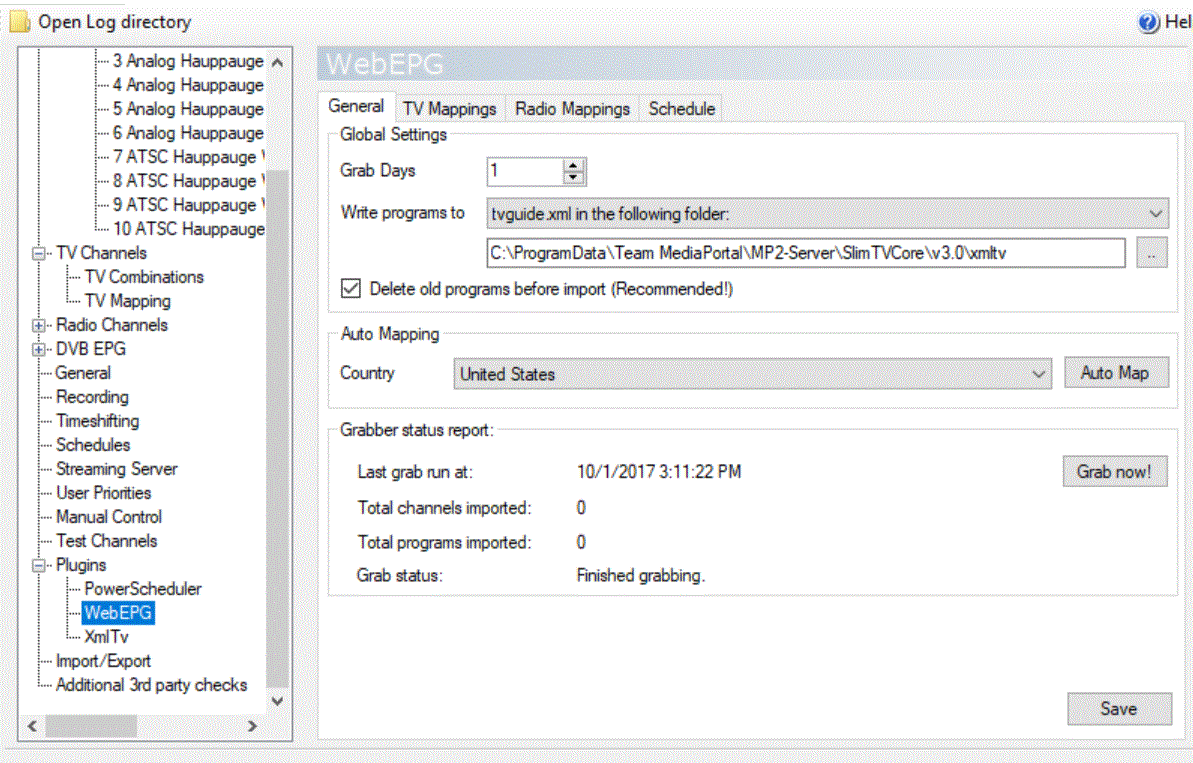
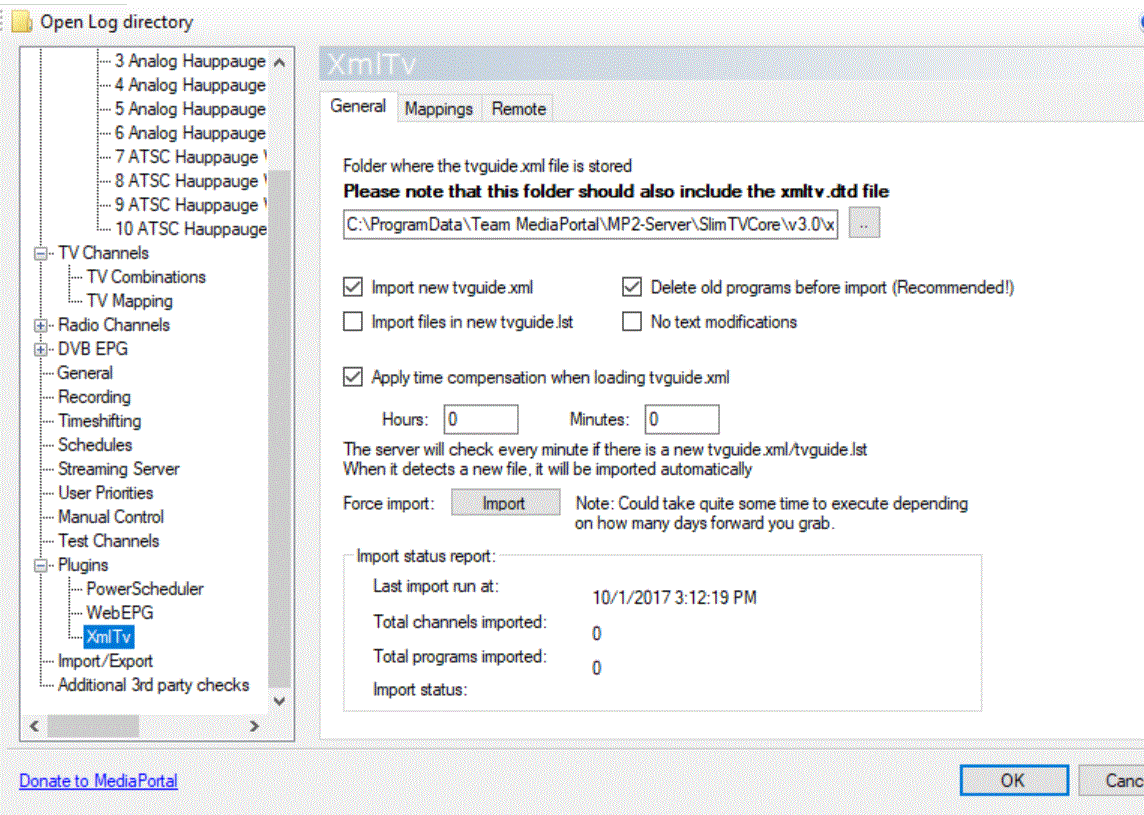
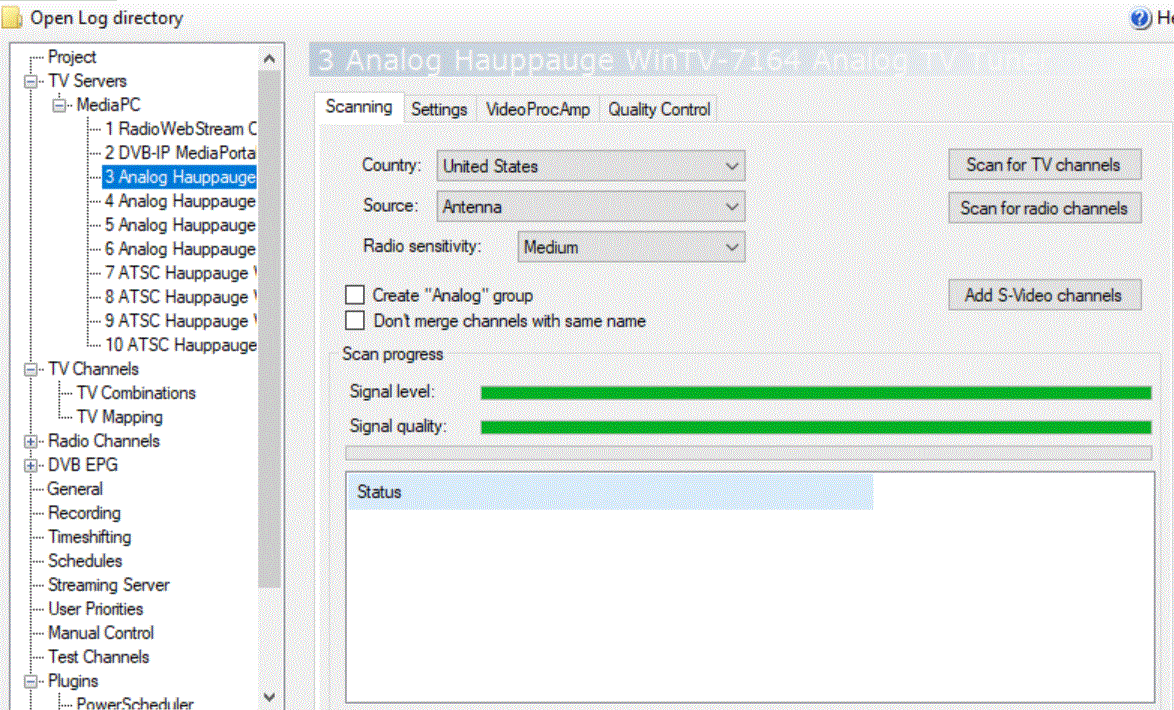
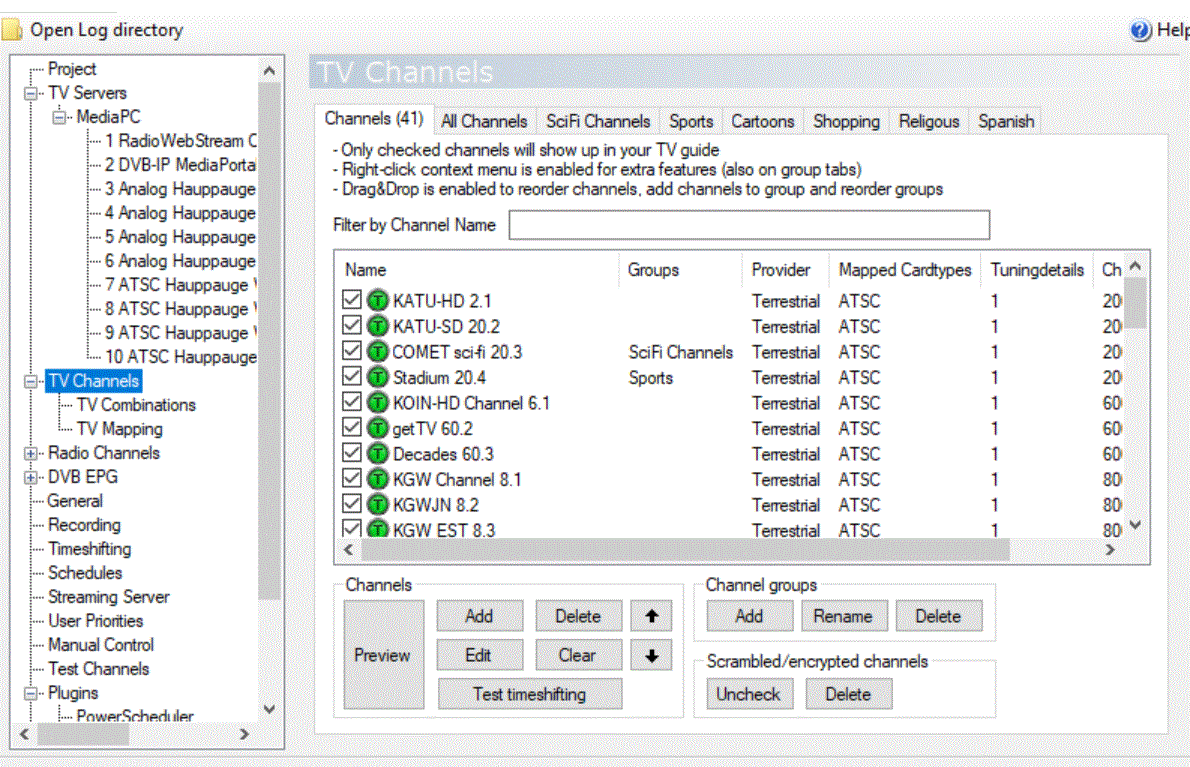
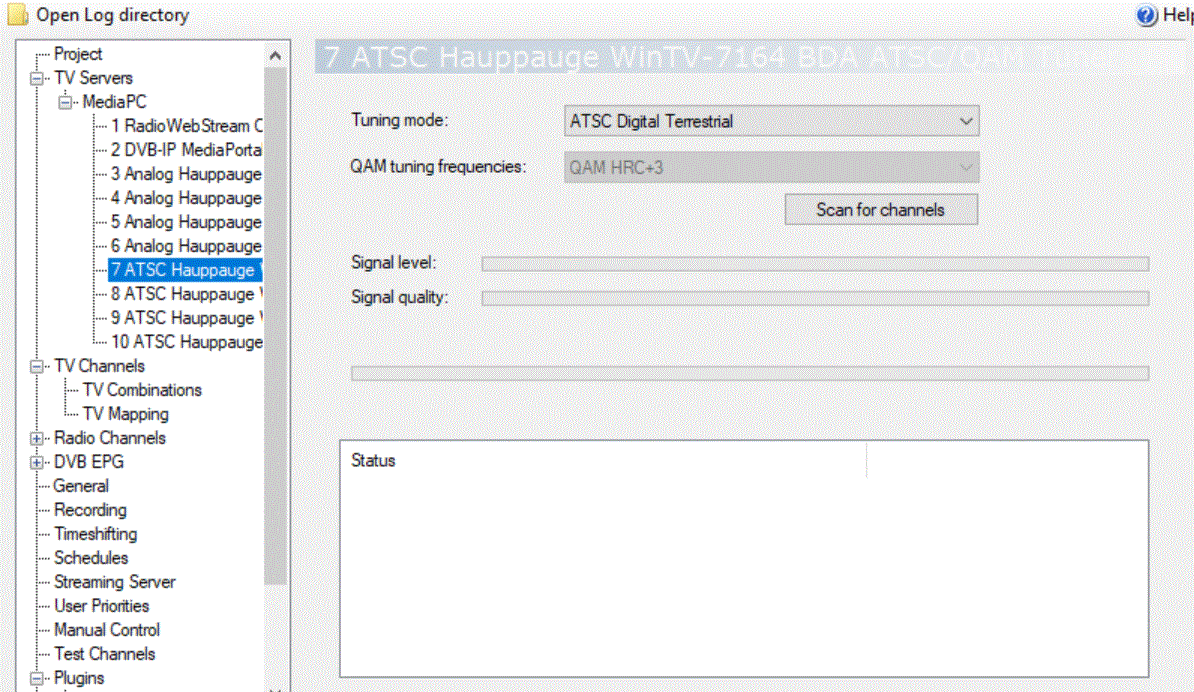
    I found that in spite of failed scanning with a crash, a bunch of ATSC channels showed up. I moved forward with the assumption that somehow many of them worked and followed the mapping instructions. Now I cannot get an TVguide (epg) information. I used the two built in plugin ins and followed the instructions for the two files required in the one folder (xmltv.dtd and tvguide.xml) ... I note the analog side of the tuners show a signal, the ATSC sides do not, which is strange as I understand there is no longer any analog signals in the U.S. I am uploading screen snips for additional discussion.
     

    Attachments

    • Analog .GIF
      Analog .GIF
      214.9 KB
    • ATSC Channels Showing As Mapped.GIF
      ATSC Channels Showing As Mapped.GIF
      202.3 KB
    • ATSC Digital.GIF
      ATSC Digital.GIF
      191.2 KB
    • ATSC Tuning Detail.GIF
      ATSC Tuning Detail.GIF
      166.6 KB
    • WEBepg.GIF
      WEBepg.GIF
      153.3 KB
    • XmlTv No Channels Imported.GIF
      XmlTv No Channels Imported.GIF
      171 KB

    Users who are viewing this thread

    Similar threads

    I don't know about MP2 but as you said you tried MP1 too, how is the MP music config ? MP(1) will only use LAV if you select "Internal DirectShow player" as music output, but then you lose gapless playback. If you you don't have multichannel music you can choose WASAPI as the output and set the number of speakers to stereo. I have...
    I don't know about MP2 but as you said you tried MP1 too, how is the MP music config ? MP(1) will only use LAV if you select...
    Not sure if this a a bug/config/settings problem. I am running a media portal 2.5 server with 2.41 client but it seems I get the...
    Replies
    1
    Views
    656
    Thanks very much, Jasmeet. Worked. But note that this setting has moved, apparently, to: Settings > TV (not Plugins)
    Thanks very much, Jasmeet. Worked. But note that this setting has moved, apparently, to: Settings > TV (not Plugins)
    I recently did a fresh install of 2.5 on a new Windows 11 PC. My previous (Windows 10) version of 2.5 gave my broadcast TV channel...
    Replies
    2
    Views
    2K
    FYI, you can also play with these settings: show TV Server Configuration shortcut => Right-click => Properties => Compatibility => Change High DPI settings That way you don't have to change the whole scaling of Windows just for this particular application
    FYI, you can also play with these settings: show TV Server Configuration shortcut => Right-click => Properties => Compatibility =>...
    Hi all Please see attached after new install just now. Win 11 - Also new build. TV 3.5 Any thoughts as to where how I fix this...
    Replies
    4
    Views
    1K
    I should point out that the developers have not formally left the project, and development has not formally stopped. The developers have instead simply "faded away", gradually spending less and less time on MP2 until the present, when they spend no time on MP2. But one or more of the developers might return next week! It is impossible...
    I should point out that the developers have not formally left the project, and development has not formally stopped. The developers...
    Hi Folks, I need some help with fixing the Problem that MP2 doesn't keep the sorted Order of Channels in TV-Configuraiton. I am...
    Replies
    10
    Views
    3K
    Sorry, I didn't get email notifications on these latest replies. I just came here to report I solved the problem after adjusting power settings for "Intel Graphics". I set it to Maximum Performance. I tried many other things so it could be a combination of them, but this was the last thing I did and I haven't had the problem return...
    Sorry, I didn't get email notifications on these latest replies. I just came here to report I solved the problem after adjusting...
    I'm running MP1 as a client only on this: https://www.amazon.com/dp/B0DZX5DWS5?ref_=pe_123509780_1038749300_t_fed_asin_title&th=1...
    Replies
    5
    Views
    2K
    Top Bottom