[New] MyFilms v4.4.1.4 (2 Viewers)

whatisk

Portal Pro
May 21, 2007
242
12
Brisbane
Home Country
Australia Australia
One thing that I have noticed with the new version of the plugin is that with most skins, when I first go in, it defaults to the area where you can change the Layout, Sort By, etc rather than having the listing of movies as the focus.

Out of the skins I have installed (X-Face, PMIII, Spinsafe Revolve, Blue 2), only Spinsafe Revolve doesn't display this behaviour. That is, Spinsafe has the movie list as the focus rather than the view selection, etc.

Is there an easy fix for this to have the movie list focused? I'm assuming it's something in the xml file for the skin?
 

zebons

Portal Pro
January 2, 2006
1,484
114
One thing that I have noticed with the new version of the plugin is that with most skins, when I first go in, it defaults to the area where you can change the Layout, Sort By, etc rather than having the listing of movies as the focus.

Out of the skins I have installed (X-Face, PMIII, Spinsafe Revolve, Blue 2), only Spinsafe Revolve doesn't display this behaviour. That is, Spinsafe has the movie list as the focus rather than the view selection, etc.

Is there an easy fix for this to have the movie list focused? I'm assuming it's something in the xml file for the skin?
You can try to define the defaukt control in the skin file MesFilms.xml (in the skin directory you want to change). Put :
<defaultcontrol>1026</defaultcontrol>
instead
<defaultcontrol>6</defaultcontrol>
 

whatisk

Portal Pro
May 21, 2007
242
12
Brisbane
Home Country
Australia Australia
One thing that I have noticed with the new version of the plugin is that with most skins, when I first go in, it defaults to the area where you can change the Layout, Sort By, etc rather than having the listing of movies as the focus.

Out of the skins I have installed (X-Face, PMIII, Spinsafe Revolve, Blue 2), only Spinsafe Revolve doesn't display this behaviour. That is, Spinsafe has the movie list as the focus rather than the view selection, etc.

Is there an easy fix for this to have the movie list focused? I'm assuming it's something in the xml file for the skin?
You can try to define the defaukt control in the skin file MesFilms.xml (in the skin directory you want to change). Put :
<defaultcontrol>1026</defaultcontrol>
instead
<defaultcontrol>6</defaultcontrol>

Thanks. I will try it and let you know how it goes.

edit: Worked great thanks Zebons.
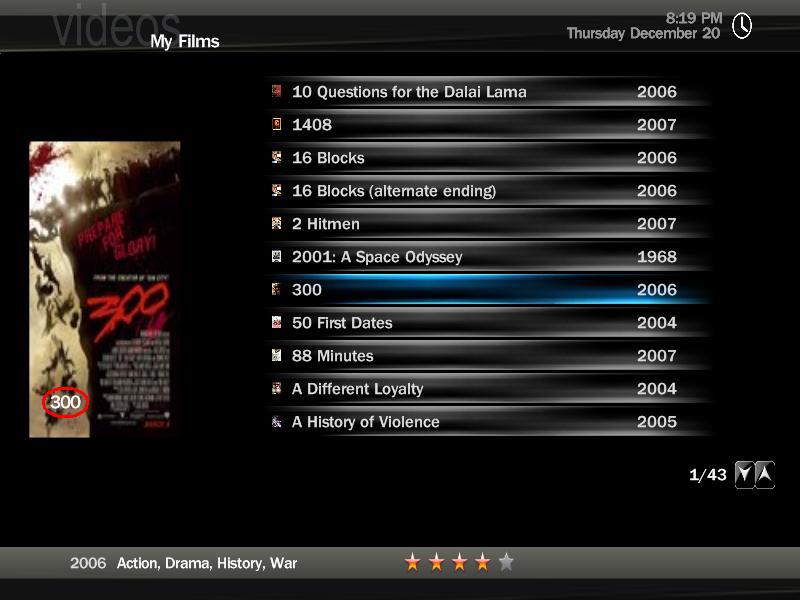
One other thing if I may regarding XFace skin and the plugin again, is it possible to remove the movie name which is over the top of the film graphic on the left?

Thanks.
 

cams

Portal Member
January 19, 2007
21
0
Home Country
United States of America United States of America
Just seen this plugin, looks good.. but what is the benefit of using this over the built in MP movie DB... I dont have a existing movie DB so does this add any new features over the "my videos" built into MP

What i have been doing is once i add a movie, i search imdb using MP... and i get all my movie info..Just asking to see if its worth it to add all my movies using my films or stick with the stock MP
 

zebons

Portal Pro
January 2, 2006
1,484
114
One thing that I have noticed with the new version of the plugin is that with most skins, when I first go in, it defaults to the area where you can change the Layout, Sort By, etc rather than having the listing of movies as the focus.

Out of the skins I have installed (X-Face, PMIII, Spinsafe Revolve, Blue 2), only Spinsafe Revolve doesn't display this behaviour. That is, Spinsafe has the movie list as the focus rather than the view selection, etc.

Is there an easy fix for this to have the movie list focused? I'm assuming it's something in the xml file for the skin?
You can try to define the defaukt control in the skin file MesFilms.xml (in the skin directory you want to change). Put :
<defaultcontrol>1026</defaultcontrol>
instead
<defaultcontrol>6</defaultcontrol>

Thanks. I will try it and let you know how it goes.

edit: Worked great thanks Zebons.
One other thing if I may regarding XFace skin and the plugin again, is it possible to remove the movie name which is over the top of the film graphic on the left?

Thanks.
Can you be more precise ?
 

whatisk

Portal Pro
May 21, 2007
242
12
Brisbane
Home Country
Australia Australia
One other thing if I may regarding XFace skin and the plugin again, is it possible to remove the movie name which is over the top of the film graphic on the left?

Thanks.
Can you be more precise ?

Sorry if I didn't explain clearly. I will get a screendump and post to show what I mean.

Thanks.

edit: see screen shot for example. I have circled the movie title that is showing over the picture of the cover art for the movie.
 

Attachments

  • screenshot.JPG
    screenshot.JPG
    58.7 KB

GregorV

Portal Pro
October 2, 2007
137
11
Bonn
Home Country
Germany Germany
BUG found in MesFilms 4.3.3 SVN

If MP is closed while My Films screen is open AND showlastactivemodule is set to yes, then MP does not start correct.
An exception is thrown and navigation in MP is not possible (e.g. leaving My Films screen).
It just shows empty film details, like '#Title'.
Here the Error log:
2007-12-29 12:25:22.195875 [ERROR][MPMain]: Exception: System.NullReferenceException: Der Objektverweis wurde nicht auf eine Objektinstanz festgelegt.
bei MesFilms.MesFilmsDetail.OnMessage(GUIMessage messageType)
bei MediaPortal.GUI.Library.GUIWindowManager.ActivateWindow(Int32 newWindowId, Boolean replaceWindow)

Gregor

Hi,

I like the plugin - it does exactly what I was looking for - good work.

A scrollbar for navigation would be great.
As an alternative a pair of buttons like +100 and -100 (eventually configurable step/percentage values) or some buttons like (start from) 'A'. 'D', ...

Thanks,
Gregor
 

Users who are viewing this thread

Top Bottom