SAF v4.00 ''stable'' (StandAlone Filters) - DXVA ready (H.264 and VC-1). (4 Viewers)

Should i integrate FFDshow in to SAF?

  • Yes

    Votes: 406 85.5%
  • No

    Votes: 69 14.5%

  • Total voters
    475

hoborg

Portal Pro
June 13, 2008
4,413
1,644
Nový Jičín
Home Country
Czech Republic Czech Republic
TIP:

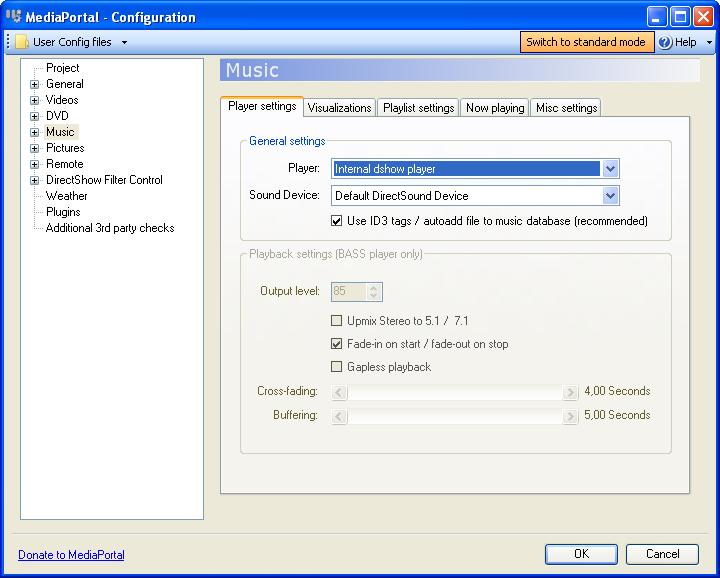
If you want to passthrough not only audio from Video files, but by some reason simple audio files too, just enable dsplayer in MP config:
audio.png


Now SAF will proceed all audio and you will be able to connect Graphstudio.

Rules are the same like Video files have.
 

Seeco

Portal Pro
October 15, 2007
241
7
Linköping
Home Country
Sweden Sweden
pilehave: I had actually already done that, but it doesn't seem to make any difference. I guess I'm stuck with Reclock for TV then, if there's no other way of controlling it? It's a question about merits I guess.
 

Snader

MP Donator
  • Premium Supporter
  • September 5, 2007
    270
    10
    Aalsmeer
    Home Country
    Netherlands Netherlands
    I was having troubles with the latest SAF release and a lot of DVD's. I had Microsoft navigator as the navigator and PDVD as mpeg codec. Since I always used PDVD7.3 on my HTPC and the latest PDVD mpeg codec I tried installing my old copy of PDVD7.3 after I installed SAF.

    All DVD's seem to work now with the PDVD navigator 7.3 and the latest PDVD mpeg codec. (I tested 5 that didn't work before). No other problems seem to have happened after installing the program. Did work for me, don't know if it could work for other people though...
     

    ridderdk

    Portal Member
    May 4, 2006
    31
    0
    Home Country
    Denmark Denmark
    Anybody,
    Why is it i get no sound when playing Youtube clips?
    SAF v4 .0 has been installed and everything but Onlinevideos works perfect.
    Picture is great, but no sound :-(
    I use mb M3N78-EM and Nvidia HD audio through HDMI and ffdshow as audio codec but when starting a clip from Youtube, only Haali media splitter shows up in taskbar, when playing videos (dvd, mkv), TV and Music, ffdshow is active in taskbar.
    Does anybody have an idea?
     

    Attachments

    • Capture1.JPG
      Capture1.JPG
      35.1 KB

    kiwijunglist

    Super Moderator
  • Team MediaPortal
  • June 10, 2008
    6,743
    1,754
    New Zealand
    Home Country
    New Zealand New Zealand
    Anybody,
    Why is it i get no sound when playing Youtube clips?
    SAF v4 .0 has been installed and everything but Onlinevideos works perfect.
    Picture is great, but no sound :-(
    I use mb M3N78-EM and Nvidia HD audio through HDMI and ffdshow as audio codec but when starting a clip from Youtube, only Haali media splitter shows up in taskbar, when playing videos (dvd, mkv), TV and Music, ffdshow is active in taskbar.
    Does anybody have an idea?

    first step (as documented) is always too post a screenshot of the graph and attach a clean set of logs.
     

    elvis56

    Portal Pro
    January 5, 2009
    121
    0
    Home Country
    Canada Canada
    Hi Hoborg,

    Just put together my sons computer and installed SAF V4.00beta 20. This motherboard has on board graphics Media accelerator driver

    Operating System: Windows XP* Professional, Service Pack 3 (5.1.2600)
    Physical Memory: 2012 MB
    Minimum Graphics Memory: 32 MB
    Maximum Graphics Memory: 256 MB
    Graphics Memory in Use: 150 MB
    Processor: x86 family 6 Model 23 Stepping 10
    Processor Speed: 2499 MHZ
    * Accelerator Information *

    Accelerator in Use: Intel(R) G41 Express Chipset
    Video BIOS: 1785.0
    Current Graphics Mode: 1024 by 768 True Color (60 Hz)

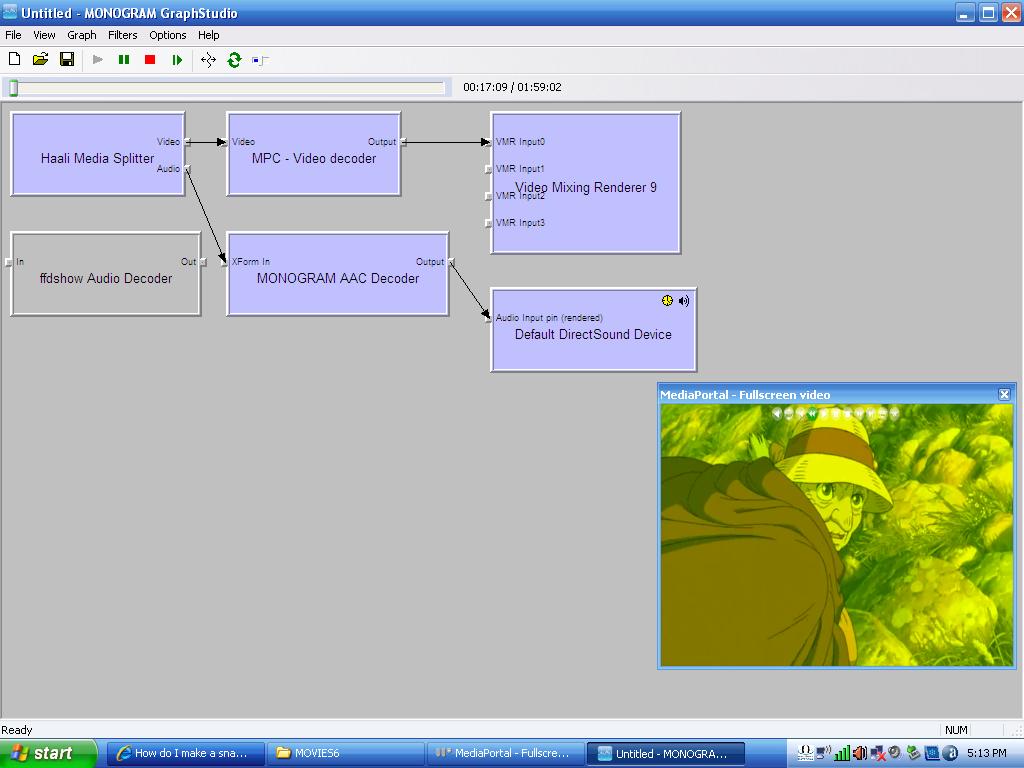
    Everything is ok except my Mkv movies have a green screen. I can see the picture but it is green. Would you have a suggestion?

    thanks very much

    Please send me SAF logs and provide small problematic video sample.

    Code:
    SAF v4.00 beta20 *LOCKED* (11112009 17:35:32)
    
    AutoDL: Disabled
    
    *** Hardware: ***
    CPU: Pentium(R) Dual-Core  CPU      E5200  @ 2.50GHz
    GPU: Intel(R) G41 Express Chipset (iEGL0)
    GPU provider: Intel Corporation
    GPU driver version: 6.14.10.5132   date: 9-23-2009
    
    *** Software: ***
    OS: Microsoft Windows XP (unknown) x86 (5) C:\WINDOWS
    Build: 2600.xpsp_sp3_gdr.090804-1435
    VMR9 ver.: 6.5.2600.5822 status OK
    
    MediaPortal: (TV Server installed: No)
    Path: "C:\Program Files\Team MediaPortal\MediaPortal"
    Required build: 23089 (or newer)
    Installed ver./build: 1.0.4.24047 (1.1.0 Beta1 SVN build 24047 for TESTING ONLY)
    Status: OK
     
    
    CLVsd.ax (PowerDVD MPEG2 Decoder):
    On root ("C:"): version: 8.4.0.330
     
    QuickTime requirements:
    MediaLooks QT Source direct show filter: Not installed
     
    QuickTime Alternative:
    Not installed 
    
    AnyDVD installed: No
    
    DirectVobSub installed: No
    
    DirectX version check: OK (D3DX9_42.dll)
    
    Local media:
    AVI:   OK {E436EBB5-524F-11CE-9F53-0020AF0BA770}
    FLV:   OK {C9ECE7B3-1D8E-41F5-9F24-B255DF16C087}
    M2TS:  OK {1365BE7A-C86A-473C-9A41-C0A6E82C9FA3}
    M4V:   OK
    MKV:   OK {55DA30FC-F16B-49FC-BAA5-AE59FC65F82D}
    MOV:   OK
    MOVSD: OK
    MP4:   OK {55DA30FC-F16B-49FC-BAA5-AE59FC65F82D}
    MPEG:  OK
    MPG:   OK {1365BE7A-C86A-473C-9A41-C0A6E82C9FA3}
    MTS:   OK {55DA30FC-F16B-49FC-BAA5-AE59FC65F82D}
    RM:    OK {765035B3-5944-4A94-806B-20EE3415F26F}
    RMVB:  OK {765035B3-5944-4A94-806B-20EE3415F26F}
    TS:    OK {55DA30FC-F16B-49FC-BAA5-AE59FC65F82D}
    VOB:   OK {1365BE7A-C86A-473C-9A41-C0A6E82C9FA3}
    WMV:   OK
    
    Streams:
    AVI:   OK
    FLV:   OK
    M4V:   OK
    MKV:   OK
    MP4:   OK
    MOV:   OK
    WMV:   OK
    
    Passthrough enabled: No
    Power DVD: Not found
    
    Adobe Flash Player (IE version): 10.0.32.18

    Media Info

    Code:
    Format                           : Matroska
    File size                        : 300 MiB
    Duration                         : 1h 59mn
    Overall bit rate                 : 352 Kbps
    Encoded date                     : UTC 2008-09-10 14:05:13
    Writing application              : mkvmerge v2.2.0 ('Turn It On Again') built on Mar  4 2008 12:58:26
    Writing library                  : libebml v0.7.7 + libmatroska v0.8.1
    
    Video
    ID                               : 1
    Format                           : AVC
    Format/Info                      : Advanced Video Codec
    Format profile                   : High@L5.1
    Format settings, CABAC           : Yes
    Format settings, ReFrames        : 16 frames
    Muxing mode                      : Container profile=Unknown@5.1
    Codec ID                         : V_MPEG4/ISO/AVC
    Duration                         : 1h 58mn
    Nominal bit rate                 : 272 Kbps
    Width                            : 672 pixels
    Height                           : 368 pixels
    Display aspect ratio             : 16:9
    Frame rate                       : 23.976 fps
    Resolution                       : 24 bits
    Colorimetry                      : 4:2:0
    Scan type                        : Progressive
    Bits/(Pixel*Frame)               : 0.046
    Writing library                  : x264 core 60 r900 a9af942
    Encoding settings                : cabac=1 / ref=16 / deblock=1:1:1 / analyse=0x3:0x113 / me=umh / subme=7 / brdo=1 / mixed_ref=1 / me_range=16 / chroma_me=1 / trellis=2 / 8x8dct=1 / cqm=0 / deadzone=21,11 / chroma_qp_offset=0 / threads=3 / nr=0 / decimate=1 / mbaff=0 / bframes=16 / b_pyramid=1 / b_adapt=1 / b_bias=0 / direct=3 / wpredb=1 / bime=1 / keyint=250 / keyint_min=25 / scenecut=40(pre) / rc=2pass / bitrate=272 / ratetol=1.0 / rceq='blurCplx^(1-qComp)' / qcomp=1.00 / qpmin=10 / qpmax=51 / qpstep=4 / cplxblur=20.0 / qblur=0.5 / ip_ratio=1.40 / pb_ratio=1.30 / aq=2:1.00
    
    Audio
    ID                               : 2
    Format                           : AAC
    Format/Info                      : Advanced Audio Codec
    Format version                   : Version 4
    Format profile                   : LC
    Format settings, SBR             : Yes
    Format settings, PS              : No
    Codec ID                         : A_AAC
    Duration                         : 1h 59mn
    Channel(s)                       : 2 channels
    Channel positions                : L R
    Sampling rate                    : 44.1 KHz
    Resolution                       : 16 bits
    Title                            : English
    Language                         : English

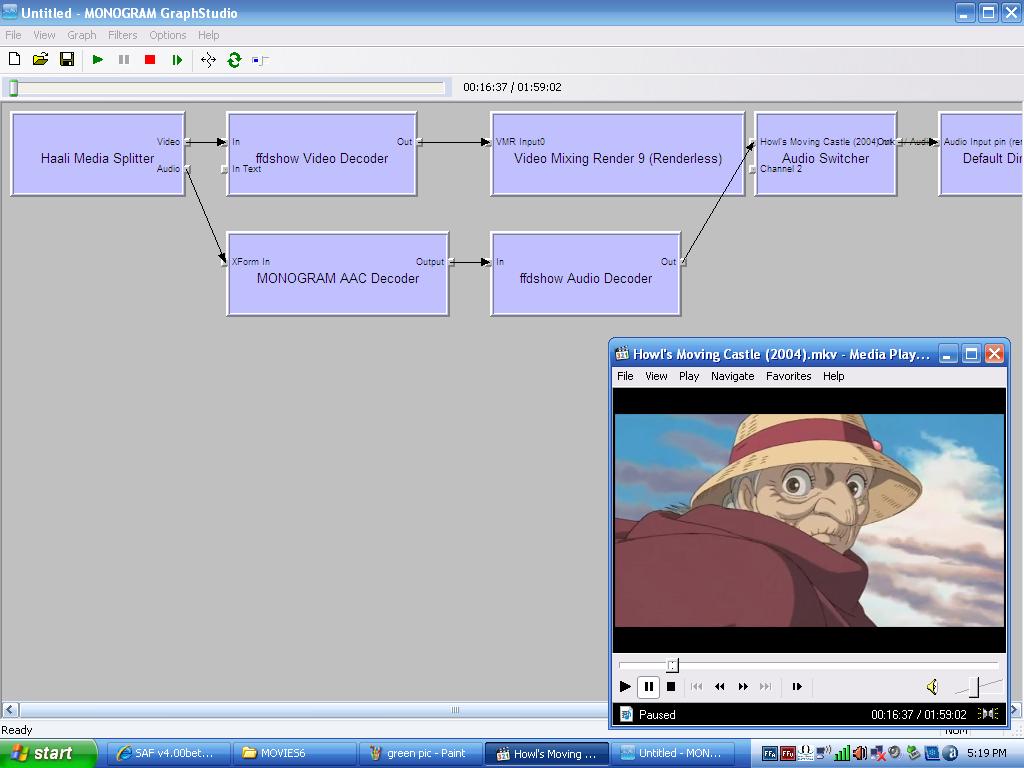
    Wierd thing is that the picture if fine if I play it in MPC-HC. This is only happening If I play it with MEdia Portal. I have attached a file.

    :D
     

    Attachments

    • green pic.JPG
      green pic.JPG
      79.1 KB
    • MPC-HC.JPG
      MPC-HC.JPG
      88.2 KB

    hoborg

    Portal Pro
    June 13, 2008
    4,413
    1,644
    Nový Jičín
    Home Country
    Czech Republic Czech Republic
    Anybody,
    Why is it i get no sound when playing Youtube clips?
    SAF v4 .0 has been installed and everything but Onlinevideos works perfect.
    Picture is great, but no sound :-(
    I use mb M3N78-EM and Nvidia HD audio through HDMI and ffdshow as audio codec but when starting a clip from Youtube, only Haali media splitter shows up in taskbar, when playing videos (dvd, mkv), TV and Music, ffdshow is active in taskbar.
    Does anybody have an idea?

    Looks like you have some "NVIDIA High Definition Audio" decoder wich is used instead of FFDShow audio decoder

    Code:
    2009-11-12 23:18:10.796875 [Debug][MPMain]: DirectShowUtils: added filter:DirectSound: NVIDIA High Definition Audio to graph

    elvis56:

    I known "Intel(R) G41 Express Chipset" is problematic, but one thing i do not understand - how can be h.264 video decoded by ffdshow ? SAF disable it by default...
    But looks like FFDShow needs to be used to decode h.264 on Intel(R) G41 Express Chipset...

    I will look what can i do.
     

    ridderdk

    Portal Member
    May 4, 2006
    31
    0
    Home Country
    Denmark Denmark
    Looks like you have some "NVIDIA High Definition Audio" decoder wich is used instead of FFDShow audio decoder

    Code:
    2009-11-12 23:18:10.796875 [Debug][MPMain]: DirectShowUtils: added filter:DirectSound: NVIDIA High Definition Audio to graph

    Yeah, that's also my conclusion, i was hoping someone could point me to how to make ffdshow decode audio when playing clips from youtube.
    But anyway, it's a generel problem in windows, because i get no sound when playing clips directly from youtube in IE.
    So i guess this is not the place to ask for help, sorry.
     

    hoborg

    Portal Pro
    June 13, 2008
    4,413
    1,644
    Nový Jičín
    Home Country
    Czech Republic Czech Republic
    Looks like you have some "NVIDIA High Definition Audio" decoder wich is used instead of FFDShow audio decoder

    Code:
    2009-11-12 23:18:10.796875 [Debug][MPMain]: DirectShowUtils: added filter:DirectSound: NVIDIA High Definition Audio to graph

    Yeah, that's also my conclusion, i was hoping someone could point me to how to make ffdshow decode audio when playing clips from youtube.
    But anyway, it's a generel problem in windows, because i get no sound when playing clips directly from youtube in IE.
    So i guess this is not the place to ask for help, sorry.

    You can try to simply lower merrit of NVIDIA High Definition Audio, or try to unregister it completly...
     

    Users who are viewing this thread

    Top Bottom