
SAF v4.00 ''stable'' (StandAlone Filters) - DXVA ready (H.264 and VC-1). (13 Viewers)

Should i integrate FFDshow in to SAF?

  • Yes

    Votes: 406 85.5%
  • No

    Votes: 69 14.5%

  • Total voters
    475

hoborg

Portal Pro
June 13, 2008
4,413
1,644
Nový Jičín
Home Country
Czech Republic Czech Republic
you and your codec package are fantastic!!!only one thing....i have some tv series downloaded in mkv format, i added the softsub downloading a .srt file. i can't see the subs if they are not contained in the mkv package. is there any way to play an external sub for mkv?i can play it if the video is in avi format.thank you so much for you work!!!

Thanks!
You need latest MP+SVN to be able to play MKV+external subtitles. Make sure they have same name like video.mkv and video.srt. But for best compatibility you need to put them inside MKV by mkvmerge software to make them 100% working.

ok thank you so much! yes i know that the best way is to put the subs inside mkv with mkvmerge, but i download a lot of episodes and it's not so quickly. do you know if there's a command line input or a batch do put the sub into the mkv?i have to read all the instructions for mkvmerge :D

one last thing....i know that one of the best x264 codec il coreavc. i don't want to install it and take the system not working, do you know if there is a way to implement coreavc with your package?is coreavc the best?

you are the best hoborg!!!!

Sorry man, i have no personal experience with CoreAVC...
 

wizard84

Portal Pro
February 23, 2005
52
0
Thanks!
You need latest MP+SVN to be able to play MKV+external subtitles. Make sure they have same name like video.mkv and video.srt. But for best compatibility you need to put them inside MKV by mkvmerge software to make them 100% working.

ok thank you so much! yes i know that the best way is to put the subs inside mkv with mkvmerge, but i download a lot of episodes and it's not so quickly. do you know if there's a command line input or a batch do put the sub into the mkv?i have to read all the instructions for mkvmerge :D

one last thing....i know that one of the best x264 codec il coreavc. i don't want to install it and take the system not working, do you know if there is a way to implement coreavc with your package?is coreavc the best?

you are the best hoborg!!!!

Sorry man, i have no personal experience with CoreAVC...

not a problem, i will try and reply my experience, so if anybody would like to use coreavc, they could know if it works :D bye bye
 

hoborg

Portal Pro
June 13, 2008
4,413
1,644
Nový Jičín
Home Country
Czech Republic Czech Republic
Hello.
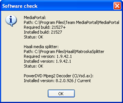
Becouse i add some "software check" in to new SAF version, i need from you to test it.
Here is new SAF 3.40 beta1.

You need latest Media Portal SVN for this version!
What is new:
*added "software check"
340_sw_check.png
*fix for MP SVN 21527
*MPC-HC filters updated to v. 985
*no need to have "CLVsd.ax" in C:\ root when "updating" mode
*MediaPortal "MpaDecFilter.ax" and "Mpeg2DecFilter.ax" are registered back when SAF is uninstalled

Please, post your experience with this build!
Note: I am thinking of adding check for "bad" software in next SAF versions. Like check if there is PowerDVD, NERO, CCCP, etc instaled. If yes, SAF cannot be installed until "blaclisted" software will be removed. What do you think about it?
 

akajester

Portal Pro
October 13, 2008
318
17
Home Country
United States of America United States of America
Hello.
Becouse i add some "software check" in to new SAF version, i need from you to test it.
Here is new SAF 3.40 beta1.

You need latest Media Portal SVN for this version!
What is new:
*added "software check"
View attachment 33846
*fix for MP SVN 21527
*MPC-HC filters updated to v. 985
*no need to have "CLVsd.ax" in C:\ root when "updating" mode
*MediaPortal "MpaDecFilter.ax" and "Mpeg2DecFilter.ax" are registered back when SAF is uninstalled

Please, post your experience with this build!
Note: I am thinking of adding check for "bad" software in next SAF versions. Like check it there is PowerDVD, NERO, CCCP, etc instaled. If yes, SAF cannot be installed until "blaclisted" software will be removed. What do you think about it?

Regarding the check for bad software, I would have it pop up a warning then allow the user to choose to continue or exit. At least that's my opinion. Thanks for the updated version! :)

one last thing....i know that one of the best x264 codec il coreavc. i don't want to install it and take the system not working, do you know if there is a way to implement coreavc with your package?is coreavc the best?

I ran coreavc until I discovered SAF. I'm pretty sure you can have both installed, then pick which one you want in MP. Coreavc is a software only decoder though. But it works quite well. Due to my system specs I prefer to have DXVA running.
 

recoil

Portal Pro
March 25, 2007
99
0
50
Has any1 got any other things I can try??

well I dont know what I did, I tried loads uninstalling drivers and re0installing. And it WORKS!!!!
 

kiwijunglist

Super Moderator
  • Team MediaPortal
  • June 10, 2008
    6,743
    1,754
    New Zealand
    Home Country
    New Zealand New Zealand
    I installed SAF 3.30 and it has broken my hardware acceleration for mkv files with subtitles. I have some movies with subtitles in english. MPC-HC Player used to play the files without subtitiles, now it plays them with subtitles and i can't find an option to disable subtitiles. Hence i have lost hardware acceleration.

    Also when i play the mkv file in mediaportal it also no longer has hardware acceleration (even though subtitles are not dispalyed - although i do have the option to display subtitles)

    I tried running SAF uninstall but that did not fix the problem.

    How can i change things so that MPC-HC Player wont play the subtitles within the mkv file?

    I also noted that h264 720P files that were not compatible with hardware acceleration now use more cpu than prior to SAF 3.3

    Prior to SAF i was using XP SP3 + Catalyst 8.12 + MP 1.0.0 + PDVD8 Ultra latest build + Latest MPCVideoDec.ax + Onboard HD3200. (And yes even though people state that 8.12 breaks hardware acceleration, i had h.a. working fine for DVB-T 1080i in MP and h264 mkv in MPC-HC on my install)

    EDIT:

    ok, i figured out i could disable autoloading subtitles by clicking on the directvobsub icon in the task bar, so now have h.a. back in MPC-HC, however i can no longer play some of my h264 mkv videos in MP now (Just get black screen). I have tried uninstalling SAF and the reregistering MPCVideoDec.ax but havn't been able to restore playback. Unfortunately I didn't to a ghost prior to installing SAF, so now my video playback in MP is no longer perfect =(
     

    jo16v

    Portal Pro
    August 23, 2008
    263
    8
    Home Country
    United Kingdom United Kingdom
    Prior to SAF i was using XP SP3 + Catalyst 8.12 + MP 1.0.0 + PDVD8 Ultra latest build + Latest MPCVideoDec.ax + Onboard HD3200. (And yes even though people state that 8.12 breaks hardware acceleration, i had h.a. working fine for DVB-T 1080i in MP and h264 mkv in MPC-HC on my install)
    Hardware acceleration working fine here for live TV with 8.12 and PDVD 7.3.
     

    akajester

    Portal Pro
    October 13, 2008
    318
    17
    Home Country
    United States of America United States of America
    Prior to SAF i was using XP SP3 + Catalyst 8.12 + MP 1.0.0 + PDVD8 Ultra latest build + Latest MPCVideoDec.ax + Onboard HD3200. (And yes even though people state that 8.12 breaks hardware acceleration, i had h.a. working fine for DVB-T 1080i in MP and h264 mkv in MPC-HC on my install)
    Hardware acceleration working fine here for live TV with 8.12 and PDVD 7.3.

    I believe anything higher than 8.5 breaks hw accel for mpeg2, not other stuff.
     

    hoborg

    Portal Pro
    June 13, 2008
    4,413
    1,644
    Nový Jičín
    Home Country
    Czech Republic Czech Republic
    I installed SAF 3.30 and it has broken my hardware acceleration for mkv files with subtitles. I have some movies with subtitles in english. MPC-HC Player used to play the files without subtitiles, now it plays them with subtitles and i can't find an option to disable subtitiles. Hence i have lost hardware acceleration.

    Also when i play the mkv file in mediaportal it also no longer has hardware acceleration (even though subtitles are not dispalyed - although i do have the option to display subtitles)

    I tried running SAF uninstall but that did not fix the problem.

    How can i change things so that MPC-HC Player wont play the subtitles within the mkv file?

    I also noted that h264 720P files that were not compatible with hardware acceleration now use more cpu than prior to SAF 3.3

    Prior to SAF i was using XP SP3 + Catalyst 8.12 + MP 1.0.0 + PDVD8 Ultra latest build + Latest MPCVideoDec.ax + Onboard HD3200. (And yes even though people state that 8.12 breaks hardware acceleration, i had h.a. working fine for DVB-T 1080i in MP and h264 mkv in MPC-HC on my install)

    EDIT:

    ok, i figured out i could disable autoloading subtitles by clicking on the directvobsub icon in the task bar, so now have h.a. back in MPC-HC, however i can no longer play some of my h264 mkv videos in MP now (Just get black screen). I have tried uninstalling SAF and the reregistering MPCVideoDec.ax but havn't been able to restore playback. Unfortunately I didn't to a ghost prior to installing SAF, so now my video playback in MP is no longer perfect =(

    Hello.
    Firstly, WH aceleration (DXVA) + subtitles was never working under MP.

    Disabling subtitles:
    Make sure you click on No in SAF instalation when asking to enable MKV subtitles and in MP configuration - Videos - Subtitles/audio and uncheck Show subtitles.

    If you using MKV + external subtitles, put subtitles in to MKV or simply delete external subtitles file to make it working correctly.

    If this didnt help, post here small video example to test.
     

    Users who are viewing this thread

    Top Bottom