
SAF v4.00 ''stable'' (StandAlone Filters) - DXVA ready (H.264 and VC-1). (3 Viewers)

Should i integrate FFDshow in to SAF?

  • Yes

    Votes: 406 85.5%
  • No

    Votes: 69 14.5%

  • Total voters
    475

hoborg

Portal Pro
June 13, 2008
4,413
1,644
Nový Jičín
Home Country
Czech Republic Czech Republic
öhm maybe my question is a little stupid but i am not sure if i have understand everything the last 47 pages - so i ask :D

is that cool-codec SAF solution only for 780G based systems?

i have ONE HTPC with that board - but my "main-HTPC" in the livig room is NOT a 780G based one.

that has a ATI HD3470 sapphire fanless and a BE4850e AM2+ with WinXP SP3
(the case has a own 6.3" TFT so i needed a Dual-View-able VGA-out grafic-solution)

SAF should be working on any hardware in software mode.
If your hardware are DXVA compatible, DXVA will be in use.
 

jacc1234

Portal Pro
April 11, 2008
167
7
öhm maybe my question is a little stupid but i am not sure if i have understand everything the last 47 pages - so i ask :D

is that cool-codec SAF solution only for 780G based systems?

i have ONE HTPC with that board - but my "main-HTPC" in the livig room is NOT a 780G based one.

that has a ATI HD3470 sapphire fanless and a BE4850e AM2+ with WinXP SP3
(the case has a own 6.3" TFT so i needed a Dual-View-able VGA-out grafic-solution)

You card supports DXVA along with basically all of the video cards released in the past few years.
 

thebalance

MP Donator
  • Premium Supporter
  • August 11, 2008
    113
    0
    Home Country
    United Kingdom United Kingdom
    I think I might be losing the plot somewhere.

    I have these MOV files that will not play in MP or WMP. MPC is fine. I've tried changing to .mkv with no difference found. Have run filmerit found some problems.

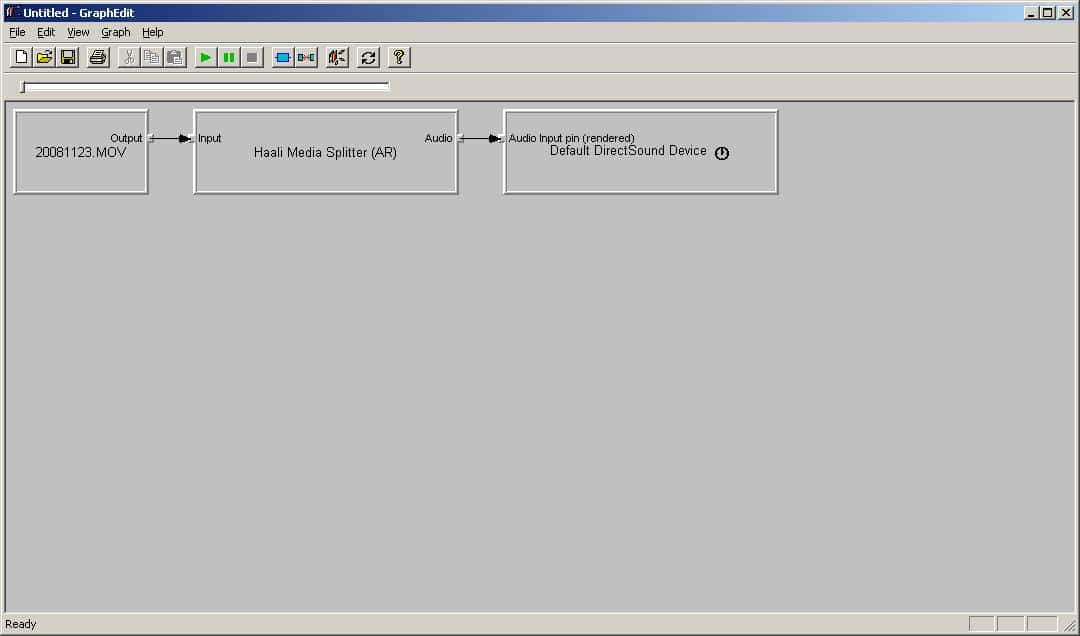
    I now have two issues rather than 1 : mov files still do not play - I get the attached graph & yes I get sound but not video -gspot gives the same basic result even though it also spots that it is a video file and should play at a certain resolution. No problems identified looking at the codecs on gspot. So no mov files to play yet and in need of desperate help please - I've attached a short file (a couple of seconds only but still 3mb, sorry - had to zip to upload but didn't help the size much)

    2nd problem - filmerit spotted a missing clsid for "wmvideo decoder dmo" - no luck on a fix for that - I've deleted it completely, not sure what's going to happen now!

    Already on my knees begging for help!
     

    Attachments

    • graph.JPG
      graph.JPG
      44.7 KB

    jo16v

    Portal Pro
    August 23, 2008
    263
    8
    Home Country
    United Kingdom United Kingdom
    I think I might be losing the plot somewhere.

    I have these MOV files that will not play in MP or WMP. MPC is fine. I've tried changing to .mkv with no difference found. Have run filmerit found some problems.

    I now have two issues rather than 1 : mov files still do not play - I get the attached graph & yes I get sound but not video -gspot gives the same basic result even though it also spots that it is a video file and should play at a certain resolution. No problems identified looking at the codecs on gspot. So no mov files to play yet and in need of desperate help please - I've attached a short file (a couple of seconds only but still 3mb, sorry - had to zip to upload but didn't help the size much)

    2nd problem - filmerit spotted a missing clsid for "wmvideo decoder dmo" - no luck on a fix for that - I've deleted it completely, not sure what's going to happen now!

    Already on my knees begging for help!
    I think that .mov file is an mjpeg but I think it's corrupted as it won't play at all for me on MPC-HC- it plays something with ffdshow but less than a second of movement with a bit more sound.

    With filmerit did you make a backup? wmvideo decoder dmo is the Windows Media Decoder. It's not a huge issue because MPC-HC should be able to play all WMV content though.
     

    thebalance

    MP Donator
  • Premium Supporter
  • August 11, 2008
    113
    0
    Home Country
    United Kingdom United Kingdom
    Thanks for looking - you will be disappointed to hear that the file isn't corrupted - it really is a 3mb file with about 1 sec of video, it comes off a Panasonic TZ5 camera at its highest resolution (1280z720 @ 30 fps) and was the shortest film I could achieve.

    It works on my mpc-hc but obviously because of the shortness (and darkness of where I pointed the camera!) it is odd but works the same as any of my videos from that camera - if you got video you did well.

    I might give running mpc-hc as the external player for media portal a go if it can support dxva as it does work and is no hassle.

    filmerit does make an automatic restore point, I forgot that so reinstalled wmp which worked.

    Thanks
     

    hoborg

    Portal Pro
    June 13, 2008
    4,413
    1,644
    Nový Jičín
    Home Country
    Czech Republic Czech Republic
    I think I might be losing the plot somewhere.

    I have these MOV files that will not play in MP or WMP. MPC is fine. I've tried changing to .mkv with no difference found. Have run filmerit found some problems.

    I now have two issues rather than 1 : mov files still do not play - I get the attached graph & yes I get sound but not video -gspot gives the same basic result even though it also spots that it is a video file and should play at a certain resolution. No problems identified looking at the codecs on gspot. So no mov files to play yet and in need of desperate help please - I've attached a short file (a couple of seconds only but still 3mb, sorry - had to zip to upload but didn't help the size much)

    2nd problem - filmerit spotted a missing clsid for "wmvideo decoder dmo" - no luck on a fix for that - I've deleted it completely, not sure what's going to happen now!

    Already on my knees begging for help!

    Hello.
    Your video is a really really special, it is Jpeg video + raw audio, it is realy hard to add support for that, becouse no direct filters are availabe :(

    Your damaged "wmvideo decoder dmo" is ok, this did SAF. This is "fix" for HD video in WMV container (wmvideo decoder is replaced by MPC-HC decoder). It will be corrected automaticaly if you uninstall SAF.
     

    thebalance

    MP Donator
  • Premium Supporter
  • August 11, 2008
    113
    0
    Home Country
    United Kingdom United Kingdom
    Many thanks for looking into it - good response from you guys, still awaiting any response on the format from panasonic!
     

    Topher5000

    Portal Pro
    April 5, 2006
    179
    0
    My HTPC is an X2 3800+ with 1gb of RAM (maybe 2, I can't remember) & an Asus EN8600GT Silent video card. Running MP 0.2.3.0, it's able play anything, from avi's with external subs (an idx file & a rar file with .sub subs, or .srt subs) to 1080p mkv's with embedded subs. I'm able to cycle through the subs, including the ones embedded in mkv's, with the yellow remote button. Is this is because 0.2.3.0 uses video overlay?
    I'd like to upgrade to MP 1.0 RC4, mainly because of the cool skins, but after keeping track of this thread, it looks like I'd either have to choose between subs & being able to watch HD movies. Is this correct? Some movies, like Syrianna, have to have subs & my HTPC isn't powerful enough to play 1080p movies without hardware acceleration. From a couple of pages back, it looks like both would be possible if MP read the subs from "null renderer", whatever that is (I know nothing about coding).
    Perhaps I'll wait for MP 1.0 & see what happens with that.
     

    jacc1234

    Portal Pro
    April 11, 2008
    167
    7
    My HTPC is an X2 3800+ with 1gb of RAM (maybe 2, I can't remember) & an Asus EN8600GT Silent video card. Running MP 0.2.3.0, it's able play anything, from avi's with external subs (an idx file & a rar file with .sub subs, or .srt subs) to 1080p mkv's with embedded subs. I'm able to cycle through the subs, including the ones embedded in mkv's, with the yellow remote button. Is this is because 0.2.3.0 uses video overlay?
    I'd like to upgrade to MP 1.0 RC4, mainly because of the cool skins, but after keeping track of this thread, it looks like I'd either have to choose between subs & being able to watch HD movies. Is this correct? Some movies, like Syrianna, have to have subs & my HTPC isn't powerful enough to play 1080p movies without hardware acceleration. From a couple of pages back, it looks like both would be possible if MP read the subs from "null renderer", whatever that is (I know nothing about coding).
    Perhaps I'll wait for MP 1.0 & see what happens with that.

    You might be able to play 1080p content using CoreAVC as your decoder. It is very efficient and I am able to do full hd decoding with subs on a similar system to yours. I just have more memory.
     

    Users who are viewing this thread

    Top Bottom