SAF v4.00 ''stable'' (StandAlone Filters) - DXVA ready (H.264 and VC-1). (23 Viewers)

Should i integrate FFDshow in to SAF?

  • Yes

    Votes: 406 85.5%
  • No

    Votes: 69 14.5%

  • Total voters
    475

kiwijunglist

Super Moderator
  • Team MediaPortal
  • June 10, 2008
    6,743
    1,754
    New Zealand
    Home Country
    New Zealand New Zealand
    csapollo: not a direct answer to your question, but have you thought of disabling ffdshow for DTS then using a different codec for DTS only eg. ac3filter and having the 130ms delay in ac3fliter? There is also an option (skin dependent) to bring up a video osd options menu while playing a video, and there is an option to change audio delay 'on the fly'.

    PS: Also an audio sync issue for DTS only, might mean that you are processing the DTS format to another format which takes time, ensure ffdshow is not changing the sample rate/using it's mixer etc, this may introduce delay.
     

    csapollo

    Portal Pro
    May 17, 2007
    217
    13
    40
    Sydney, Australia
    Home Country
    @csapollo: not a direct answer to your question, but have you thought of disabling ffdshow for DTS then using a different codec for DTS only eg. ac3filter and having the 130ms delay in ac3fliter? There is also an option (skin dependent) to bring up a video osd options menu while playing a video, and there is an option to change audio delay 'on the fly'.

    PS: Also an audio sync issue for DTS only, might mean that you are processing the DTS format to another format which takes time, ensure ffdshow is not changing the sample rate/using it's mixer etc, this may introduce delay.

    My ffdshow options are SAF default (apart from the separate profile I created). I would like to try the AC3 suggestion, but how can you configure it that way? In MP config I can only recall one option for audio decoder..
     

    hoborg

    Portal Pro
    June 13, 2008
    4,413
    1,644
    Nový Jičín
    Home Country
    Czech Republic Czech Republic
    I searched the thread and did not see anything else like this described.

    I have what I would describe as Blinking or flashing of video on some video. It always does this on one TV station but never on the others. Once in a while playing a DVD will also do this.

    I have attached a very short clip that exhibits this on my system. I think it is related to the PDVD9 decoder but can’t prove it. Thanks in advance for any suggestions…

    I am running Win XP SP3
    Unlocked SAF beta 20
    My system is Nvidia on board 8300 and AMD 7750 CPU
    Output to TV HDMI 720P 60HZ

    Also attached is the graph from graph studio

    Try to disable DXVA - SATRT - SAF - PDVD MPEG-2 - Disable DXVA
    - looks like Nvidia driver problem.
     

    hoborg

    Portal Pro
    June 13, 2008
    4,413
    1,644
    Nový Jičín
    Home Country
    Czech Republic Czech Republic
    Yes i believe I read somewhere in an ATI forum (Rage3D.com I think) that DXVA is broken in 9.11.

    Yeah I've only just noticed that. Damn, ATI are hopeless.

    American Gangster looks terrible right now, might have to roll back to 9.10.

    Hm, i tested 9.11 on my ATI 4550 + WinXP and no problem at all...
     

    hoborg

    Portal Pro
    June 13, 2008
    4,413
    1,644
    Nový Jičín
    Home Country
    Czech Republic Czech Republic
    Is there a way to switch ffdshow audio profiles from within MediaPortal?

    I've got to delay audio if I'm watching something with DTS, and I have a profile that is about 130ms but I have to close MP, switch profiles each time.

    Please test this:

    Install SAF test 4+
    Apply this patch

    Start in MP in window and start any video with DTS.
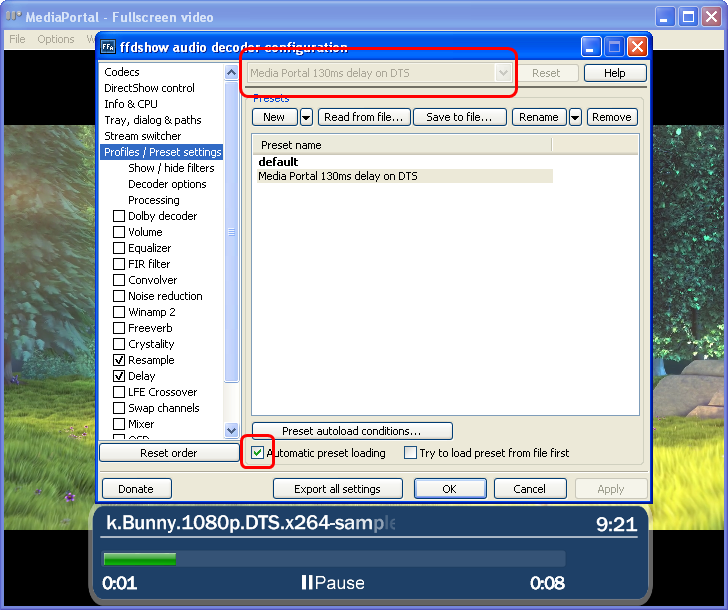
    Double click on FFDshow audio icon, and enable "automatic preset loading"
    FFDShow_auto.png

    Stop video in MP and start it again. Now "Media Portal 130ms delay on DTS" should be autoloaded and DTS should be delayed 130ms - you can check it like on screenshot above - "Media Portal 130ms delay on DTS" must be in header.
    This preset is only loaded for MP + DTS audio. You can change delay value in "delay"

    Please test and report if it is working or not, so i can add it to SAF pernamently.
     

    MetalPhreak

    New Member
    December 6, 2009
    3
    0
    9.10 has the same problems for me. Most of my 1080p videos won't play with DXVA (tested by checking CPU usage and MPC-HC). Some of them do work with DXVA along with most of my 720p vids. The thing is, they all play fine with DXVA on my other mediaPC with an 8500GT in it. Is there anything special you have to do with ATi graphics cards?

    Also, I tried using an older version of MPC-HC, and the problematic 1080p videos play with DXVA, but it ends up with severe blocking.

    I think I'll do some more reading in regards to ATi and DXVA :)
     

    hoborg

    Portal Pro
    June 13, 2008
    4,413
    1,644
    Nový Jičín
    Home Country
    Czech Republic Czech Republic
    9.10 has the same problems for me. Most of my 1080p videos won't play with DXVA (tested by checking CPU usage and MPC-HC). Some of them do work with DXVA along with most of my 720p vids. The thing is, they all play fine with DXVA on my other mediaPC with an 8500GT in it. Is there anything special you have to do with ATi graphics cards?

    Also, I tried using an older version of MPC-HC, and the problematic 1080p videos play with DXVA, but it ends up with severe blocking.

    I think I'll do some more reading in regards to ATi and DXVA :)

    ATI have limit in profile 5.1 and 6 or more ref. frames. So if video is for example profile 5.1 and 11 ref frames, you will get no DXVA on ATI.
     

    csapollo

    Portal Pro
    May 17, 2007
    217
    13
    40
    Sydney, Australia
    Home Country
    Please test and report if it is working or not, so i can add it to SAF pernamently.

    Your patch works, in the sense that it actually detects DTS and launches the delay however the delay has no effect. I increased the delay to 250ms, 1000ms, and that also has no effect. So I'm wondering if you can actually delay whilst using passthrough..?

    My 130ms comment was a guess based on what I'm seeing - right now I've disabled DTS in ffdshow as when it outputs DTS as AC3 the sync issue is only minimal (the audio coming before the picture sort of thing).
     

    Users who are viewing this thread

    Top Bottom