SAF v4.00 ''stable'' (StandAlone Filters) - DXVA ready (H.264 and VC-1). (28 Viewers)

Should i integrate FFDshow in to SAF?

  • Yes

    Votes: 406 85.5%
  • No

    Votes: 69 14.5%

  • Total voters
    475

kiwijunglist

Super Moderator
  • Team MediaPortal
  • June 10, 2008
    6,743
    1,754
    New Zealand
    Home Country
    New Zealand New Zealand
    @csapollo: not a direct answer to your question, but have you thought of disabling ffdshow for DTS then using a different codec for DTS only eg. ac3filter and having the 130ms delay in ac3fliter? There is also an option (skin dependent) to bring up a video osd options menu while playing a video, and there is an option to change audio delay 'on the fly'.

    PS: Also an audio sync issue for DTS only, might mean that you are processing the DTS format to another format which takes time, ensure ffdshow is not changing the sample rate/using it's mixer etc, this may introduce delay.

    My ffdshow options are SAF default (apart from the separate profile I created). I would like to try the AC3 suggestion, but how can you configure it that way? In MP config I can only recall one option for audio decoder..

    Try hoborgs profile suggestion instead, probably easier to setup.

    Please test and report if it is working or not, so i can add it to SAF pernamently.

    Your patch works, in the sense that it actually detects DTS and launches the delay however the delay has no effect. I increased the delay to 250ms, 1000ms, and that also has no effect. So I'm wondering if you can actually delay whilst using passthrough..?

    My 130ms comment was a guess based on what I'm seeing - right now I've disabled DTS in ffdshow as when it outputs DTS as AC3 the sync issue is only minimal (the audio coming before the picture sort of thing).

    You might need to turn off dts pass through as well if it is not disabled with his patch.
     

    csapollo

    Portal Pro
    May 17, 2007
    217
    13
    40
    Sydney, Australia
    Home Country
    Yep, audio is passthrough as it is - no delay possible. Then i cannot do anything with that issue.

    Ah, well I'll have to drop some $ on a new receiver then hehe. I've got a set of z-5500 speakers which are fine for my apartment, but the receiver only has one optical input. So I have HDMI from my HTPC to the TV, and optical from the HTPC to the receiver. TV, xvid, or even MKV with AC3 sound has no sync issue, just DTS.

    I think a new receiver which has HDMI inputs and can decode audio over HDMI is the solution.
     

    kiwijunglist

    Super Moderator
  • Team MediaPortal
  • June 10, 2008
    6,743
    1,754
    New Zealand
    Home Country
    New Zealand New Zealand
    @hoborg -

    Just tried reformat + MP1.1 beta + latest svn + saf beta20, two suggestions/notes:

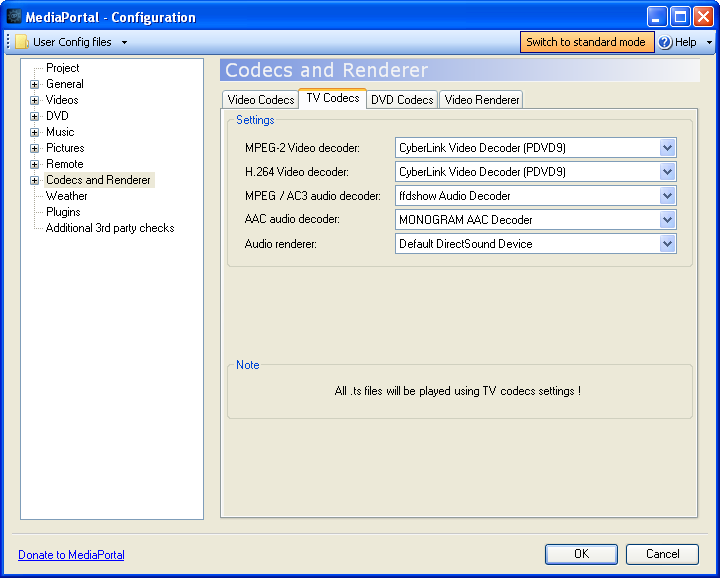
    1. default setup has TV using MPC-HC for h264 live TV, had to manually change it to PDVD

    2. It would be good if the directx version check and the page stating to remove other codecs etc, was shown before wget downloads the files, otherwise you have to DL using wget twice if you quit the install to install directx etc...

    Yep, audio is passthrough as it is - no delay possible. Then i cannot do anything with that issue.

    Ah, well I'll have to drop some $ on a new receiver then hehe. I've got a set of z-5500 speakers which are fine for my apartment, but the receiver only has one optical input. So I have HDMI from my HTPC to the TV, and optical from the HTPC to the receiver. TV, xvid, or even MKV with AC3 sound has no sync issue, just DTS.

    I think a new receiver which has HDMI inputs and can decode audio over HDMI is the solution.

    you can disable dts and re-encode dts -> ac3 with manually set delay, is that a problem?
     

    junkiepilot

    Portal Member
    May 11, 2007
    38
    0
    48
    Home Country
    United Kingdom United Kingdom
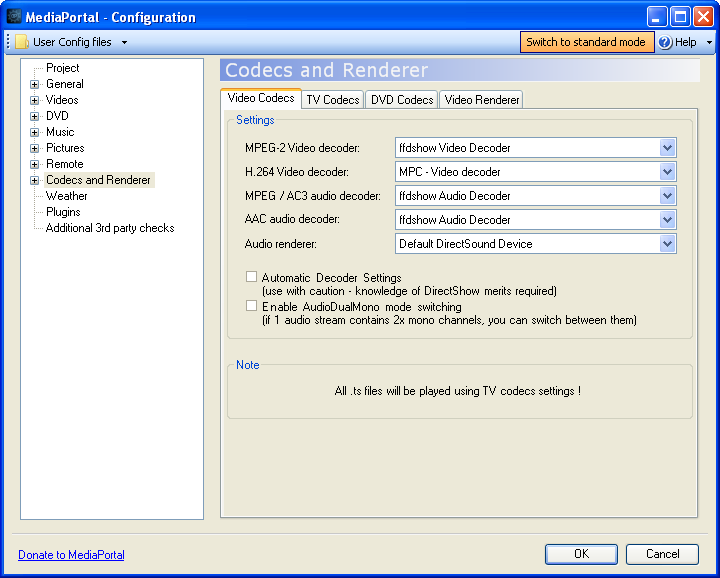
    Just out of curiosity, can you explain why MPC is used for H.264 in Videos but PDVD is used in TV?

    Video:
    SAF_VIDEO_configuration.png


    TV:
    SAF_TV_configuration.png
     

    mascot

    Portal Pro
    November 20, 2007
    182
    6
    Home Country
    Sweden Sweden
    Yes i believe I read somewhere in an ATI forum (Rage3D.com I think) that DXVA is broken in 9.11.

    Yeah I've only just noticed that. Damn, ATI are hopeless.

    American Gangster looks terrible right now, might have to roll back to 9.10.

    Hm, i tested 9.11 on my ATI 4550 + WinXP and no problem at all...

    Would I gain anything to use 9.11 instead of recommended 9.5 on my ATI HD3200 (780g) graphics chipset?

    Everything runs fine and usually I prefer not to try and repair something that aint broken but... ;)
     

    Domini0n

    Portal Pro
    July 21, 2008
    130
    7
    Would I gain anything to use 9.11 instead of recommended 9.5 on my ATI HD3200 (780g) graphics chipset?

    Everything runs fine and usually I prefer not to try and repair something that aint broken but... ;)

    Well... there is no but... ;) If it works it works and I suggest to leave it like that, until it stops working properly.
     

    Users who are viewing this thread

    Top Bottom