Series Summery in WideBanner View (1 Viewer)

xadox

Portal Pro
August 18, 2005
220
26
Home Country
Germany Germany
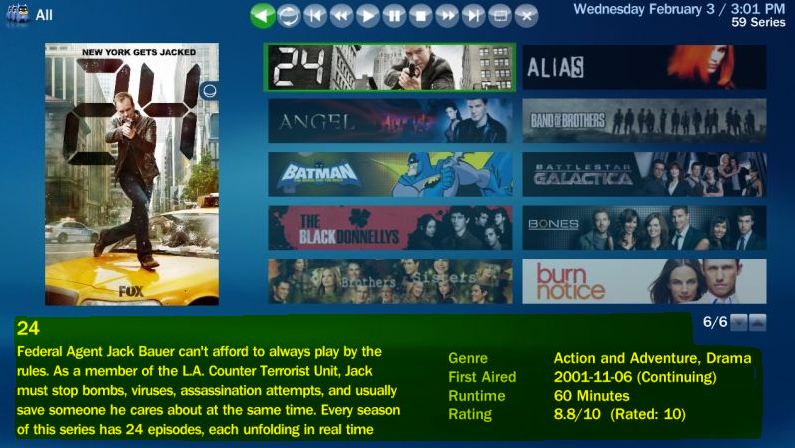
Before MediaPortal v1.2 there was shown a summery in the WideBanner view.
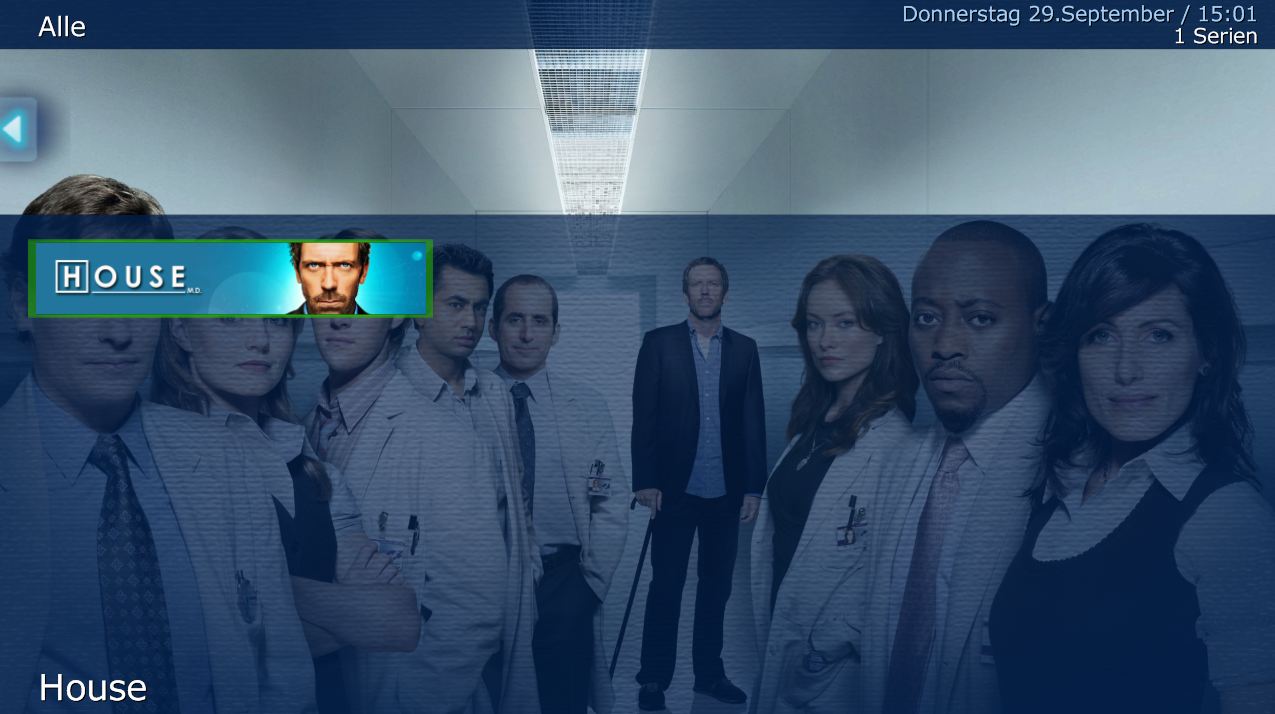
Now in MediaPortal v1.2 the summery is missing.

Is there a way to activate the summery again?
 

Attachments

  • WideBanner_Old.JPG
    WideBanner_Old.JPG
    84.5 KB
  • WideBanner_New.JPG
    WideBanner_New.JPG
    99.1 KB

RoChess

Extension Developer
  • Premium Supporter
  • March 10, 2006
    4,434
    1,897
    Before MediaPortal v1.2 there was shown a summery in the WideBanner view.
    Now in MediaPortal v1.2 the summery is missing.

    Is there a way to activate the summery again?

    You should be able to re-use the skin XML files from the older version.

    If you did not keep a backup, then you can obtain all the older branch skin files from:

    mptvseries - Revision 1869: /branch/MP11/skin files/Blue3wide

    The specific file you need is "TVSeries.SeriesWideBanners.xml", but it might rely on other XML files as well. I would suggest you just overwrite that file first (always make backup first), and if it still doesn't work then investigate what other files are needed. If you overwrite all files you might end up with errors because the new version expects those changes inside skin file to exist.
     

    xadox

    Portal Pro
    August 18, 2005
    220
    26
    Home Country
    Germany Germany
    AW: Series Summery in WideBanner View

    Ok, thx. So there is no option in setup to activate it again?
     

    RoChess

    Extension Developer
  • Premium Supporter
  • March 10, 2006
    4,434
    1,897
    Re: AW: Series Summery in WideBanner View

    Ok, thx. So there is no option in setup to activate it again?

    No, there is no support for old skin method anymore.

    Another option you have is to look at other skins that do use the layout you prefer.

    Avalon, aMPed, and StreamedMP are just a few of the skins that might display it the way you like, and those skins install seperate. Most of the new skins come in an MPEI package, so it is easy to install them. Look at their respective websites for screenshots, and see if they contain one with a layout on MP-TVSeries that you like.
     

    ltfearme

    Community Plugin Dev
  • Premium Supporter
  • June 10, 2007
    6,760
    7,224
    Sydney
    Home Country
    Australia Australia
    Im pretty sure I included a few possible options, in the skin directory you can see the following files:
    Code:
    TVSeries.SeriesWideBanners.xml
    TVSeries.SeriesWideBanners.2.xml
    TVSeries.SeriesWideBanners.3.xml
    TVSeries.Facade.xml
    TVSeries.Facade.2.xml
    TVSeries.Facade.3.xml
    You can experiment with the layout you like the most by editing TVSeries.xml, look for the two entries:
    Code:
    <import>TVSeries.SeriesWideBanners.xml</import>
    <import>TVSeries.Facade.xml</import>
    Change these accordingly.
     

    Users who are viewing this thread

    Similar threads

    I was just tinkering with a few settings in the MediaPortal configuration and am happy to have found the cause of the problem. Disabling the option "Single seat setup: force RTSP usage" under "TV/Radio", "Advanced Options" resolved the issue. After I disabled this option, I was able to delete the recordings the first time...
    I was just tinkering with a few settings in the MediaPortal configuration and am happy to have found the cause of the problem...
    Deleting recordings sometimes doesn't work. Neither the 0 button nor the Info/Delete button works. Nothing happens at all with...
    Replies
    6
    Views
    505
    Are the media/video folders on the Mint host?
    Are the media/video folders on the Mint host?
    I've used Mediaportal for years on a Windows Host with restricted online-access. Lately I reinstalled...
    Replies
    1
    Views
    1K
    MP1 MP2 1.38 Titan Skin Bug DE
    I fixed the bug, the file menu should work again now! You just need to copy the attached DialogFile.xml to the Titan folder and the graphic files to the corresponding media folder! ;) There also seems to be a problem with the background displayed, which @ajs might be able to fix! ;)
    I fixed the bug, the file menu should work again now! You just need to copy the attached DialogFile.xml to the Titan folder and the...
    MP 32bit 1.38.003 A bug is in the videos section. I use the folder-view. When I try to move a file to another folder, I get the...
    Replies
    9
    Views
    2K
    MP1 MP2 Migrating to win 11 DE
    Well beep :) I upgraded because mepo 2 was a fresh way.. and migration screwed up all old settings .. So apparently back to 1.. tanx for the info
    Well beep :) I upgraded because mepo 2 was a fresh way.. and migration screwed up all old settings .. So apparently back to 1...
    As many other i have to upgrade from win 10 to win 11. Im currently running a MePo 2 installation, is there a way to copy...
    Replies
    2
    Views
    1K
    i think info but I'm really not sure
    i think info but I'm really not sure
    When I import new films using Moving Pictures, it takes an incredibly long time for the information to be found and downloaded...
    Replies
    3
    Views
    739
    Top Bottom